Fotor Remove Object from Video
What is Fotor Remove Object from Video?
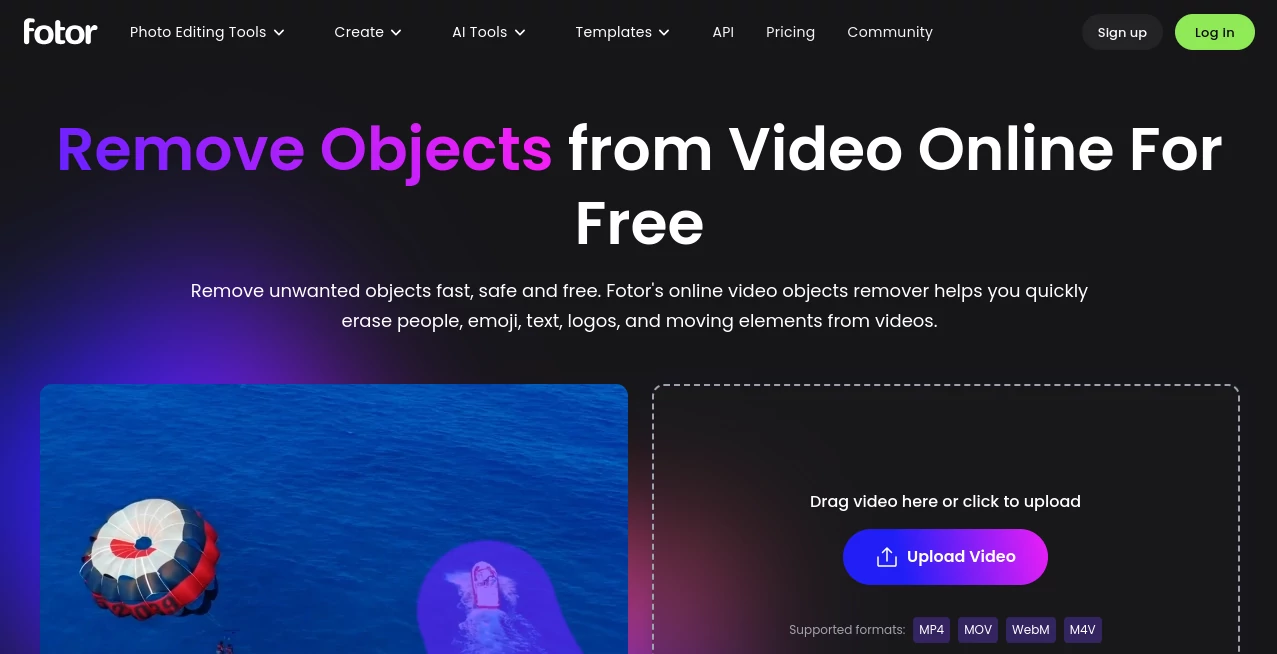
Removing an unwanted person, logo, text overlay, emoji, or moving object from a video can be surprisingly difficult with traditional editing software. What looks like a small distraction in a clip can require tracking, masking, and frame-by-frame adjustments. Fotor makes this process much more approachable with an AI-powered video object removal tool designed to handle these cleanup tasks directly in a web browser.
The workflow is refreshingly simple. Upload a video, paint over the object you want to remove, and let the AI process the selected area. The tool is particularly useful for creators who want to tidy up footage without spending time learning advanced video editing techniques. It supports common formats including MP4, MOV, WebM, and M4V, with uploads supported up to 4K resolution, 60 seconds, 60 FPS, and 1 GB according to the current tool page.
For example, imagine recording a travel video at a busy beach and noticing a passerby walking through an important shot. Instead of cutting the scene or opening a complicated editor, you can mark the unwanted person and let the AI reconstruct the area behind them. The same approach can be useful for cleaning up promotional videos, social media clips, product footage, and other short-form content.
Key Features
- AI-powered removal of unwanted video objects
- Remove people and moving elements from footage
- Erase logos, text, emojis, and other visual distractions
- Brush-based selection for choosing the area to remove
- Support for MP4, MOV, WebM, and M4V input files
- Video uploads up to 4K, 60 FPS, 60 seconds, and 1 GB
- MP4 output for downloaded results
- Browser-based workflow with no advanced editing skills required
- Designed to preserve a natural-looking background after removal
- Useful for both personal and commercial video cleanup
User Interface
The interface focuses on the task rather than overwhelming users with a large collection of editing controls. After uploading a clip, the main action is selecting the unwanted area with a brush. This makes the workflow easy to understand even for someone who rarely works with video software.
The straightforward design is one of the strongest aspects of the experience. Instead of searching through timelines, masks, layers, or tracking panels, users can concentrate on the specific object they want gone. That simplicity can be especially valuable when the goal is a quick correction rather than a complete video edit.
Accuracy & Performance
The tool uses AI to analyze the selected portion of a video and reconstruct the area after the unwanted element is removed. This is particularly helpful when dealing with objects that move through a scene, since manually editing every frame would take considerably more effort.
Results can vary depending on the complexity of the footage. A relatively clean background is generally easier for an AI system to reconstruct than a crowded scene with several overlapping objects and complicated movement. Even so, the automated approach can dramatically reduce the amount of work involved in ordinary cleanup tasks.
The service is also designed to avoid the obvious blurred patches that can make conventional object removal look artificial. For creators preparing short social clips or marketing material, that can make the finished footage feel much more polished.
Capabilities
The range of objects that can be targeted is one of the tool's practical advantages. Users can remove people, logos, watermarks, text, emojis, timestamps, and other unwanted elements from video footage. Moving subjects are also supported, which expands its usefulness beyond simple static-object cleanup.
It can be useful when repurposing existing footage for another campaign, cleaning up a product demonstration, preparing a social media clip, or removing an accidental distraction from an otherwise good recording. The ability to work with video directly also means there is less need to extract individual frames and edit them separately.
Security & Privacy
Video files can contain considerably more information than ordinary images, so privacy is an important consideration when using an online editor. According to the current product information, the service uses SSL encryption to protect uploaded files and states that edited videos are deleted after 24 hours.
Users should still avoid uploading sensitive footage unless they are comfortable with the provider's current privacy terms and handling practices. For professional projects, checking the latest privacy policy before uploading confidential material is always a sensible step.
Use Cases
- Social Media Creators: Remove unwanted people, stickers, text, or visual distractions from TikTok, Instagram, and other short-form videos.
- Travel Videos: Clean up footage containing unexpected passersby or objects that appeared in the background.
- Product Marketing: Remove distracting elements from promotional clips and make product-focused footage cleaner.
- E-commerce: Prepare product videos for online stores without recreating an entire recording.
- YouTube Videos: Fix small visual mistakes without reopening a complex professional editing project.
- Brand Content: Remove unwanted graphics or visual elements when adapting existing footage for another campaign.
- Personal Videos: Clean up family trips, events, and everyday recordings where something unwanted appears in the frame.
- Influencer Content: Quickly polish short videos before publishing them across multiple platforms.
Pros and Cons
- Pros: Simple brush-based workflow, AI-assisted removal, support for moving objects, common video formats, high-resolution input support, and no advanced editing knowledge required.
- Pros: Useful for removing people, logos, text, emojis, timestamps, and other distracting elements from short video clips.
- Cons: The maximum video duration is currently limited to 60 seconds on the online tool.
- Cons: Highly complicated scenes may require additional editing if the reconstructed background is not perfectly consistent.
- Cons: The online workflow requires uploading the video before processing it.
Pricing Plans
The video object removal feature is presented as a free online tool, making it accessible for users who want to test AI-assisted object removal without committing to professional video editing software. The service also offers free access to the removal workflow, although account credits and download conditions can vary across Fotor's AI features and plans.
For occasional cleanup jobs, the free option can be a convenient starting point. Users who need heavier usage or access to additional AI editing capabilities should check the current pricing information before choosing a paid plan, as available credits and features may change over time.
How to Use It
- Upload your video: Select a supported MP4, MOV, WebM, or M4V file from your device.
- Select the unwanted object: Use the brush tool to paint over the person, logo, text, emoji, or other element you want to remove.
- Start the removal: Click the remove button and allow the AI to process the selected area.
- Review the result: Check the processed video to make sure the reconstructed area looks natural.
- Download the result: Save the finished video as an MP4 file.
Comparison with Similar Tools
Traditional desktop editors offer considerably more control, but that flexibility often comes with a steeper learning curve. Removing a moving object manually may involve masks, motion tracking, keyframes, and repeated corrections. That workflow makes sense for complex professional productions, but it can be excessive when the only goal is to remove one unwanted element from a short clip.
AI-powered video removal takes a different approach. Instead of asking the user to manually reconstruct every frame, the system attempts to understand the selected area and generate a suitable replacement automatically. This makes it particularly attractive for quick edits, social media content, marketing clips, and one-off corrections.
The main advantage here is convenience. It is not intended to replace a full professional editing suite, but it can save substantial time when a project only needs targeted object removal. Users who value speed and simplicity may find this approach much more practical than building the same effect manually.
Conclusion
Removing an unwanted object from video no longer has to mean opening a complicated editing application and working through dozens of settings. This AI-powered solution turns the process into a focused three-step workflow: upload, brush over the unwanted element, and remove it.
Its support for people, logos, text, emojis, watermarks, timestamps, and moving objects gives it plenty of practical applications. The ability to handle videos up to 4K and 60 FPS also makes it suitable for many modern short-form content workflows.
For creators who occasionally capture a great shot with one frustrating distraction in the frame, this kind of AI editing can be a genuine time saver. It keeps the process simple while giving users a practical way to rescue footage that might otherwise need to be cropped, reshot, or heavily edited.
Frequently Asked Questions (FAQ)
Can I remove people from a video?
Yes. The tool can be used to remove unwanted people from video footage, including passersby and other distracting subjects. The user selects the unwanted area with the brush and lets the AI process the footage.
What video formats are supported?
The current online tool supports MP4, MOV, WebM, and M4V video files. The listed upload limits support videos up to 4K resolution, 60 FPS, 60 seconds, and 1 GB.
Can I remove text and logos from a video?
Yes. Logos, text overlays, watermarks, emojis, timestamps, and other unwanted visual elements can be selected for removal.
Does it work with moving objects?
Yes. The service is designed to handle moving elements as well as objects that remain relatively stationary. Results can depend on the movement and complexity of the surrounding scene.
Do I need video editing experience?
No advanced video editing skills are required. The main workflow involves uploading a clip, painting over the unwanted object, and starting the removal process.
What format can I download?
The current tool provides the processed video as an MP4 file.
Are uploaded videos protected?
The current product information states that SSL encryption is used to protect video files and that edited videos are deleted after 24 hours. Users handling sensitive footage should also review the latest privacy terms before uploading.
These classifications represent its core capabilities and areas of application. For related tools, explore the linked categories above.
Fotor Remove Object from Video details
Website unavailable — View Alternatives
Pricing
- Free
Apps
- Web App
Categories

Fotor Remove Object from Video Alternatives Product

Ultra Face S…

LatentSync

Zeemo AI

Kling O1

remove bg vi…

Quso AI

Kapwing

Seedance 2.5

GenVideo AI