

















What is GenVideo AI?
GenVideo is an advanced AI-powered creative platform built for anyone who wants to transform ideas into engaging videos without traditional production tools. Whether you are a content creator, marketer, entrepreneur, educator, or designer, the platform makes it possible to generate professional-looking videos directly from text prompts or images in just a few steps. Instead of spending hours recording footage or learning complicated editing software, users can focus on creativity while AI handles the visual production process.
One of the platform's biggest strengths is its practical workflow. Rather than overwhelming users with complex settings, it guides them through creating social media clips, product demonstrations, cinematic scenes, educational explainers, and promotional videos using structured prompts. The result is a streamlined experience that feels approachable for beginners while still offering enough flexibility for experienced creators.
The platform also supports multiple state-of-the-art AI video models, allowing users to experiment with different generation engines from a single workspace. This flexibility makes it an attractive option for professionals who frequently test creative concepts before investing in full-scale video production.
Key Features
User Interface
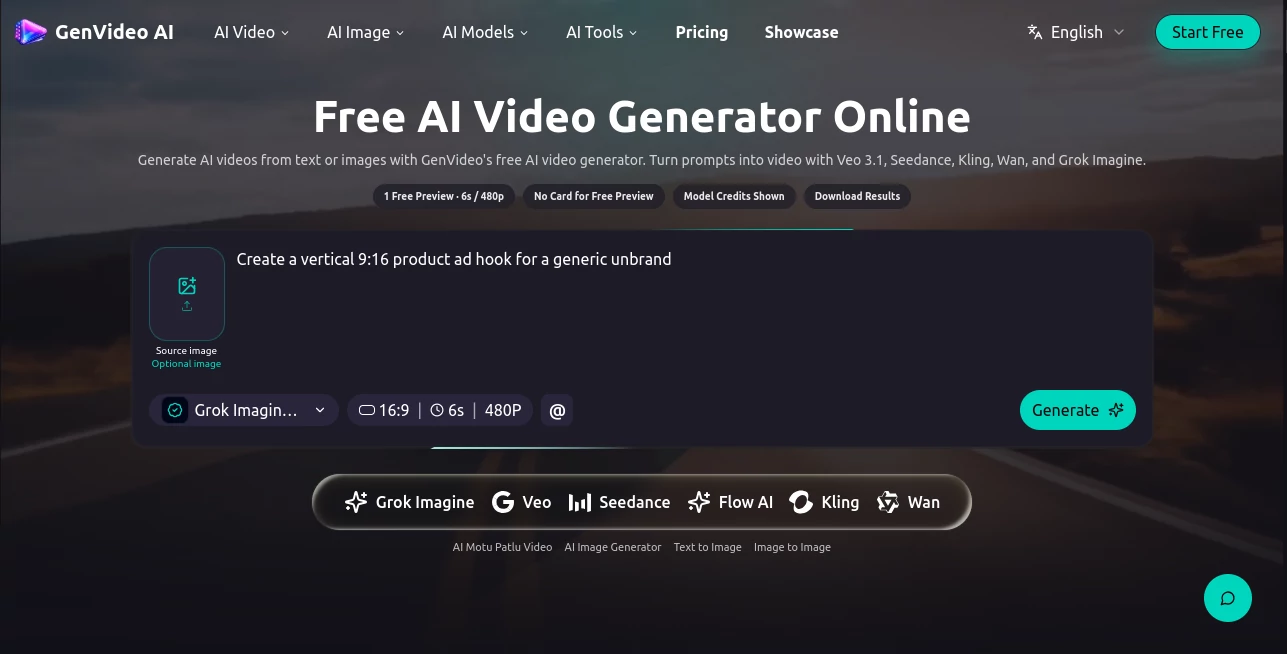
The workspace is clean, intuitive, and designed around productivity. Users simply describe their scene, choose the preferred aspect ratio, configure video settings, and generate a draft. Helpful prompt templates for product videos, social media content, cinematic scenes, explainers, and advertisements reduce the learning curve and help users achieve better results from their very first project.
Accuracy & Performance
The platform delivers impressive visual quality by supporting several modern AI video generation models. Short-form videos are generated efficiently, making rapid iteration possible when testing different creative ideas. Prompt refinement is straightforward, allowing users to adjust camera movement, lighting, subject, or mood until the desired outcome is achieved.
Capabilities
Its feature set extends well beyond simple text-to-video generation. Users can create videos from images, generate vertical content for TikTok and Instagram Reels, build product showcases, produce advertising creatives, develop educational explainers, and prototype cinematic storytelling sequences. Multiple aspect ratios, reusable prompt templates, commercial workflows, and project history further improve the overall production experience.
Security & Privacy
User projects remain available through a persistent generation history, making it easy to revisit previous creations. Commercial workflows are supported across paid plans, allowing businesses and agencies to safely integrate generated content into professional marketing campaigns. As with any cloud-based AI platform, users should avoid uploading confidential or copyrighted material unless they have the appropriate rights.
Use Cases
Content creators can quickly generate engaging short-form videos for YouTube Shorts, Instagram Reels, and TikTok. Marketing teams can produce advertising concepts before launching expensive campaigns. Ecommerce businesses can showcase products with realistic promotional videos. Educators can simplify complex topics through animated explainers, while startups can visualize product ideas and investor presentations without hiring an entire production team. Even filmmakers can use the platform to prototype scenes, camera movements, and visual storytelling concepts before filming.
Pros and Cons
Pros
Supports multiple leading AI video generation models in one platform.
Simple interface suitable for beginners.
Excellent prompt templates for faster content creation.
Multiple output formats including vertical, square, and widescreen.
Useful for commercial projects and marketing campaigns.
Fast iteration makes creative experimentation much easier.
Cons
Most advanced features require a paid subscription.
Generation quality still depends heavily on prompt quality.
Complex scenes may require several refinements to achieve ideal results.
Pricing Plans
The platform offers professional subscription plans designed for different levels of usage. Creator plans are suitable for individuals beginning regular AI video production, while Pro plans target marketers and freelancers producing client work. Studio plans provide higher monthly credit allocations for agencies and teams with larger production requirements. A limited free preview is also available for new users to experience the generation workflow before purchasing credits.
How to Use GenVideo
Begin by creating an account and selecting either a text-to-video or image-to-video workflow. Describe your scene with a focused prompt that includes the subject, action, camera movement, lighting, and overall mood. Choose the preferred aspect ratio and duration, then generate the first draft. Review the output, refine individual prompt elements if necessary, and continue iterating until the final video matches your creative vision. Finished projects can then be downloaded and used across websites, advertisements, presentations, or social media platforms.
Comparison with Similar Tools
Compared with many AI video generators that rely on a single generation engine, this platform brings multiple leading AI models together in one workspace. This allows creators to experiment with different technologies without switching between separate services. The structured prompt templates also make it easier for newcomers to create professional results, while experienced users benefit from faster workflow iteration and broader creative flexibility.
Conclusion
For creators seeking a practical AI video generation platform, this solution offers an excellent balance between ease of use and professional capability. Its support for multiple AI models, straightforward workflow, commercial-friendly features, and flexible content creation options make it valuable for marketers, businesses, educators, and independent creators alike. Instead of replacing creativity, it accelerates the production process, allowing users to focus on ideas rather than technical complexity.
Frequently Asked Questions (FAQ)
1. Can beginners use this platform?
Yes. Its guided workflow and reusable prompt templates make it accessible even for users with no video editing experience.
2. Does it support commercial projects?
Yes. Paid plans include support for commercial workflows, making it suitable for businesses and agencies.
3. What types of videos can be created?
Users can generate social media clips, product demonstrations, advertisements, explainers, cinematic scenes, educational videos, and promotional content.
4. Does it support image-to-video generation?
Yes. Users can generate videos from both text prompts and existing images.
5. Is there a free version?
New users can access a limited preview experience before upgrading to paid plans with additional credits and premium AI models.