Froging AI
What is Froging AI?
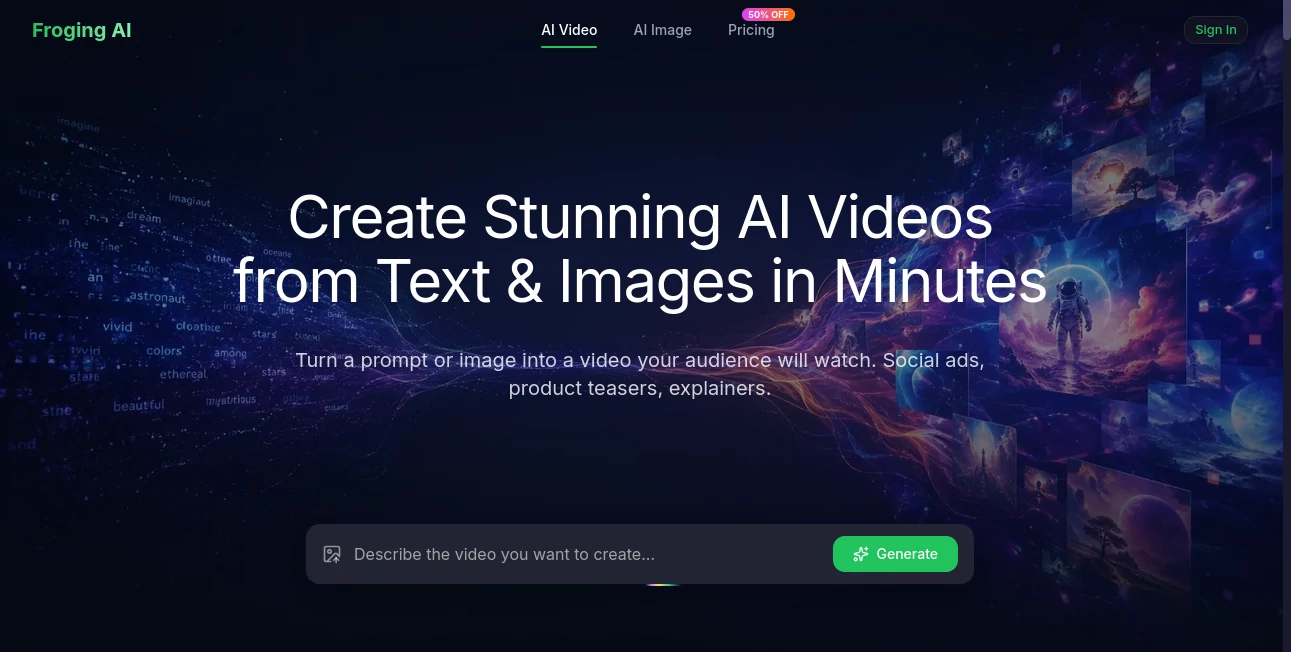
Froging AI is built for people who want to turn an idea into a finished video without setting up cameras, learning complicated editing software, or spending hours on a timeline. Its main workflow is simple: describe a scene or upload an image, choose an AI model, and generate the result. The platform is designed around modern AI video models and supports both text-to-video and image-to-video creation.
What makes the experience particularly appealing is the range of models available in one workspace. Instead of being tied to a single generation engine, creators can experiment with models such as Kling, Veo, MiniMax, Wan, and Seedance, choosing the one that fits the scene they have in mind.
Key Features
- Text-to-video generation from natural-language prompts
- Image-to-video generation for animating existing images
- Access to multiple AI video models from one workspace
- HD video generation with outputs up to 1080p
- Support for 16:9, 9:16, and 1:1 aspect ratios
- Watermark-free downloads
- Audio-enabled video generation on supported plans
- Premium AI model access
- Commercial-use friendly options on paid plans
- 2K/4K image generation included with paid plans
User Interface
The interface focuses on the creative task rather than technical video editing. Users can enter a description of the scene they want to create or provide an image as a starting point. The workflow avoids the need for traditional timelines and keyframes, which makes the platform approachable for marketers, creators, educators, and business owners who may not have professional video-editing experience.
The model selection system is also useful for experimentation. A creator can try different generation engines depending on whether a project needs stronger motion, visual detail, realism, speed, or audio.
Accuracy & Performance
Video generation quality naturally depends on the selected model, prompt, source image, and complexity of the requested scene. The platform is designed to handle elements such as camera movement, lighting, motion, and visual effects from a written description.
For image-to-video projects, users can describe the movement they want in plain language. This is useful when a still product photograph needs subtle camera motion, a portrait needs animation, or a landscape needs a cinematic movement effect. Generation is designed to be fast enough for iterative creative work, with the website stating that generated videos can be ready in under a minute in its standard workflow.
Capabilities
The tool covers a surprisingly broad range of creative tasks. A marketer can turn a product image into a promotional clip, while a social media creator can generate vertical content for platforms such as TikTok, Reels, and Shorts. Educators can also use generated visuals to explain scientific processes, historical events, or abstract concepts.
For filmmakers and visual artists, text prompts can be used to describe cinematic scenes, surreal environments, animations, and other concepts without requiring a production crew. The ability to switch between several AI models gives users more room to test different visual approaches before settling on a final result.
Security & Privacy
Privacy and data handling should always be considered when uploading photographs, product assets, or other potentially sensitive material to an online AI service. The public-facing product information focuses primarily on video generation, model access, output quality, and commercial usage rather than providing extensive privacy details on the main product page.
For business or confidential projects, users should review the current privacy policy and terms before uploading sensitive source material. This is especially important for customer information, unreleased products, private photographs, and proprietary creative assets.
Use Cases
Social Media Content: Create vertical videos for Reels, TikTok, and Shorts from a short description without filming every scene yourself.
Product Marketing: Turn a product photograph into an animated showcase, lifestyle scene, or promotional visual for an online store or advertising campaign.
Advertising: Generate different creative concepts from the same marketing brief, making it easier to test alternative styles, camera angles, and moods.
Education: Convert complicated ideas into visual explanations that can be used in courses, presentations, tutorials, and educational content.
Creative Projects: Explore cinematic environments, visual effects, animated concepts, and short-form storytelling without needing a traditional production setup.
Pros and Cons
Pros:
- Supports both text-to-video and image-to-video workflows
- Offers several leading AI video models in one place
- Simple prompt-based creation process
- Supports common social media aspect ratios
- Outputs can be generated without watermarks
- Free credits are available to get started
- Paid plans include commercial-use friendly features
Cons:
- Generation quality can vary depending on the selected model and prompt
- Frequent video generation can consume credits quickly
- Advanced users looking for detailed manual editing may still need a dedicated video editor
- Privacy and data-handling details should be reviewed carefully for sensitive projects
Pricing Plans
The platform uses a credit-based pricing system with monthly and annual options. A free starting option provides credits for trying the service without requiring a credit card.
- Starter: $23.33 per month when billed annually, with 800 credits added monthly.
- Pro: $35 per month when billed annually, with 1,600 credits added monthly.
- Enterprise: $50 per month when billed annually, with 4,000 credits added monthly.
The paid plans include AI video generation, access to premium models, 2K/4K image generation, audio-enabled video generation, watermark-free downloads, and commercial-use friendly capabilities. Higher tiers add faster generation, priority support, and, for the top plan, early access to new models.
How to Use the Tool
- Open the platform and sign in or start with the available free credits.
- Choose whether you want to create a video from text or animate an existing image.
- Write a clear description of the scene, movement, camera direction, lighting, and visual style you want.
- Select an AI model that suits the project.
- Generate the video and review the result.
- Try another model or refine the prompt if the movement or visual style is not what you expected.
- Choose the appropriate aspect ratio for your destination, such as 16:9 for YouTube or 9:16 for vertical social content.
- Download the finished video and use it in your project according to the applicable plan and usage terms.
Comparison with Similar Tools
Many AI video platforms concentrate on one generation model or build their experience around a particular creative workflow. This platform takes a broader approach by bringing multiple video models into a single workspace. That can be valuable for creators who care about comparing results rather than committing to one engine.
It also combines text-to-video and image-to-video creation, making it practical for both completely new concepts and existing visual assets. Someone creating a campaign, for example, can start with a written idea for one scene and then animate a product photograph for another without moving between separate services.
The main trade-off is that it remains a generation-focused platform rather than a replacement for a full professional video-editing suite. Users who need detailed cuts, complex timelines, advanced compositing, or frame-by-frame control may still want to finish their work in traditional editing software.
Conclusion
For creators who want to move quickly from an idea to a usable video, this platform offers a practical combination of AI models, simple prompting, image animation, and flexible output options. The ability to compare several generation models in one place is particularly useful because different models can produce noticeably different results from the same concept.
It is a strong fit for social media creators, marketers, e-commerce businesses, educators, and anyone experimenting with cinematic AI video. The free starting credits also make it easy to test the workflow before deciding whether a paid plan makes sense for regular production.
Frequently Asked Questions (FAQ)
Can I generate videos from text?
Yes. You can describe a scene in natural language and use the text-to-video workflow to generate a video based on your prompt.
Can I turn an image into a video?
Yes. You can upload an image and describe the movement or camera action you want to apply to it.
Which AI video models are available?
The platform provides access to multiple models, including Kling, Veo, MiniMax, Wan, and Seedance. Available models can change as new generation technologies are added.
What video resolutions are supported?
The service supports HD video generation, including 720p and up to 1080p video output. Paid plans also include 2K/4K image generation.
Can I create vertical videos for social media?
Yes. The platform supports 9:16 output alongside 16:9 and 1:1 formats, making it suitable for vertical short-form content.
Are generated videos watermarked?
The service states that generated videos can be downloaded without watermarks, including when using its free starting credits.
Can I use generated videos commercially?
Paid plans are described as commercial-use friendly. Users should check the current terms of service for the specific rights and restrictions that apply to their content.
Is there a free option?
Yes. New users can start with free credits and explore the generation workflow before choosing a paid subscription.
Which plan is best for regular creators?
The Pro plan is positioned for creators and professionals and provides 1,600 credits each month when billed annually. The right choice ultimately depends on how frequently you generate videos and how many credits your projects require.
AI Image to Video , AI Video Generator , AI Text to Video .
These classifications represent its core capabilities and areas of application. For related tools, explore the linked categories above.

Froging AI Alternatives Product
Whisper Thun…
soro2

Vidtool AI

Seedance Art
Wan AI Video…
Seedance 3.0…
JoyFlix AI

Seedance 2.0

Seedance 2.0…