
Gardenly
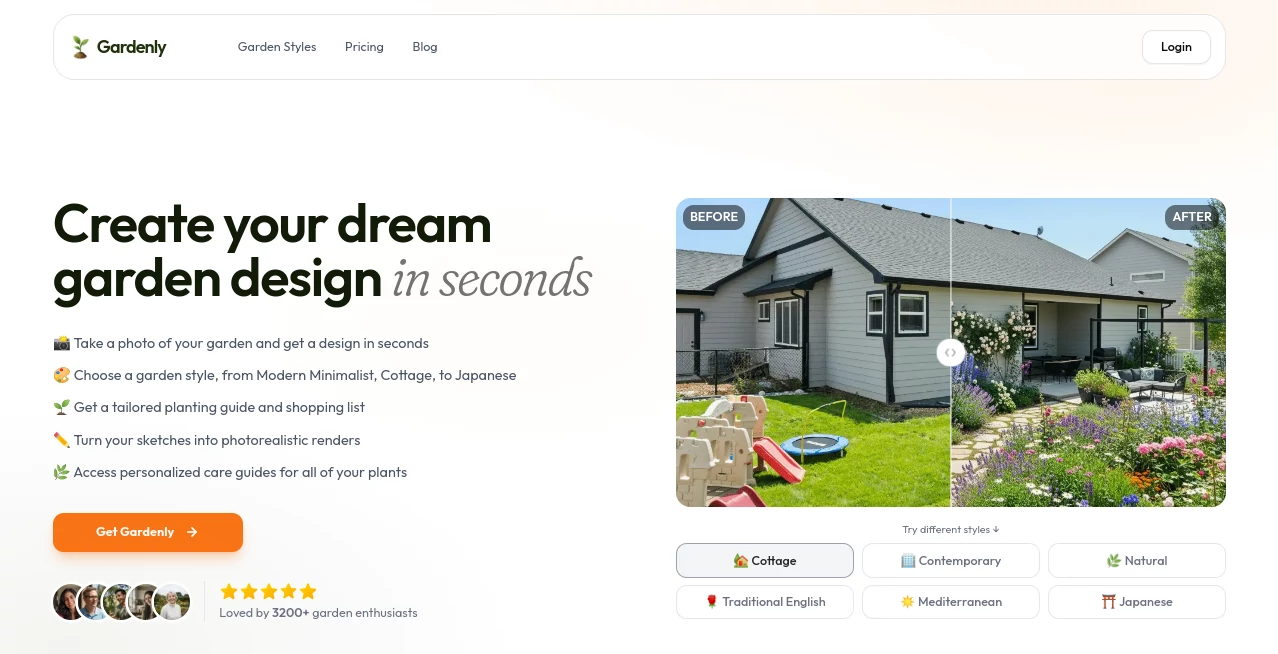
What is Gardenly?
I still remember standing in my backyard last spring, overwhelmed by the blank space and zero idea where to start. Then a friend showed me what this tool could do. I snapped one quick photo of my messy yard, picked a style, and suddenly I was looking at beautiful, realistic redesigns that actually fit my space and climate. What used to feel like an intimidating project became exciting and doable in minutes. The best part? It gave me plant recommendations that make sense for my area instead of generic suggestions I’d later regret.
Introduction
Designing a garden that looks good and actually thrives is harder than most people admit. You need to balance aesthetics with practical things like sunlight, soil, and local climate. Gardenly makes that balance feel achievable. Upload a photo of your outdoor space, choose from over 20 styles — from modern minimalist to cozy cottage or serene Japanese — and the AI generates photorealistic redesigns tailored to your actual yard. It doesn’t just slap pretty pictures on top; it understands layout, existing features, and growing conditions to suggest designs that feel realistic and plantable. For homeowners, new gardeners, and even landscape pros testing ideas, it removes the biggest barrier: not knowing where to begin.
Key Features
User Interface
The whole process is refreshingly straightforward. A big, inviting upload area waits for your photo, then clear style options appear so you can explore different directions without confusion. Results load fast, and the before-and-after view lets you appreciate the transformation instantly. You can adjust details, regenerate specific areas, or ask for variations with simple clicks. It never feels technical — it feels like having a talented landscape designer who works at the speed of thought.
Accuracy & Performance
The AI pays attention to real details: sun exposure, existing hardscaping, and your local climate zone. The generated designs look believable rather than cartoonish, and the plant suggestions are practical for your region. Most transformations happen in under 30 seconds, which keeps the creative energy flowing instead of killing it with long waits. In my experience, the first round already gives strong concepts you can refine further.
Capabilities
Beyond beautiful renders, you get climate-adapted plant lists with quantities, seasonal care guides, and even shopping lists. You can turn rough sketches into photorealistic views, experiment with different styles on the same space, and generate AI videos that show how your garden could evolve over time. It works for everything from tiny balconies to large backyards, respecting what you already have instead of forcing a complete overhaul.
Security & Privacy
Your photos are processed securely and not stored long-term unless you choose to save a design. The platform focuses on delivering value without unnecessary data collection, giving you confidence to upload personal backyard shots without worry.
Use Cases
A young couple with a blank backyard uploads their space and explores modern versus cottage styles before deciding on a direction that fits their lifestyle. A busy parent turns their small patio into a productive herb garden with kid-friendly elements. An experienced gardener tests bold new ideas without the risk of expensive mistakes. Even landscape designers use it to quickly show clients multiple concepts, speeding up the consultation process dramatically. It fits anyone who has an outdoor space and wants it to feel intentional and beautiful.
Pros and Cons
Pros:
- Transforms a single photo into multiple realistic garden concepts in seconds.
- Climate-smart plant recommendations that actually make sense for your area.
- Beautiful, photorealistic results that help you visualize the end result.
- Works for all garden sizes, from balconies to large yards.
- Makes garden design accessible even if you have zero experience.
Cons:
- Very complex or heavily shaded spaces may need some manual adjustment.
- Advanced features and unlimited generations require a paid plan.
Pricing Plans
It offers a generous way to try before committing, with paid plans that unlock higher resolution, more styles, video generation, and unlimited designs. The pricing feels fair for the time and costly mistakes it can help you avoid. Many users say seeing their dream garden visualized is worth every penny — especially when they actually follow through and plant it.
How to Use Gardenly
Take a clear photo of your garden or outdoor space. Upload it on the site, choose your preferred style (or try several), and let the AI work its magic. Review the different concepts, zoom in on plant details, and check the care guide and shopping list. Tweak the prompt or regenerate specific areas if you want changes. Once you find a design you love, download the renders and start planning your real-world transformation. The whole process is fast enough that you can explore multiple directions in one sitting.
Comparison with Similar Tools
Many garden apps offer basic templates or generic suggestions that don’t account for your actual space. This one starts with your real photo and builds designs around what you already have, which makes the results far more practical and inspiring. The combination of speed, realism, and climate-aware recommendations sets it apart from both traditional landscape software and simpler AI tools.
Conclusion
Your outdoor space deserves to feel like an extension of your home — beautiful, functional, and personal. This tool makes that vision accessible without the usual stress, cost, or guesswork. It turns vague dreams into clear, achievable plans and gives you the confidence to actually start. Whether you have a tiny balcony or a large backyard, it helps you create something you’ll love coming home to for years to come.
Frequently Asked Questions (FAQ)
How good does my photo need to be?
Clear, well-lit photos work best, but it handles a wide range surprisingly well.
Does it work for small spaces?
Absolutely — many users successfully redesign balconies, patios, and small courtyards.
Are the plant suggestions realistic for my area?
Yes — they factor in your climate zone, sun exposure, and local conditions.
Can I export the designs?
Yes, you get high-resolution images ready for planning or sharing with contractors.
Is there a free way to try it?
Yes — you can generate initial designs to see the quality before upgrading.
AI Design Assistant , AI Design Generator , AI Graphic Design , AI Interior & Room Design .
These classifications represent its core capabilities and areas of application. For related tools, explore the linked categories above.

Gardenly Alternatives Product

AI Consisten…

Fuser Studio

Sketchready

Z image AI

UNi-1 AI

Generador De…

Just Christm…

KoloQR

Try FLux2