
















KoloQR
Verified Blue CheckMark
Verified Blue CheckMark products are featured above free or unverified listings.
This badge indicates authenticity and builds trust, giving your product higher visibility across the platform.
Upgrade to get verified
Verified Blue CheckMark products are featured above free or unverified listings. This badge indicates authenticity and builds trust, giving your product higher visibility across the platform.
Upgrade to get verified
What is KoloQR?
Creating a QR code should be simple, fast, and flexible. Whether you need to share a website, connect visitors to Wi-Fi, promote a restaurant menu, distribute a PDF, or display social media profiles, a modern generator makes the process effortless. Instead of dealing with complicated software or mandatory registrations, users can build professional-looking QR codes in just a few clicks and download them instantly.
One of the biggest advantages of this platform is its balance between simplicity and customization. Beginners can generate a code within seconds, while businesses and designers can personalize colors, shapes, and branding elements to match their visual identity. The ability to export in both PNG and SVG formats also makes it suitable for digital marketing campaigns as well as high-quality print materials.
From small business owners and educators to event organizers and marketing teams, this solution provides an efficient way to bridge offline and online experiences without unnecessary barriers.
Key Features
- Create QR codes for website URLs.
- Generate Wi-Fi QR codes for instant network access.
- Build QR codes for digital business cards.
- Share PDF documents with a quick scan.
- Create restaurant and café menu QR codes.
- Generate social media QR codes.
- Customize colors to match your brand.
- Select different QR code shapes and styles.
- Add logos for stronger brand recognition.
- Download files in PNG format.
- Export scalable SVG files for professional printing.
- No account registration required.
- Fast generation with a clean workflow.
User Interface
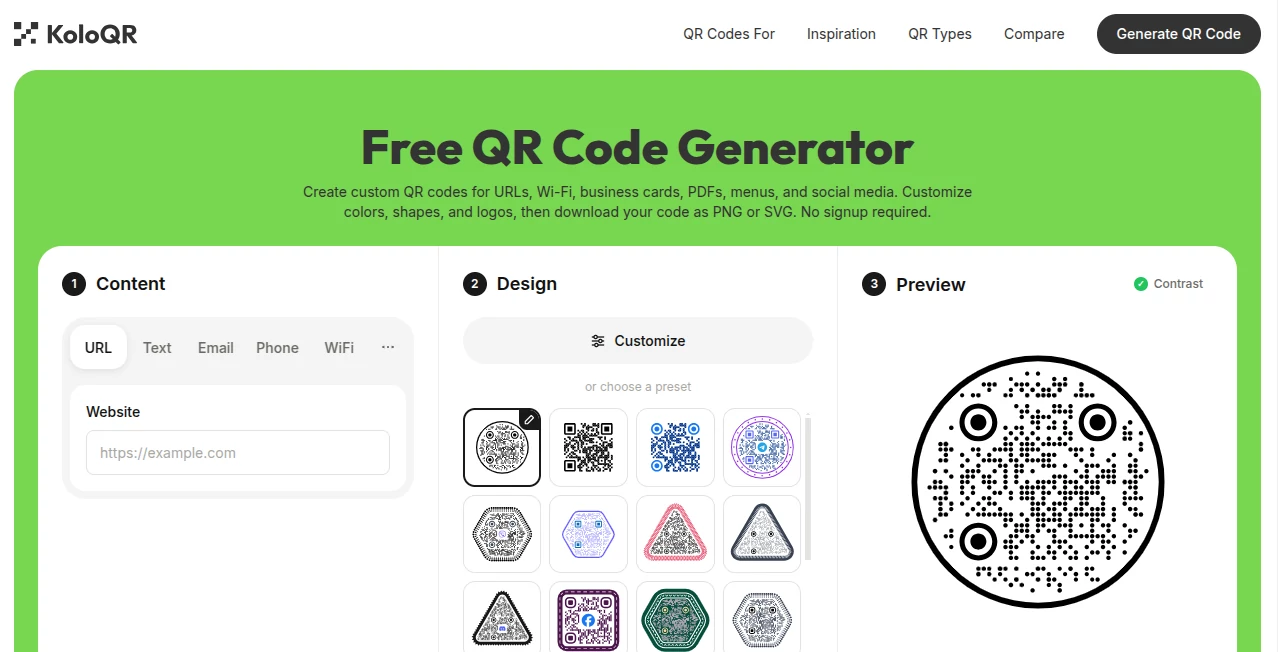
The interface focuses on speed and clarity. Every important option is presented in a logical order, allowing users to move from entering content to downloading a finished QR code without confusion. Customization tools are easy to understand, making it possible to experiment with colors, layouts, and logos without feeling overwhelmed.
This straightforward design is especially valuable for users who occasionally need QR codes and prefer not to spend time learning a complex editor.
Accuracy & Performance
The generated QR codes are designed for reliable scanning across modern smartphones and QR reader applications. Exporting in SVG ensures crisp results regardless of print size, while PNG provides a convenient option for websites, presentations, and social media graphics.
Generation is completed quickly, making it practical for both one-time projects and recurring business needs.
Capabilities
The platform supports several popular QR code applications, including websites, wireless network credentials, business cards, downloadable files, restaurant menus, and social platforms. Branding options allow organizations to create QR codes that feel like a natural extension of their visual identity rather than generic black-and-white squares.
This combination of flexibility and ease of use makes it suitable for marketing campaigns, printed brochures, product packaging, educational materials, exhibitions, and customer engagement.
Security & Privacy
Users can create and download QR codes without signing up, reducing unnecessary friction during the creation process. Since no mandatory account is required, visitors can quickly generate the resources they need while maintaining a straightforward user experience.
Use Cases
- Share websites on flyers and posters.
- Allow customers to join Wi-Fi instantly.
- Create digital business cards for networking events.
- Provide downloadable PDF guides and brochures.
- Replace printed restaurant menus.
- Promote social media accounts through printed materials.
- Add branded QR codes to product packaging.
- Include QR codes in presentations and educational resources.
Pros and Cons
- Pros
- Free to use.
- No signup required.
- Supports multiple QR code types.
- Easy customization with colors, shapes, and logos.
- Downloads available in PNG and SVG formats.
- Simple interface suitable for beginners.
- Cons
- Focused specifically on QR code generation rather than broader marketing features.
- Advanced enterprise campaign management is not the primary focus.
Pricing Plans
The platform offers free QR code generation, allowing users to create customized QR codes and download them without creating an account. This makes it an attractive option for individuals, startups, educators, and small businesses looking for an accessible solution.
How to Use the Tool
- Choose the type of QR code you want to create.
- Enter the required information such as a URL, Wi-Fi details, PDF, or social profile.
- Customize colors, shapes, and optionally upload a logo.
- Preview the generated QR code.
- Download the finished design as PNG or SVG.
- Use it on websites, printed materials, packaging, menus, or promotional campaigns.
Comparison with Similar Tools
Many QR code generators focus either on simplicity or advanced customization. This solution successfully combines both. Users can generate codes within seconds while still having access to branding options that improve visual appeal. The ability to create multiple QR code types, export scalable SVG files, and skip the registration process provides a smoother experience than many alternatives that require accounts before downloads become available.
Conclusion
For anyone looking to create attractive, reliable QR codes without unnecessary complexity, this platform delivers an excellent balance of convenience and customization. The combination of support for multiple QR code formats, branding options, instant downloads, and a registration-free workflow makes it suitable for personal projects, educational materials, marketing campaigns, restaurants, and growing businesses.
Whether the goal is improving customer engagement, simplifying information sharing, or strengthening brand visibility, this generator offers an efficient and professional solution that is easy to recommend.
Frequently Asked Questions (FAQ)
Can I create QR codes without creating an account?
Yes. QR codes can be generated and downloaded without signing up.
Which file formats are available?
The generated QR codes can be downloaded as PNG or SVG files.
Can I customize the appearance?
Yes. Colors, shapes, and logos can be customized to match your branding.
What types of QR codes can be created?
You can generate QR codes for URLs, Wi-Fi access, business cards, PDFs, menus, and social media profiles.
Who can benefit from using this platform?
Businesses, educators, marketers, restaurants, event organizers, freelancers, and individuals can all use it to share information quickly and professionally.