


















Gemini Omni Video
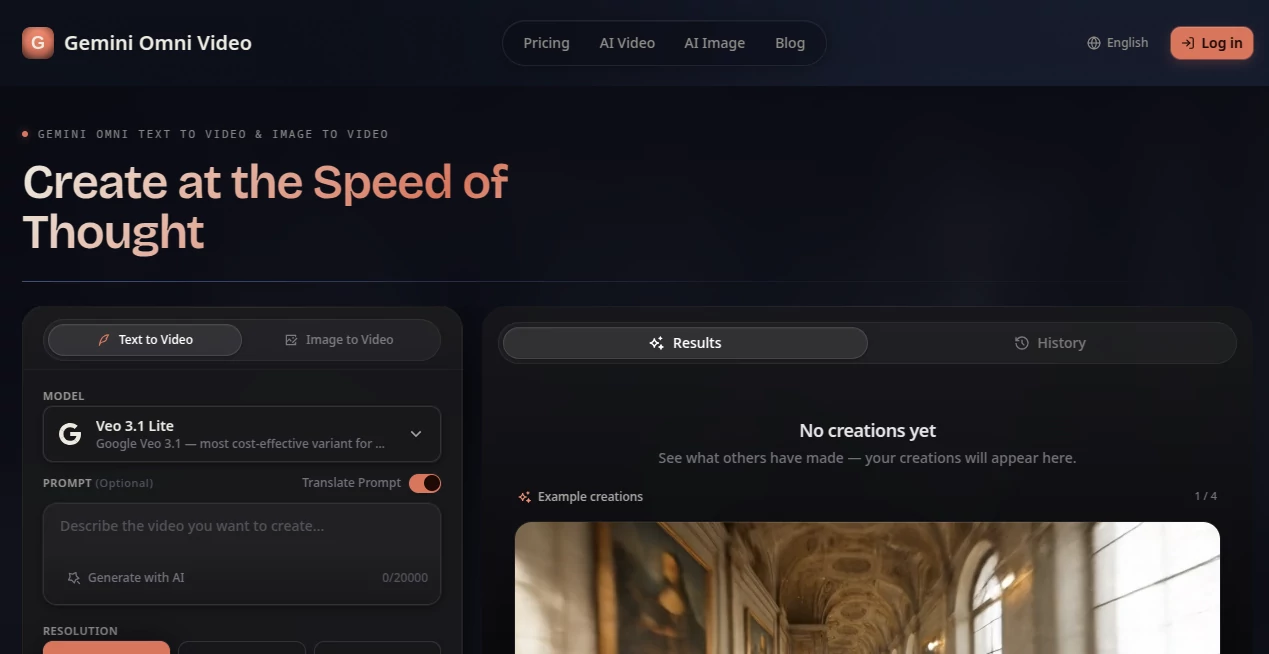
What is Gemini Omni Video?
Gemini Omni is an advanced AI video creation platform designed to help creators transform ideas into cinematic videos using text prompts, images, videos, and audio references. The platform makes video production more accessible by allowing users to describe their vision and generate engaging visual content without needing professional editing skills.
Whether you are creating marketing videos, social media clips, educational content, or creative stories, this tool provides a simple workflow where imagination becomes a finished video. Its multimodal approach allows different types of inputs to work together, helping users maintain visual consistency and create more natural-looking scenes.
For creators who often spend hours searching for the right footage, editing scenes, and adjusting visual details, this solution offers a faster way to explore ideas and produce high-quality content.
Key Features
- Text to Video Generation: Create videos by describing scenes, characters, movements, and styles through simple written prompts.
- Image to Video Creation: Transform static images into dynamic video scenes with realistic movement and visual effects.
- Multimodal Input Support: Combine text, images, videos, and audio references to guide the final creation.
- Reference-Based Generation: Use multiple reference images to maintain character appearance, style, and scene consistency.
- Cinematic Camera Controls: Generate professional-looking shots with camera movements, lighting adjustments, and creative direction.
- AI-Powered Editing: Improve generated videos through conversational instructions instead of complicated editing timelines.
- Audio and Lip Sync Support: Create videos with synchronized sound elements and more natural character interactions.
User Interface
The interface is designed around simplicity. Users can start by entering an idea, uploading references, and selecting generation settings without dealing with complex professional video software. The clean workflow helps beginners experiment quickly while giving experienced creators more control over their visual projects.
The platform focuses on reducing unnecessary steps. Instead of managing multiple editing tools, users can communicate their creative direction naturally and refine results through additional instructions.
Accuracy & Performance
The system focuses on producing coherent video sequences with improved consistency between scenes. By understanding relationships between different inputs, it can better preserve important details such as characters, environments, and overall visual style.
Creators can use it for rapid prototyping, concept development, and content production where speed and creative flexibility are important. The ability to combine different references helps reduce the common problem of inconsistent AI-generated visuals.
Capabilities
This platform supports a wide range of creative workflows, including generating promotional videos, storytelling scenes, product demonstrations, educational animations, and social media content.
Users can explore different creative directions by changing camera angles, environments, lighting, character actions, and artistic styles. The tool is especially useful for creators who want to test ideas before investing time and resources into traditional production.
Security & Privacy
The platform is designed to provide a modern AI creation experience while giving users control over their generated content and uploaded references. Users should always review the platform's latest privacy terms and usage policies when working with personal or commercial materials.
Use Cases
- Content Creators: Produce engaging videos for YouTube, TikTok, Instagram, and other social platforms.
- Marketing Teams: Create promotional videos, advertisements, and product showcases faster.
- Educators: Develop visual lessons, explanations, and animated learning materials.
- Filmmakers: Build story concepts, previews, and creative prototypes before production.
- Businesses: Generate visual content for campaigns without requiring large production budgets.
- Designers: Experiment with visual ideas, scenes, and creative concepts.
Pros and Cons
Pros
- Supports multiple input formats including text, images, videos, and audio.
- Simple workflow suitable for beginners and professionals.
- Helps maintain consistency across generated scenes.
- Useful for many industries including marketing, education, and entertainment.
- Reduces the time required for video concept creation.
Cons
- Advanced generations may require more credits or higher plans.
- AI-generated results may still need creative review and refinement.
- Professional editors may require additional tools for advanced post-production.
Pricing Plans
The platform provides access through a credit-based generation system. Users can start exploring AI video creation and choose suitable plans depending on their production needs, generation volume, and required features.
Different pricing options are designed for casual creators as well as users who need more frequent video generation for professional projects.
How to Use Gemini Omni
- Create an account and access the video creation workspace.
- Enter a detailed text prompt describing your desired scene.
- Add image, video, or audio references when you need specific visual guidance.
- Select generation options such as resolution and video format.
- Generate the video and refine the result with additional instructions.
Comparison with Similar Tools
Compared with traditional AI video generators, this platform stands out through its ability to combine different types of creative inputs in one workflow. Many tools focus mainly on text prompts, while this solution provides more flexibility by allowing users to guide the creation process with multiple references.
It is a strong option for users who want more control over storytelling, character consistency, and cinematic results without managing complicated production software.
Conclusion
Gemini Omni provides a powerful creative environment for anyone looking to turn ideas into engaging videos. By combining text, images, videos, and audio in one workflow, it makes professional-style video creation more approachable for creators, businesses, and storytellers.
With its focus on creative control, realistic scenes, and efficient production, the platform offers a valuable solution for users who want to explore the future of AI-powered video creation.
Frequently Asked Questions (FAQ)
What can this AI video tool create?
It can generate videos from text prompts, images, videos, and other creative references for different content needs.
Can beginners use this platform?
Yes. The simple prompt-based workflow allows beginners to create videos without advanced editing knowledge.
Can I use images as references?
Yes. Users can upload reference images to guide characters, environments, and visual styles.
Is it useful for marketing videos?
Yes. Businesses and marketers can use it to create promotional videos, advertisements, and social media content.
Does it replace professional video editing software?
It helps speed up video creation and concept development, but advanced productions may still benefit from traditional editing tools.
AI Image to Video , AI Video Generator , AI Video Editor , AI Text to Video .
These classifications represent its core capabilities and areas of application. For related tools, explore the linked categories above.
Gemini Omni Video details
Website unavailable — View Alternatives
Pricing
- Free
Apps
- Web App
Categories

Gemini Omni Video Alternatives Product

Kling O1

kling 3 AI
Kling-4 Vide…

Kling 5.0
SkyReels-V4

AISeedance2

Viewra

Seedance 3.0…

VeoNano
