PostPop
What is PostPop?
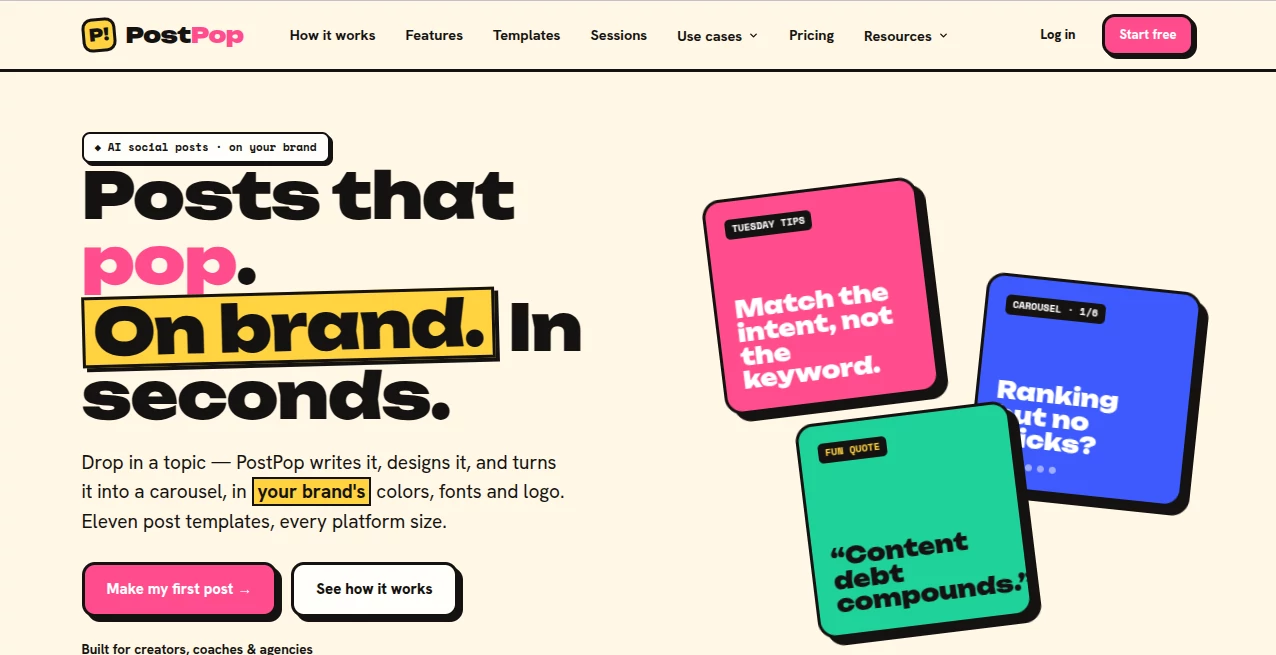
Creating social content sounds simple until the blank canvas appears. You may have a strong idea, but turning it into polished graphics, writing the caption, choosing the right format, and keeping everything consistent with your brand can take much longer than expected. PostPop takes a more practical approach by turning a topic into a finished social post while keeping your visual identity at the center.
The platform is designed for creators, coaches, agencies, and professionals who want to publish more consistently without spending their day inside a design editor. Instead of starting with a generic template, you add your website, let the system build a brand kit from your colors, fonts, and logo, then provide a topic. The result is written, designed, and prepared for export.
What makes the experience particularly appealing is the focus on brand consistency. A social post should feel like it belongs to your business, not like something copied from a template library. This tool is built around that idea.
Key Features
The platform combines content generation and visual creation in one workflow. It can develop a hook, organize the content, create slides for supported formats, and prepare the final assets for different social platforms.
- Automatic brand kit creation from an existing website
- AI-generated hooks, structures, captions, and hashtags
- Multiple social post formats for different content goals
- Carousel creation with up to eight slides
- Multiple visual designs for many templates
- Brand colors, fonts, and logos applied automatically
- Instagram, LinkedIn, X, and Facebook export sizes
- PNG image exports with accompanying copy
- Editable brand kits for continued use
- Custom HTML templates on eligible plans
User Interface
The interface is built around a short workflow rather than a traditional design canvas. You start by adding your website, choose the type of post you want to create, enter a topic, select the desired platform and tone, and generate the result.
This is useful for people who know what they want to say but do not want to spend time moving text boxes around or adjusting layouts manually. The generated design can be reviewed and edited before export, giving users a practical balance between automation and control.
Accuracy & Performance
Content generation is focused on turning a short topic into a usable social post rather than producing large amounts of generic text. The system can create the opening hook, structure the content, and develop slide-by-slide copy where appropriate.
A notable detail is its handling of statistics. Numbers are not supposed to be invented simply to make a post look more convincing. Statistics and claims that require verification are flagged for review, which is a sensible approach for businesses that care about credibility.
The overall workflow is also designed for speed. A simple idea can move from topic to branded, export-ready content without requiring a separate writing application and design editor.
Capabilities
The available formats cover several common social content styles. Users can create educational carousels, recurring tips, quotes, myth-versus-fact posts, listicles, announcements, before-and-after content, how-to posts, Q&A content, statistics-focused posts, and photo-based posts.
For example, an SEO consultant could enter an idea about improving organic traffic and turn it into a short educational carousel. A coach might transform a lesson into a sequence of practical tips, while an agency can create content for several clients using separate brand kits.
There is also support for different tones, allowing the generated writing to be adjusted toward styles such as punchy, expert, or friendly. This makes the tool more useful than a simple image generator because the written voice and visual identity can be considered together.
Security & Privacy
The service is primarily focused on creating and exporting social content. Users provide website and brand information so the platform can build an editable brand kit, including colors, fonts, and logos.
As with any online content platform, businesses should review the provider's current privacy and terms documentation before uploading sensitive brand materials or confidential information. For ordinary public-facing brand assets, the website-based brand extraction workflow is straightforward and convenient.
Use Cases
Creators can use the platform to maintain a more regular publishing schedule without repeatedly designing posts from scratch. A weekly content idea can quickly become a branded graphic or carousel, making batch creation much easier.
Coaches and consultants can turn their expertise into educational posts. A single lesson, opinion, or customer question can become a structured piece of content that is easier for followers to read and share.
Agencies have another strong use case. Multiple brand kits can be maintained for different clients, allowing teams to switch between identities without rebuilding the visual system for every post.
SEO professionals and marketers can also benefit from the format-driven approach. Search insights, content tips, common mistakes, and campaign announcements can be converted into social-friendly posts without starting from an empty design file.
Pros and Cons
Pros
- Strong focus on maintaining brand identity
- Very short workflow from idea to finished post
- Automatic extraction of colors, fonts, and logo from a website
- Useful selection of educational and promotional post formats
- Carousel creation reduces manual slide design work
- Multiple export sizes support several major social networks
- Statistics are flagged for review rather than casually fabricated
- Agency features make multi-client content production easier
Cons
- The free plan includes a watermark
- The free plan is limited to eight posts per month
- Automatic publishing and scheduling are not currently included
- Some advanced designs and export options require a paid plan
- Users wanting highly customized graphic layouts may still prefer a full design application
Pricing Plans
The free plan costs €0 and includes one brand kit, eight posts per month, the available templates with Design A, and square Instagram export. Free exports include a watermark, making this plan most suitable for testing the workflow before committing.
The Creator plan is listed at €190 per year, with a monthly equivalent of €228 per year when paid monthly. It provides three brand kits, unlimited posts, carousels, all supported sizes, watermark-free exports, additional template designs, custom HTML templates, and priority support.
The Agency plan is listed at €590 per year, with a monthly equivalent of €708 per year when paid monthly. It adds unlimited brand kits, client switching, three included team seats, and priority rendering while retaining the Creator features.
There is also an optional Sessions feature that allows users to refine generated content through an ongoing thread. It can be tried for seven days before a one-time €9.99 purchase. Additional brand kits and team seats are available as paid add-ons where applicable.
How to Use It
Start by adding your website so the platform can identify your brand colors, fonts, and logo. Review the automatically generated brand kit and make any adjustments you need.
Next, choose a content format that matches your idea. You can select an educational carousel, listicle, announcement, quote, how-to post, or another available format depending on the message you want to communicate.
Enter a topic in a short sentence. You do not need to prepare a complete article or detailed creative brief. The system uses the topic to develop the hook, structure, written content, and visual slides.
Choose the platforms and tone, then generate the post. Review the text and slides, make any necessary edits, and export the finished images along with the caption and hashtags.
Comparison with Similar Tools
Traditional design platforms give users enormous creative freedom, but that freedom can also mean more work. You usually need to choose a template, adjust colors, select fonts, write the copy, resize the design, and prepare each variation yourself.
AI writing tools solve a different part of the problem by producing captions and ideas, but they often leave the visual creation to another application. This platform sits between these two approaches by connecting the writing and design stages.
Its strongest distinction is the brand-first workflow. Instead of generating another generic social graphic and asking the user to customize it afterward, the brand kit is established at the beginning and carried through the creation process. For users producing content regularly, that can remove a surprisingly large amount of repetitive work.
Conclusion
For anyone who regularly needs social content but dislikes the design process, this platform offers a refreshingly direct workflow. The concept is simple: bring an idea, apply the brand, and turn it into something ready to publish.
The combination of automated brand extraction, content writing, structured templates, carousel creation, and multi-platform exports makes it especially attractive for creators, consultants, marketers, and agencies. It does not try to replace every professional design tool, nor does it attempt to become a social scheduler. Instead, it concentrates on one valuable part of the publishing process and makes that part considerably faster.
The free plan is a sensible way to test whether the workflow fits your content routine. For people who publish frequently or manage several brands, the paid plans provide the additional capacity and customization needed for a more serious production workflow.
Frequently Asked Questions (FAQ)
Do I need design skills?
No. The workflow is designed around choosing a content type and entering a topic rather than working with a traditional blank canvas.
How does the brand kit work?
You provide your website, and the platform extracts your colors, fonts, and logo into an editable brand kit. These elements can then be applied to generated posts.
Can I create carousels?
Yes. Carousel posts are supported, with the carousel format capable of producing up to eight slides.
Which social platforms are supported?
Exports are designed for Instagram, LinkedIn, X, and Facebook, including the appropriate supported dimensions for each platform.
Does it automatically publish posts?
No. The platform currently focuses on creating and exporting the content. The exported files and copy can then be used with a scheduler or published directly to the relevant social platform.
Does the free plan include a watermark?
Yes. The free plan includes a small watermark on exported content. Paid Creator and Agency plans provide watermark-free exports.
Can it create custom designs?
Creator and Agency users can create custom HTML templates using supported content slots, allowing businesses and agencies to build designs beyond the built-in template collection.
Are statistics generated by the system reliable?
Statistics are not intended to be invented. Claims and numbers that need verification are flagged for review, so users can check the source before publishing them.
AI Content Generator , AI Social Media Assistant , AI Graphic Design , AI Marketing Plan Generator .
These classifications represent its core capabilities and areas of application. For related tools, explore the linked categories above.

PostPop Alternatives Product
Schema Synth

nano banana …

AlpacaBag

LLaMaRush

Enji

SEOTakeoff
PDF to Video
Quikauthor

MakeBanner.ai