GetYourCV
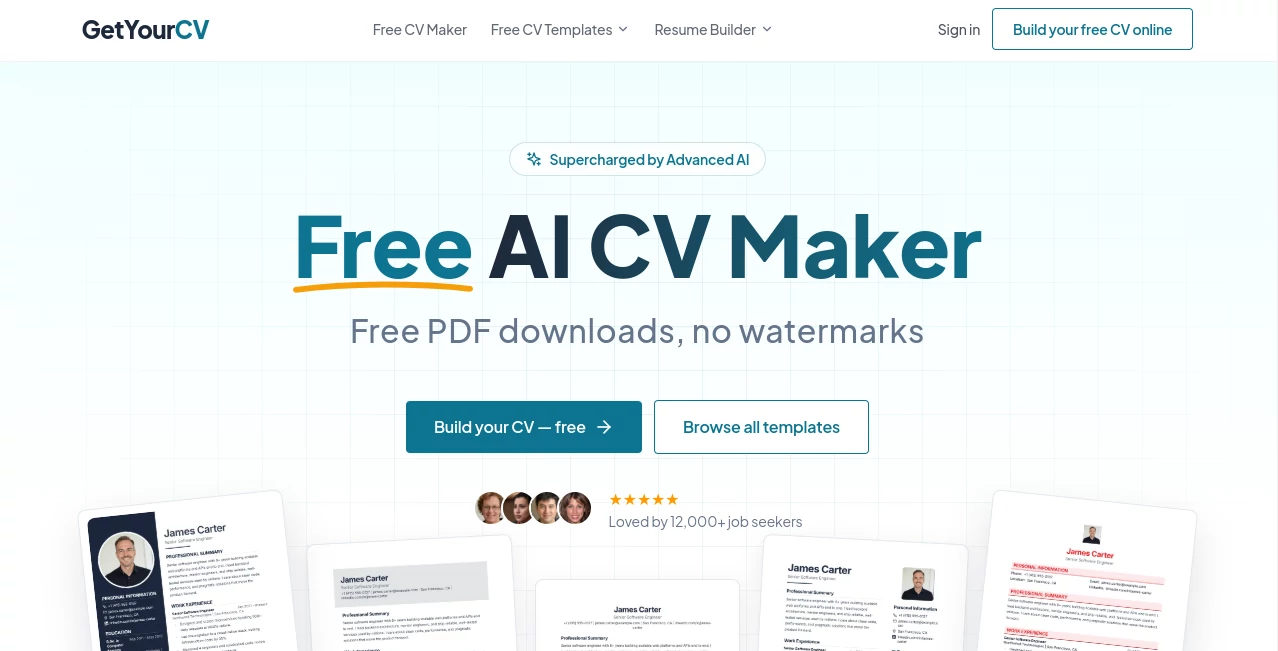
What is GetYourCV?
GetYourCV is a free AI-powered CV maker designed to take the frustration out of building a professional resume. Instead of spending hours adjusting margins, fixing formatting, or trying to make a document look polished in Microsoft Word, users can choose a ready-made template, enter their information, refine the content with AI assistance, and create a finished CV online.
The platform focuses strongly on accessibility. It provides ATS-friendly templates, PDF downloads without watermarks, customizable designs, and support for multiple languages. The service has evolved from a collection of downloadable CV templates into an online builder used by more than 100,000 job seekers each month.
What stands out is the practical approach. The builder is designed for someone who simply wants to get a good CV finished without becoming an expert in document design. A recent graduate, for example, can start with a template and gradually work through education, skills, experience, and other sections instead of facing a completely blank page.
Key Features
- Free online CV creation and PDF downloads.
- ATS-friendly CV templates with clean structures and readable formatting.
- AI assistance for writing and improving CV content.
- Customizable fonts, colors, layouts, and sections.
- Support for CV creation in 20 languages.
- Multiple professional templates for different career styles.
- PDF output without watermarks.
- Ability to create separate CVs for different job applications.
- Job-tailoring assistance for adapting a CV to a specific position.
- Step-by-step guidance for users who are unfamiliar with CV creation.
User Interface
The experience is built around a straightforward three-step process: choose a template, enter your information, and customize and download the finished CV. The editor is intended to keep the user's attention on the content rather than on complicated formatting controls.
The live editing approach is particularly useful when making small changes. You can work through your professional summary, employment history, education, and skills while keeping an eye on how the final document will look. Someone preparing a CV for the first time can therefore make progress section by section rather than trying to design an entire document at once.
Accuracy & Performance
For a CV builder, accuracy is less about generating long pieces of text and more about producing useful, relevant wording without losing the candidate's actual experience. The AI features can help turn rough notes into stronger bullet points, improve summaries, rephrase content, check spelling, analyze a CV, and tailor information toward a particular job.
AI-generated suggestions should still be reviewed before a CV is submitted. The platform itself makes this distinction clear: automated suggestions can contain mistakes or stylistic inaccuracies, so the final responsibility for the information remains with the applicant.
Capabilities
The platform combines traditional CV-building features with AI assistance. Users can start with structured templates, enter their personal and professional information, and adjust the design to suit their target industry. The templates are built around ATS-friendly principles, including clean layouts, standard headings, readable fonts, and selectable text.
Its multilingual support is another useful capability. CVs can be created in 20 different languages, including support for right-to-left CVs such as Arabic. This makes the builder more practical for international applicants and people applying across different markets.
Users can also maintain multiple versions of a CV. This matters more than it might initially seem. A software developer applying for a backend role and a product-focused position should not necessarily send identical documents. Keeping separate versions makes it easier to highlight the experience that matters for each opportunity.
Security & Privacy
Privacy is especially important for a CV builder because users may provide names, contact details, employment history, education, and other personal information. The service states that personal information and CV data are protected, that CVs are private by default, and that personal information is not sold to third parties.
The service also states that CV content is not used to train public or proprietary AI models. Payment information for paid plans is handled by Paddle, so the platform does not receive or store full credit card details.
Use Cases
- Job seekers: Create a polished CV without spending hours working on document formatting.
- Recent graduates: Build a first CV with structured templates and guided sections.
- Career changers: Rework existing experience so it is more relevant to a new career direction.
- Experienced professionals: Maintain different CV versions for different positions.
- International applicants: Create CVs in multiple languages for applications in different countries.
- Applicants targeting ATS systems: Start with structured templates designed with applicant tracking systems in mind.
- People who struggle with writing: Use AI suggestions to turn rough notes into clearer professional descriptions.
Pros and Cons
Pros
- Free CV creation and PDF downloads.
- No watermark on the finished CV.
- ATS-friendly template designs.
- AI writing assistance for professional content.
- Multiple customization options.
- Support for 20 languages.
- Useful for creating CVs tailored to different jobs.
- Simple workflow suitable for first-time CV creators.
Cons
- AI-generated content still needs human review before being submitted to an employer.
- Users looking for highly artistic or unconventional resume designs may prefer a dedicated graphic design platform.
- Some advanced AI and premium capabilities require a paid plan.
Pricing Plans
The platform uses a freemium model. Its free plan is designed to provide the core CV-building experience, including professional templates, AI assistance, customization, and PDF creation without a watermark.
For users who want additional capabilities, paid options include a monthly subscription, a three-month pass, and a lifetime plan. The three-month option is a one-time payment rather than an automatically renewing subscription, while the lifetime option is also a one-time purchase. Exact prices and applicable taxes are displayed before checkout.
This pricing structure makes sense for different types of job seekers. Someone who only needs one CV can use the free offering, while an active applicant managing several tailored CVs may find the additional features more useful.
How to Use the CV Maker
- Choose a template: Start by selecting a professional design that fits your industry and career level.
- Enter your information: Add your contact details, professional summary, work experience, education, skills, and any other relevant sections.
- Use AI assistance: Improve rough descriptions, create stronger bullet points, or refine sections where you are struggling to find the right wording.
- Customize the design: Adjust fonts, colors, layouts, spacing, and sections to create a CV that feels personal while maintaining a professional structure.
- Review the content: Check dates, job titles, company names, contact details, and AI-generated suggestions carefully.
- Download the PDF: Once everything looks right, export the completed CV as a clean PDF ready for job applications.
Comparison with Similar Tools
Many online resume builders concentrate heavily on visual templates, while others put most of their attention on AI-generated writing. This platform takes a more balanced route by combining both parts of the process.
Its strongest advantage is the combination of an accessible free tier, ATS-oriented templates, AI writing help, multilingual support, and PDF downloads without watermarks. That combination is particularly attractive to applicants who want a practical CV rather than an elaborate design project.
It is also worth remembering that no CV builder can guarantee an interview. ATS compatibility can improve how easily a document is processed, but the quality and relevance of the candidate's actual experience, skills, achievements, and keywords remain crucial.
Conclusion
Creating a CV should not require hours of fighting with formatting software. This platform offers a much simpler path: choose a suitable template, provide your information, improve the wording where necessary, personalize the design, and export a professional PDF.
The combination of AI assistance and ATS-friendly templates makes it particularly useful for people who know what they have accomplished but are not sure how to present it on paper. Add multilingual support, multiple CV versions, free PDF downloads, and a genuinely usable free tier, and it becomes a practical option for both first-time applicants and experienced professionals.
Most importantly, the tool does not try to replace the candidate's judgment. Its AI can help with the writing and refinement, but the strongest CV will still be the one that accurately represents the person's real experience and is thoughtfully adapted to the job being pursued.
Frequently Asked Questions (FAQ)
Is the CV maker free?
Yes. The platform provides a free CV-building option that allows users to create a professional CV and download it as a PDF without a watermark. Premium plans are available for users who want additional features.
Can I download my CV as a PDF?
Yes. Completed CVs can be exported as PDF files. The PDF is designed to preserve the appearance of the finished document and can be used for applications or sharing with employers.
Are the templates ATS-friendly?
Yes. The templates are designed around ATS-friendly principles such as clean structures, standard headings, readable fonts, and selectable text rather than complicated image-based layouts.
Can AI help me write my CV?
Yes. AI features can help improve professional summaries, refine experience descriptions, generate stronger bullet points, rephrase text, check spelling, analyze a CV, and tailor content toward a particular job.
Can I create a CV in another language?
Yes. The platform supports CV creation in 20 languages, making it suitable for applicants targeting international employers or preparing documents in their native language.
Can I create multiple CVs?
Yes. Users can create different CV versions for different roles or industries. This is useful when the same professional background needs to be presented differently depending on the position.
Does the platform guarantee that my CV will pass an ATS?
No CV builder can guarantee an ATS result because screening depends on the specific employer, software, job description, and content of the CV. ATS-friendly formatting can help, while relevant experience and appropriate keywords remain important.
Is my CV data private?
The service states that CVs are private by default, personal information is not sold to third parties, and users can delete their account and associated data. It also states that CV content is not used to train public or proprietary AI models.
Do I need design or technical skills?
No. The builder is designed for people without previous CV design experience. Users can follow the guided process, enter their information, choose a template, and customize the finished document without working directly with complex document formatting.
Can I use the CV maker on mobile?
Yes. The service can be accessed through a mobile browser, and an Android application is also available for users who prefer creating their CV from a mobile device.
These classifications represent its core capabilities and areas of application. For related tools, explore the linked categories above.

GetYourCV Alternatives Product

ResignWell
ATSScores

ModelsLab

EarnBetter
ResumeTailor…

CoPrep AI

JobSprout

JobCopy

TryApplyNow