
GoFaceless
What is GoFaceless?
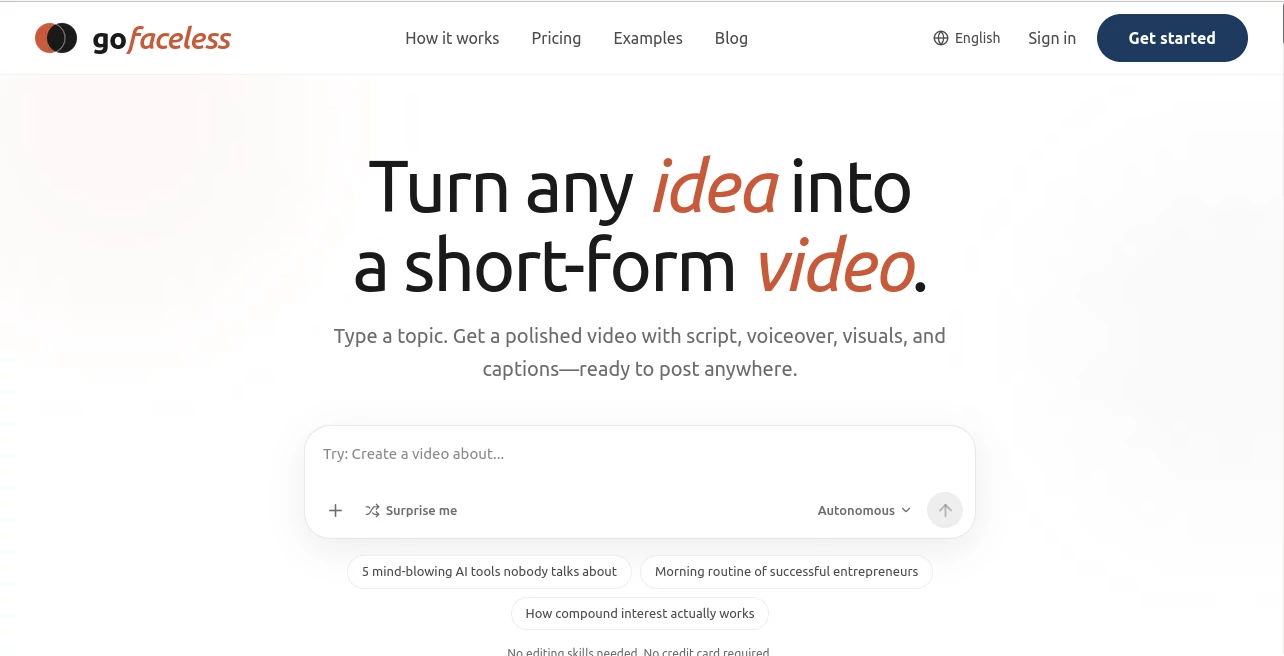
I’ve talked to countless creators who dream of posting consistently but get stuck at the editing stage or hate being on camera. This platform removes those roadblocks almost entirely. You type a topic — anything from finance tips to daily motivation — and it delivers a complete short video with script, natural-sounding voiceover, matching visuals, captions, and music, ready to upload. The first time I tried it, I went from idea to finished Reel in under a minute. The output looked polished enough that friends asked who edited it for me. That kind of speed and quality is addictive for anyone trying to build an audience without burning out.
Introduction
Creating short-form content consistently is one of the hardest parts of growing online. GoFaceless makes it feel almost effortless. It’s built specifically for faceless channels and busy creators who want to publish daily without showing their face or spending hours editing. From a simple topic, it handles the entire pipeline — writing an engaging script, generating voiceover (including voice cloning on higher plans), creating or selecting visuals, adding animated captions, and syncing background music. The videos feel human and intentional, not robotic. It’s become a favorite for people building lifestyle, finance, motivational, tech, and many other niche channels because it lets them focus on ideas instead of production.
Key Features
User Interface
The dashboard is clean and motivating. You enter a topic, choose format (YouTube Shorts, TikTok, Reels, etc.), pick a voice style, and hit generate. Progress is visible, and the final video appears with options to tweak script or regenerate specific parts. Everything stays simple and fast — no steep learning curve. Even creators who aren’t tech-savvy tell me they were publishing their first video within minutes of signing up.
Accuracy & Performance
The AI writes scripts that actually sound human and engaging, not stiff or generic. Voiceovers feel natural, and the visuals match the narration surprisingly well. Generation is quick enough to support daily or multiple daily posts. Users consistently report higher engagement because the content feels authentic rather than mass-produced. The consistency across videos helps channels build a recognizable style over time.
Capabilities
It supports multiple formats and styles: fully faceless with AI footage, avatar overlay, or UGC-style talking head. You can clone your own voice for brand consistency, generate original scenes, add sound effects, and choose from different caption animations. The output is ready for direct posting to YouTube Shorts, TikTok, Instagram Reels, and LinkedIn. It’s particularly strong for educational, motivational, and storytelling content that performs well in short-form.
Security & Privacy
Your topics and generated videos are handled securely. The platform focuses on giving creators full ownership of their content. Voice cloning (on paid plans) is private and tied to your account, so your signature voice stays yours.
Use Cases
A finance creator publishes daily explainer Shorts without ever appearing on camera and grows their following steadily. A motivational speaker builds an entire faceless channel that runs mostly on autopilot while they focus on bigger projects. A small business owner creates product explanation videos and customer stories quickly for social media. A teacher turns lesson highlights into engaging Reels that students actually watch and share. It works beautifully for anyone who wants to maintain a consistent posting schedule without sacrificing quality or personal time.
Pros and Cons
Pros:
- Extremely fast workflow — topic to finished video in under a minute.
- High-quality, natural-sounding voiceovers and matching visuals.
- Perfect for faceless channels that still feel personal and engaging.
- Multiple formats and styles to match different platform needs.
- Voice cloning option makes content sound uniquely yours.
Cons:
- Free tier has limited credits, so serious creators upgrade quickly.
- Very niche or complex topics sometimes need prompt refinement for best results.
Pricing Plans
You can create your first video completely free with no credit card required. Paid plans (Pro and Business) offer more monthly credits, higher resolutions, voice cloning, AI-generated visuals, and team seats. The pricing is competitive for the time it saves and the quality it delivers — many creators say it pays for itself through increased posting frequency and engagement.
How to Use GoFaceless
Sign up (free to start), go to the generator, type your topic or idea, choose the video format and voice style, and hit create. Review the generated script, voiceover, and visuals. Make small adjustments if needed, then download the finished video. Post directly to YouTube Shorts, TikTok, Reels, or LinkedIn. With practice, you’ll develop a prompting style that consistently gives you videos ready for your audience.
Comparison with Similar Tools
Many AI video tools produce generic or low-quality output that needs heavy editing. GoFaceless stands out by delivering more complete, ready-to-post videos with better script quality and visual coherence. It’s particularly strong for creators who want faceless content that still feels authentic and engaging, rather than obviously AI-generated.
Conclusion
Consistency is everything in short-form content, but most creators burn out trying to keep up. This platform removes the biggest bottlenecks and lets you publish high-quality videos at a pace that actually builds momentum. Whether you’re growing a faceless channel for fun or revenue, it gives you a real competitive advantage by making great content creation feel almost effortless. If you’ve been wanting to post more without sacrificing your life or quality, this could be the tool that finally makes it possible.
Frequently Asked Questions (FAQ)
How long does it take to create a video?
Usually under one minute from topic to finished video.
Do I need to show my face?
No — it’s specifically built for faceless content with multiple style options.
Can I use my own voice?
Yes, voice cloning is available on Pro plans and above.
Are the videos ready to post?
Yes — complete with captions, music, and optimized format for each platform.
Is there a free way to try it?
Absolutely — you can create your first video free with no credit card needed.
AI Animated Video , AI Content Generator , AI Video Generator , AI Text to Video .
These classifications represent its core capabilities and areas of application. For related tools, explore the linked categories above.

GoFaceless Alternatives Product

Harvey

ImagineToVid…

VideoLens

Sora2 AI Vid…

S2LIfe AI

seedance 3.0

Wan 2.7

nano banana …

Voe4 AI Video