


















Grok Video
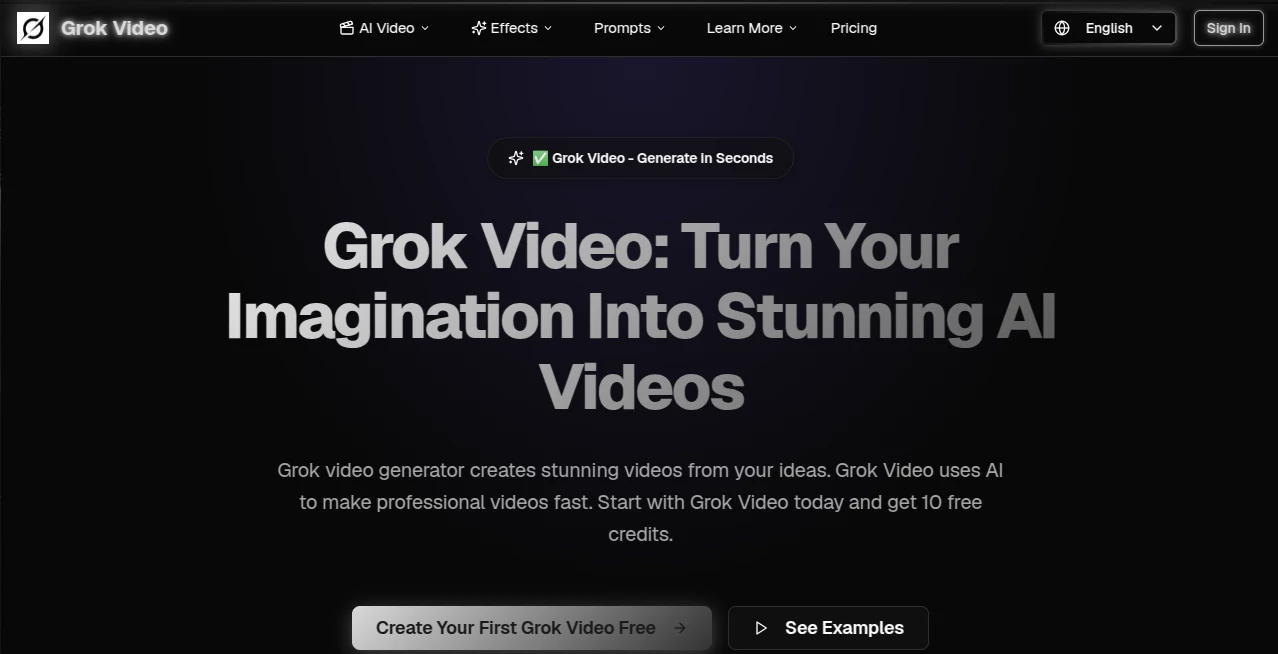
What is Grok Video?
Creating engaging videos no longer requires advanced editing skills, expensive software, or hours of manual work. This platform transforms simple text prompts or reference images into polished AI-generated videos within minutes, making professional-quality content accessible to creators, marketers, educators, and businesses alike. Whether the goal is producing eye-catching social media clips, promotional campaigns, educational animations, or creative storytelling, the entire process feels remarkably straightforward.
The experience is designed for speed without sacrificing quality. Users simply describe their idea, choose an aspect ratio that matches their preferred platform, and allow the AI to generate a ready-to-share video. Support for both text-to-video and image-to-video workflows gives creators the flexibility to start from either an idea or an existing visual, opening the door to countless creative possibilities.
For individuals who publish content regularly, the platform offers an impressive balance between simplicity and powerful AI capabilities. Even first-time users can quickly generate polished videos while experienced creators can rapidly produce multiple concepts for marketing campaigns, advertisements, presentations, or social media content.
Key Features
User Interface
The interface is refreshingly clean and beginner-friendly. Every major feature is easy to find, allowing users to begin creating immediately without navigating complex editing timelines. Prompt input, aspect ratio selection, generation history, and download options are organized logically, making the workflow intuitive from start to finish.
Accuracy & Performance
The AI understands natural language prompts with impressive consistency, helping transform written descriptions into visually engaging short videos. Generation is typically completed within only a few minutes, allowing creators to experiment with multiple concepts while maintaining a productive workflow. HD output, multiple aspect ratios, and AI-powered upscaling contribute to professional-looking results suitable for online publishing.
Capabilities
- Generate videos directly from text prompts.
- Animate existing images into dynamic video clips.
- Create content optimized for social media platforms.
- Support multiple aspect ratios including 16:9, 9:16, and 1:1.
- Produce HD-quality downloadable videos.
- Enhance output quality with AI video upscaling.
- Manage generations and credits from a centralized dashboard.
- Fast rendering designed for rapid content production.
Security & Privacy
User privacy is treated seriously through secure account management and transparent credit tracking. The platform states that personal information is not sold, generation history is managed securely, and content moderation policies help prevent abusive or infringing requests. These measures provide additional confidence for individuals and businesses working with AI-generated media.
Use Cases
- Create promotional videos for products and services.
- Produce engaging TikTok, Instagram Reels, and YouTube Shorts.
- Generate marketing advertisements within minutes.
- Turn product photos into animated showcases.
- Create educational demonstrations and tutorials.
- Develop creative storytelling and concept videos.
- Generate visual assets for presentations.
- Rapidly test multiple advertising concepts.
Pros and Cons
Pros
- Very easy for beginners.
- Supports both text-to-video and image-to-video generation.
- Fast rendering process.
- Multiple export formats and aspect ratios.
- High-quality HD output with AI enhancement.
- Free starter credits for new users.
- Flexible credit-based pricing.
Cons
- Longer videos may require additional credits.
- Advanced manual editing tools are intentionally limited.
- Output quality depends on the clarity of the prompt.
Pricing Plans
New users receive free starter credits to explore the platform before purchasing additional usage. Paid options include flexible monthly subscriptions and credit-based plans designed for occasional creators, professionals, and larger teams. Higher-tier plans provide additional credits, priority processing, watermark-free exports, and expanded generation capacity, making the service suitable for both casual and commercial projects.
How to Use Grok Video
- Enter a detailed text prompt or upload a reference image.
- Select the desired aspect ratio for your target platform.
- Choose the appropriate generation settings.
- Start the AI generation process.
- Preview the finished video.
- Download the completed file and publish it wherever you need.
Comparison with Similar Tools
Compared with many AI video generators, this solution focuses on reducing complexity while maintaining impressive output quality. Instead of overwhelming users with complicated editing controls, it emphasizes fast generation, intuitive prompting, and ready-to-publish videos. The addition of image animation, AI upscaling, flexible aspect ratios, and a transparent credit system makes it especially attractive for creators who value efficiency and consistent results.
Conclusion
This platform successfully lowers the barrier to professional video creation. By combining natural language understanding, image animation, fast rendering, and high-quality exports into a streamlined workflow, it becomes an excellent choice for creators who want to produce engaging content without investing significant time in traditional editing software. Whether building marketing campaigns, educational materials, or social media videos, users can move from an idea to a polished result with remarkable speed and simplicity.
Frequently Asked Questions (FAQ)
Can beginners use this platform?
Yes. The interface is designed for users with little or no video editing experience.
Can images be converted into videos?
Yes. Users can upload a reference image and animate it into a dynamic video.
Which aspect ratios are supported?
Popular formats including 16:9, 9:16, and 1:1 are available for different publishing platforms.
Is there a free version?
New accounts receive free starter credits, allowing users to test the platform before purchasing additional credits or subscriptions.
Who benefits most from this platform?
Content creators, marketers, educators, agencies, business owners, and social media managers can all benefit from its fast AI-powered video generation workflow.
AI Image to Video , AI Video Editor , AI Text to Video , AI Video Generator .
These classifications represent its core capabilities and areas of application. For related tools, explore the linked categories above.

Grok Video Alternatives Product
Kling 3.0

ReelsBuilder…

GrokImagineAI

Seedance 2.0
GoViralTrend

Voor AI
ds video

bridger west…
Veo 3.1
