
hAIve Mix
What is hAIve Mix?
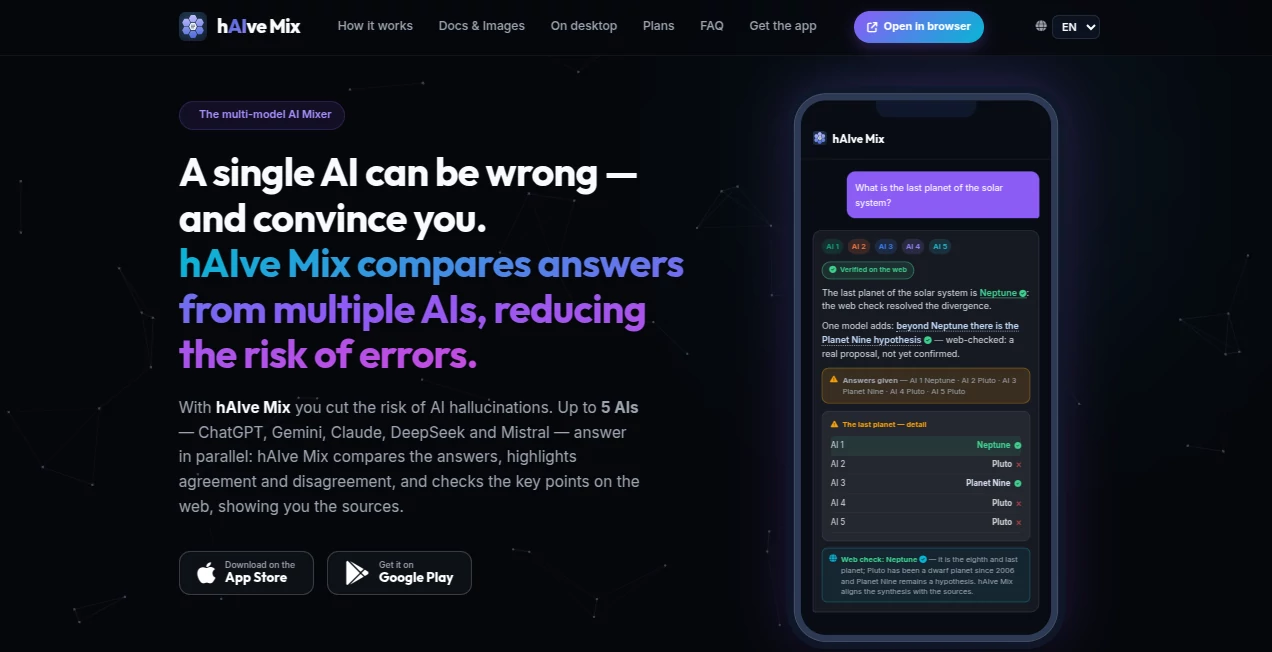
When an AI gives you an answer, it can be tempting to accept it immediately. The problem is that even a confident answer can contain mistakes. hAIve Mix takes a different approach by putting several AI models on the same question and comparing what they produce before presenting the result.
The platform can query up to five AI models in parallel, including ChatGPT, Gemini, Mistral, DeepSeek, and, on the highest plan, a choice between Claude and Grok. Instead of forcing users to switch between different AI services, it brings their responses into one workspace and makes agreements, disagreements, and useful details easier to spot.
This makes it particularly interesting for research, document work, business questions, writing, and situations where checking an answer matters more than simply getting one quickly.
Key Features
- Parallel answers from multiple AI models
- Comparison of agreements and disagreements between models
- Web-based verification with sources for disputed claims
- Word and PDF analysis, creation, and editing on supported plans
- AI-powered image generation and editing
- Photo and screenshot analysis on supported plans
- Document generation with DOCX and PDF export
- Advanced editing that preserves existing document structure and formatting
- Combining multiple Word files into a single document
- Cross-device conversation synchronization
- Native applications for iOS and Android
- Browser access for desktop users
User Interface
The interface is built around a familiar chat experience, so there is little to learn before getting started. You ask a question, upload a document or image when needed, and let the platform coordinate the AI models behind the scenes.
One useful detail is that the same conversations can be continued across supported devices. Desktop users can open the browser version, while mobile users can continue through the native applications. This makes the service feel more like a single workspace rather than a collection of separate AI tools.
The comparison view is also practical. When models disagree, the difference is brought forward instead of being buried inside a long response. For someone researching a topic, that small design choice can save quite a bit of time.
Accuracy & Performance
The strongest part of the platform is its approach to reliability. Rather than assuming that one AI model is always right, it sends the same question to several models and compares their responses.
When several models reach the same conclusion, that agreement provides a useful confidence signal. When they disagree, the conflicting information is highlighted so the user knows where further checking is worthwhile.
For supported plans, web verification adds another layer. Important claims can be checked against current online sources, with the relevant sources shown to the user. This is especially useful for research questions where information may have changed since a model's training data was collected.
It is not a guarantee that every answer is correct, but the workflow is considerably more transparent than simply trusting a single generated response.
Capabilities
The platform goes beyond ordinary question answering. It can work with Word and PDF documents, allowing users to analyze existing files, create new documents, and make targeted edits.
Document editing is particularly useful when formatting matters. Uploaded DOCX files can be modified while keeping elements such as styles, logos, tables, headers, and footers intact. Multiple Word documents can also be merged while preserving a selected layout.
For new documents, users can request items such as reports, business letters, contracts, or CVs and export the result to DOCX or PDF. When tables are part of an answer, Excel export is also supported.
Image generation follows the same comparison philosophy. Multiple image generators can work on the same request, allowing users to compare the results and continue editing the preferred version.
Security & Privacy
Privacy is an important consideration when working with documents and personal conversations. The platform states that conversations remain private and that users retain control of their data. Sign-in is available through Google or Apple.
Documents are protected through encrypted connections and remain accessible through the user's account. Original and processed files are also kept synchronized across supported devices.
As with any cloud-based AI service, users should still consider the sensitivity of information before uploading confidential business, legal, financial, or personal material and review the provider's current privacy terms for details.
Use Cases
Research is one of the clearest applications. Instead of asking a single model to provide an answer and then manually checking it, users can compare several independent responses and investigate the points where they differ.
Students and researchers can use the comparison workflow to explore difficult topics, identify claims that deserve verification, and work with source-backed information.
Businesses can use it for drafting reports, business correspondence, proposals, contracts, and other structured documents. The ability to edit existing Word files without rebuilding their formatting can be especially valuable for teams that already rely heavily on document templates.
Content creators can also benefit from the multi-model approach when brainstorming, researching subjects, developing outlines, or comparing different writing directions. Image generation adds another option for projects that require both written and visual material.
A practical example would be researching a market trend. Instead of asking one AI for a conclusion, a user can request the analysis from several models, inspect their points of agreement, identify conflicting figures or claims, and then use web verification to investigate the disputed information.
Pros and Cons
One of the biggest advantages is the ability to compare several AI models without manually opening multiple services. The disagreement detection makes the process more transparent, while web verification gives users a way to investigate important claims.
Document handling is another strong point. Creating, analyzing, editing, merging, and exporting files from the same environment can remove several steps from a typical AI-assisted workflow.
The main limitation is that the most advanced capabilities are reserved for paid plans. Users who need premium models, deeper web research, document analysis, image analysis, or annotated document reviews may need to move beyond the free tier.
- Pros: Multiple AI models can answer the same question in parallel
- Pros: Disagreements are clearly highlighted
- Pros: Web verification can provide supporting sources
- Pros: Strong Word and PDF document capabilities
- Pros: Image generation and editing are integrated into the workflow
- Pros: Available on mobile and desktop
- Cons: Advanced capabilities require higher-tier plans
- Cons: Comparing multiple models can take more resources than using a single AI
Pricing Plans
A free plan is available for users who want to try the core multi-model experience. It provides access to three AI models answering in parallel.
The Go plan costs €14.99 per month and increases the number of models to four, adding DeepSeek alongside ChatGPT, Gemini, and Mistral. It also provides additional capabilities compared with the free tier.
The Pro plan costs €24.99 per month and adds features such as deeper web search, document capabilities, and image analysis, making it more suitable for users with heavier research and productivity requirements.
The Max plan costs €39.99 per month and provides access to five AI models, including a choice between Claude and Grok as the premium model. It also includes annotated document reviews and higher limits.
Image generation varies by plan as well, with higher tiers providing access to more image-generating models. Limits can vary between plans, and additional volume options may be available.
How to Use It
Start by creating an account and opening a new conversation. Enter a question or task just as you would with a conventional AI assistant.
The platform sends the request to the available AI models in parallel. Once the responses arrive, the system combines them and identifies areas where the models agree or disagree.
If the question contains claims that need current verification, supported plans can use web sources to check the disputed information. You can then inspect the sources behind the verified answer.
For document work, upload a supported Word or PDF file and describe what you want to analyze or change. You can also ask the system to create a new document from scratch and export the result in a suitable format.
For image tasks, describe the visual you want to create or provide an image for supported editing and analysis workflows. Multiple generated results can then be compared before choosing the direction you prefer.
Comparison with Similar Tools
Traditional AI assistants generally focus on giving users a single model's response. That approach is convenient, but it can make it harder to recognize when the answer is uncertain or incorrect.
Other multi-model services may let users access several models from one interface, but the comparison process is not always the central part of the experience. Here, the workflow is built around independent answers, visible disagreements, synthesis, and optional source verification.
The document features also make it more than a simple model comparison interface. Users who regularly work with Word and PDF files can move from research to document creation and editing without changing applications.
For people who simply need quick answers to everyday questions, a conventional chatbot may be enough. For users who value cross-checking, research, document work, and the ability to see where AI models differ, a multi-model workflow can be considerably more useful.
Conclusion
AI is most useful when it helps people make better decisions, not simply when it produces an answer as quickly as possible. The multi-model approach offered here addresses one of the biggest weaknesses of generative AI: the possibility of receiving a convincing answer that is wrong.
By comparing several models, exposing disagreements, checking important claims against web sources, and bringing document and image workflows into the same environment, the platform offers a practical alternative to jumping between multiple AI services.
The free tier makes it easy to test the basic concept, while the paid plans add the deeper research, document, image, and premium-model capabilities that more demanding users may need. For researchers, professionals, students, creators, and anyone who prefers to verify important AI-generated information, it is a particularly interesting addition to an everyday AI toolkit.
Frequently Asked Questions (FAQ)
How many AI models can answer a question at the same time?
Depending on the plan, up to five AI models can answer the same question in parallel. Available models include ChatGPT, Gemini, Mistral, DeepSeek, and, on the Max plan, a choice between Claude and Grok.
Does it help reduce AI hallucinations?
Its approach is designed to reduce the risk by comparing independent answers, highlighting disagreements, and using web verification for supported claims. This does not make AI output infallible, but it gives users more information for evaluating an answer.
Can I analyze PDF and Word files?
Yes. Supported plans can analyze, create, and edit Word and PDF documents using multiple AI models. Higher-tier features can also provide annotated document reviews.
Can it create documents from scratch?
Yes. Users can request reports, business letters, contracts, CVs, and other structured documents. Results can be exported to DOCX or PDF, with Excel export available when the response contains tables.
Does it support image generation?
Yes. Multiple image-generation models can work on the same request, allowing users to compare outputs and continue refining a selected result.
Is there a free plan?
Yes. The Free plan provides access to the core multi-model experience with three AI models answering in parallel.
Is it available on mobile and desktop?
Yes. Native iOS and Android applications are available, and the same conversations can be continued through the browser on desktop with synchronized history.
What happens when AI models disagree?
The disagreement is surfaced rather than hidden. The system shows the different proposed answers and indicates which models support each position. Supported paid plans can also use web sources to verify contested information.
Can I continue a request if I close the app?
Yes. Requests continue running on the service's servers, so the completed response can be available when you return to the application.
AI Documents Assistant , AI Productivity Tools , AI Research Tool , AI Chatbot .
These classifications represent its core capabilities and areas of application. For related tools, explore the linked categories above.
hAIve Mix details
Website unavailable — View Alternatives
Pricing
- Freemium
Apps
- Web App
- iOS App
- Android App
Categories

hAIve Mix Alternatives Product

Geoleaper

Fleck

Ai Angels

Read PDF Alo…
JSON to TOON…

Oasis

Neurohelper

gemini omni …

Treeova