
HeadshotCam
What is HeadshotCam?
A professional headshot can make a noticeable difference on LinkedIn, a CV, a company profile, a freelance marketplace, or even an email signature. The problem is that arranging a studio session is not always practical. It takes time, costs money, and can feel like a lot of effort for a single photograph.
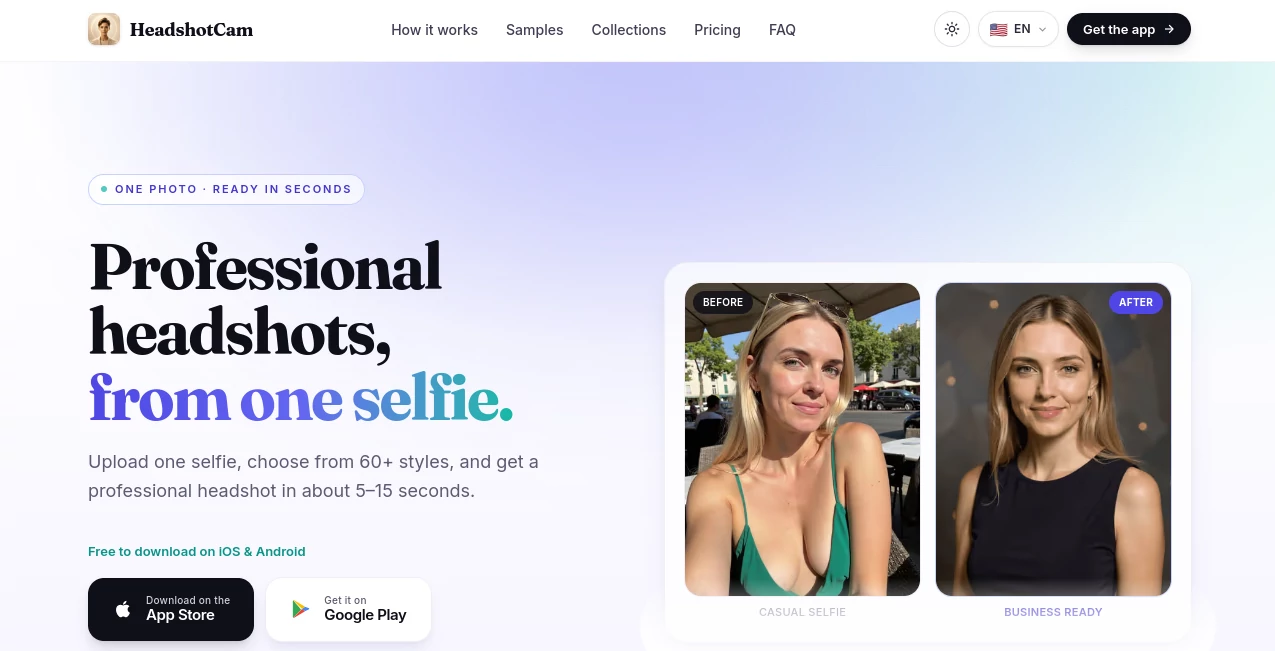
HeadshotCam takes a much simpler approach. You provide one clear selfie, choose a professional style, and receive a polished headshot in around 5–15 seconds. The service is designed around everyday situations rather than elaborate photo sessions, so a good phone photo can become something suitable for a professional profile.
What makes the experience particularly appealing is the range of choices. There are more than 60 professional styles across 11 collections, covering areas such as corporate work, startups, creative careers, healthcare, academia, legal services, finance, government, and wellness. This gives users room to choose a look that actually fits their profession instead of forcing everyone into the same generic business portrait.
Key Features
- Generate professional headshots from a single selfie.
- More than 60 professional styles across 11 collections.
- Most images are generated within approximately 5–15 seconds.
- High-resolution downloads without watermarks.
- Professional styles for corporate, startup, creative, academic, healthcare, legal, finance, government, and wellness professionals.
- Text-based editing for changing clothing, backgrounds, lighting, expressions, and other details.
- Face structure is kept consistent during text-based edits.
- Available as a free-to-download mobile app for iOS and Android.
- One-time credit packs are available alongside a yearly subscription.
User Interface
The experience is deliberately straightforward. Instead of navigating through a complicated photo-editing workflow, users start with a single selfie and move through a small number of decisions. The basic process is essentially: provide a photo, select a style, and generate the result.
The style library is where the experience becomes more interesting. Users can choose from professional looks designed for different industries and situations. Someone updating a LinkedIn profile can choose a clean corporate appearance, while a designer or startup founder can select something less formal.
There is also a practical editing option for people who want to make small changes after generation. Rather than manually adjusting numerous sliders, users can describe a change in ordinary language. For example, asking for a white background or a navy suit is much more approachable than learning a traditional image editor.
Accuracy & Performance
The service is built around keeping the person recognizable while improving the presentation of the photograph. The platform can adjust elements such as lighting, clothing, backdrop, and crop while maintaining the user's facial identity.
Generation speed is one of its strongest practical advantages. Most headshots are ready in approximately 5–15 seconds, although actual processing time can vary depending on server load and image complexity. That makes it useful when a professional photo is needed quickly rather than several hours or days later.
Input quality still matters. A clear, centered, shoulder-up selfie with good lighting generally gives the system better material to work with. Photos with sunglasses, heavy shadows, animals, or multiple people are less suitable.
Capabilities
The platform goes beyond simply adding a suit to a selfie. Its style collections are designed around different professional identities and use cases. Corporate and finance users can choose polished, formal looks, while creative professionals have more expressive options. Healthcare, academic, legal, government, and wellness collections provide additional context-specific choices.
Another useful capability is natural-language editing. If the initial result is close but not quite right, users can describe the desired adjustment instead of starting over. Requests such as changing the background, adding a particular jacket, adjusting the hairstyle, or softening the lighting can be handled through text.
This makes the tool particularly convenient for people who know what they want visually but do not want to spend time learning photo-editing software.
Security & Privacy
Privacy is especially important when working with personal photographs. The service states that uploaded and processed images are encrypted during transfer and processing. It also states that images are not shared with third parties and that users can delete their photos from its servers.
Anyone using an AI photo service should still review the current privacy policy before uploading sensitive images, particularly when creating photographs for professional organizations or company teams.
Use Cases
LinkedIn profiles: A clean professional portrait can replace an outdated selfie and give a profile a more polished first impression.
CV and resume photos: Users who need a professional portrait for a CV can create one without arranging a separate photography session.
Freelance profiles: Freelancers on platforms such as Upwork can use a professional-looking portrait that feels more appropriate for client-facing work.
Company websites: Small businesses can create more consistent team photographs when employees are working remotely or are spread across different locations.
Email signatures: A tightly cropped professional portrait can work well in an email signature where space is limited.
GitHub and professional profiles: Developers and other technical professionals can create a clean avatar that remains recognizable even at a small size.
Press and executive profiles: Founders, executives, consultants, and public-facing professionals can create a polished portrait for biographies, company pages, and media materials.
Dating and personal profiles: The same technology can also produce a more polished personal profile photograph, although using a natural-looking result is generally preferable to an overly formal appearance.
Pros and Cons
Pros
- Only one selfie is required.
- Very fast generation, with most results ready in 5–15 seconds.
- More than 60 professional styles to choose from.
- Styles cover a wide range of professions and industries.
- Text-based editing makes revisions simple.
- High-resolution results are available without watermarks.
- Both one-time credits and a yearly plan are available.
- Available on both iOS and Android.
Cons
- The final result depends heavily on the quality of the original selfie.
- People looking for highly creative lifestyle photography may want a broader image-generation service.
- Users who need an official government-compliant passport photograph should not assume an AI-generated portrait meets the relevant authority's requirements.
- The mobile-first approach may be less convenient for people who prefer completing the entire workflow on a desktop browser.
Pricing Plans
The app is free to download on iOS and Android, while image generation is available through credits or a subscription.
- 20 headshots: $5.99 one-time credit pack.
- 50 headshots: $12.99 one-time credit pack.
- 200 headshots: $39.99 one-time credit pack.
- Yearly plan: $39.99 per year with unlimited generation across the available styles.
The credit system is useful for someone who only needs a few professional images, while the yearly option makes more sense for users who expect to experiment with different styles or refresh their professional photographs regularly.
How to Use It
Start by downloading the mobile app and taking or selecting one clear selfie. A shoulder-up image with good lighting and a centered face is recommended. Avoid sunglasses, heavy shadows, group photographs, and distracting backgrounds.
Next, choose a style from the available professional collections. You can select a traditional corporate appearance, a startup-oriented look, a creative style, or an option designed around a particular profession.
After selecting the style, generate the headshot. Most results should appear within 5–15 seconds. Once you have a result you like, download the high-resolution version without a watermark.
If something needs changing, use a natural-language instruction. For example, you could request a lighter background, different clothing, softer lighting, or another small adjustment. The editing system is designed to preserve your facial structure while modifying the requested details.
Comparison with Similar Tools
AI headshot services generally fall into two groups. Some require users to upload a larger collection of photographs and wait for a model or photo session to be processed. Others are designed for broader creative image generation and offer many different types of scenes and compositions.
This service takes a more focused route. The workflow is centered on professional headshots, with one selfie as the starting point and a collection of purpose-built professional styles. The quick generation time also makes it particularly suitable when the goal is to update a profile today rather than plan a dedicated photo session.
The choice ultimately depends on what the user needs. Someone looking specifically for a professional portrait and a quick workflow may appreciate the simplicity, while users wanting elaborate lifestyle scenes or highly experimental photography may prefer a more general-purpose image-generation platform.
Conclusion
A professional photograph does not always require a photographer, studio booking, and a carefully scheduled afternoon. For many everyday professional situations, a good starting selfie is enough to create something considerably more polished.
With more than 60 professional styles, fast generation, high-resolution downloads, mobile access, and simple text-based editing, this tool offers a practical solution for people who need a new headshot without turning it into a major project. The combination of one-time credits and an annual unlimited option also gives users flexibility depending on how often they need new images.
For LinkedIn profiles, CVs, freelance accounts, company pages, email signatures, and other professional uses, it is a convenient way to turn an ordinary phone photo into a presentation-ready portrait in seconds.
Frequently Asked Questions (FAQ)
How many photos are needed to create a headshot?
Only one clear selfie is required. A shoulder-up photograph with good lighting and a centered face is recommended for the best results.
How long does it take to generate a headshot?
Most headshots are generated within approximately 5–15 seconds. Processing time can vary depending on server load and image complexity.
How many styles are available?
There are more than 60 professional styles organized into 11 collections, including Corporate, Startup, Creative, Academic, Healthcare, Client-Facing, Legal, Finance, Government, Wellness & Fitness, and Foundations.
Can I change the generated photo?
Yes. Users can describe desired changes in plain English, such as changing the background, adding a navy suit, removing glasses, adjusting the hairstyle, or modifying the lighting.
Are the uploaded photos secure?
The service states that photos are encrypted during upload and processing, are not shared with third parties, and can be deleted from its servers by the user.
Is there a free option?
The mobile app is free to download on iOS and Android. Generation is available through paid credit packs or a yearly unlimited plan.
AI Photo & Image Generator , AI Selfie & Portrait , AI Photography .
These classifications represent its core capabilities and areas of application. For related tools, explore the linked categories above.
HeadshotCam details
Website unavailable — View Alternatives
Pricing
- Freemium
Apps
- Web App
- iOS App
- Android App
Categories

HeadshotCam Alternatives Product
KissPixel

Shutterstock

Nano Banana 2

UNi-1 AI
Banana Prompt

Pixelied

flux 3

Nano Image AI

AI Hairstyle…