Heyo
What is Heyo?
Turning an ordinary photo into something lively no longer requires a complicated editing workflow. Heyo is a mobile-focused AI creative tool that adds animated effects to photos and transforms them into short, shareable videos. Instead of starting with a blank timeline, users can begin with an image they already have and experiment with different visual effects, movements, and creative styles.
The platform is particularly appealing to people who enjoy making social media content, playful photo animations, visual experiments, and short clips without spending time learning professional video-editing software. Its collection of AI effects gives users a quick way to try different looks and turn everyday pictures into more engaging content.
Key Features
- AI-powered photo animation for turning still images into short videos.
- A broad selection of creative visual effects and styles.
- Text-to-video generation for creating video concepts from written descriptions.
- Image-to-video effects that add movement and atmosphere to existing photos.
- Creative short clips designed for social media sharing.
- Mobile-first creation that keeps the workflow simple and accessible.
- High-definition output for sharing and saving generated creations.
- Specialized effects covering artistic, cinematic, cartoon, atmospheric, and playful styles.
User Interface
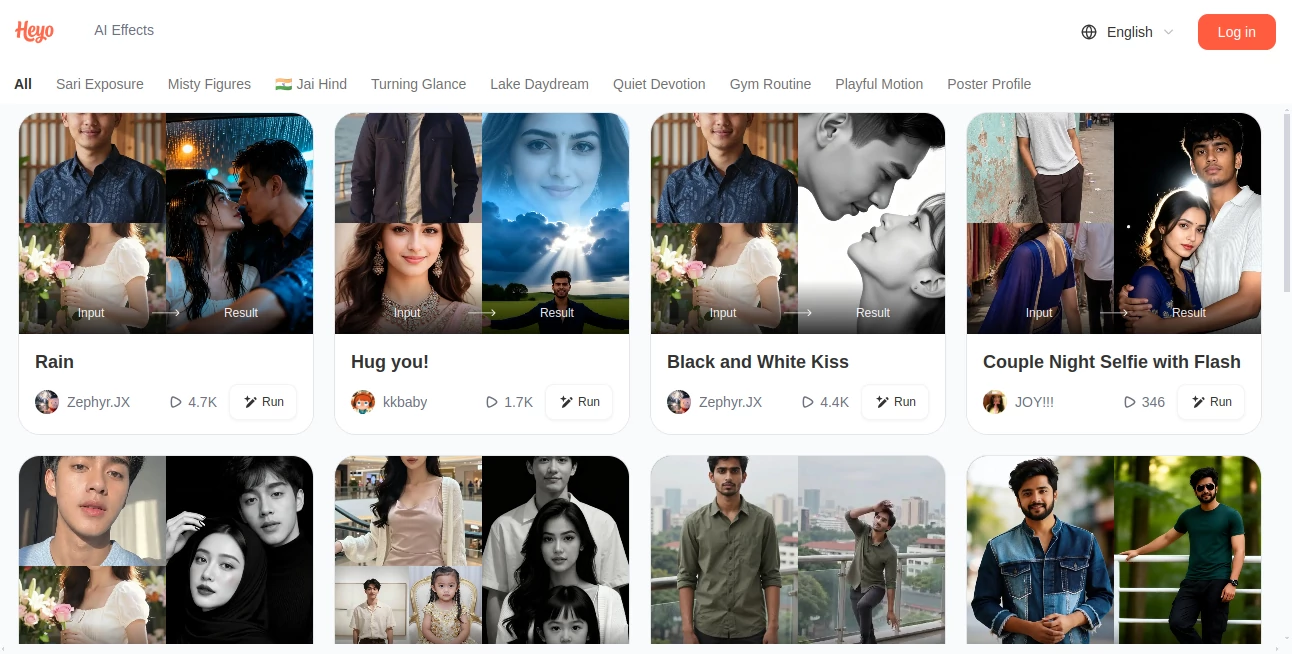
The experience is designed around quick creation rather than traditional video editing. Users can browse available AI effects, select a style, provide a photo or creative prompt, and generate the result without dealing with complicated timelines or layers.
This approach makes the tool especially convenient on a smartphone. Someone who wants to turn a vacation photo into a short atmospheric clip, for example, can experiment with an effect directly from their phone instead of moving the image into a desktop editor first.
Accuracy & Performance
Performance naturally varies depending on the selected effect and the source material, but the platform is built around fast AI transformations. Its official video-generation workflow describes generating results within seconds, while the app focuses on producing short animated content rather than lengthy productions.
The quality of the final result also depends on the original image. Clear portraits, well-composed photographs, and images with visible subjects generally provide the AI with better material to work with. For creative experimentation, the quick generation cycle makes it practical to try several effects and choose the version that feels right.
Capabilities
The strongest part of the platform is its variety. It is not limited to one animation style. Available experiences cover everything from photo-to-video transformations and cartoon effects to atmospheric edits, double exposure artwork, cinematic treatments, and other AI-powered visual effects.
For example, a normal portrait can be transformed into an animated visual, while a landscape can receive a more dramatic atmosphere. There are also effects designed around specific creative scenarios, making the service feel more like a collection of specialized AI tools than a single-purpose generator.
The platform also offers text-to-video functionality, allowing users to describe a scene and turn an idea into a generated visual. This makes it useful for people who want to experiment with concepts before creating more polished content.
Security & Privacy
The developer's Google Play disclosure states that no data is shared with third parties. It also indicates that the application may collect personal information, app information and performance data, and device or other IDs. Data is encrypted in transit, and users can request deletion of their data. These details are developer-provided disclosures and may change as the application evolves.
Because users may upload personal photographs, it is still sensible to review the current privacy policy before processing particularly sensitive or private images.
Use Cases
- Social media creators: Turn ordinary photos into short, attention-grabbing clips for social platforms.
- Personal photo projects: Give family pictures, portraits, and travel photos a more dynamic presentation.
- Short-form video: Create quick visual content without building a complete video manually.
- Creative experimentation: Test cartoon, cinematic, artistic, atmospheric, and other visual concepts.
- Profile and avatar content: Transform portraits into more distinctive visual creations.
- Marketing experiments: Produce simple visual concepts that can be tested in social campaigns.
- Entertainment: Experiment with playful effects and imaginative photo transformations.
Pros and Cons
- Pros: Easy mobile workflow, large selection of creative effects, photo-to-video capabilities, short-form video creation, and a strong focus on quick visual experimentation.
- Pros: Useful for people without professional video-editing experience and convenient for social-media-oriented content.
- Cons: It is primarily designed for short creative content rather than full professional video production.
- Cons: The quality and realism of an AI transformation can vary depending on the selected effect and source image.
- Cons: Some features may require in-app purchases, so users should check the current availability and pricing inside the application.
Pricing Plans
The official product pages promote free access to its AI video-generation experience, while the Android application is listed with in-app purchases. This means the exact availability of individual effects or generation options may depend on the current app version and account. Users should check the latest pricing shown in the application before committing to a paid feature.
For someone who only wants to experiment occasionally, the free functionality can be a useful starting point. More frequent creators may want to review the available paid options based on how many generations and effects they actually use.
How to Use the Tool
Getting started is straightforward:
- Install the Android application and open the creative effects section.
- Choose the type of effect or video experience you want to try.
- Upload a suitable photo or enter a text description when the selected feature supports text generation.
- Select a preferred visual style or effect.
- Start the generation process and wait for the AI transformation.
- Review the result and create another version if you want to explore a different style.
- Save the finished creation or share it on your preferred social platform.
For the best results with photo animation, start with a clear image where the main subject is easy to recognize. Portraits with good lighting and an uncluttered composition are especially suitable for many of the available effects.
Comparison with Similar Tools
Compared with traditional video editors, the biggest difference is the amount of manual work involved. Conventional editors give users detailed control over timelines, transitions, layers, and individual frames. This platform takes a different route by automating much of the visual transformation.
It also differs from general-purpose AI video generators because a significant part of its appeal comes from ready-made effects that can be applied to existing photographs. Someone looking for a quick transformation rather than a complete production environment may find this approach considerably more convenient.
For professional filmmakers working on long-form projects, a dedicated video editor will still provide deeper control. For casual creators, social media users, and anyone who enjoys experimenting with AI-powered visual effects, the simpler workflow can be a real advantage.
Conclusion
AI-powered photo animation is becoming an increasingly practical way to make everyday images more engaging, and this platform takes a distinctly playful approach to the idea. Its combination of photo effects, short video generation, creative styles, and mobile accessibility makes it well suited to people who want results quickly rather than another complicated editing application to learn.
The strongest reason to try it is the variety of possibilities. A single photograph can become the starting point for several completely different creative directions, from subtle animation to highly stylized visual effects. For social content, personal projects, and casual experimentation, that flexibility makes the experience worth exploring.
Frequently Asked Questions (FAQ)
What is this AI video maker used for?
It is designed to add AI-powered effects to photographs, animate still images, and create short creative videos that can be saved or shared.
Can I turn a photo into a video?
Yes. Photo-to-video functionality is one of the core experiences, allowing users to transform still images into short animated clips.
Does it support text-to-video generation?
Yes. The platform provides a text-to-video experience where users can describe a scene and generate a visual result from the description.
Do I need video-editing experience?
No. The workflow is aimed at quick creation and does not require knowledge of professional editing software.
Can I use it for social media content?
Yes. Short animated clips and creative photo effects are particularly suitable for social media posts and other short-form visual content.
Is it available on mobile?
Yes. The Android application is designed around mobile creation, allowing users to access the AI effects and video-generation features from a smartphone.
Is the service free?
Some AI creation experiences are promoted as free, while the Android application also includes in-app purchases. The exact free limits and paid options can change, so users should check the current offers in the app.
What kind of photos work best?
Clear, well-lit photographs with a recognizable subject generally provide a good starting point. Portraits and images with a strong focal point are especially useful for many visual effects.
Is user data protected?
According to the current Google Play data-safety disclosure, data is encrypted in transit and the developer states that no data is shared with third parties. The disclosure also lists certain types of data the application may collect.
AI Animated Video , AI Image to Video , AI Video Generator , AI Short Clips Generator .
These classifications represent its core capabilities and areas of application. For related tools, explore the linked categories above.

Heyo Alternatives Product

Sora 2 Video

Wan 2.7 AI

Wan 2.7

Gamelabs Stu…

Kling O1

Seedance 2 V…

SocialRails

Kling 5.0

Seedance 2.0