
Humanizer Free
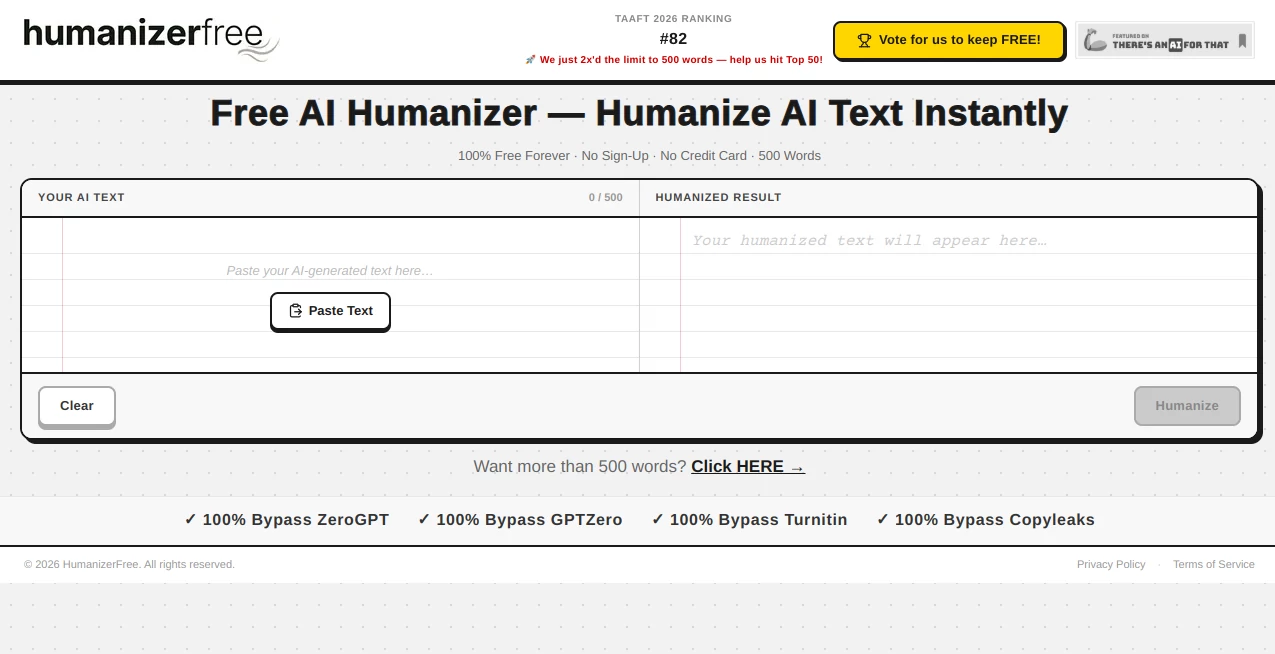
What is Humanizer Free?
Humanizer Free is an AI-powered writing enhancement tool designed to transform AI-generated text into smoother, more natural, and human-style content. It helps writers, students, marketers, and professionals improve the readability of machine-generated drafts while keeping the original meaning and message intact.
As AI writing tools become a regular part of modern content creation, many users face the challenge of producing text that feels authentic and engaging. This tool provides a simple solution by refining robotic sentence patterns, improving flow, and creating a more natural writing experience without requiring advanced editing skills.
The platform focuses on fast and accessible text transformation. Users can paste their generated content, process it quickly, and receive a rewritten version that feels closer to something created by a human writer. It is especially useful for bloggers, content creators, students, and businesses that rely on AI-assisted writing workflows.
Key Features
User Interface
The interface is designed with simplicity in mind. Users do not need technical knowledge or complicated settings to improve their content. The workflow is straightforward: add text, start the transformation process, and review the improved version.
The clean layout makes it convenient for beginners while still being practical for experienced writers who need a quick editing assistant. The minimal design helps users focus on their content rather than navigating unnecessary options.
Accuracy & Performance
The tool focuses on preserving the original intent of written content while adjusting sentence structure, vocabulary, and overall readability. Instead of only replacing individual words, it works on improving the overall tone and rhythm of the text.
For everyday writing tasks such as blog drafts, emails, product descriptions, and reports, it can help make AI-assisted content feel more polished and naturally written.
Capabilities
This AI writing assistant can be used for multiple types of content improvement, including:
- Rewriting AI-generated articles and blog posts
- Improving email communication
- Enhancing marketing copy
- Making academic drafts easier to read
- Refining product descriptions
- Creating smoother professional documents
- Improving overall writing style and sentence variation
A common workflow among content creators is writing a first draft with AI and then using a humanization tool to add a more personal and natural touch before publishing.
Security & Privacy
Privacy is an important consideration for anyone working with written content. The platform is designed to process user text without making the experience complicated. Users can improve their drafts quickly while maintaining control over their own content.
For professionals handling business documents, marketing materials, or personal writing projects, having a simple editing workflow can make content preparation faster and more convenient.
Use Cases
Humanizer Free can support different groups of users who want to improve AI-assisted writing. Some practical examples include:
- Content Creators: Improve AI-generated articles and make them more engaging for readers.
- SEO Professionals: Refine website content and create more natural-sounding pages.
- Students: Improve clarity and readability of drafts and assignments.
- Marketing Teams: Polish advertisements, campaigns, and promotional content.
- Business Owners: Create professional communication materials more efficiently.
- Freelance Writers: Speed up editing processes while maintaining quality.
Pros and Cons
Pros
- Simple and beginner-friendly interface
- Helps improve AI-generated writing quality
- Maintains the original meaning of content
- Useful for multiple writing purposes
- Fast text processing experience
- Suitable for marketers, writers, and professionals
Cons
- Advanced customization options may be limited
- Very specialized writing styles may require additional manual editing
- Large documents may require higher usage limits depending on the plan
Pricing Plans
The platform offers flexible options for different types of users. A free version allows users to test the service and improve smaller pieces of content before deciding whether they need additional capacity.
- Free Plan: Provides basic access with limited daily usage and word limits.
- Basic Plan: Offers higher usage limits and additional features for regular users.
- Pro Plan: Designed for professionals who need more frequent content processing.
- Max Plan: Suitable for heavy users requiring extensive writing transformation capabilities.
- Enterprise: Provides customized solutions for organizations with larger workflows.
How to Use Humanizer Free
Using the tool is designed to be quick and accessible. The basic process includes:
- Open the writing transformation tool.
- Paste AI-generated text into the input area.
- Start the rewriting process.
- Review the improved version.
- Make final personal edits if needed.
For the best results, users should provide clear and complete text. Adding personal examples, brand details, or specific writing goals can further improve the final output.
Comparison with Similar Tools
Many AI writing improvement tools focus on simple rewriting, but this platform stands out by concentrating on readability and natural language flow. It provides an easy option for users who want a lightweight solution without dealing with complex editing software.
Compared with traditional paraphrasing tools, it aims to improve the complete writing style rather than only changing individual phrases. This makes it more suitable for users who want content that feels smoother and more engaging.
Conclusion
Humanizer Free is a practical solution for anyone using AI-generated text and looking for a more natural writing style. It bridges the gap between fast AI content creation and the personal touch that readers expect from high-quality writing.
Whether you are creating blog content, preparing business documents, improving marketing materials, or simply refining a draft, this tool provides a convenient way to enhance your writing workflow. Its simple approach, accessibility, and focus on readability make it a useful addition to modern content creation processes.
Frequently Asked Questions (FAQ)
What does Humanizer Free do?
It improves AI-generated text by making it sound more natural, readable, and closer to human writing while preserving the original message.
Who can use this tool?
Writers, students, marketers, business professionals, bloggers, and anyone who works with AI-assisted content can benefit from using it.
Does it require technical skills?
No. The platform is designed for everyday users and requires only basic steps to transform written content.
Can it help improve SEO content?
Yes. It can help content creators make AI-assisted drafts more readable and engaging, which can support better user experiences on websites.
Is there a free version available?
Yes. Users can access a free option with limited usage and upgrade to higher plans when they need more capacity.
AI SEO Assistant , AI Content Generator , AI Rewriter , AI Writing Assistants .
These classifications represent its core capabilities and areas of application. For related tools, explore the linked categories above.

Humanizer Free Alternatives Product

AiZolo

Sourcetable

StyleBias

ForthWrite

etsyseotools

Maestra

Free Marketi…

AISEOMate

UndetectedGPT