
ImageToVid
What is ImageToVid?
ImageToVid is an AI-powered image-to-video platform designed to turn ordinary photos, artwork, portraits, and product images into short, dynamic videos. Instead of starting with a blank video editor, users can upload an existing image, describe the movement they want, and let the AI create an animated sequence from it.
The workflow is particularly appealing for creators who already have strong visual material but need a faster way to give it motion. A product photo can become a promotional clip, an illustration can become a short scene, and an old family portrait can be given subtle movement. The platform also supports creative content for social media, advertising, storytelling, and real estate presentations.
New users receive 100 free credits, making it possible to experiment with the core image-to-video workflow before deciding whether the service fits their regular content creation needs.
Key Features
- Convert static images into AI-generated videos.
- Upload JPG, PNG, and WEBP images.
- Add text prompts describing movement, camera direction, and visual style.
- Choose between available AI generation models.
- Create short videos with smooth AI-generated motion.
- Generate HD videos with output available up to 1080p.
- Export videos without visible watermarks.
- Use images of people, products, artwork, illustrations, and properties.
- Create content for TikTok, Instagram Reels, YouTube Shorts, advertising, and websites.
- Preview generated videos directly after creation.
User Interface
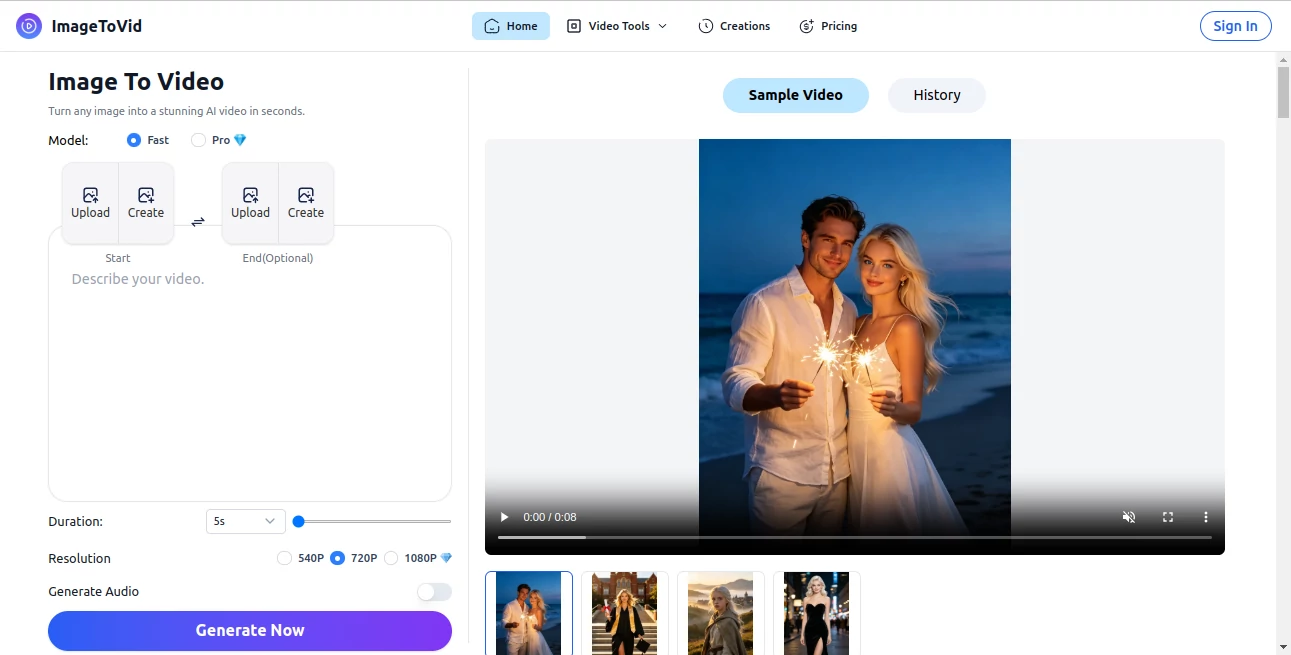
The interface keeps the process straightforward. Users begin by uploading an image, then provide an optional description of the movement or scene they want to create. Generation settings are presented alongside the main workflow, including model selection, duration, and resolution.
This simple structure is useful for people who do not want to spend time learning a traditional video editor. The main idea is clear from the first screen: upload an image, describe the desired result, and generate.
Accuracy & Performance
Performance depends on factors such as image complexity, selected generation settings, video length, and current processing demand. The service is designed to produce videos within seconds in many typical cases, making it practical for quick content experiments and repeated creative iterations.
Motion quality is one of the more important aspects of an image-to-video workflow. The platform focuses on natural movement, camera motion, transitions, and cinematic effects rather than simply applying a basic slideshow effect to a photograph.
Capabilities
The tool can work with a wide range of visual material. Portraits can be animated with subtle expressions and movement, artwork can become a short cinematic scene, and product photographs can be transformed into promotional clips with camera movement and visual effects.
There is also room for more creative storytelling. A single character illustration or storyboard frame can serve as the starting point for a short scene. For businesses, static product and property photographs can be turned into more engaging marketing material without having to organize a traditional video shoot.
Security & Privacy
When working with an AI image generation service, users should consider the nature of the images they upload and avoid submitting private or sensitive material unless they are comfortable with the platform's applicable policies. For commercial projects, users should also make sure they have the necessary rights to the source images and understand the service's current terms before publishing generated content.
Use Cases
- Social Media Content: Turn static photos into short videos suitable for TikTok, Instagram Reels, and YouTube Shorts.
- E-commerce Marketing: Transform product photographs into promotional clips with movement and cinematic presentation.
- Real Estate: Create engaging property videos from existing listing photographs.
- Creative Storytelling: Animate illustrations, concept art, and storyboard frames to explore scenes before production.
- Old Photo Animation: Add subtle movement to portraits and older photographs to create memorable visual content.
- Advertising: Produce short visual assets from existing campaign imagery without creating an entire video from scratch.
- Content Creation: Give existing artwork and photographs a new format for websites, presentations, and digital campaigns.
Pros and Cons
Pros
- Simple image-to-video workflow.
- Supports common JPG, PNG, and WEBP image formats.
- Text prompts provide additional control over the generated motion.
- Supports multiple visual use cases, from social media to product marketing.
- HD output can reach up to 1080p.
- Generated videos can be exported without watermarks.
- New users receive 100 free credits.
Cons
- Short AI-generated clips are better suited to many social and marketing scenarios than long-form video production.
- Results can vary depending on the source image and the prompt.
- Users looking for detailed timeline editing may still prefer a traditional video editor alongside the AI workflow.
- Generation time and output quality can vary depending on processing demand and selected settings.
Pricing Plans
The platform offers a free way to get started, with new users receiving 100 free credits. This provides a practical opportunity to test image-to-video generation and understand how different images and prompts perform before committing to regular use.
For users who need more generations, the service also provides paid credit-based options through its pricing system. Since credit requirements can depend on the selected model and generation settings, checking the current pricing page is recommended before purchasing a plan.
How to Use the Tool
- Step 1: Upload a JPG, PNG, or WEBP image. This can be a portrait, product photograph, artwork, illustration, or another suitable visual.
- Step 2: Describe what should happen in the video. Include useful details such as subject movement, camera motion, atmosphere, or visual style.
- Step 3: Select the available AI model and choose the desired video settings, including duration and resolution.
- Step 4: Start the generation process and wait for the AI to create the video.
- Step 5: Preview the result and use the generated video for your social media, marketing, storytelling, or other creative project.
Comparison with Similar Tools
The image-to-video market includes a growing number of platforms, including services built around advanced video models and broader creative suites. Many of these products provide extensive controls, multiple generation modes, and large creative toolsets.
This platform takes a more focused approach. Rather than requiring users to navigate a complicated production environment, it centers the experience around one straightforward task: taking an existing image and turning it into moving video content. That can be particularly useful when speed and simplicity matter more than having dozens of editing controls.
For example, a social media manager who already has a collection of product photographs may not need a full video production suite. Uploading those images, describing a camera movement, and generating short clips can be a much quicker workflow.
Conclusion
For creators and businesses sitting on a collection of static visual assets, image-to-video generation offers an easy way to make those assets more engaging. The platform combines image uploads, text-based creative direction, AI motion generation, and HD export into a relatively simple workflow.
Its strongest appeal is the balance between accessibility and creative flexibility. You can start with a single photograph and experiment with movement, camera effects, and different visual ideas without having to build a video manually from the ground up.
With 100 free credits for new users, watermark-free exports, support for common image formats, and applications ranging from social media to e-commerce and real estate, it is a useful option for anyone looking to explore AI-powered image animation without a complicated production process.
Frequently Asked Questions (FAQ)
What is an AI image-to-video generator?
An AI image-to-video generator uses artificial intelligence to transform a static image into a moving video. It can interpret the visual content and generate motion, camera effects, and transitions based on the image and the user's instructions.
Can I create a video from a single image?
Yes. The workflow is designed to create a video from a single uploaded image. Users can provide a prompt describing the desired movement and visual direction.
What image formats are supported?
JPG, PNG, and WEBP images are supported, allowing users to work with common photographs, illustrations, artwork, and product images.
Can generated videos be used for commercial projects?
The service is designed for use cases such as product promotion, marketing campaigns, social media content, and other commercial projects. Users should ensure that they have the necessary rights to the original images and comply with the applicable terms before commercial publication.
Are the generated videos watermark-free?
Yes. The service states that generated videos can be exported without watermarks, including HD output for social media, marketing, and other creative uses.
How many free credits do new users receive?
New users receive 100 free credits, allowing them to try the AI video generation workflow without paying upfront.
AI Image to Video , AI Video Generator .
These classifications represent its core capabilities and areas of application. For related tools, explore the linked categories above.

ImageToVid Alternatives Product

Veo 4 AI

Seedance 3.0

Kling O1

Mediagen

happyhorsevi…
Veo 4
Seedance 2.0…

Happy Horse …

Seedance 2.0