


















Image to Video AI
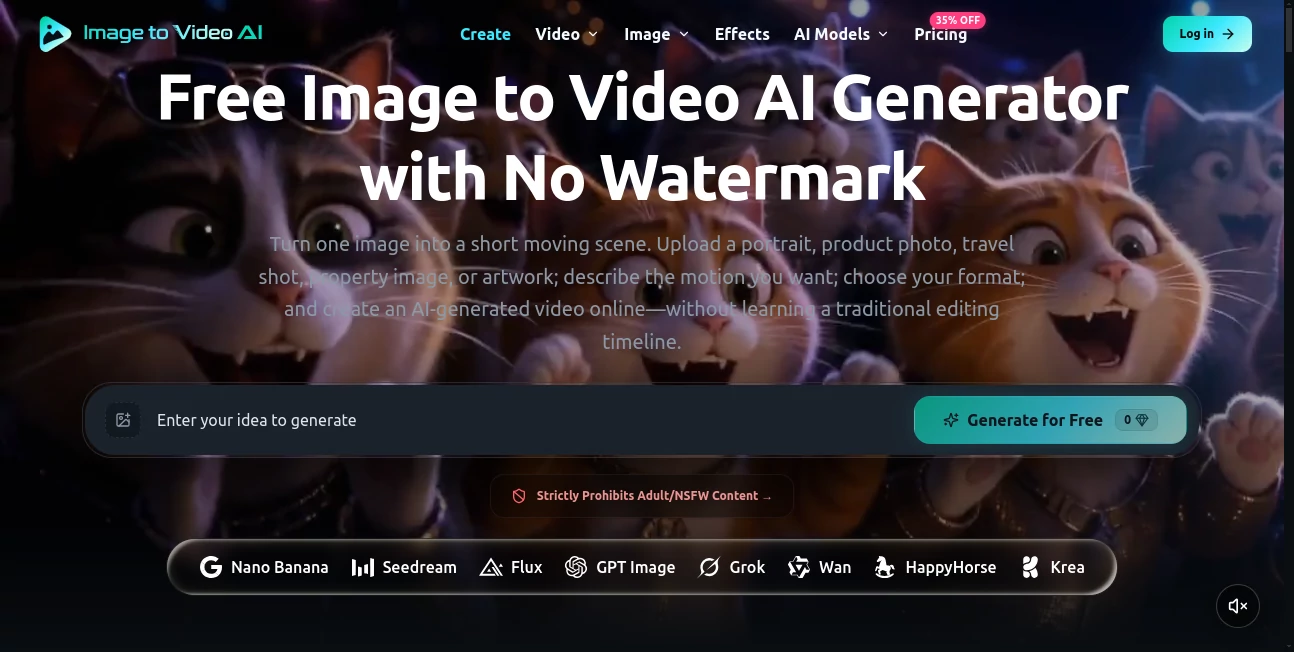
What is Image to Video AI?
Image to Video AI makes it surprisingly simple to turn a still picture into a short, moving video. Instead of opening a traditional video editor and building a timeline from scratch, users can upload a JPG, PNG, or WebP image, describe the movement they want, select the available video settings, and generate a clip directly in the browser.
The idea is straightforward, but the practical value is much broader. A product photograph can become a short promotional scene, a portrait can gain subtle camera movement, and a travel image can be turned into something that feels more alive. The service is particularly useful for creators who already have strong visual assets but need a quick way to transform them into video content.
The homepage also provides example generations so visitors can see how a still image, motion prompt, and final video relate to one another before creating their own content. That makes the workflow easier to understand, especially for someone using image-to-video generation for the first time.
Key Features
- Convert a single image into a short AI-generated video.
- Upload JPG, PNG, or WebP images up to 10 MB.
- Describe subject movement, camera movement, pace, and mood with a text prompt.
- Choose from available video models and the settings supported by each model.
- Adjust options such as aspect ratio, resolution, duration, and frame rate when supported.
- Preview generated videos before downloading them.
- Free daily generations are available after signing in with Google.
- Free Video Fast 1.0 generations can be downloaded without a visible watermark.
- Paid plans provide access to additional image and video models, higher generation capacity, and faster processing options.
- Paid plans include commercial-use licensing subject to the service terms and applicable model policies.
User Interface
The interface is built around the generation task rather than a complicated editing workspace. The process starts with an image and a motion instruction, followed by the video settings and generation step. This focused design is a good fit for users who want an animated result without spending time learning a conventional editing timeline.
The workflow also makes the estimated credit cost visible before generation for tasks where credits are required. After processing, the result can be previewed on the page and downloaded if it meets expectations.
Accuracy & Performance
Performance depends on the selected model, output settings, scene complexity, and current service demand. The platform does not promise a fixed generation time, which is a sensible approach for a workload that can vary considerably between short, simple clips and higher-resolution generations.
Input quality has a noticeable effect on the result. Clear, well-lit images with an obvious subject generally give the model more useful information than heavily blurred photographs, crowded scenes, or images containing very small subjects. Motion prompts also work better when they focus on one clear action instead of asking for several unrelated movements at once.
It is worth treating the first generation as a creative draft rather than a guaranteed final shot. If movement looks unnatural or important details change, simplifying the prompt and regenerating can often produce a more controlled result.
Capabilities
The core capability is image-to-video generation, but the wider platform also supports text-to-video and image-to-image workflows. Its model selection includes options such as FLUX 3 Video, Seedance 2.5, MiniMax H3, and other image and video models, with the exact controls depending on the selected model.
For image-to-video work, users can guide the movement of the subject and camera rather than simply describing how the final image should look. This distinction is useful when creating product demonstrations, social clips, visual concepts, or animated artwork.
Paid subscriptions expand the workflow with access to all available image and video models, reference-to-video capabilities on supported plans, multiple concurrent generations, priority processing, no-watermark outputs, unlimited storage, and commercial-use licensing.
Security & Privacy
Users should treat uploaded material responsibly, particularly when working with photographs of people, private documents, branded assets, or other protected content. The service itself advises users to upload images they have permission to use and to review generated material before publishing or monetizing it.
Commercial use is available with paid plans subject to the service's terms, payment obligations, applicable law, and relevant model policies. This is important for businesses because having access to a generation tool does not automatically grant rights to every image uploaded or every person, brand, or protected work depicted in the source material.
Use Cases
Social media content: Creators can turn static photographs into short vertical clips for social posts, reels, and other short-form content.
Product marketing: A product photograph can be given camera movement or an action-based scene, creating a more engaging asset for promotional campaigns.
Real estate: Property photographs can be transformed into short visual sequences that add movement to otherwise static listings.
Portrait animation: Portrait photographs can be animated with subtle subject or camera movement, making them more suitable for short videos and creative projects.
Travel content: A landscape or travel photograph can become a moving scene without requiring the creator to record new footage.
Storyboarding: Designers and filmmakers can use generated clips to explore visual ideas before investing time in a complete production.
Creative experiments: Illustrations, artwork, and concept images can be animated to explore movement, atmosphere, and visual storytelling.
Pros and Cons
Pros
- Simple image-to-video workflow.
- Free access is available without requiring a credit card.
- Three free Video Fast 1.0 generations are available each day with Google sign-in.
- Free generated videos can be downloaded without a visible watermark.
- Supports multiple image and video generation models.
- Motion can be guided with natural-language prompts.
- Paid plans offer commercial-use licensing.
- Paid tiers provide larger credit allowances and faster generation options.
Cons
- Generation speed can vary depending on demand and selected settings.
- Results may not perfectly preserve faces, objects, text, or physical details from the source image.
- Different video models offer different resolutions, durations, frame rates, and other controls.
- Commercial licensing is not included with the free plan.
- Higher-resolution and more advanced generations can consume credits quickly.
Pricing Plans
The service provides a free option alongside Lite, Pro, and Ultra subscriptions. The free tier costs $0 and includes welcome credits plus three free Video Fast 1.0 generations per day after Google sign-in. No credit card is required, and free generated videos can be downloaded without a visible watermark. The free plan does not include a commercial license or priority processing.
The Lite plan is listed at $14.99 per month, with annual billing reducing the effective monthly price to $9.99. It provides 36,000 credits per year, access to image and video models, up to two concurrent generations, no-watermark outputs, commercial-use licensing, and unlimited storage.
The Pro plan costs $29.99 per month, or $24.99 per month when billed annually. It includes 120,000 credits per year, up to four concurrent generations, faster and priority queues, reference-to-video support, no-watermark outputs, commercial-use licensing, and unlimited storage.
The Ultra plan is listed at $99.99 per month, with an annual equivalent of $64.99 per month. It provides 300,000 credits per year, up to eight concurrent generations, the fastest generation queue, priority support, commercial-use licensing, no-watermark outputs, and unlimited storage.
Pricing and available model options can change, so users should check the current plan information before purchasing. Unused subscription credits are also subject to the service's current rollover terms.
How to Use It
- Choose a clear source image in JPG, PNG, or WebP format.
- Upload the image to the generation workspace.
- Write a concise prompt describing what should move and how the camera or scene should behave.
- Select the video model you want to use.
- Choose the available output settings, such as aspect ratio, resolution, duration, or frame rate.
- Check whether the generation is free or how many credits it is expected to consume.
- Start the generation and wait for processing to finish.
- Preview the resulting video.
- Download the clip if the movement and visual details meet your expectations.
A useful prompt does not need to be complicated. Something like “the subject slowly turns toward the camera while the camera pushes in, with soft cinematic lighting” gives the model a clear subject action, camera movement, and visual direction. If the result becomes unpredictable, reducing the prompt to one primary movement is often a better approach.
Comparison with Similar Tools
Many AI video services focus primarily on generating footage from text prompts. This platform takes a different starting point by putting an existing image at the center of the workflow. That makes it especially appealing when the user already has a finished visual and wants to preserve its basic composition while introducing motion.
Another practical difference is the range of models available within the same workspace. Instead of committing to a single generation model, users can choose among supported models according to the controls and output they need. This can be useful when one model produces better motion for a particular image while another handles a different creative requirement.
It is not a replacement for a full professional video editor. Its strength is the generation stage: turning still visual material into short AI-generated clips quickly. For more extensive editing, users may still want a conventional editor after downloading the generated footage.
Conclusion
For anyone sitting on a collection of good photographs, illustrations, product shots, or other static visuals, this image-to-video workflow offers a practical way to give those assets a second life. The process is approachable, the free tier makes experimentation easy, and paid plans provide considerably more room for frequent production.
The strongest results are likely to come from users who treat prompting as part of the creative process rather than expecting a perfect clip from every first attempt. Start with a strong image, describe one clear movement, preview the result, and refine when necessary. For social content, product demonstrations, visual experiments, and quick creative concepts, that approach can save a considerable amount of production time.
Frequently Asked Questions (FAQ)
Can I turn an image into a video for free?
Yes. The free plan provides welcome credits and three free Video Fast 1.0 generations every day after signing in with Google. No credit card is required.
What image formats are supported?
JPG, PNG, and WebP files are supported, with an upload limit of 10 MB. Clear images with a distinct subject generally provide better input for generation.
Do free videos have a watermark?
No. Videos generated through the free daily Video Fast 1.0 access can be downloaded without a visible watermark.
Can I use generated videos commercially?
Paid plans provide commercial-use licensing, subject to the service's terms, applicable law, payment requirements, and relevant model policies. Users are responsible for having the necessary rights to uploaded images and other protected material.
How long does video generation take?
There is no single fixed generation time. Processing depends on factors such as the selected model, resolution, duration, scene complexity, and current service demand.
What should I include in an image-to-video prompt?
Focus on what should move, how the camera should move, and the intended pace or mood. Short, specific instructions are generally easier for the model to follow than prompts containing many unrelated actions.
Can I generate videos from portraits and product photos?
Yes. Portraits, product photographs, travel images, property photographs, and artwork are among the types of source material suited to the workflow.
Does every video model have the same settings?
No. Available aspect ratios, resolutions, durations, frame rates, audio options, and reference inputs depend on the selected model. The workspace displays the controls supported by the chosen model.
Is this a full video editor?
No. Its main purpose is AI video generation from visual inputs. Once a clip has been generated and downloaded, users can take it into a conventional video editor if they need detailed timeline editing.
What happens if the generated video is not accurate?
AI-generated motion can sometimes alter faces, objects, text, or physical details. A useful approach is to simplify the motion prompt, use a clearer source image, and regenerate the clip.
How many concurrent generations are available?
The free plan supports one concurrent generation. Lite supports two, Pro supports four, and Ultra supports eight concurrent generations.
Are there other AI generation features available?
Yes. In addition to image-to-video generation, the platform also provides text-to-video and image-to-image workflows, with the exact available models and features depending on the current product configuration.
AI Image to Video , AI Video Generator , AI Text to Video .
These classifications represent its core capabilities and areas of application. For related tools, explore the linked categories above.
Image to Video AI details
Website unavailable — View Alternatives
Pricing
- Freemium
Apps
- Web App
Categories

Image to Video AI Alternatives Product

Klyra AI

Seedance Art

AI ASMR Gene…

RunwayAI

happyhorsevi…

Seedance 2.0…
VideoFlux

bridger west…

Veo
