Image To Video Prompt
What is Image To Video Prompt?
Creating compelling video content often starts with the right prompt, but writing those prompts manually can be time-consuming and inconsistent. This tool simplifies that entire process by transforming static images into rich, structured video prompts that are ready for AI video generators.
Instead of guessing how to describe a scene, users can upload or reference an image and instantly receive well-crafted prompts that capture motion, mood, lighting, and storytelling elements. It feels like having a creative assistant that understands both visual design and cinematic language.
Key Features
User Interface
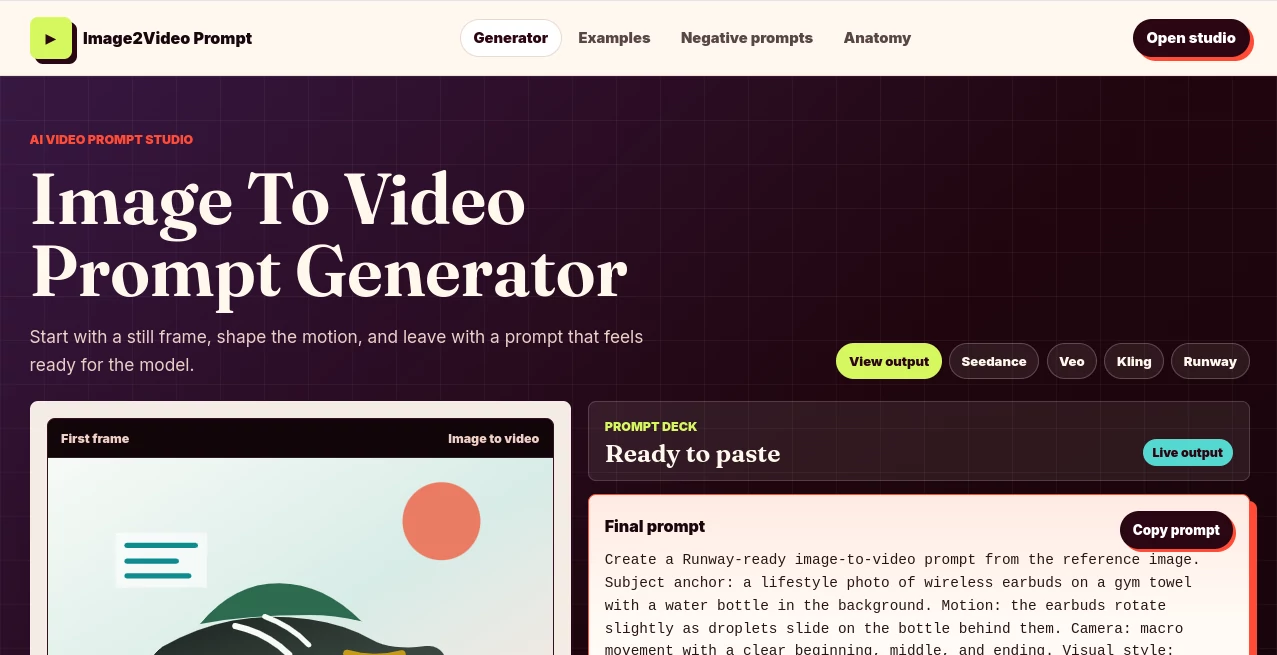
The interface is clean, minimal, and designed for speed. Users don’t need technical skills to get started. Everything is arranged in a way that focuses on one goal: turning visuals into usable video prompts in seconds.
Accuracy & Performance
The tool is optimized to interpret visual elements with impressive accuracy. It identifies objects, environments, and composition details, then translates them into structured prompts that AI video models can understand effectively.
Capabilities
- Converts images into detailed video prompts
- Generates cinematic scene descriptions
- Supports creative storytelling prompts
- Helps improve AI video generation quality
- Works across multiple visual styles
Security & Privacy
User input is handled with care, ensuring that uploaded content is processed securely. The system is designed to focus only on prompt generation without unnecessary data retention.
Use Cases
- Content creators generating AI videos from reference images
- Marketers building visual ad concepts quickly
- Filmmakers exploring scene ideas before production
- Social media creators enhancing storytelling workflows
Pros and Cons
Pros
- Fast and intuitive workflow
- High-quality prompt generation
- Great for beginners and professionals
- Saves time in creative production
Cons
- Depends on image quality for best results
- Limited manual editing of generated prompts
Pricing Plans
The tool typically follows a flexible pricing structure that may include free access with basic features and premium plans for advanced prompt generation capabilities. This allows users to test the platform before committing to a subscription.
How to Use This Tool
Getting started is simple. Users upload an image or provide a reference, then the system analyzes the visual content and generates a structured video prompt. The output can be copied directly into AI video generation platforms for immediate use.
Comparison with Similar Tools
Compared to traditional prompt writing methods or generic AI writing tools, this solution is more specialized. While other tools may require manual description, this one automates the entire interpretation process, making it faster and more consistent for video creation workflows.
Conclusion
For anyone working with AI video generation, this tool offers a practical shortcut between imagination and execution. It removes the friction of prompt writing and replaces it with a smarter, image-driven approach that feels natural and efficient.
Frequently Asked Questions (FAQ)
What does this tool do?
It converts images into detailed prompts designed for AI video generation platforms.
Do I need technical skills to use it?
No, it is designed for beginners and professionals alike with a simple interface.
Can I use any image?
Yes, most common image formats are supported, as long as the visual content is clear.
Is it suitable for professional use?
Yes, many creators and marketers can use it for production-ready workflows.
Does it work with AI video tools?
Yes, the generated prompts are optimized for modern AI video generation systems.
AI Image to Video , AI Video Generator , AI Video Editor , Prompt .
These classifications represent its core capabilities and areas of application. For related tools, explore the linked categories above.
Image To Video Prompt details
Website unavailable — View Alternatives
Pricing
- Free
Apps
- Web App
Categories

Image To Video Prompt Alternatives Product

Seedance 2.0
ds video

Kling 3.0

VideoLens

S2LIfe AI
Kling 4.0 AI

Seedance Art

gemini video

Prompt Sloth