

















ImgLume
What is ImgLume?
There’s something special about typing a few words and watching a vivid, high-quality image appear that perfectly matches what you had in mind. This platform makes that moment feel effortless and even a bit addictive. Whether you need a striking hero image for a landing page, concept art for a story, or just want to explore wild creative ideas, it delivers polished results while also helping you get better at prompting. I’ve spent more time than I’d like to admit just browsing the community prompts and generating variations — it turns a simple idea into something you actually want to share.
Introduction
AI image generation has come a long way, but many tools still feel like a lucky dip — sometimes great, sometimes frustrating. This one stands out by combining strong image generation with a smart prompt inspiration system. You get access to multiple high-performing models, a growing library of community-created prompts, and a clean workspace that makes experimentation enjoyable. It’s built for both beginners who want quick, beautiful results and more experienced creators who like to refine and iterate. The balance of power and simplicity is what keeps people coming back day after day.
Key Features
User Interface
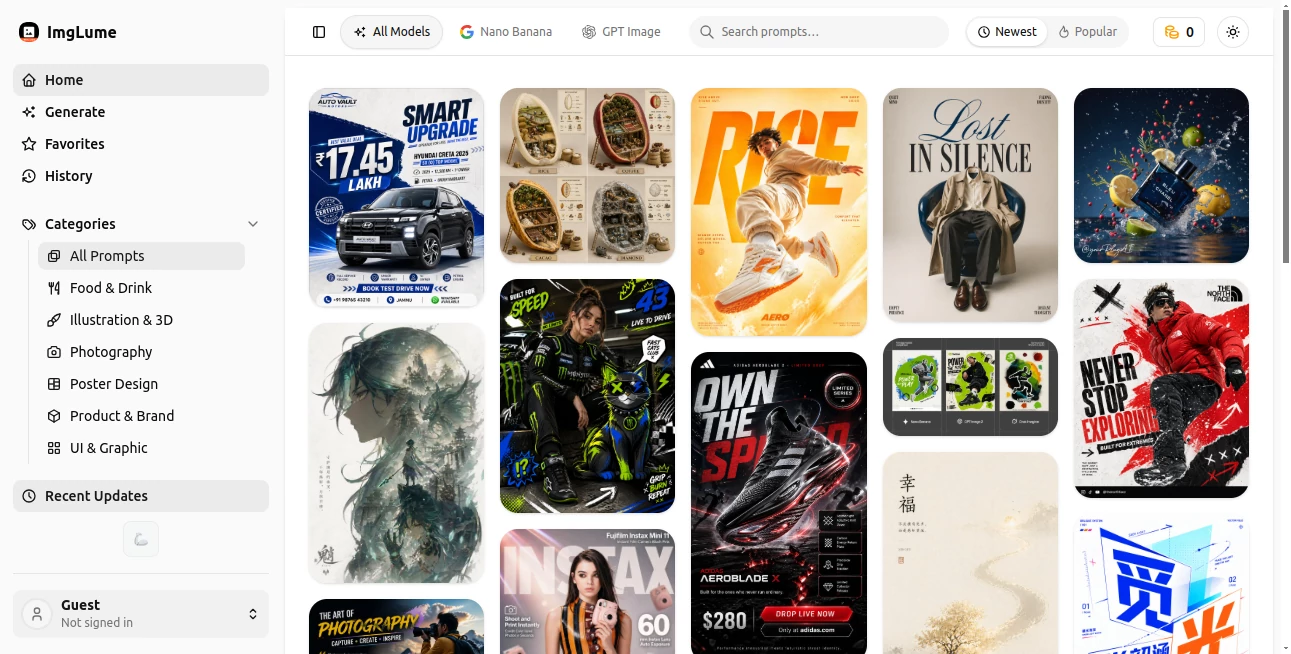
The interface is refreshingly straightforward. A big prompt box takes center stage, with quick options for aspect ratio, style influences, and model selection right nearby. Generated images appear in a clean grid, and you can easily save favorites or generate variations with one click. Everything feels fast and uncluttered — no overwhelming menus or hidden settings. Even on my first visit, I was creating usable images within a couple of minutes without needing a tutorial.
Accuracy & Performance
The models here produce sharp, detailed images with good prompt adherence. Complex scenes with multiple subjects or specific styles come out cleaner than many alternatives I’ve tried. Generation speed is solid, and the results hold up well at higher resolutions. What I appreciate most is the consistency — when you find a prompt you like, variations tend to stay on brand rather than wandering off in random directions.
Capabilities
You can generate from text prompts, remix existing images, explore trending and community prompts for inspiration, and switch between different strong models depending on the style you need. The prompt library is particularly useful — it shows exactly what people wrote to achieve certain looks, helping you learn and improve your own prompting skills over time. It supports a wide range of artistic styles, realistic renders, and creative concepts, making it versatile for marketing, personal projects, concept art, and more.
Security & Privacy
Your prompts and generated images are handled responsibly. The platform doesn’t aggressively push account creation for basic use, and generated content stays under your control. It’s a comfortable environment for experimenting with ideas without worrying about unnecessary data collection or permanent storage of every test image.
Use Cases
A marketer needs eye-catching social media visuals and generates several variations in minutes instead of waiting on a designer. An indie game developer explores character concepts and environments by feeding in mood descriptions and refining from the best outputs. A content creator builds consistent visual branding by saving and remixing prompts that match their style. Even hobbyists use it to turn weekend story ideas into illustrated scenes they can share with friends. It fits naturally into both professional workflows and personal creative play.
Pros and Cons
Pros:
- Strong image quality with good prompt understanding across different styles.
- Helpful prompt inspiration library that actually teaches you to write better prompts.
- Clean, fast interface that keeps the focus on creativity.
- Multiple model options let you choose the best fit for each project.
- Generous free access to try before committing to paid plans.
Cons:
- Very complex or highly specific prompts can still need refinement.
- Heavy daily use benefits from a paid plan for higher limits and priority.
Pricing Plans
The free tier gives you a solid taste with daily generations, making it easy to test quality on your own projects. Paid plans unlock higher limits, faster generation, access to premium models, and more storage for saved prompts and images. The pricing feels reasonable for the time and creative output it unlocks — many users find the upgrade pays for itself after just a few bigger projects.
How to Use ImgLume
Head to the generator page and start typing your idea in the prompt box. Be as descriptive as you like — add style references, lighting, mood, or composition details. Choose an aspect ratio and model if you have a preference, then hit generate. Browse the results, save the ones you like, and use the variation or remix tools to refine further. Explore the community prompt gallery whenever you need fresh inspiration or want to see how others achieved certain looks. The whole process stays quick and enjoyable from first prompt to final download.
Comparison with Similar Tools
While many AI image generators focus purely on raw output, this one adds real value with its prompt inspiration library and clean workflow. It avoids the overwhelming complexity of some platforms while delivering stronger consistency than many free alternatives. The balance of creative support and high-quality generation makes it feel more like a thoughtful creative partner than just another image tool.
Conclusion
ImgLume turns the often hit-or-miss process of AI image creation into something reliable, inspiring, and genuinely fun. It gives you both excellent results and the tools to keep improving your own skills. Whether you need visuals for work, personal projects, or just want to explore ideas visually, it consistently delivers images worth keeping and sharing. For anyone who works with visuals, it’s quickly becoming one of those go-to platforms you wonder how you managed without.
Frequently Asked Questions (FAQ)
How good is the free tier?
Surprisingly generous — enough daily generations to test ideas and complete smaller projects.
Do I need to write perfect prompts?
Not at all. The platform performs well with natural language, and the inspiration gallery helps you improve over time.
Can I use the images commercially?
Yes, generated images can be used for commercial purposes (check specific plan terms for details).
How fast are generations?
Most images appear within seconds to under a minute, depending on complexity and current load.
Is there a way to save and organize my prompts?
Yes — paid plans offer better organization and history features for saved work.
AI Photo & Image Generator , AI Art Generator , AI Design Generator , AI Text to Image .
These classifications represent its core capabilities and areas of application. For related tools, explore the linked categories above.

ImgLume Alternatives Product
GenPPT AI
AniFlow AI

gempix2

Reztune

volume shade…

Gpt Image 1.5

NanoBanana2

Text Behind …

Fine Image
