
InExporter
What is InExporter?
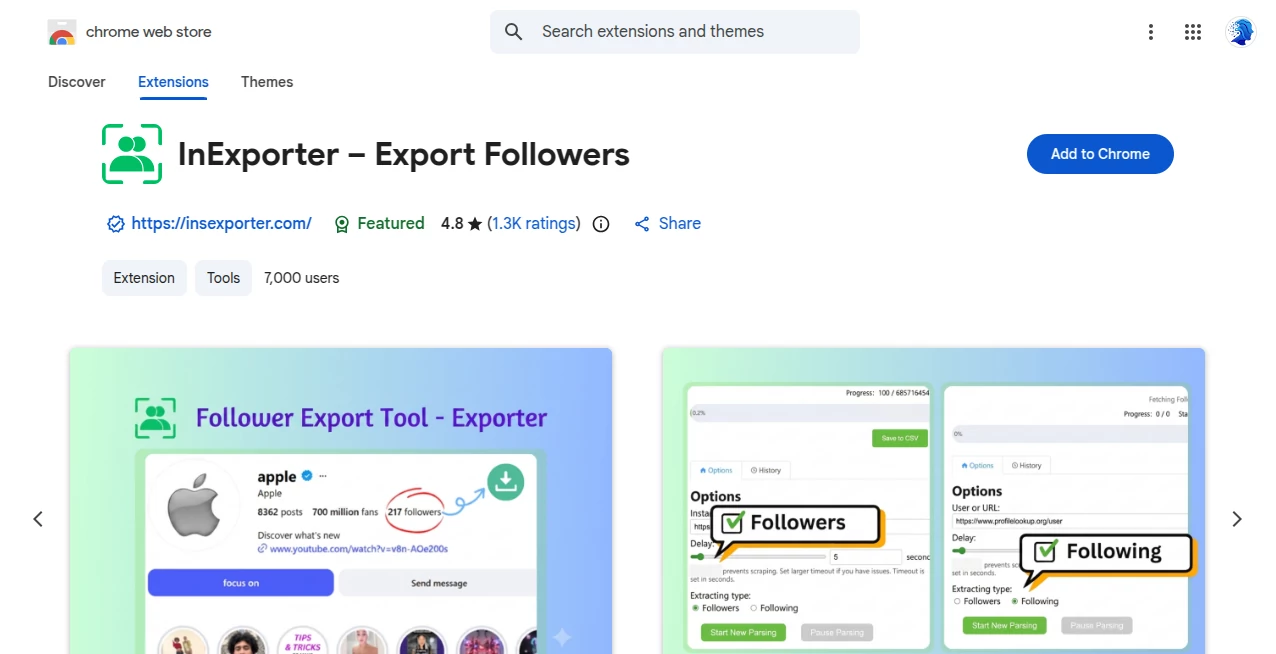
Follower Export Tool - Exporter is a lightweight Chrome extension designed to make follower and following data easier to collect and work with. Instead of manually copying usernames and profile details one by one, users can enter a public profile username or URL and generate a structured CSV file in a few steps.
The extension is particularly useful for marketers, social media managers, researchers, creators, and anyone who needs a practical way to turn publicly available follower information into a spreadsheet. There is no coding involved, and the extension does not require users to provide an account password.
For someone doing competitor research or preparing a social media report, this can save a surprising amount of repetitive work. A list that would normally require endless copying and pasting can be turned into a usable file instead.
Key Features
- Export followers and following lists from public profiles.
- Generate structured CSV files for use with Excel, Google Sheets, Notion, and similar applications.
- Collect follower information without manually copying individual profiles.
- Support batch collection for larger follower lists.
- Work without requesting account passwords or sensitive login credentials.
- Run directly inside the browser without requiring a separate desktop application.
- Provide useful profile information such as usernames, profile URLs, and verification status.
User Interface
The interface is built around a straightforward workflow. After installing the extension, users can open it from the Chrome toolbar, enter a username or profile URL, and start the export process.
This simple approach is one of its strongest points. There are no complicated dashboards to learn and no technical setup required. Someone who has never worked with scraping or data-export tools can understand the basic process almost immediately.
Accuracy & Performance
The extension is designed to collect publicly available follower information and turn it into structured data. Exported information can include follower count, user ID, username, full name, profile URL, avatar URL, verification status, and whether the profile is already followed by the user.
Performance is also helped by its lightweight browser-based design. For ordinary research tasks, the ability to collect information without repeatedly switching between profiles can make the overall workflow considerably faster.
As with any browser-based social data collection tool, results can depend on the availability of public information and changes to the underlying social platform. Large collections may also require sensible usage rather than running continuous exports without breaks.
Capabilities
The main capability is converting follower and following lists into a format that is much easier to analyze outside the social platform. CSV is especially practical because it can be opened in common spreadsheet applications and then filtered, sorted, searched, or combined with other datasets.
For example, a marketing professional researching a competitor can export a public follower list and use a spreadsheet to organize usernames, profile URLs, verification status, and other available fields. A creator could also use the exported information as part of a broader audience research workflow.
Security & Privacy
Privacy is an important part of the extension's positioning. The extension states that it does not require passwords or account login credentials and does not access direct messages, Stories, or private account information. Its stated purpose is limited to publicly available profile data.
The Chrome Web Store privacy disclosure also states that the developer declares it does not collect or use user data. :contentReference[oaicite:1]{index=1}
Users should still use follower-export functionality responsibly. The extension itself warns that excessive or inappropriate use of follower-export tools may result in account restrictions or suspension, so moderate usage and compliance with the relevant platform's rules are important.
Use Cases
There are several practical situations where this type of extension can be useful. Social media marketers can use exported lists for audience research and competitor analysis. Agencies can create working spreadsheets for campaign research. Researchers can organize publicly visible profile information for further analysis.
It can also be useful for creators who want a simple snapshot of a public audience rather than manually recording hundreds of profiles. Once the CSV has been created, the information can be sorted and filtered in a familiar spreadsheet environment.
Another useful scenario is reporting. Instead of presenting raw information copied from a social network, teams can work with a structured file and use it as part of their internal research or reporting process.
Pros and Cons
Pros
- Simple workflow with little technical knowledge required.
- Exports follower and following information into CSV.
- Does not require users to provide their account password.
- Provides several useful public profile fields.
- Works directly through Chrome.
- Useful for social media research and marketing workflows.
- Lightweight compared with larger social media management platforms.
Cons
- Designed around publicly available information rather than private account data.
- Large-scale collection may require careful usage and appropriate pacing.
- Social platform changes can affect how follower information is collected.
- CSV export may require additional processing for advanced analytics.
Pricing Plans
The Chrome Web Store listing presents the extension as a browser tool that can be added directly to Chrome. The listing does not provide a detailed multi-tier pricing table or subscription structure, so users should check the current extension listing for the latest availability and any changes to its offering.
This straightforward distribution model is convenient for users who want to test a follower-export workflow without setting up a separate software environment.
How to Use Follower Export Tool - Exporter
Getting started is relatively simple. First, install the extension through the Chrome Web Store and add it to the browser. Once installed, open the extension from the Chrome toolbar.
Next, enter the username or profile URL you want to work with. The extension can then collect the available follower information and prepare it for export. When the process is complete, select the download option to generate the CSV file.
The resulting file can be opened in Excel, Google Sheets, Notion, or another application that supports CSV data. From there, users can sort, filter, search, and analyze the information according to their own workflow.
Comparison with Similar Tools
Many social media data tools are built as large marketing platforms with analytics dashboards, scheduling features, campaign management, or subscription-based reporting. This extension takes a narrower approach and focuses on one practical task: turning publicly available follower and following information into a usable file.
That difference can be valuable. If the goal is simply to obtain a structured follower list, a focused browser extension may be more convenient than paying for an entire social media management platform.
It is also different from automation tools that perform actions such as following accounts, sending messages, or posting content. Its primary purpose is data collection and export, which makes it better suited to research and spreadsheet-based workflows.
Conclusion
For users who regularly work with social media research, manually collecting follower information can quickly become one of those tedious jobs that consumes far more time than expected. This extension offers a cleaner alternative by turning publicly available follower and following information into structured CSV data.
Its simple interface, browser-based workflow, useful profile fields, and lack of password requirements make it approachable for both casual users and marketing professionals. It is not intended to replace a complete social media analytics platform, but that is also part of its appeal: it concentrates on a specific job and keeps the process relatively straightforward.
For competitor research, audience analysis, reporting, or simply organizing public follower information, it is a practical addition to a Chrome-based social media workflow.
Frequently Asked Questions (FAQ)
What can be exported?
The available export can include follower count, user ID, username, full name, profile URL, avatar URL, verification status, and information about whether the user already follows the profile.
Does it require my social media password?
No. The extension states that it does not require a password or sensitive account credentials for its follower-export functionality.
Can the exported data be opened in Excel?
Yes. The generated CSV files are compatible with common spreadsheet applications such as Microsoft Excel and Google Sheets.
Does it access private messages?
No. According to its Chrome Web Store description, it does not access direct messages, Stories, or private account data.
Is it suitable for marketing research?
Yes. Public follower and profile information can be useful for competitor research, audience research, social media reporting, and other marketing-related tasks.
Can I export large follower lists?
The extension supports batch collection, but users should use it responsibly and avoid excessive activity. The listing specifically warns that inappropriate usage frequency may lead to account restrictions or suspension.
Does it work with private profiles?
The advertised functionality is focused on public profiles and publicly available information. Private profile data is not presented as part of its supported functionality.
Is the extension affiliated with Meta?
No. The extension identifies itself as an independent third-party product and states that it is not affiliated with, endorsed by, or officially authorized by Meta or its subsidiaries.
AI Instagram Assistant , AI Social Media Assistant , AI Analytics Assistant .
These classifications represent its core capabilities and areas of application. For related tools, explore the linked categories above.
InExporter details
Website unavailable — View Alternatives
Pricing
- Freemium
Apps
- Chrome Extensions
Categories

InExporter Alternatives Product

X Growth Eng…

LinkedIn Spe…

Free Marketi…

AiDisco

Leado.co

igrecent

AyeWatch AI

Quso AI

Chainsaw Man…