


















Jobfoto
What is Jobfoto?
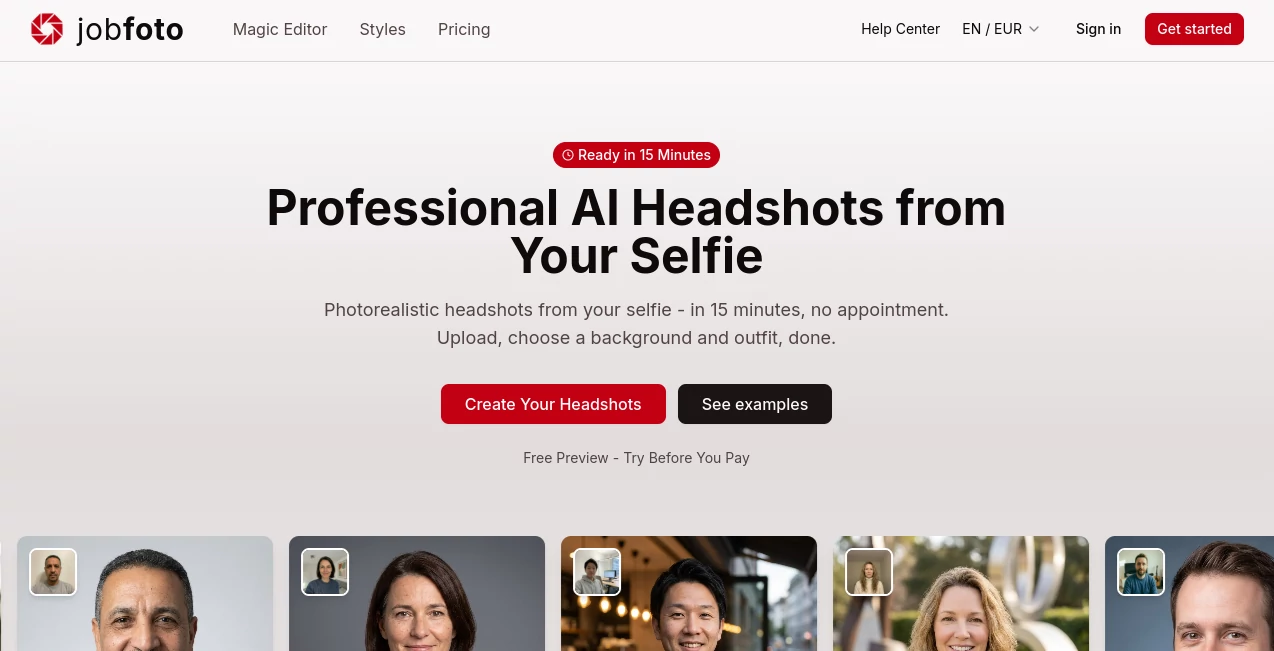
I still remember the stress of needing a new LinkedIn photo for a job application but dreading the whole studio process — booking time, traveling, dealing with lighting, and then waiting days for the results. Then I tried this Swiss-made tool and the entire experience changed. You upload a few normal selfies, pick some outfits and backgrounds, and in about 15 minutes you have a full set of studio-quality headshots that look remarkably real. No appointments, no expensive photographer, no awkward posing. Just results that actually look like you on a good day.
Introduction
Professional headshots used to be a luxury — something you did once every few years if you could afford it. Jobfoto flips that reality. Using advanced AI trained specifically for job-application photos, it turns ordinary selfies into polished, photorealistic portraits ready for LinkedIn, resumes, company websites, or personal branding. Made in Switzerland with strong privacy standards, it delivers consistent quality without the plastic “AI look” you often see elsewhere. The best part is how natural the results feel — same person, better presentation, ready in minutes instead of days.
Key Features
User Interface
The process is delightfully straightforward. Upload 8–12 clear selfies (no fancy equipment needed), choose from dozens of professional outfits and backgrounds, and let the AI generate variations with different expressions and angles. A free preview lets you see the quality before paying anything. The Magic Editor then lets you fine-tune any shot with simple clicks or text instructions. Everything feels designed for busy professionals who want results fast without complexity.
Accuracy & Performance
The AI excels at preserving your actual features while enhancing lighting, skin texture, and posture in a natural way. It avoids the overly smoothed, doll-like results common in other tools. Processing takes around 15 minutes, and the output comes in multiple resolutions up to 8K. In real use, people consistently report getting at least several shots they’re happy to use professionally — often far more than a traditional photoshoot delivers for the price.
Capabilities
You get up to 120 headshots per session depending on the package, with varied poses, expressions, outfits, and backgrounds. The Magic Editor lets you change clothing, background, facial expression, or even camera angle after generation. It supports different styles suitable for corporate, creative, or executive roles. All photos come with full commercial rights and can be used anywhere you need a professional image.
Security & Privacy
Built in Switzerland with strong data protection standards. Your photos are processed securely and automatically deleted after 30 days (or immediately upon request). No selling or sharing of your images. The 14-day money-back guarantee adds real confidence — if you don’t find at least one photo you love, you get a full refund.
Use Cases
A job seeker updates their LinkedIn profile with fresh, professional shots and notices more recruiter views within days. A consultant refreshes their headshot for speaking engagements and website without scheduling a photographer. A team lead orders headshots for the entire department in one go, saving significant time and cost. Recent graduates create their first professional images for applications without breaking the bank. It works beautifully for anyone who needs to look polished online but doesn’t have time or budget for a traditional studio session.
Pros and Cons
Pros:
- Extremely fast — studio quality in 15 minutes instead of days.
- Natural-looking results that actually resemble you.
- Generous number of variations and editing tools.
- Strong privacy protection and money-back guarantee.
- Much more affordable than traditional photography.
Cons:
- Best results come from clear, well-lit selfies (though it handles average ones well).
- Very creative or artistic styles are more limited than pure fun AI avatar tools.
Pricing Plans
Pricing is one-time per session with three clear tiers. The Basic plan at $19 gives you 36 headshots with essential styles. Professional ($29) expands to 60 shots with more variety, and Executive ($39) delivers up to 120 shots with maximum options. Every plan includes a free preview before payment and a 14-day money-back guarantee. No subscriptions — pay once and keep your photos forever.
How to Use Jobfoto
Go to the site and start with the free preview — upload 8–12 selfies taken in good lighting. Choose your desired styles and backgrounds. The AI generates your headshots in about 15 minutes. Review them, use the Magic Editor to make any final adjustments, and download your favorites. The whole process is designed to feel simple and stress-free, even if you’re not tech-savvy.
Comparison with Similar Tools
Many AI headshot generators produce overly stylized or unnatural results that don’t work well for professional contexts. Jobfoto stands out by focusing specifically on job-application and LinkedIn quality — realistic skin texture, proper business framing, and natural lighting. Combined with Swiss privacy standards and a solid money-back guarantee, it feels more trustworthy and practical than most alternatives.
Conclusion
Looking professional online shouldn’t require a big budget or half a day of your time. Jobfoto makes high-quality headshots accessible, fast, and surprisingly realistic. Whether you’re job hunting, updating your personal brand, or refreshing your team’s images, it delivers results you can be confident using. In a world where first impressions often happen on screens, having the right photo matters — and this tool makes getting it remarkably easy.
Frequently Asked Questions (FAQ)
How many photos do I get?
Between 36 and 120 depending on the package, with multiple variations.
Do I need professional photos to start?
No — regular selfies taken with your phone work great.
Are the headshots good enough for LinkedIn?
Absolutely — many users specifically create them for professional networking.
What if I don’t like the results?
You get a 14-day money-back guarantee with no questions asked.
Are my photos private?
Yes — strong Swiss privacy standards and automatic deletion after 30 days.
AI Selfie & Portrait , Photo & Image Editor , AI Photo Enhancer , AI Image to Image .
These classifications represent its core capabilities and areas of application. For related tools, explore the linked categories above.

Jobfoto Alternatives Product

Sora Waterma…
FacialHarmon…

Picnana
Krea2 Edit

AI Raphael

AIImageEdit
TextSharp | …

WatermarkZero

CozAIPhoto
