

















JsonTranslate
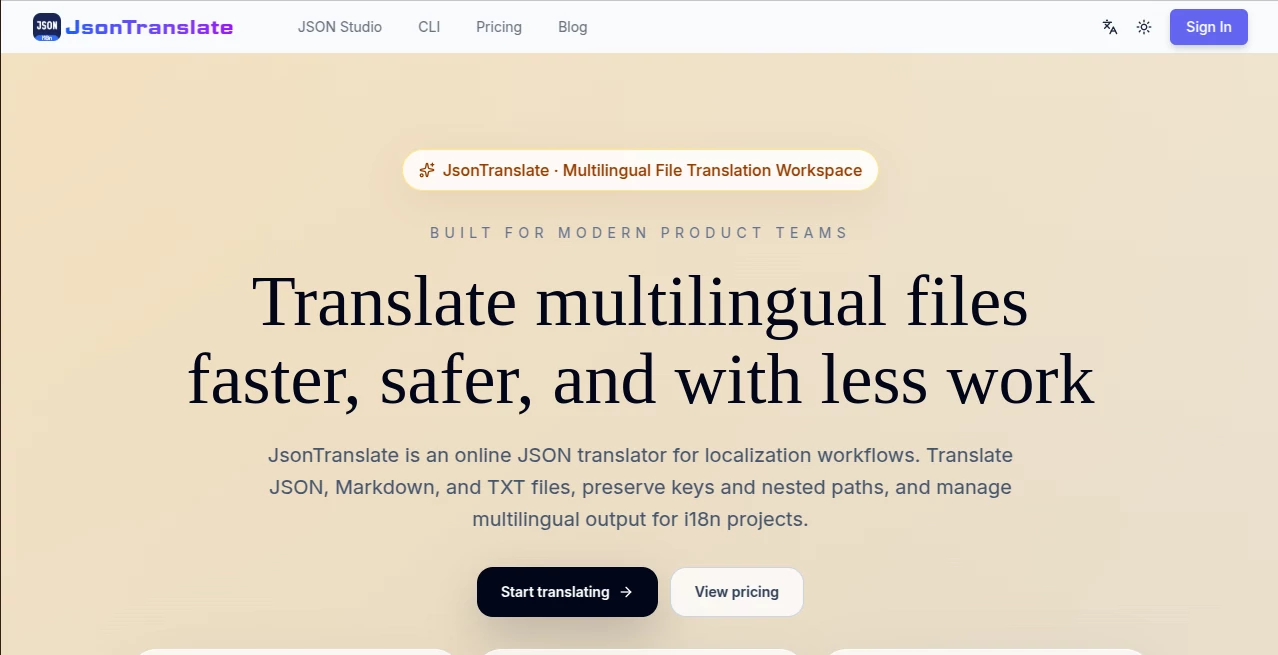
What is JsonTranslate?
Working with multilingual software projects can become surprisingly complicated once a product grows beyond a handful of languages. Translation is only one part of the job. Developers also need to preserve JSON keys, maintain folder structures, update only changed content, and move translated files back into the project without creating extra cleanup work.
JsonTranslate is built specifically around this kind of localization workflow. It provides an online workspace for translating JSON, Markdown, TXT, and other plain-text files while keeping the structure needed for i18n projects. Instead of treating every translation as a separate copy-and-paste task, it connects file translation with project management, path mapping, version history, and a local CLI workflow.
That makes it particularly useful for developers, SaaS teams, and localization professionals who regularly maintain multilingual products rather than translating a document once and moving on.
Key Features
The platform brings several practical features together in one workspace. Users can upload, drag, or paste supported files and choose between incremental or full translation workflows. Project-level translation is also available when an entire multilingual codebase needs to be processed.
- JSON, Markdown, and TXT translation support
- Incremental translation for newly added or edited content
- Full-file and full-project translation
- Project path mapping for locale structures
- Web Studio and CLI integration
- 20+ common languages with expansion to 100+ languages
- Bring Your Own Key support for custom AI models
- Task tracking for batch translation jobs
- ZIP export with project directory structure preserved
- Multiple project management options depending on the plan
User Interface
The interface is designed around the actual translation workflow rather than presenting a simple text box and a result field. Source information, file paths, translation parameters, and target results are organized inside the same workspace.
A split source-and-target layout makes it easier to inspect original content and compare translated locales. Target languages can be viewed through separate tabs, while project settings, uploads, model configuration, and translation actions remain accessible from the main workspace.
For someone working on a large application, this organization can save a fair amount of back-and-forth. You can imagine opening a project in the morning, checking which strings changed overnight, translating only those updates, reviewing the results, and then pulling them back into the local codebase.
Accuracy & Performance
Translation quality depends partly on the selected AI model, especially when using custom providers through the BYOK option. The platform focuses less on being a general-purpose translator and more on keeping translation operations consistent with software localization requirements.
One useful performance-oriented feature is change detection. The workflow can identify newly added or edited content so teams do not have to repeatedly process unchanged strings. For larger jobs, a dedicated task center provides visibility into queued, running, paused, completed, and failed tasks.
This approach is especially practical for products that receive frequent updates. Translating only what changed can reduce unnecessary processing and make recurring localization work easier to manage.
Capabilities
The strongest part of the platform is the connection between translation and development workflows. Project directories can be mapped using common localization patterns, including locale folders, module folders, and locale suffixes.
Translated projects can also be exported as ZIP archives while preserving their original folder hierarchy. This means developers do not have to manually reorganize every translated file before putting it back into the application.
The CLI adds another useful layer. Local repositories can be initialized, authenticated, uploaded, translated, checked for status, and synchronized with the latest results. This creates a more natural bridge between the browser-based workspace and day-to-day development.
Security & Privacy
Teams that already have preferred AI providers or internal API budgets can use the BYOK approach instead of relying entirely on a hosted model workflow. This gives developers more control over which provider, model, and API key they use for their translation process.
For organizations with specific security or compliance requirements, choosing a model provider through their own existing setup can also make the workflow easier to align with internal policies. As with any service that processes project files, teams should review the provider's current privacy and data-handling terms before uploading sensitive material.
Use Cases
The platform is a natural fit for software teams maintaining applications in multiple languages. A frontend team, for example, can keep its translation files organized by locale while processing only the strings that changed during a new release.
SaaS companies can use project-level translation when launching a product in new markets. Localization teams can manage batches of files without manually reconstructing folder structures afterward. Independent developers can also use the free plan to experiment with multilingual projects before committing to a larger workflow.
- Localizing SaaS applications
- Translating JSON i18n files
- Maintaining multilingual frontend projects
- Updating translations after software releases
- Managing large batches of localization files
- Synchronizing translation work with local repositories
- Preparing applications for international markets
Pros and Cons
Pros
- Designed specifically around software localization workflows
- Supports JSON, Markdown, and TXT files
- Incremental translation reduces unnecessary work
- Project path mapping helps preserve existing structures
- Web Studio and CLI can work together
- BYOK provides flexibility in model selection
- Free plan available for individuals and indie developers
Cons
- The feature set may be more than needed for someone looking for a simple one-off translator
- Advanced project and API capabilities are reserved for higher plans
- Translation quality can vary depending on the selected AI model
- Teams unfamiliar with i18n workflows may need some time to understand project mapping and CLI features
Pricing Plans
A free plan is available for individuals and indie developers. It includes 50 translations per month, JSON Studio, CLI access, one project, three file-version history entries, support for 10+ languages, and the ability to use custom AI models through BYOK.
The Pro plan is aimed at growing teams and includes 500 translations per month, up to 10 projects, 30+ languages, faster translation processing, 20 file-version history entries, cloud synchronization, report exports, and priority technical email support.
The Max plan is intended for organizations with larger localization requirements. It provides 5,000 translations per month, unlimited projects, 100+ languages, API access, faster processing, cloud synchronization, report exports, a dedicated customer success manager, and priority handling for custom feature requests.
Monthly pricing currently lists Pro at $9.90 per month and Max at $59.90 per month. Annual billing and one-time credit purchases are also available, with the exact offers and prices presented on the pricing page subject to change.
How to Use It
Start by creating an account and opening the translation workspace. You can upload, drag, or paste a supported JSON, Markdown, or TXT file. For a small job, a single-file translation may be all you need.
For a larger application, create a project and configure the source locale, target locales, root directory, and path pattern. The project can then be uploaded and processed using either incremental or full translation.
Once processing begins, the task center can be used to monitor progress and investigate exceptions. Developers working locally can use the CLI to push files, start translations, check task status, and pull the completed results back into the project.
The result can then be reviewed in the workspace before being exported or synchronized with the local repository. This workflow is particularly convenient when translation is part of an ongoing development cycle rather than an occasional task.
Comparison with Similar Tools
Traditional online translators are generally built around individual pieces of text. That works well when someone needs to translate a sentence, paragraph, or small document, but it does not necessarily solve the problems created by a growing software project.
Dedicated localization platforms can offer broader collaboration and translation-management features, while developer-focused workflows often require additional configuration. This solution sits in an interesting middle ground by combining AI translation with project path management, incremental updates, a browser workspace, and a CLI.
For a developer who mainly wants to translate a single sentence, a conventional translator may be simpler. For a team maintaining JSON-based i18n files across multiple releases, the project-oriented approach can be considerably more useful.
Conclusion
For software teams, localization is rarely a one-time translation job. New features introduce new strings, existing content changes, and every supported language has to stay aligned with the product. A workflow that understands files, projects, paths, and development tools can make that process much easier to maintain.
This platform stands out by focusing on those practical details rather than stopping at basic text translation. Incremental updates, project path mapping, CLI synchronization, BYOK support, and structured exports make it a compelling option for developers and localization teams working on multilingual products.
The free plan also gives smaller teams a straightforward way to test the workflow before moving to a larger plan. For anyone responsible for maintaining i18n files as part of an active software project, it is worth considering as a dedicated localization companion.
Frequently Asked Questions (FAQ)
What file formats are supported?
The platform supports JSON, Markdown, TXT, and other plain-text content, making it suitable for common software localization files as well as some documentation workflows.
Can I translate only content that changed?
Yes. Incremental translation and Git-diff-like change detection are designed to identify added or edited content so teams can avoid repeatedly translating unchanged material.
Can I translate an entire project?
Yes. Both file-level and project-level translation workflows are available, including full-project translation for larger localization jobs.
Does it preserve my project structure?
The project workflow supports path mapping and can generate translated locale files according to configured directory conventions. Full projects can also be exported as ZIP files while preserving the directory hierarchy.
Can developers use a CLI?
Yes. The CLI supports authentication, project initialization, API key setup, file upload, translation, status checking, and pulling completed results back into the local project.
How many languages are supported?
The service supports 20+ common languages in its core coverage, with plans extending language availability to 30+ or 100+ languages depending on the subscription level.
Can I use my own AI model or API key?
Yes. BYOK support allows users to connect their own provider, model, and API key, which can be useful for teams that already have an established AI infrastructure or cost strategy.
Is there a free plan?
Yes. The free plan includes 50 translations per month along with JSON Studio, CLI access, one project, version history, 10+ languages, and BYOK support.
Who is this platform best suited for?
It is particularly well suited to frontend and full-stack developers, SaaS teams, localization professionals, and engineering groups that regularly maintain multilingual i18n projects.
Is it useful for one-time translations?
It can handle individual files, but its biggest advantage becomes apparent when translations need to be maintained over time. The project, incremental, and CLI features are designed for recurring localization work.
AI Translate , AI Developer Tools .
These classifications represent its core capabilities and areas of application. For related tools, explore the linked categories above.

JsonTranslate Alternatives Product

DeepSeek
langextract.…
Timestamp Ro…

KaneAI

Maestra

freellm.net

GPTLocalhost

ModelsLab

vivgrid
