


















Knovari
What is Knovari?
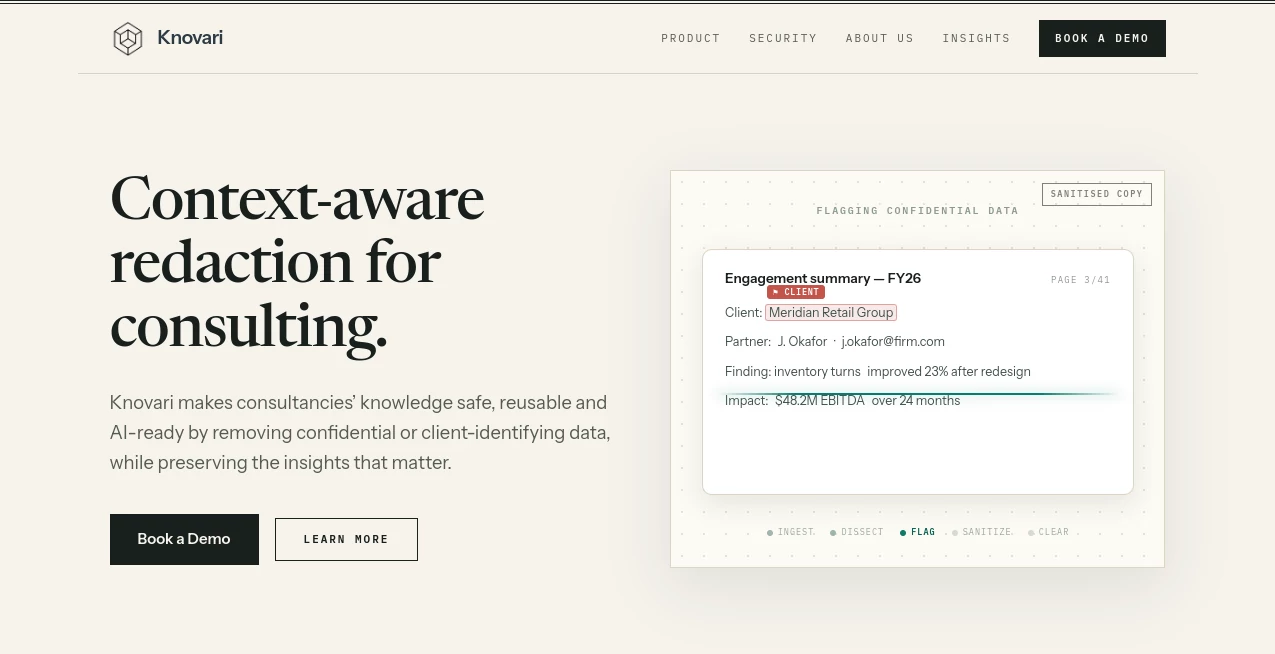
Knovari is built for a very specific problem that many consulting firms face: valuable knowledge is often locked away because client information cannot safely be reused. Instead of treating confidentiality as a reason to leave old presentations untouched, the platform helps consulting teams turn sensitive PowerPoint deliverables into cleaner, reusable knowledge while keeping the important business insight intact.
The idea is particularly useful for firms that want to make better use of their accumulated project knowledge or prepare internal material for AI-powered knowledge systems. Rather than simply searching for names or obvious personal information, the system looks at the context surrounding the content. That matters in consulting, where a client can sometimes be identified by a combination of facts even when their name never appears on the slide.
For example, a presentation might mention a company's position in a particular industry, a distinctive financial figure, or a specific strategic initiative. Individually, these details may seem harmless. Together, they could reveal the client. The platform is designed to catch this type of contextual sensitivity while retaining as much useful information as possible.
Key Features
- Context-aware detection of confidential and client-identifying information
- Automated sanitisation of PowerPoint deliverables
- Detection based on both visual and textual analysis
- Code-level cleansing of PowerPoint files
- Transparent explanations for sanitisation decisions
- Human review and override capabilities
- Private cloud deployment for demanding enterprise environments
- Compatibility with consulting workflows and PowerPoint deliverables
User Interface
The workflow is designed to fit naturally into the way consulting teams already handle presentations. Users can work through a PowerPoint plugin or web application, allowing sensitive material to be identified before a document is reused or shared.
The review process is also important. Instead of forcing users to accept an unexplained automated result, changes can be reviewed, adjusted, or overridden. This gives knowledge managers and consultants more control when dealing with documents where context matters.
A useful example would be a project deck containing a client name, financial figures, a company logo, and several indirect references to the organisation. Rather than removing everything from the presentation, the system can distinguish between information that needs attention and insights that can remain useful.
Accuracy & Performance
The main strength of the approach is its focus on context rather than simple keyword matching. Traditional redaction methods can find an obvious company name or email address, but consulting documents often contain less direct clues. A combination of industry position, financial information, project details, or strategic recommendations can be identifying even without an explicit name.
The platform combines vision analysis with text analysis to examine what is actually present in a PowerPoint presentation. It can also operate at the underlying file level, helping address information that may remain hidden inside embedded objects or PowerPoint XML.
The result is intended to be more than a visually clean presentation. The goal is a sanitised file that can be reused without leaving behind confidential traces that a basic manual redaction process might overlook.
Capabilities
The current product is focused on PowerPoint deliverables used by consulting firms. It can identify sensitive material, generate a sensitivity report for human review, or automatically sanitise a presentation depending on the chosen workflow.
Automated sanitisation can remove, replace, or anonymise sensitive elements while attempting to preserve the original storyline and useful business insight. The system can make surgical changes at different levels, from individual words and clauses to larger elements such as charts when necessary.
Another notable capability is code-level cleansing. PowerPoint files can contain embedded information that is not immediately visible on a slide, including chart data, workbook information, speaker notes, or links associated with images and logos. Addressing these underlying elements makes the sanitisation process considerably more thorough.
Security & Privacy
Security is central to the product because the documents being processed can contain highly sensitive client information. The platform has been independently penetration tested, while SOC 2 compliance is currently in progress through Vanta.
For enterprise deployments, a private cloud option is available. The enterprise model can run inside a customer's own cloud tenancy, allowing organisations with stricter security or data-residency requirements to maintain greater control over their environment.
Customer content is not used to train the company's models, and the security documentation states that customer data remains the customer's property. The service also supports encryption in transit and at rest, with enterprise deployments designed around controlled infrastructure and data handling.
Use Cases
Consulting knowledge management: Knowledge teams can sanitise previous project presentations before adding them to internal knowledge repositories, making more of the firm's accumulated work reusable.
AI knowledge bases: Firms preparing internal knowledge for AI assistants and agents can use sanitised material as a safer foundation, reducing the risk of exposing client-specific information.
Proposal and project reuse: Older proposals and project documents often contain useful methodologies, structures, and insights alongside confidential details. Sanitisation can make more of that material suitable for reuse.
Large-scale document processing: Organisations processing substantial volumes of PowerPoint deliverables can reduce the amount of manual work required for confidentiality reviews.
Knowledge management teams: Teams responsible for maintaining reusable intellectual property can gain a more systematic way to identify and document sensitive content before it enters wider internal workflows.
Pros and Cons
- Pros: Designed specifically around consulting confidentiality requirements
- Pros: Goes beyond basic keyword-based redaction
- Pros: Combines visual and text analysis
- Pros: Supports code-level PowerPoint cleansing
- Pros: Provides explanations and auditability for changes
- Pros: Offers private cloud deployment for enterprise environments
- Cons: Current product scope is focused on PowerPoint files
- Cons: Pricing is not publicly listed
- Cons: The product is primarily aimed at consulting and other knowledge-intensive enterprise workflows rather than casual users
Pricing Plans
There is no public self-service price list. Pricing is structured around the volume of deliverables processed, with engagements typically beginning with a scoped, paid proof of concept using a customer's own presentation material.
This approach makes sense for an enterprise-focused product because the value depends heavily on the volume of documents, the organisation's workflow, and its deployment requirements. Companies interested in adopting the platform need to contact the provider for a quote rather than selecting a standard individual subscription from a public pricing page.
How to Use Knovari
- Prepare the PowerPoint deliverable that needs to be reviewed or sanitised.
- Upload or connect the presentation through the available workflow.
- Allow the system to analyse the presentation's text and visual content.
- Review the sensitive elements identified by the platform if using the detection and flagging workflow.
- Approve, adjust, or override suggested changes where necessary.
- Run automated sanitisation when the document is ready.
- Use the resulting sanitised presentation as a cleaner knowledge asset or prepare it for approved internal AI workflows.
Comparison with Similar Tools
Generic redaction software is often designed around obvious identifiers such as names, addresses, email addresses, or specific keywords. That approach can work well for conventional document privacy tasks, but consulting presentations introduce a different challenge: sensitive information can be inferred from context.
This platform takes a more specialised route. Instead of treating a PowerPoint file as a collection of visible words, it examines the broader context and the underlying file structure. That distinction is especially relevant when a presentation contains strategic recommendations, financial information, client-specific analysis, embedded data, or visual elements that could reveal the source organisation.
It also differs from presentation-building tools. The purpose here is not to create attractive slides or accelerate slide design. The focus is on making existing consulting knowledge safer to reuse while preserving the insight contained within it.
Conclusion
For consulting firms, the biggest challenge with AI adoption is not always finding another AI model. Sometimes the real obstacle is getting the firm's own knowledge into an AI-ready state without compromising client confidentiality.
This product addresses that gap with a focused approach to PowerPoint sanitisation. Its combination of contextual detection, visual and text analysis, explainable changes, and underlying XML cleansing makes it particularly relevant to organisations where a simple search-and-replace approach is not enough.
The current PowerPoint-focused scope means it is a specialised solution rather than a general document privacy platform. For consulting teams dealing with large libraries of client presentations, however, that specialisation can be an advantage. It turns confidentiality from a barrier to knowledge reuse into a process that can be managed, reviewed, and incorporated into a broader AI strategy.
Frequently Asked Questions (FAQ)
What type of files does the platform currently support?
The current product scope is PowerPoint files in the .pptx format. Word, Excel, and PDF support are planned for the roadmap but are not currently available.
Can it detect confidential information that is not an obvious keyword?
Yes. The system is designed for context-aware detection and can identify information that may reveal a client indirectly rather than relying only on straightforward keyword matches.
Does it automatically remove sensitive information?
It can. Users can choose a detection and flagging workflow for human review or an automated redaction workflow that sanitises the presentation.
Can users review the changes?
Yes. Sanitisation changes are designed to be transparent, with modifications highlighted and explained so users can review, adjust, or override them.
Does sanitisation only affect visible slide content?
No. The system is designed to cleanse PowerPoint content at the underlying XML level as well, helping address hidden information such as embedded chart data, workbook information, speaker notes, and certain image or logo traces.
Is the product suitable for enterprise organisations?
Yes. It offers enterprise deployment options, including private cloud deployment, and has been independently penetration tested. SOC 2 compliance is currently in progress.
Is pricing publicly available?
No. Pricing is based on the volume of deliverables processed and is provided through a quote. The provider also offers a scoped, paid proof of concept rather than a standard free trial.
Can sanitised presentations be used for AI knowledge systems?
Yes. One of the central use cases is preparing consulting knowledge so it can be reused more safely in AI platforms, internal knowledge bases, and AI agents while reducing exposure to confidential client information.
AI Document Extraction , AI Knowledge Management , AI Documents Assistant , AI Knowledge Base .
These classifications represent its core capabilities and areas of application. For related tools, explore the linked categories above.

Knovari Alternatives Product

Meet Submind

LocalRAG!

Sourcetable

Futurwise

Docubix

jpg to excel

ChatView-AI …

mainaro

PDF to MD
