Kuvu AI
What is Kuvu AI?
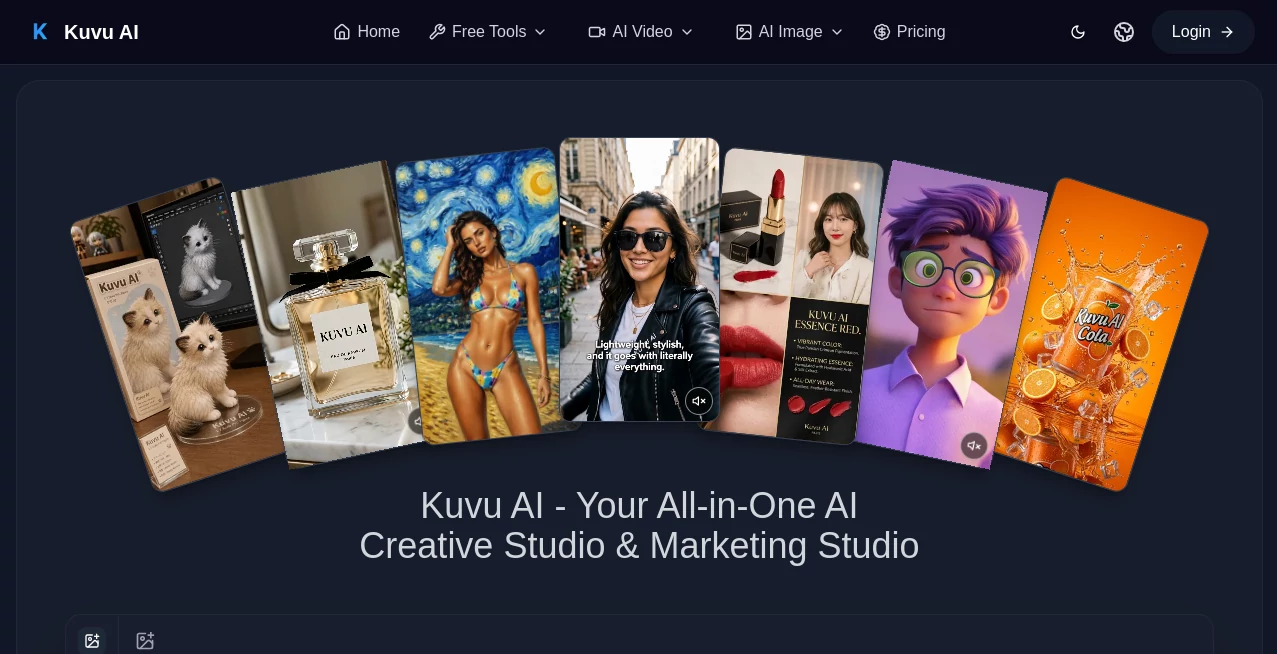
Kuvu AI is an all-in-one creative workspace designed for people who want to create images, videos, audio, and other visual content without jumping between a long list of separate AI platforms. Instead of paying for several model providers and managing multiple accounts, creators can work with a broad selection of popular AI models from a single interface.
The platform brings together image and video generation models such as Seedance, Veo, Kling, GPT Image, Nano Banana, Seedream, and FLUX. It also includes AI voice and audio capabilities, prompt enhancement, batch generation, and tools for turning existing images into moving video.
For a creator producing social posts in the morning, product visuals in the afternoon, and a short promotional video later in the day, having these capabilities under one roof can make the workflow noticeably simpler. There is less switching between tabs, fewer subscriptions to manage, and more room to compare different generation models before deciding which result works best.
Key Features
- Access to multiple leading AI image and video models from one workspace
- Text-to-image generation with different styles, aspect ratios, and resolutions up to 4K
- Text-to-video generation for creating videos from written prompts
- Image-to-video generation for animating existing images
- AI voiceovers and sound effects through supported audio models
- Prompt enhancement for turning simple ideas into more detailed prompts
- Batch generation for producing and comparing multiple variations
- Watermark-free generations on paid plans
- Commercial usage on eligible paid plans
- Flexible credit-based plans for different levels of content production
User Interface
The interface is built around a straightforward creative workflow. Users can describe what they want to make, choose a generation model, select options such as resolution or aspect ratio, and start producing content without needing technical configuration.
This simplicity is particularly useful for creators who want to experiment with several models without learning a different dashboard for each one. The ability to move between image and video creation within the same workspace also makes the experience feel more like a creative studio than a collection of disconnected AI utilities.
Accuracy & Performance
Generation speed depends on the selected model, output type, and settings. The platform states that many images can be generated within roughly 5 to 15 seconds, while video generation can take around 30 seconds to two minutes. Higher-priority queues are available with suitable plans.
Image generation supports outputs up to 4K, while video resolution varies by model and can reach 1080p or 2K. Since different models have different strengths, having several options available is useful when a first attempt does not quite match the desired style, composition, or motion.
Capabilities
The creative range goes well beyond simple text-to-image generation. Users can create images from descriptions, transform existing images, animate still visuals, generate short videos, produce voiceovers, and create multiple variations of an idea.
The prompt enhancement feature is another practical addition. Someone who writes a basic instruction such as a product scene or social media concept can use the system to develop it into a more detailed generation prompt. For beginners, this can reduce the trial-and-error involved in learning how to communicate effectively with image and video models.
Batch generation is also valuable for professional workflows. Rather than accepting the first result, creators can generate several alternatives and compare them before selecting the strongest version for a campaign, thumbnail, product visual, or social post.
Security & Privacy
The service provides dedicated privacy and legal policies for users to review before creating content. Paid plans also include commercial usage rights for eligible projects, although users should consider the specific usage restrictions associated with the underlying models they choose.
For businesses and agencies, checking the applicable licensing terms before using generated material in commercial campaigns is a sensible step, especially when content will be distributed at scale or used for client work.
Use Cases
- Social Media Content: Create images, short videos, promotional visuals, and variations for social platforms.
- Marketing Campaigns: Produce campaign concepts, advertising visuals, product scenes, and creative variations.
- Product Photography: Generate polished product imagery and experiment with different environments and compositions.
- Video Creation: Turn written concepts into video or animate existing images with AI-generated motion.
- Content Creation: Build visual assets for blogs, newsletters, websites, presentations, and online channels.
- Concept Art: Explore characters, environments, visual ideas, and creative directions before committing to production.
- Agency Work: Produce multiple creative options for clients while keeping different generation models accessible from one workspace.
- Voiceovers: Add generated narration and audio elements to video and other creative projects.
Pros and Cons
Pros
- Multiple popular AI models are available from one interface.
- Supports both image and video generation.
- Includes text-to-image, text-to-video, and image-to-video workflows.
- Prompt enhancement can help users improve basic instructions.
- Batch generation makes it easier to compare creative variations.
- Paid plans provide commercial usage for eligible projects.
- Credit-based plans accommodate both casual and high-volume creators.
Cons
- Credit consumption varies between models and generation settings.
- High-volume video production can require a larger plan or additional credits.
- Results can differ noticeably between models, so users may need to experiment to find the best option for a particular project.
- Commercial users should review the applicable rights and restrictions for the specific models they use.
Pricing Plans
The platform uses a credit-based pricing system with monthly, yearly, and one-time purchase options. Credit usage depends on the model and type of generation, so image and video production can consume different amounts.
The Lite plan is aimed at casual creators and is displayed at $10 per month on the yearly billing option. It includes 3,600 credits issued upfront for the year, supports up to two parallel generation tasks, and provides access to image, text-to-video, and image-to-video tools.
The Pro plan is displayed at $14.50 per month on the yearly option and provides 12,000 credits issued upfront for the year. It supports three parallel generation tasks, access to multiple video models, and additional credit purchases.
The Ultra plan is displayed at $69.50 per month on the yearly option and provides 60,000 credits issued upfront for the year. It is designed for teams, agencies, and high-volume production workflows, with higher generation capacity, priority processing, advanced models, and commercial usage for client and business projects.
One-time credit packs are also available for users who want additional generation capacity without starting a recurring subscription. The available pricing and promotions can change, so checking the current plan details before purchasing is recommended.
How to Use It
- Step 1: Create an account and open the creative workspace.
- Step 2: Decide whether you want to create an image, generate a video, animate an existing image, or work with audio.
- Step 3: Select an available AI model based on the type of result you want.
- Step 4: Write your prompt and use prompt enhancement when you need help expanding the idea.
- Step 5: Choose settings such as aspect ratio, resolution, or number of outputs when available.
- Step 6: Generate your content and compare variations.
- Step 7: Refine the prompt or switch models if the first result does not meet your expectations.
- Step 8: Download and use the finished content according to the applicable plan and model licensing terms.
Comparison with Similar Tools
Many AI creative platforms focus heavily on one particular generation method or are built around a single model family. This approach takes a different route by bringing several model options into the same creative environment.
The main advantage is flexibility. A creator can try different image or video models without maintaining separate workflows for each service. This is especially helpful when a project needs several types of output, such as a product image, an animated version of that image, and a short promotional video.
It is not necessarily about replacing every specialized creative application. Instead, its strongest value comes from giving creators a convenient place to test models, compare results, and build AI-generated assets without constantly moving between platforms.
Conclusion
For creators who regularly work with AI-generated images and videos, having access to several capable models in one workspace can make a real difference. The combination of image generation, video creation, image animation, audio tools, prompt enhancement, and batch generation creates a practical environment for experimenting as well as producing finished content.
Its credit-based plans also make the service suitable for different workflows, from occasional creative experiments to agency-level production. The biggest appeal is straightforward: instead of building a workflow around one model, creators can explore several models and choose the one that delivers the right result for each project.
Whether the goal is creating social media assets, testing product concepts, producing marketing videos, or simply exploring what modern generative AI can do, this platform offers a broad creative toolkit without requiring users to manage a separate workspace for every model.
Frequently Asked Questions (FAQ)
What can I create with this platform?
You can generate AI images, create videos from text, animate images into video, produce voiceovers and sound effects, and create multiple variations of visual concepts.
Which AI models are available?
The available models include options such as Seedance, Veo, Kling, GPT Image, Nano Banana, Seedream, FLUX, and other models that may be added over time.
Can I generate videos from images?
Yes. The image-to-video workflow lets you upload an image and generate motion from it, making it possible to turn a static visual into a dynamic clip.
Does it support high-resolution images?
Yes. Image generation can support resolutions up to 4K, depending on the selected model and settings.
Can I use generated content commercially?
Paid plans include commercial usage for eligible client and business projects. Users should still review the applicable rights and restrictions associated with the models used for their specific content.
Do I need technical skills?
No technical setup is required for the standard creative workflow. Users can describe what they want to create, select a model, adjust available settings, and generate the result.
How does the credit system work?
Credits are consumed when generating images, videos, avatars, or using supported AI features. The amount required can vary depending on the model, output type, and selected settings.
Is there a free way to try the service?
The platform provides a free starting experience, allowing users to explore its creative workflow before choosing a paid credit plan.
AI Photo & Image Generator , AI Image to Video , AI Video Generator , AI Text to Image .
These classifications represent its core capabilities and areas of application. For related tools, explore the linked categories above.

Kuvu AI Alternatives Product

MixHub AI

flux 3

Nano Banana …

Omnesuite AL…

seedream 5

grok imagine…
seedance 2

Wurt.app
SkyReels-V4