


















LectMate
What is LectMate?
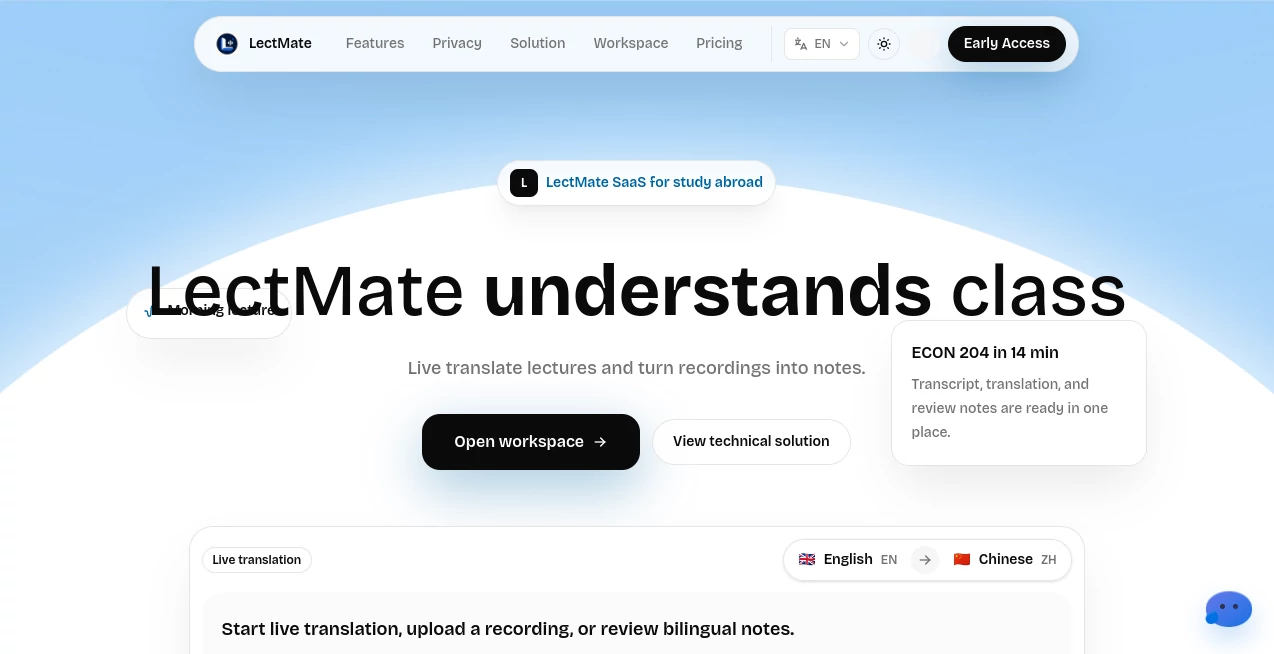
LectMate is an AI-powered learning assistant designed to help students understand lectures, especially in international and multilingual learning environments. It transforms live classroom conversations, recorded lectures, and academic discussions into organized transcripts, translations, and review-ready notes.
For students studying abroad, language barriers can make even a simple lecture challenging. Fast speaking, unfamiliar accents, and complex academic terminology can cause important information to disappear in seconds. This platform creates a smoother learning experience by connecting listening, understanding, and reviewing in one workflow.
Instead of spending hours rewriting notes after class, students can focus on learning while the system captures important details in real time. It brings together transcription, translation, keyword extraction, searchable notes, and audio replay to create a practical study environment.
Key Features
User Interface
The platform provides a clean web-based workspace where students can manage live sessions, recordings, transcripts, translations, and study materials without switching between multiple applications.
The interface is built around a simple idea: keep everything connected. Students can follow the original speech, view translated content, search important terms, and revisit specific parts of a lecture from one place.
- Organized lecture workspace for managing learning sessions
- Live transcript and translation view
- Searchable lecture history
- Easy access to recordings and generated notes
- Export options for keeping personal study materials
Accuracy & Performance
The platform focuses on turning spoken academic content into useful learning resources. Real-time transcription helps students follow lectures while they are happening, while post-session processing helps improve structure and readability.
By combining speech recognition, translation technology, and language understanding, it helps learners capture important concepts without constantly interrupting their study flow.
- Real-time speech-to-text conversion
- Support for multilingual lecture understanding
- Keyword identification for faster review
- Structured summaries from long recordings
- Audio replay connected with transcript sections
Capabilities
This tool goes beyond simple transcription. It creates a complete learning workflow where spoken information can become searchable and reusable knowledge.
- Live lecture transcription
- Lecture translation for multilingual students
- Bilingual notes creation
- Recording analysis
- Keyword and concept extraction
- Search through previous lectures
- Review-focused study organization
Security & Privacy
Academic recordings and personal notes can contain sensitive information. The platform emphasizes user control by allowing students to manage their recordings, transcripts, translations, and exported materials.
Having control over learning data is especially important for students, researchers, and professionals who work with private lectures, meetings, or discussions.
- User-controlled recordings and transcripts
- Ability to manage stored learning materials
- Privacy-focused workflow
- Clear control over exported content
Use Cases
The platform is useful for anyone who needs to understand spoken information more effectively. While it is especially valuable for international students, its applications extend to many learning and communication scenarios.
- International Students: Follow lectures delivered in another language and create bilingual study notes.
- Online Learning: Capture important details from virtual classes and educational sessions.
- University Lectures: Record explanations, concepts, and examples for later exam preparation.
- Research: Convert interviews, academic discussions, and seminars into searchable text.
- Meetings: Keep accurate records of discussions and important decisions.
Pros and Cons
Pros
- Combines transcription, translation, and notes in one workflow
- Useful for multilingual education environments
- Makes long lectures easier to review
- Helps students save time on manual note-taking
- Creates searchable learning resources
Cons
- Performance may depend on audio quality and speaker clarity
- Advanced features may require a suitable subscription plan
- Highly specialized academic terminology may still require human review
Pricing Plans
The platform follows a SaaS model designed around flexible usage. Users can explore its learning workflow and choose a plan based on their study requirements and volume of lectures.
- Free Access: Suitable for users who want to explore basic features.
- Premium Plans: Designed for students and professionals who need more frequent transcription, translation, and storage capabilities.
Pricing availability and included features may change as the platform continues to develop.
How to Use LectMate
Using the platform is designed to be simple, even for users who are new to AI learning tools.
- Create a workspace for your lecture or recording.
- Start a live session or upload an existing audio file.
- Follow real-time transcription and translated content.
- Review generated notes, keywords, and summaries.
- Search important topics and replay specific moments when studying.
Comparison with Similar Tools
Many transcription applications focus only on converting audio into text. This platform takes a more education-focused approach by combining transcription with translation, review tools, and structured study materials.
Compared with traditional note-taking methods, it reduces the effort required to capture information manually. Compared with basic speech-to-text solutions, it provides a workflow designed specifically for students who need to understand and revisit complex lectures.
Conclusion
LectMate offers a practical solution for students who want to get more value from every lecture. By connecting real-time understanding with organized study materials, it helps transform spoken lessons into resources that can be reviewed anytime.
For international learners, researchers, and anyone dealing with information-heavy conversations, this type of AI-powered learning workflow can make studying more efficient and less stressful. It brings together the essential steps of listening, understanding, organizing, and reviewing in a single environment.
Frequently Asked Questions (FAQ)
What is LectMate?
It is an AI learning assistant that converts lectures and recordings into transcripts, translations, and organized study notes.
Who can use this platform?
It is designed mainly for students, especially those studying in another language, but it can also help researchers, professionals, and anyone who needs searchable audio notes.
Can it translate lectures in real time?
Yes, the platform is designed to support live lecture translation alongside transcription features.
Can users review old lectures?
Yes. Recorded sessions can be organized, searched, and revisited to help with exam preparation and research.
Does it replace traditional note-taking?
It works as a support tool rather than a replacement for active learning. Students can focus on understanding while the system helps capture important information.
AI Translate , AI Education Assistant , AI Transcription , AI Speech to Text .
These classifications represent its core capabilities and areas of application. For related tools, explore the linked categories above.

LectMate Alternatives Product

EduSolver: A…

Traecta
Transcribe A…

ekstrakt

TopPDF

Gizmo
Ask Bishop

FluentDictat…
PrepScore
