Lesson Reach
What is Lesson Reach?
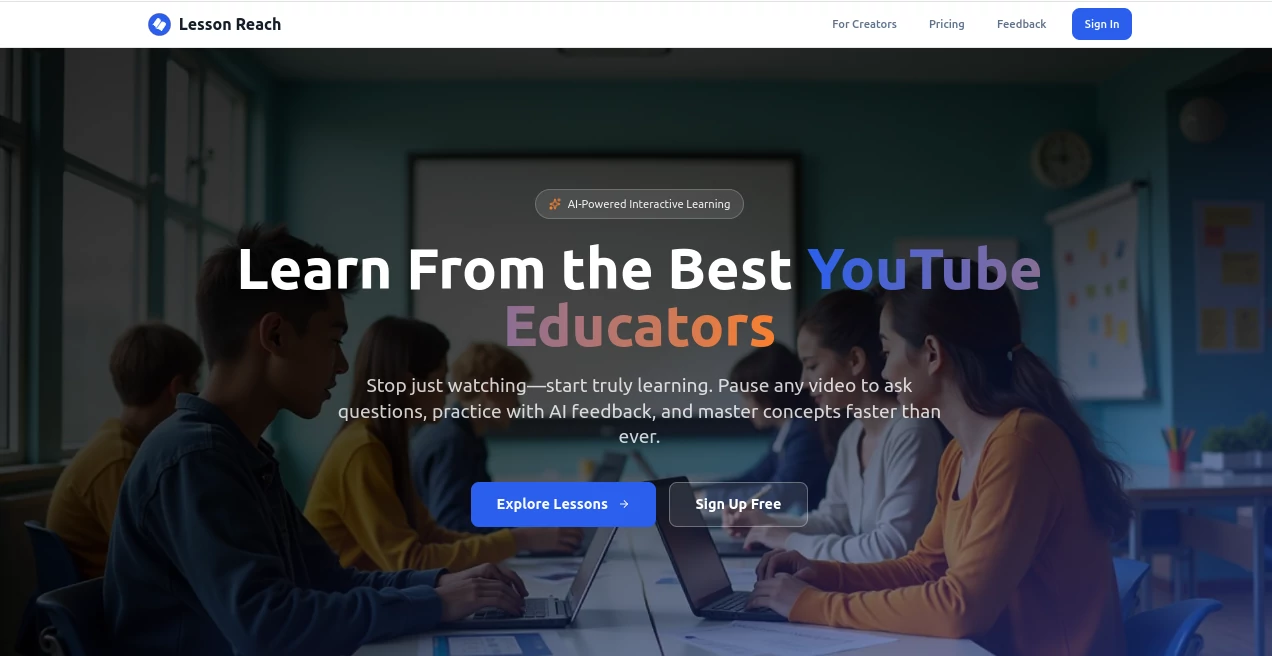
I’ve lost count of how many educational videos I’ve watched only to realize an hour later that very little actually stuck. YouTube is full of great teachers, but passive viewing has its limits. This platform changes the game. You take any good educational video and it becomes an interactive lesson where students can pause, ask questions, get explanations grounded in the actual content, and practice with immediate feedback. It feels like having a personal tutor sitting right there with you while you watch — and the difference in retention is noticeable from the very first session.
Introduction
Great educators pour their heart into videos, but students often watch passively and move on. LessonReach bridges that gap by turning regular YouTube-style lessons into truly interactive experiences. Students can pause at any moment and ask the AI tutor questions that are answered based on what the creator actually taught — not generic internet answers. They can also complete practice problems with smart feedback that guides them without just giving away the answer. For creators, it’s an easy way to make their content more engaging and effective without extra filming or editing. It respects the original teaching style while adding the interactivity that modern learners crave.
Key Features
User Interface
The player feels familiar but smarter. You watch the video as usual, but now you can pause anytime and type or speak a question. The AI tutor responds instantly with explanations tied directly to the video’s content and timestamps. Practice questions appear at natural points, and progress tracking keeps everything organized. It’s clean, intuitive, and works beautifully on both desktop and mobile — no steep learning curve for students or teachers.
Accuracy & Performance
The AI is trained specifically on the creator’s video transcript and teaching style, so answers stay consistent with how the instructor explains things. This grounding makes a huge difference — no more conflicting advice or off-topic responses. Response times are fast, feedback on practice problems is helpful and educational, and the whole system feels reliable even during longer lessons.
Capabilities
Creators can import YouTube videos and quickly turn them into full interactive lessons. Students get pause-and-ask functionality, AI explanations with timestamps, practice problems with guided feedback, and progress tracking. It supports multiple subjects and age groups, and creators get insights into where students struggle most. The result is a complete learning loop: watch, ask, practice, master — all while staying true to the original creator’s voice and approach.
Security & Privacy
Student interactions stay within the lesson environment, and creators maintain control over their content. The platform is built with education in mind, focusing on safe, productive learning experiences without unnecessary data collection or distractions.
Use Cases
A math teacher imports her YouTube lessons and suddenly students can ask clarifying questions at any point instead of getting stuck and giving up. A self-taught developer uses coding tutorials with AI feedback to practice concepts immediately after watching. A parent supplements their child’s schoolwork with interactive history videos that make the subject come alive. Independent learners finally understand complex topics because they can ask “why” as many times as needed and get answers grounded in the specific lesson. It works for classrooms, homeschooling, and self-paced adult learning alike.
Pros and Cons
Pros:
- Turns passive video consumption into active, effective learning.
- AI tutor stays faithful to the original creator’s explanations.
- Practice problems with smart feedback accelerate mastery.
- Easy for creators to set up without technical headaches.
- Works beautifully across different subjects and age groups.
Cons:
- Quality depends on the strength of the original video content.
- Some advanced analytics and features are on higher plans.
Pricing Plans
Free lessons and trials let students and creators experience the difference without commitment. Paid plans for creators unlock unlimited interactive lessons, advanced insights, custom branding, and priority support. For students, premium access offers more features and ad-free experiences. The pricing is reasonable for the leap in learning effectiveness it provides.
How to Use LessonReach
For students: Browse available lessons, start watching, pause whenever something isn’t clear, ask the AI tutor questions, and complete practice problems as they appear. For creators: Claim your page, import a YouTube video, let the AI build the interactive elements, review and tweak, then share with your audience. The whole process is designed to feel natural and rewarding for everyone involved.
Comparison with Similar Tools
Regular YouTube watching is passive. Generic quiz tools feel disconnected from the video. This platform combines the best of both worlds — keeping the original teaching intact while adding meaningful interactivity and personalized support. It stands out by focusing on staying true to the creator’s voice rather than replacing it with generic AI answers.
Conclusion
Learning from videos should be more than just watching — it should be engaging, interactive, and genuinely effective. LessonReach makes that possible without asking creators to rebuild everything from scratch or forcing students to struggle in silence. It respects both the teacher’s expertise and the learner’s time, creating experiences that help concepts actually stick. For anyone who wants to learn better or teach more effectively through video, it’s a refreshing and practical solution.
Frequently Asked Questions (FAQ)
Do students need an account?
Basic lessons can be accessed easily, with optional accounts for saving progress.
How accurate is the AI tutor?
It’s trained specifically on the video content, so answers stay consistent with the creator’s teaching.
Can creators monetize their lessons?
Yes — many creators use it to build deeper engagement and new revenue opportunities.
Is it suitable for all ages?
It works across elementary to adult learners, with appropriate difficulty levels.
How long does it take to create an interactive lesson?
Most creators can turn an existing video into a full interactive lesson in just a few minutes.
AI Tutorial , AI Course , AI Education Assistant .
These classifications represent its core capabilities and areas of application. For related tools, explore the linked categories above.

Lesson Reach Alternatives Product

Gizmo

Wondika

Translate a …

Manus
Mexty AI

Sourcetable
Sovi.AI
Classroom Sc…

FLINT AI