
LoadQ
What is LoadQ?
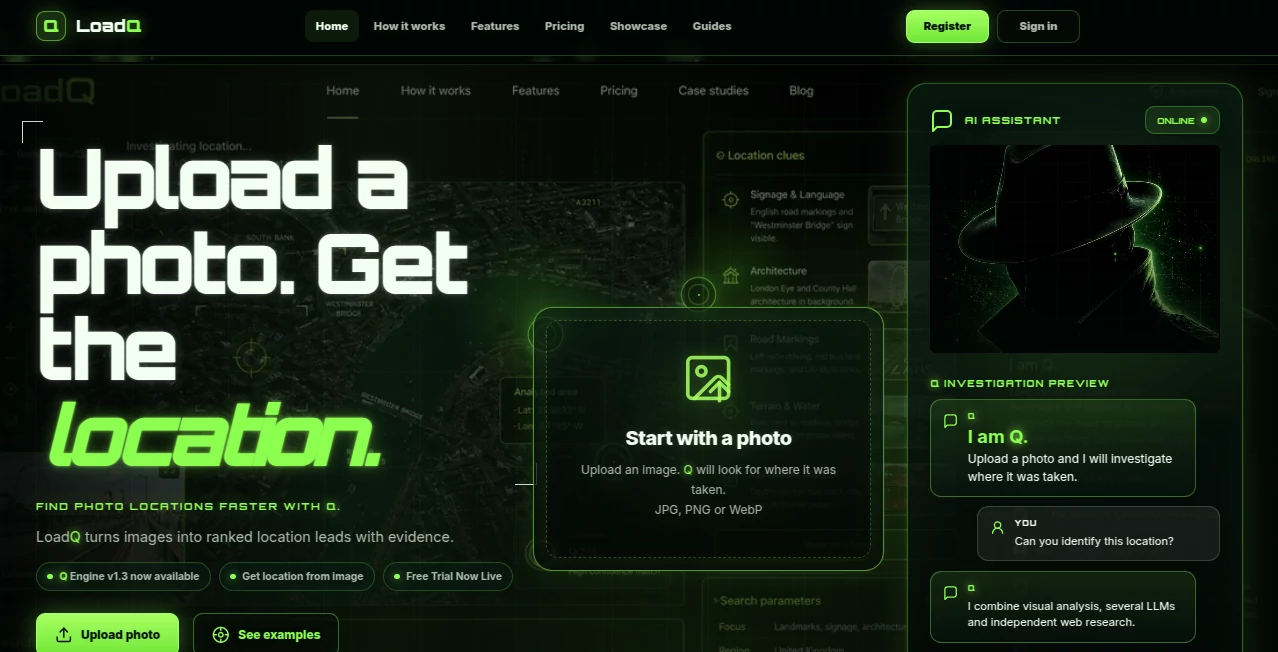
There's a unique thrill in looking at a random photo and wondering, "Where on earth was this taken?" This tool turns that curiosity into answers. You upload an image, and its AI investigator — called Q — carefully studies every visual clue: architecture, signs, vegetation, lighting, even small background details. Then it researches, cross-checks, and returns ranked location possibilities with clear explanations. I've seen people stunned when it correctly identified an obscure street corner from a vacation snapshot they barely remembered. It feels less like a gadget and more like having a sharp-eyed detective who never sleeps.
Introduction
Most of us have scrolled past photos online and wondered about the location, or tried to remember where we took that one picture from years ago. Traditional reverse image search often falls short when there are no exact matches. LoadQ fills that gap with a purpose-built AI that doesn't just describe the image — it investigates it like a real detective. Combining computer vision, multiple language models, and autonomous web research, it turns vague visual hints into concrete location leads. Whether you're a traveler retracing steps, a researcher verifying sources, an OSINT enthusiast, or just someone who loves solving visual mysteries, it delivers satisfying results with surprising accuracy.
Key Features
User Interface
The experience is delightfully straightforward. A big, friendly upload area greets you, followed by a clean workspace where Q shows its step-by-step reasoning. You can chat with Q directly to ask follow-up questions or provide extra context. Everything feels calm and focused — no cluttered dashboards or confusing options. You upload, watch Q think out loud, and get clear location suggestions with supporting evidence. It's the kind of interface that makes complex geolocation feel approachable and even fun.
Accuracy & Performance
Q stands out because it's not a general-purpose AI repurposed for location work. It's specially trained and self-improving for geolocation tasks. It excels at reading subtle clues most tools miss: regional architecture styles, road markings, vegetation patterns, and local signage. Results come with confidence levels and detailed reasoning, so you can judge for yourself. Many users report it successfully locates places that stump standard reverse image searches, especially when the photo has no famous landmarks.
Capabilities
It handles everyday photos, travel shots, historical images, and even screenshots. Q can work without GPS data, reads text in images, compares architectural styles, and verifies leads against real-world sources. You get ranked location suggestions with evidence for each. The chat feature lets you refine searches ("Is it Europe or North America?") or dig deeper into specific clues. It's powerful for both quick checks and serious investigations.
Security & Privacy
Your uploaded photos are handled responsibly — processed securely and not used for training without permission. You can explore many features without creating an account, and paid plans offer additional privacy controls. For sensitive or personal images, that thoughtful approach builds real trust.
Use Cases
Travelers upload old vacation photos to remember exact spots they visited. Researchers verify the origin of historical images for articles or reports. OSINT enthusiasts analyze public photos for investigations. Content creators find shooting locations for recreations. Even casual users solve "where was this taken?" puzzles that have bugged them for years. The tool shines whenever a photo holds a location mystery worth solving.
Pros and Cons
Pros:
- Specialized AI that significantly outperforms general models on geolocation tasks.
- Clear, transparent reasoning so you understand why it suggests each location.
- Works on a wide variety of photo types, even those without obvious landmarks.
- Chat interaction lets you guide and refine the investigation naturally.
- Free preview option lets you test quality before committing.
Cons:
- Very obscure or low-detail photos can still be challenging (as expected with any tool).
- Heavy daily use requires a paid plan for full access.
- Best results come from reasonably clear images with visible contextual clues.
Pricing Plans
A free tier with limited daily usage and preview scans lets anyone try the magic. Paid monthly and annual plans provide more tokens for quick scans and deep investigations, plus priority processing and export options. Token top-up packs offer flexibility for occasional heavy users. The pricing feels fair for the specialized capability it delivers.
How to Use LoadQ
Upload your photo (JPG, PNG, or WebP). Q automatically begins analyzing visual clues and researching. Watch its step-by-step reasoning as it narrows down possibilities. Review the ranked location suggestions with supporting evidence. Chat with Q if you want to provide hints or dig deeper. Save or export the full case when you're satisfied. The entire process feels natural, like collaborating with a knowledgeable friend who loves solving location puzzles.
Comparison with Similar Tools
Generic reverse image search tools often return visually similar photos but fail to pinpoint exact locations. General AI chatbots can guess but lack deep geolocation reasoning and verification. LoadQ stands apart by combining strong vision capabilities with dedicated research steps and transparent evidence-based conclusions. It's more focused and reliable for the specific task of photo geolocation than broader tools.
Conclusion
LoadQ turns the casual question "Where was this taken?" into a satisfying investigation with real answers. It's thoughtful, capable, and genuinely fun to use. Whether you're solving personal mysteries, verifying sources, or just enjoying the detective work, it delivers results that feel both impressive and trustworthy. In a world full of photos with hidden stories, this tool helps uncover them — one image at a time.
Frequently Asked Questions (FAQ)
How accurate is it really?
It performs remarkably well on photos with decent contextual clues, often outperforming general AI significantly. Very minimal or abstract images are naturally harder.
Do I need an account to try it?
You can start with a free preview without signing up, though creating a free account unlocks saved cases and more features.
Can it handle old or low-quality photos?
Yes — it often succeeds on historical or compressed images where other tools struggle, as long as some contextual clues remain visible.
Is my photo data private?
Photos are processed securely and not stored long-term or used for training unless explicitly allowed.
AI Life Assistant , AI Fun Tools .
These classifications represent its core capabilities and areas of application. For related tools, explore the linked categories above.

LoadQ Alternatives Product

FortuneTelle…
Kirkify Al

Japanese Nam…

Kirkify

Caricature G…
ao3dle

tryon.ink

Omoglow
TryInks