
Locally AI
What is Locally AI?
What if you could use a capable AI assistant without sending your conversations to a remote server? Locally AI takes a different approach by running language and vision models directly on Apple devices. Once a model has been downloaded, users can chat, analyze images, generate text, and work with AI without needing an internet connection.
The biggest attraction is privacy. There is no account to create, no cloud processing, and no requirement to keep an internet connection active. For people who work with sensitive information or simply prefer keeping their conversations on their own hardware, this approach makes a lot of sense.
The application is designed for iPhone, iPad, and Mac, with a strong focus on Apple Silicon performance. It supports a growing selection of open-source models, giving users the freedom to choose different models depending on the task.
Key Features
- Completely offline AI processing after models are downloaded.
- No login or account creation required.
- On-device processing designed to keep user data private.
- Support for popular open-source model families such as Llama, Gemma, Qwen, DeepSeek, SmolLM, Granite, Cogito, and LFM.
- Language and vision capabilities for text and image-based tasks.
- Real-time voice conversations through local voice mode.
- Siri integration for interacting with local AI models.
- Customizable system prompts for controlling the assistant's behavior.
- Apple Shortcuts integration for automation and custom workflows.
- Quick access through Control Center, Lock Screen, and the Action Button on supported devices.
User Interface
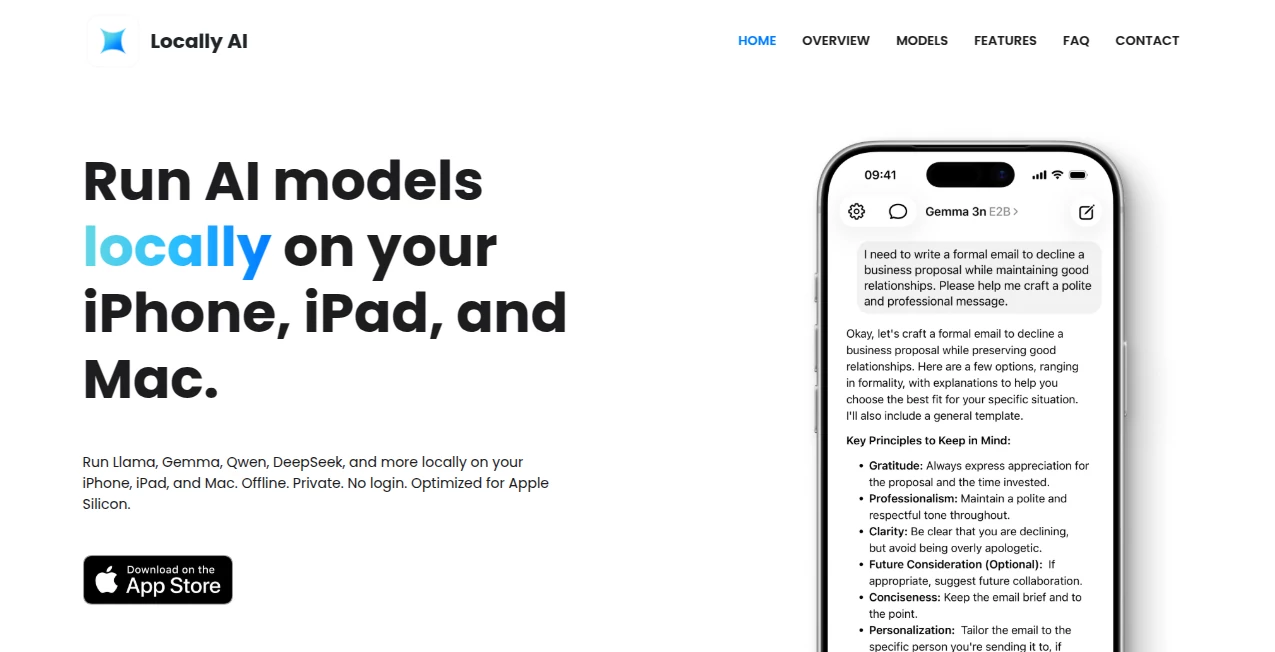
The interface follows Apple's native design philosophy rather than trying to overwhelm users with technical controls. This makes the experience approachable even for someone who has never worked with local AI models before.
Recent updates have also focused on improving navigation and taking advantage of newer Apple interface features. The application is available across iPhone, iPad, and Mac, so users with several Apple devices can work with a familiar environment on each screen.
Accuracy & Performance
Performance depends heavily on the model selected and the hardware available. Smaller models can be practical for everyday conversations and quick tasks, while more demanding models are better suited to devices with greater memory and processing capability.
The software is built around Apple's MLX machine learning framework, allowing it to take advantage of Apple Silicon's unified memory architecture. This is particularly useful for local inference, where efficient memory usage can make a noticeable difference in responsiveness.
The service also highlights that larger models can be used on iPad and Mac for more advanced workloads. In practice, choosing the right model for the device is important: a compact model may feel considerably faster for routine questions, while a larger model can provide stronger reasoning or richer responses.
Capabilities
The application goes beyond basic text chat. Its supported language and vision models can handle tasks such as answering questions, generating text, analyzing images, summarizing information, brainstorming ideas, and assisting with coding or reasoning.
Voice mode adds another practical option. Instead of typing every request, users can have real-time conversations with an assistant that processes the interaction directly on the device.
Model selection is another strong point. Supported families include Meta Llama, Google Gemma, Qwen, DeepSeek, Hugging Face SmolLM, IBM Granite, Deep Cogito, and Liquid AI models. This gives users more flexibility than an assistant locked to a single model.
Security & Privacy
Privacy is the central reason many users will be interested in this type of AI application. Processing takes place locally rather than being sent to a cloud AI service. The official privacy policy states that the application does not collect information when it is downloaded or used, and registration is not required.
For a practical example, imagine drafting a private note while traveling with no Wi-Fi or cellular connection. After downloading the required model, the task can still be handled locally. The same principle can be useful for sensitive brainstorming, personal documents, or conversations that users would rather not send to an external AI provider.
Use Cases
Private writing: Draft emails, notes, ideas, summaries, and other text while keeping processing on the device.
Offline productivity: Continue asking questions and working with AI during flights, travel, remote work, or situations with unreliable connectivity.
Image analysis: Use supported vision models to examine images and extract useful information without relying on a cloud processing service.
Learning and research: Ask questions, explore concepts, summarize material, and experiment with different models directly from an Apple device.
Coding assistance: Reasoning and coding-oriented models can be useful for developers who want an additional local assistant.
Voice interaction: Use local voice conversations when typing is inconvenient or when a more natural interaction is preferred.
Automation: Apple Shortcuts integration opens the door to custom workflows that trigger AI actions as part of everyday routines.
Pros and Cons
- Pros: Strong privacy model, offline operation, no login requirement, support for multiple open-source models, Apple Silicon optimization, voice capabilities, vision support, Siri integration, and Shortcuts automation.
- Pros: Available across iPhone, iPad, and Mac, making it particularly attractive to users already invested in the Apple ecosystem.
- Cons: Local AI performance is tied to the device's hardware, so older or less powerful devices may not handle larger models as comfortably.
- Cons: Models need to be downloaded before offline use, which can require meaningful local storage.
- Cons: Local models can vary significantly in reasoning quality, speed, and language performance, so users may need to experiment to find the right model.
Pricing Plans
The application is currently available as a free download. Its terms describe the service as freemium, while the App Store listing shows the application as free. The official website does not present a conventional monthly pricing table for the core application.
This pricing approach makes it relatively easy to try local AI without committing to another recurring AI subscription. The main practical consideration is the hardware and storage required to run and download the desired models.
How to Use It
- Download the application from the appropriate App Store for your Apple device.
- Open the application and browse the available AI models.
- Choose a model that fits your device and the type of work you want to perform.
- Download the selected model to your device.
- Start a conversation or use the available text, image, or voice capabilities.
- Customize the system prompt if you want the assistant to follow a particular style or role.
- For automation, connect supported actions with Apple Shortcuts and create workflows that suit your routine.
Comparison with Similar Tools
Local AI applications generally fall into a different category from cloud-based assistants. Instead of relying on a remote server for every request, they use the processing resources available on the user's own hardware.
This approach offers a major privacy and offline advantage, but it also introduces a hardware trade-off. Cloud services can provide access to extremely large models without requiring the user to own powerful hardware, while local applications depend on available memory, processing power, battery capacity, and storage.
For Apple users who value privacy and want to experiment with several open-source models, the local approach is especially appealing. It also provides an interesting balance between convenience and control: the experience remains simple, while the underlying model choice is more flexible than a single-model assistant.
Conclusion
Local AI is becoming increasingly practical as Apple hardware and on-device machine learning continue to improve. This application makes that idea accessible without requiring users to understand complicated local AI infrastructure.
The combination of offline operation, strong privacy principles, multiple open-source models, voice interaction, vision capabilities, Siri support, and Shortcuts integration gives it a surprisingly broad range of uses. It is particularly compelling for people who want AI assistance but do not want every conversation to depend on a cloud service.
For everyday questions, writing, image analysis, coding experiments, learning, and private conversations, running AI directly on an Apple device can be a refreshing alternative to the usual cloud-first experience.
Frequently Asked Questions (FAQ)
Can it work without an internet connection?
Yes. After downloading an AI model, the application can operate completely offline because processing takes place on the device.
Does it require an account?
No. Users can start using the application without creating an account or logging in.
Which AI models are supported?
Supported model families include Llama, Gemma, Qwen, DeepSeek, SmolLM, Granite, Cogito, and LFM, with the exact selection evolving over time.
Does it support image understanding?
Yes. Supported vision models can process images in addition to handling text-based interactions.
Can I use voice conversations?
Yes. Local voice mode allows real-time voice conversations with processing performed on the device.
Is my data sent to the cloud?
The official privacy information states that the application does not collect user information and that processing takes place locally, without cloud processing or external data sharing.
Which devices are supported?
The application is designed for recent iPhone, iPad, and Mac devices, with optimization for Apple Silicon hardware.
Can I customize how the AI responds?
Yes. A customizable system prompt allows users to define instructions and adjust the assistant's behavior for different tasks.
Is the application free?
The application is listed as free on the App Store, while its terms describe the service as freemium.
Is it suitable for sensitive information?
Its local-processing design makes it particularly interesting for privacy-conscious users. However, users should still choose models and device settings carefully and follow appropriate security practices for their own devices.
AI Productivity Tools , AI Chatbot , AI Voice Assistants .
These classifications represent its core capabilities and areas of application. For related tools, explore the linked categories above.
Locally AI details
Website unavailable — View Alternatives
Pricing
- Freemium
Apps
- Web App
- iOS App
Categories

Locally AI Alternatives Product

Sourcetable

Krisp

VisualGPT

CodeProt

GameClick.io

TWT Chat

Fina Money

UPDF AI

EntreDash