
Mastra
What is Mastra?
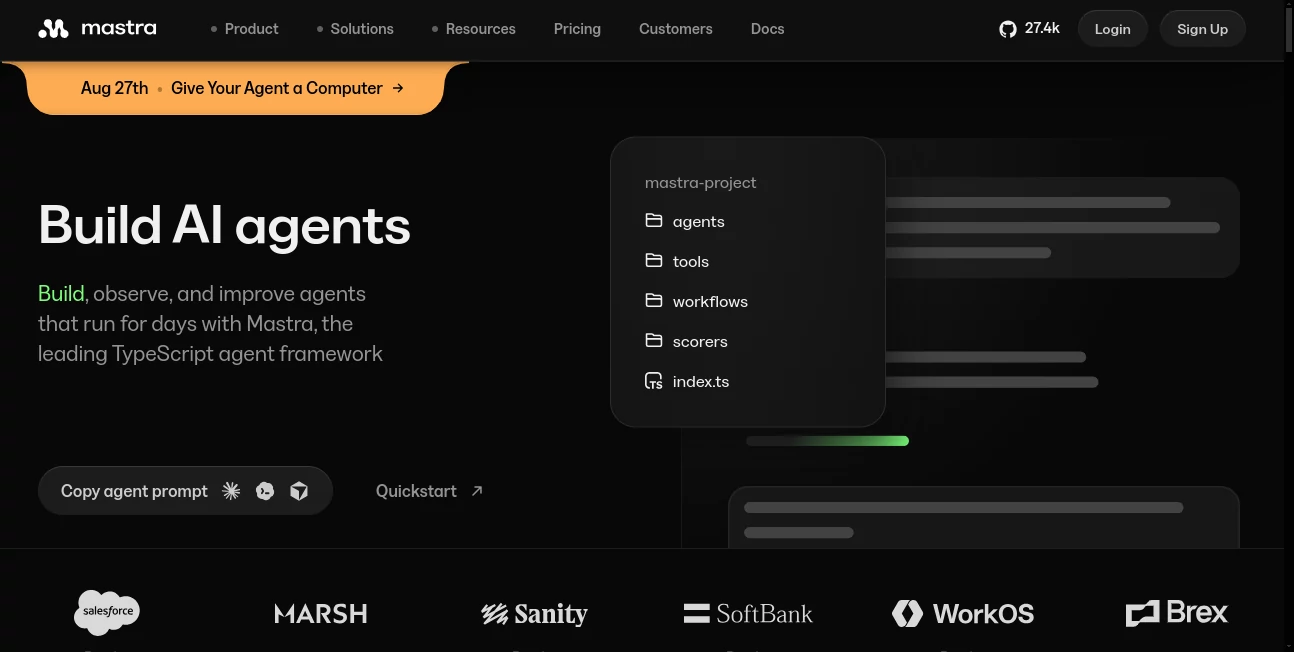
Mastra is a TypeScript framework built for developers who want to create, deploy, observe, and improve AI agents and intelligent applications without stitching together a collection of unrelated libraries. Its approach brings agents, workflows, memory, evaluation, observability, and server capabilities into one development environment.
The framework is particularly appealing when an AI project needs to do more than answer a single prompt. Developers can create agents that use tools, maintain context, follow structured workflows, and operate over longer periods. The result is a more practical foundation for building AI features that need to behave like part of a real application rather than a simple chatbot.
Key Features
- TypeScript-based framework for building AI agents and applications.
- Agent development with models, instructions, tools, and runtime behavior.
- Typed workflows with sequential steps, branching, retries, and parallel execution.
- Durable memory with semantic recall, observational memory, and thread-aware storage.
- Built-in evaluations, scorers, datasets, metrics, logs, and traces.
- Model routing that supports hundreds of models across multiple providers.
- Human-in-the-loop controls for workflows that need review or approval.
- Local development and deployment options through its server and cloud platform.
- Open-source framework available under the Apache 2.0 license.
User Interface
The developer experience centers around code, documentation, and a visual development environment rather than a traditional consumer-facing interface. Mastra Studio provides a place to inspect agent and workflow activity, while the framework itself keeps the main development process familiar to TypeScript developers.
This structure works well for engineering teams. A developer can define an agent, connect tools and memory, create a workflow, and then inspect what happened during execution. For someone already comfortable with TypeScript, the experience feels closer to building a normal application than learning an entirely separate AI platform.
Accuracy & Performance
Performance is not treated simply as a matter of choosing a faster language model. The framework provides observability features that allow developers to examine latency, token usage, model calls, tool usage, and individual execution steps.
Its evaluation system is also useful for improving reliability. Developers can create repeatable checks and scorers for agent outputs, compare results, and identify changes that affect quality. For multi-step applications, being able to see where an execution went wrong can be just as valuable as improving the underlying model.
Capabilities
The framework covers a broad part of the AI application development lifecycle. Agents can be configured with instructions, models, tools, and runtime behavior, while workflows can coordinate multiple operations through typed steps, branches, retries, and parallel execution.
Memory adds another important layer. Applications can retain conversation context, use semantic recall, and maintain longer-term observational information. Developers can also suspend and resume workflows, which is useful for processes that require human approval or depend on an external event before continuing.
Another strong point is model flexibility. The built-in model router supports more than 600 models, including models from major providers such as OpenAI and Anthropic. This gives development teams more freedom to experiment with different models without redesigning the entire application architecture.
Security & Privacy
Security becomes especially important when AI agents have access to private information, business systems, or external tools. The framework provides controls for agent context, authentication, guardrails, prompt-injection protection, and data-leak prevention.
For organizations with stricter requirements, the enterprise self-hosted offering is designed to keep data inside the company's own VPC. According to the platform's current documentation, traces, prompts, and outputs can remain within the organization's environment rather than being sent outside it. This makes the architecture more suitable for teams handling sensitive production workloads.
Use Cases
One practical use is building customer-facing AI agents that can answer questions while calling internal tools or services. A company could combine an agent with a knowledge source, business API, and memory layer to create a more capable support experience.
It can also be used for internal automation. For example, a team could create an agent that reviews incoming requests, gathers information from several systems, performs analysis, and sends the result to another service.
Complex business processes are another natural fit. A workflow could validate information, perform several operations in sequence, branch depending on the result, pause for human approval, and then resume later. This is considerably more structured than simply sending a prompt to an LLM.
Development teams can also use the framework for coding agents, research assistants, document-processing systems, agentic search, and other applications where several AI and software components need to work together.
Pros and Cons
Pros:
- Strong TypeScript-first development experience.
- Combines agents, workflows, memory, evaluations, and observability.
- Supports a large selection of language models.
- Useful controls for long-running and multi-step agent processes.
- Open-source framework with flexible deployment options.
- Detailed tracing and evaluation capabilities for production systems.
- Good fit for developers building AI into existing applications.
Cons:
- It is primarily a developer framework rather than a beginner-friendly no-code AI builder.
- Understanding TypeScript and application architecture is helpful for getting the most from it.
- Production deployments can introduce additional infrastructure and usage costs.
- The large number of available features may feel excessive for a very small AI project.
Pricing Plans
The open-source framework is available for free under the Apache 2.0 license, allowing developers to build and host agents themselves. The hosted platform currently includes a Starter plan at $0 per month, with usage-based allowances for observability events, CPU time, data egress, and other resources.
The Teams plan is currently priced at $250 per month and provides larger allowances, lower usage rates for certain resources, multiple-team functionality, SSO, and access to SOC 2 documentation. Enterprise pricing is custom and adds features such as RBAC, audit logs, support, uptime SLAs, and dedicated assistance.
For developers experimenting with an idea, the free options make it possible to start without committing to a paid subscription. Larger teams can move toward hosted or enterprise infrastructure as their workloads become more demanding.
How to Use It
Start by creating a TypeScript project and installing the framework packages required for the application. From there, define an agent with its instructions, model, and available tools. A simple agent can then be expanded with memory or connected to external services as the project grows.
For more structured automation, create a workflow and divide the process into individual steps. Sequential operations can be chained together, while conditional branches and parallel execution can handle more complicated logic.
Once the application is running, use the observability and evaluation features to inspect agent behavior. Review traces, latency, model calls, tool usage, and evaluation scores. This feedback loop makes it easier to identify weak prompts, inefficient workflows, or unreliable agent behavior before the application becomes heavily used.
Comparison with Similar Tools
Compared with simpler AI SDKs, this framework takes a broader approach to application architecture. Instead of focusing primarily on connecting an application to a language model, it provides dedicated building blocks for agents, workflows, memory, evaluations, and production observability.
It also differs from no-code agent builders because development remains centered on TypeScript and application code. That can require more technical knowledge, but it gives engineering teams substantially more control over how agents operate and how they integrate with existing software.
For a developer who only needs a basic model API call, a lightweight SDK may be enough. For a project involving multiple tools, persistent memory, long-running workflows, evaluations, and production monitoring, the broader architecture can be a significant advantage.
Conclusion
For developers serious about building production-grade AI agents, this framework offers a compelling combination of flexibility and structure. It brings many of the pieces that normally have to be assembled separately into a single TypeScript-focused environment.
The strongest reason to consider it is not simply the ability to create an AI agent. It is the surrounding infrastructure: durable workflows, memory, model flexibility, evaluations, tracing, and deployment options. That makes it particularly well suited to projects where an AI system needs to perform real tasks reliably instead of merely generating an occasional response.
Frequently Asked Questions (FAQ)
What is Mastra used for?
It is used to build AI agents, agentic workflows, and AI-powered applications with tools such as memory, evaluations, model routing, and observability.
Is Mastra open source?
Yes. The framework is available under the Apache 2.0 license. Developers can build and host agents themselves without paying for the open-source framework.
Which programming language does Mastra use?
It is designed primarily for TypeScript development, making it a natural option for developers already working in the JavaScript and TypeScript ecosystem.
Does it support different AI models?
Yes. Its built-in model router supports more than 600 models from multiple providers, allowing developers to work with different LLMs through a unified interface.
Can agents remember previous conversations?
Yes. The memory system supports conversation context, semantic recall, observational memory, and thread-aware storage for applications that need persistent context.
Can workflows pause and continue later?
Yes. Workflows can be suspended and resumed, which is useful for human approval steps, external events, and other processes that cannot be completed in a single execution.
Does it provide AI agent monitoring?
Yes. Developers can inspect traces, metrics, logs, model calls, tool calls, latency, token usage, and evaluation results to understand and improve agent behavior.
Is there a free plan?
Yes. The open-source framework is free, and the hosted platform currently provides a Starter plan at $0 per month with included usage allowances.
AI Workflow Management , AI API Design , AI Developer Docs , AI Developer Tools .
These classifications represent its core capabilities and areas of application. For related tools, explore the linked categories above.

Mastra Alternatives Product

Chatref

Yorph AI

Online White…

Website Audi…

ClearWork

Chatzy AI

UpMocker
Dedoctive

Jujutsu Zero…