


















Meta Image
What is Meta Image?
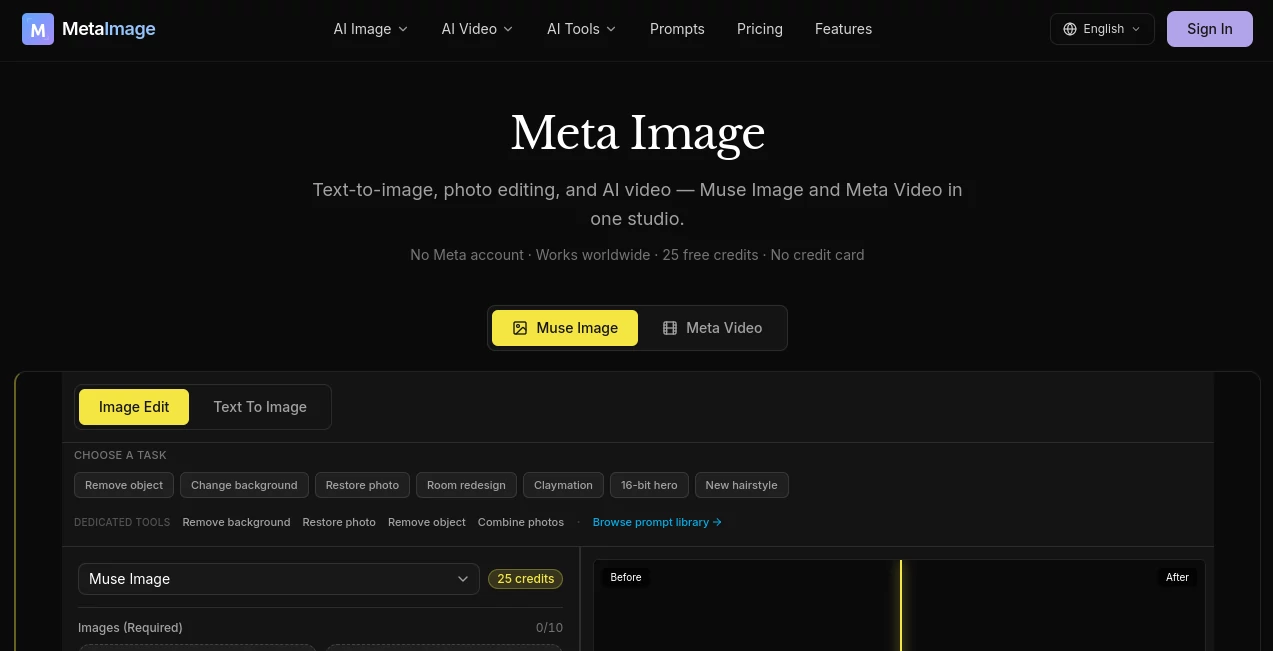
Meta Image is an independent AI creative studio that brings image generation, photo editing, and short-form video creation into one browser-based workspace. It is particularly useful for creators who want to move from an idea to a finished visual without jumping between several different tools.
The platform supports text-to-image generation as well as natural-language photo editing, allowing users to describe changes instead of working through complicated editing controls. It also brings several video engines into the same workspace, making it possible to create short clips from text or still images.
What makes the experience appealing is its practical focus. Instead of presenting users with an empty canvas and expecting them to figure everything out, the platform provides ready-made examples for product listings, social media graphics, headshots, thumbnails, posters, and other everyday creative tasks.
Key Features
- Text-to-image generation from natural-language prompts
- Natural-language photo editing
- Multi-reference image composition
- Background replacement and object removal
- Photo restoration and enhancement
- Text-to-video generation
- Image-to-video animation
- Multiple video generation engines in one workspace
- Adjustable aspect ratio, duration, and quality for video
- Generation history for keeping track of previous work
- Ready-made prompts for common creative projects
- Credit-based generation with costs shown before creation
User Interface
The interface is designed around the creative task rather than technical complexity. Users can choose between images, edits, and videos, then start from a prompt or an existing visual. The collection of copy-and-try examples is especially helpful for newcomers because it gives them a practical starting point instead of requiring them to learn prompt writing from scratch.
For video creation, the workflow is straightforward: select a generation mode, choose an available engine, configure output settings, and create the clip. The generated result can then be previewed and downloaded as an MP4.
Accuracy & Performance
Performance depends on the selected model, resolution, and type of generation. The image workspace provides access to several models, including Flux Pro, Muse Image, GPT Image 2, Nano Banana 2, and Nano Banana Pro. This gives users room to choose an engine according to the job rather than relying on one model for every type of visual.
The editing workflow is particularly useful when the original photograph needs a targeted change. Instructions such as replacing a background, removing an unwanted object, restoring an older photograph, or combining several references can be given in natural language.
Video generation follows a similar approach, with Kling 3.0, Seedance 2.0, and Gemini Omni currently available. The platform shows credit costs based on the selected options before generation, which makes experimentation easier to manage.
Capabilities
The platform covers a broad range of visual production tasks. A store owner can create a clean marketplace product image, a marketer can prepare a social media graphic, and a professional can generate a polished headshot for a profile or resume. Bloggers can also create editorial-style hero images without starting from a stock-photo library.
Image editing is another strong area. Users can upload a photograph and request changes using ordinary language. Multi-reference composition can combine people, products, and environments from separate images into a single scene, which is useful for advertising concepts and product presentations.
For motion content, users can create short videos from a text description or animate an existing still image. End-frame support is also available for compatible video workflows, giving creators more control over how a clip develops.
Security & Privacy
The service operates as an independent platform and clearly distinguishes itself from the companies behind the underlying AI models. It also explains that model names such as Flux, Gemini, Kling, and Seedance refer to third-party integrations rather than indicating ownership or endorsement.
Because users can upload photographs and other creative assets, it is sensible to avoid submitting confidential or highly sensitive material unless the applicable privacy and data-handling terms have been reviewed. For ordinary marketing, social, product, and creative projects, the browser-based workflow keeps the process convenient without requiring desktop editing software.
Use Cases
- E-commerce: Create marketplace-ready product images, white-background shots, and lifestyle scenes.
- Social Media: Produce Instagram Stories, promotional graphics, thumbnails, and social campaign visuals.
- Marketing: Turn product concepts into advertising imagery and short promotional videos.
- Personal Branding: Create professional headshots and profile visuals for resumes and business profiles.
- Blogging: Generate editorial-style hero images with room for headlines and supporting text.
- Photo Restoration: Improve faded photographs, remove scratches, and enhance facial details.
- Creative Projects: Combine multiple reference images into new scenes and visual concepts.
- Video Creation: Turn prompts or still images into short MP4 clips for digital content.
Pros and Cons
Pros
- Images and videos are available from the same creative workspace.
- Natural-language editing makes photo changes easier for non-designers.
- Several image and video models are available.
- Useful ready-made prompts cover real-world creative projects.
- Video generation costs are displayed before creation.
- Failed generations are automatically refunded.
- The free plan includes credits without requiring a credit card.
Cons
- Credit consumption varies depending on the model and output settings.
- The built-in image model has a 1K output limit.
- Higher-resolution generations can consume considerably more credits.
- Video generation can use substantially more credits than standard image generation.
Pricing Plans
The platform uses a credit-based pricing system. A free plan provides 100 credits at signup, with no credit card required. Paid plans are designed around different levels of usage, and credits on paid plans do not expire.
- Free: $0 with 100 signup credits and access to image generation and editing.
- Lite: $9/month with 900 credits, aimed at lighter usage.
- Creator: $19/month with 2,500 credits and generation history, positioned for regular creators.
- Pro: $49/month with 6,500 credits for daily creators and heavier workloads.
Generation costs vary by model and resolution. For example, a 1K Muse Image generation uses 25 credits, while other supported image models can require different amounts. Video costs also change according to the selected engine, duration, resolution, and quality level.
How to Use It
- Open the creative workspace and choose whether you want to create an image, edit an existing image, or generate a video.
- For image creation, describe the desired scene in a natural-language prompt.
- For editing, upload a suitable photograph and describe the change you want to make.
- For video, select text-to-video or image-to-video depending on your starting material.
- Choose the available model or video engine that best matches the project.
- Set the desired aspect ratio, duration, resolution, or quality where available.
- Review the displayed credit cost and start the generation.
- Preview the result and download the finished image or MP4 when it meets your needs.
Comparison with Similar Tools
Many AI image generators focus primarily on creating pictures from text, while dedicated video platforms concentrate on animation and motion. This platform takes a broader approach by combining image generation, image editing, multi-reference composition, and video creation within one account.
Its model selection is another practical advantage. Rather than locking every project to a single engine, users can select among several available image and video models. This can be useful when one project calls for a quick draft while another needs higher resolution, more detailed editing, or a different video style.
The strongest fit is therefore for creators who regularly move between different types of visual work. Someone who only needs occasional text-to-image generation may prefer a simpler single-purpose service, while marketers, ecommerce sellers, designers, and content creators can benefit from having multiple workflows together.
Conclusion
This is a compelling option for creators who want a practical AI studio rather than a collection of disconnected generators. Its combination of natural-language image editing, multi-reference composition, text-to-image generation, and short-form video creation covers a surprisingly wide range of everyday content needs.
The ready-made project examples are a nice touch, particularly for users who know what they want to create but are not confident with prompting. Add multiple model choices and transparent credit costs, and the result is a flexible workspace that can handle everything from a quick social graphic to a product campaign or professional headshot.
For users producing visual content regularly, the ability to create and edit images while also generating short videos from the same workspace makes it worth exploring.
Frequently Asked Questions (FAQ)
What can I create with this AI studio?
You can generate images from text, edit existing photographs, combine multiple references, restore images, and create short videos from text or still images.
Can I edit an existing photo?
Yes. You can upload a photograph and describe changes such as replacing the background, removing objects, restoring an old image, or making other natural-language edits.
Does it support image-to-video generation?
Yes. You can use a still image as the starting frame and animate it into a short video. Compatible workflows can also use an optional end frame.
Is there a free plan?
Yes. The free plan provides 100 credits at signup and does not require a credit card.
Which video models are available?
The current video workspace provides access to Kling 3.0, Seedance 2.0, and Gemini Omni. The available options and costs can vary as the service evolves.
Do paid credits expire?
No. Credits on paid plans do not expire, while monthly plans provide a specified number of credits for the subscription.
AI Photo & Image Generator , AI Image to Video , AI Video Generator , AI Text to Image .
These classifications represent its core capabilities and areas of application. For related tools, explore the linked categories above.

Meta Image Alternatives Product
Kling 3.0

Nano banana …

bridger west…

Nano AI

Z-Image

kling 4.0

RenderFlow AI

Seedance 2.0…

Shutterstock
