


















MindMapAny
What is MindMapAny?
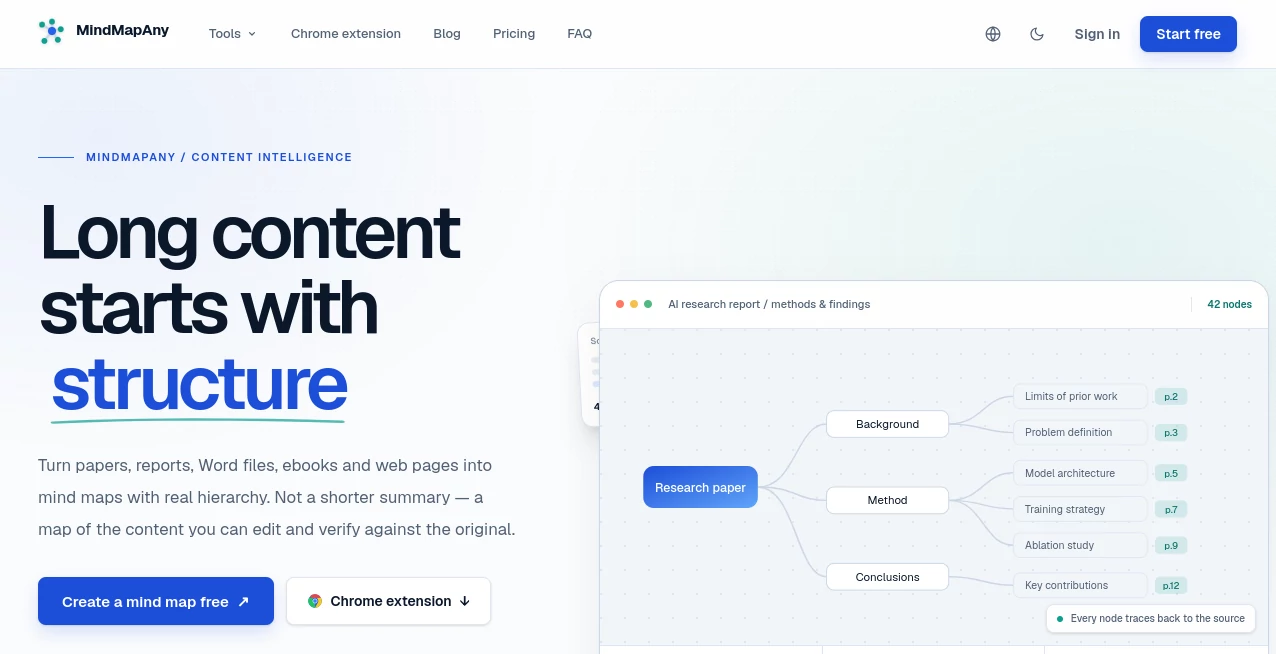
Long documents are often difficult to understand because the important ideas are scattered across dozens or even hundreds of pages. MindMapAny takes a different approach: instead of simply shortening the material, it turns long content into an editable visual structure that helps users see how ideas connect. It can work with research papers, reports, Word documents, ebooks, presentations, web pages, and pasted text, making it a practical option for students, researchers, professionals, and anyone who regularly works with information-heavy material.
One particularly useful aspect is traceability. Generated nodes can point back to the original location in the source, so users can move from an interesting idea in the map to the relevant page, section, or slide. That makes the experience much more useful for research and verification than a conventional summary.
Key Features
- Convert PDFs, DOCX files, EPUB books, PPTX presentations, TXT, Markdown, pasted text, and public web pages into mind maps.
- Create hierarchical maps with up to five levels of depth.
- Keep source references attached to generated nodes.
- Edit generated maps directly using keyboard shortcuts.
- Export maps as PNG, SVG, or Markdown.
- Create public read-only sharing links when needed.
- Generate maps in more than 30 output languages.
- Choose different depth settings depending on the desired level of detail.
- Process different content types through a shared extraction and mapping workflow.
User Interface
The interface is designed around a visual canvas rather than a traditional document editor. After content is processed, users can rename nodes, add children or siblings, collapse branches, remove information, and adjust the presentation of the map. Keyboard shortcuts make quick editing particularly convenient when refining a large structure.
The workflow is straightforward: provide the source material, select the desired output settings, allow the system to build the hierarchy, and then refine the result. For someone turning a lengthy research paper into a study outline, the ability to edit the map instead of starting over can save considerable time.
Accuracy & Performance
Accuracy is supported by the way source locations are handled. PDF nodes can retain page references, PowerPoint content can retain slide positions, and web content can use section anchors. These locations are established during the extraction process rather than being generated as part of the final text, which gives users a more dependable way to check the original material.
Long documents are processed section by section before the resulting structures are combined. Duplicate topics can be consolidated and disconnected nodes removed, helping the final map remain coherent instead of becoming a simple collection of extracted phrases.
Capabilities
The platform supports seven primary input routes, including PDF, DOCX, EPUB, PPTX, TXT, Markdown, and web links, along with pasted text. It can produce maps in more than 30 languages, with the source and output languages handled independently.
There are also some sensible limitations. Scanned PDFs currently require OCR before use, while audio, video, and legacy DOC files are not supported. Web pages that require authentication, anti-bot access, or entirely client-side rendering may also be unavailable for extraction. These limitations are clearly defined, which makes it easier to understand when the tool is a good fit.
Security & Privacy
Generated mind maps belong to the user, and maps can be exported or deleted. Public sharing is disabled by default, meaning a generated map does not automatically become accessible to other people. Users must deliberately enable a public link when they want to share a read-only version.
Use Cases
Research and academic work: Researchers can turn papers, reports, and white papers into structured maps and use source references to return to the relevant pages when checking findings or methodology.
Studying: Students can transform long reading materials into visual outlines, making it easier to identify major concepts and relationships before studying individual sections in detail.
Business documents: Reports, specifications, proposals, and internal documentation can be mapped into a structure that is easier to review during meetings or planning sessions.
Books and ebooks: EPUB files can be organized around their chapter structure, providing a high-level view of a book without losing the connection to its original organization.
Presentations: Training decks, conference presentations, and proposals can be converted into maps based on their slide order, helping users quickly understand the overall narrative.
Web research: Articles and documentation can be transformed into structured maps, which is useful when researching a subject across long online resources.
Pros and Cons
- Pros: Supports many document formats and web content.
- Pros: Source locations make generated information easier to verify.
- Pros: Maps remain editable after generation.
- Pros: Supports more than 30 output languages.
- Pros: PNG, SVG, and Markdown export options are available.
- Pros: Public sharing is optional and disabled by default.
- Cons: Scanned PDFs require OCR first.
- Cons: Audio, video, and legacy DOC files are not currently supported.
- Cons: Some JavaScript-heavy or protected web pages cannot be extracted.
Pricing Plans
The free plan costs nothing and provides 30 credits after registration. It supports common input types, up to 60,000 characters, PDFs of up to 30 pages, editing, exporting, and public sharing.
The Basic plan is aimed at regular users and includes 1,000 credits per month, support for documents up to 150,000 characters, PDFs of up to 60 pages, and all available input types.
The Pro plan costs $10.79 per month when billed monthly and is designed for deeper research and longer documents. It includes 2,000 credits per month, a higher-quality AI model, support for up to 800,000 characters, PDFs of up to 200 pages, and detailed map mode.
The Unlimited plan costs $16.19 per month when billed monthly and removes monthly credit counting under a fair-use policy. It supports up to 2,000,000 characters and PDFs of up to 200 pages, while including the capabilities of the Pro plan. Annual billing offers a 40% saving on the listed monthly rates.
How to Use MindMapAny
- Sign up for a free account.
- Paste text, upload a supported document, or provide a public web page.
- Select the output language, depth, and purpose for the map.
- Let the system extract and organize the source content.
- Review the generated hierarchy and verify important nodes using their source references.
- Edit nodes, reorganize branches, or collapse sections as needed.
- Export the finished map as PNG, SVG, or Markdown, or create a public sharing link.
Comparison with Similar Tools
Many AI-powered summarization products focus primarily on producing shorter versions of documents. This approach is useful when the goal is to save reading time, but it can make it harder to understand the relationship between individual ideas or verify where a particular point came from.
This platform takes a more structural approach. Its emphasis on hierarchy, editable nodes, and source-level references makes it especially interesting for people who need to explore and verify long material rather than simply receive a short summary. For example, a researcher reviewing a 100-page report may benefit more from seeing the report's structure and jumping directly to supporting pages than from reading a few paragraphs of generated text.
The result is not necessarily a replacement for reading the original source. Instead, it works well as a visual navigation layer that helps users decide what deserves closer attention.
Conclusion
For anyone who regularly deals with lengthy documents, research material, presentations, or online articles, turning a large body of information into a clear hierarchy can make the first stage of research much easier. The combination of multiple input formats, traceable source locations, editable maps, multilingual output, and flexible exports gives this tool a practical advantage over simple summarization workflows.
Its strongest appeal is the balance between overview and verification. Users can see the big picture first while still having a path back to the original material when a detail matters. The free starting allowance also makes it easy to test the workflow before committing to a paid plan.
Frequently Asked Questions (FAQ)
What file formats are supported?
Supported sources include PDF, DOCX, EPUB, PPTX, TXT, Markdown, pasted text, and public web pages. Individual files can be up to 20MB.
Can I edit a generated mind map?
Yes. Nodes can be renamed, added, removed, collapsed, and reorganized directly on the canvas. Layout, typography, color themes, and branch numbering can also be adjusted.
Can I verify information against the original document?
Yes. Source locations are attached to nodes where applicable. For example, PDF nodes can reference page numbers and PowerPoint nodes can reference slide positions.
Does it support different languages?
Yes. Maps can be generated in more than 30 output languages, and the source language does not have to match the selected output language.
Is there a free plan?
Yes. New users receive 30 credits after signing up. The free plan supports common input types and includes editing, exporting, and public sharing features.
AI Documents Assistant , AI PDF , AI Mind Mapping , AI Research Tool .
These classifications represent its core capabilities and areas of application. For related tools, explore the linked categories above.

MindMapAny Alternatives Product

TO MD

ModelsLab

UPDF AI

Docubix

CitedSpy
markdown to …

Serplux

JFIF to JPG …

Create Filla…
