


















Mirra
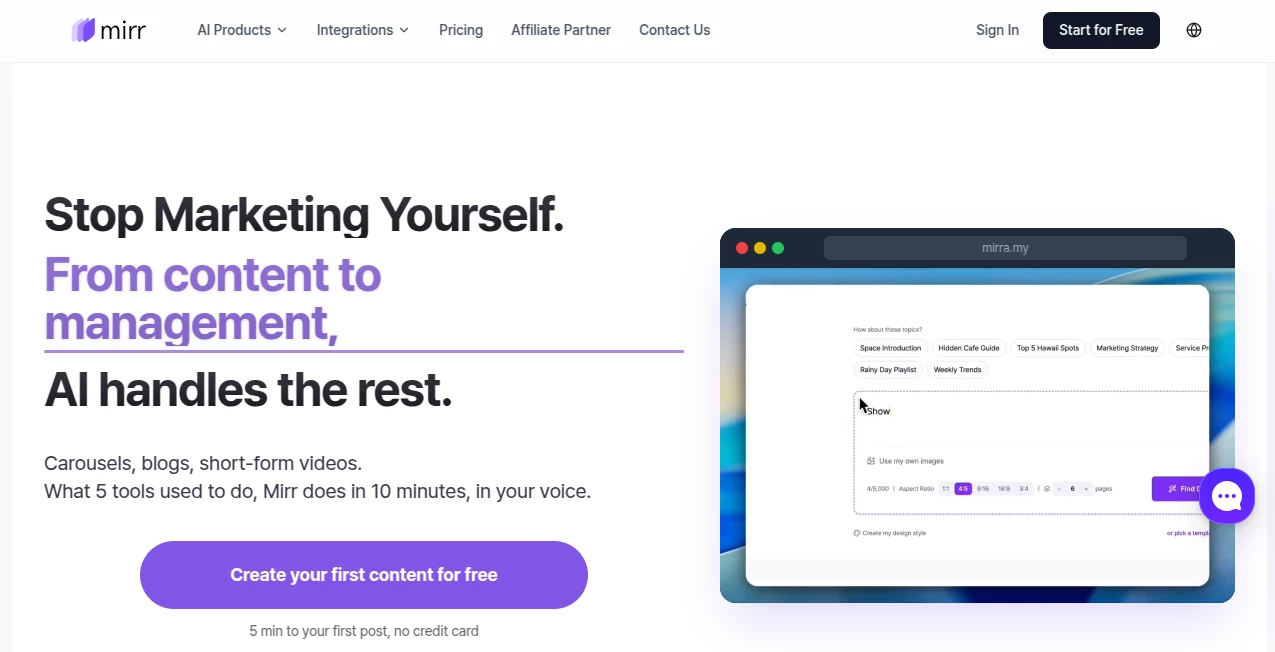
What is Mirra?
Running a business or personal brand means constant pressure to create content, post consistently, reply to comments, and somehow still find time for your actual work. Most people burn out trying to do it all. This platform changes that equation completely. You give it one idea or link, and it generates carousels, blog posts, short videos, and perfectly toned social captions—all while learning your unique voice. Then it schedules, publishes, manages comments, and even flags sales opportunities. It feels like hiring a small, extremely capable marketing team that never sleeps and actually gets you.
Introduction
I’ve talked to too many founders who spend their evenings copy-pasting between ChatGPT, Canva, and scheduling tools, only to watch engagement drop when life gets busy. Mirr was built for exactly those moments. It doesn’t just generate text—it learns your brand, designs carousels that match your style, creates short videos with narration, writes platform-specific captions, schedules everything, and even handles basic comment replies. The first time you approve a full week of content in under ten minutes, something clicks: marketing doesn’t have to steal your life anymore. It’s become the favorite “secret weapon” for busy creators, consultants, and small teams who want to show up consistently without sacrificing their main work.
Key Features
User Interface
The dashboard feels calm and purposeful. One central prompt area where you type an idea, paste a URL, or upload a document. From there you choose formats—carousel, blog, short video, social post—and it generates everything at once. Approval workflow is dead simple: review, tweak with comments, or hit publish. The mobile experience is excellent too—you can approve content or reply to important DMs while waiting for coffee. It never feels overwhelming; it’s designed for people who already have full plates.
Accuracy & Performance
What stands out is how well it captures your voice after a short learning period. The carousels look professionally designed, the blog posts read naturally with good structure, and the short videos actually sync narration with visuals. Generation is fast enough that you stay in flow, and the consistency across platforms is impressive—LinkedIn feels professional, Instagram feels engaging, Threads feel conversational. Users regularly mention that after a few rounds of feedback, the output becomes scarily close to what they would have written themselves.
Capabilities
One input becomes multiple formats: beautiful carousels with custom design references, long-form SEO blogs, short-form videos with AI narration and music, and platform-optimized social posts. It plans content calendars based on trends and your past performance, schedules and publishes across Instagram, Threads, LinkedIn, X, YouTube, and TikTok, manages comments and DMs (flagging sales leads), and gives clear analytics with AI insights you can chat with. Separate workspaces and team approval flows make it work whether you’re solo or running multiple brands.
Security & Privacy
Your brand data and content stay secure with proper workspace separation and approval controls. It only accesses connected social accounts with your explicit permission, and you maintain full control over what gets published. For business owners sharing client work or sensitive ideas, that transparency and control matter a lot.
Use Cases
A consultant uploads case studies and gets a full month of LinkedIn carousels and Threads posts that sound exactly like her. An e-commerce founder turns product photos into Reels and carousels that drive actual sales while she focuses on operations. A small agency manages ten client accounts with one person because Mirr handles creation and basic engagement. A coach generates weekly blog posts and social content from voice notes during her commute. The common theme: people reclaim their time while actually increasing output and consistency.
Pros and Cons
Pros:
- Truly learns and replicates your brand voice over time.
- One prompt → multiple formats saves enormous time.
- Comment and DM management turns engagement into real opportunities.
- Beautiful, on-brand carousels without needing a designer.
- Works across major platforms in one dashboard.
Cons:
- Best results come after it learns your style (a few rounds of feedback help).
- Very niche or highly technical content may need more human editing.
- Advanced team and analytics features live in higher plans.
Pricing Plans
It starts with a generous free trial so you can experience the difference without risk. Paid plans are reasonable for the time they save—starting low and scaling with usage. Many users say the monthly cost is less than what they used to spend on a part-time VA or multiple tools combined, while delivering far more consistent output.
How to Use Mirr
Sign up and connect the social accounts you want to manage. Upload a few examples of your past content or describe your brand voice so it learns faster. Type an idea, paste a link, or record a quick voice note. Choose the formats you want and let it generate. Review the drafts (edit or leave feedback), approve, and schedule or publish. Over time it gets smarter, suggesting topics and improving based on what performs. The whole process—from idea to scheduled content—can take as little as 5–10 minutes.
Comparison with Similar Tools
Most AI writers stop at text. Design tools stop at pretty images. Schedulers only post. This one connects everything into one intelligent workflow that actually learns you. Where others require constant prompting and copy-pasting, Mirr builds a living understanding of your brand and handles the full cycle. It’s less about replacing you and more about removing everything that drains you—so you can focus on what only you can do.
Conclusion
Marketing shouldn’t feel like a second full-time job. When done right, it should support your main work, not steal from it. This platform makes that possible by turning scattered, exhausting tasks into one smooth, intelligent system that improves with time. The founders and creators using it aren’t necessarily spending more time on marketing—they’re spending far less while getting better results. That shift is worth experiencing. If you’re tired of the content treadmill, this might be the off-ramp you’ve been looking for.
Frequently Asked Questions (FAQ)
How long does it take to learn my brand voice?
Usually noticeable improvement after 3–5 pieces of feedback. The more you use it, the better it gets.
Can I edit the AI content before publishing?
Yes—full editing is built in, and it learns from your changes.
Which platforms does it support?
Instagram, Threads, LinkedIn, X (Twitter), YouTube, TikTok, and blogs.
Is it suitable for teams?
Absolutely—workspaces, approval flows, and team invites are designed for collaboration.
Do I need to connect all my accounts?
No—you can start with one channel and add others whenever you’re ready.
AI Content Generator , AI Social Media Assistant , AI Digital Marketing Generator , AI Marketing Plan Generator .
These classifications represent its core capabilities and areas of application. For related tools, explore the linked categories above.

Mirra Alternatives Product
LeadAny

Linkedora
Schema Synth
Discord Time…

genie 4

Liftburst

SonicPost

Trending AI …

SEO Tools Hu…
