

















Modelfy
What is Modelfy?
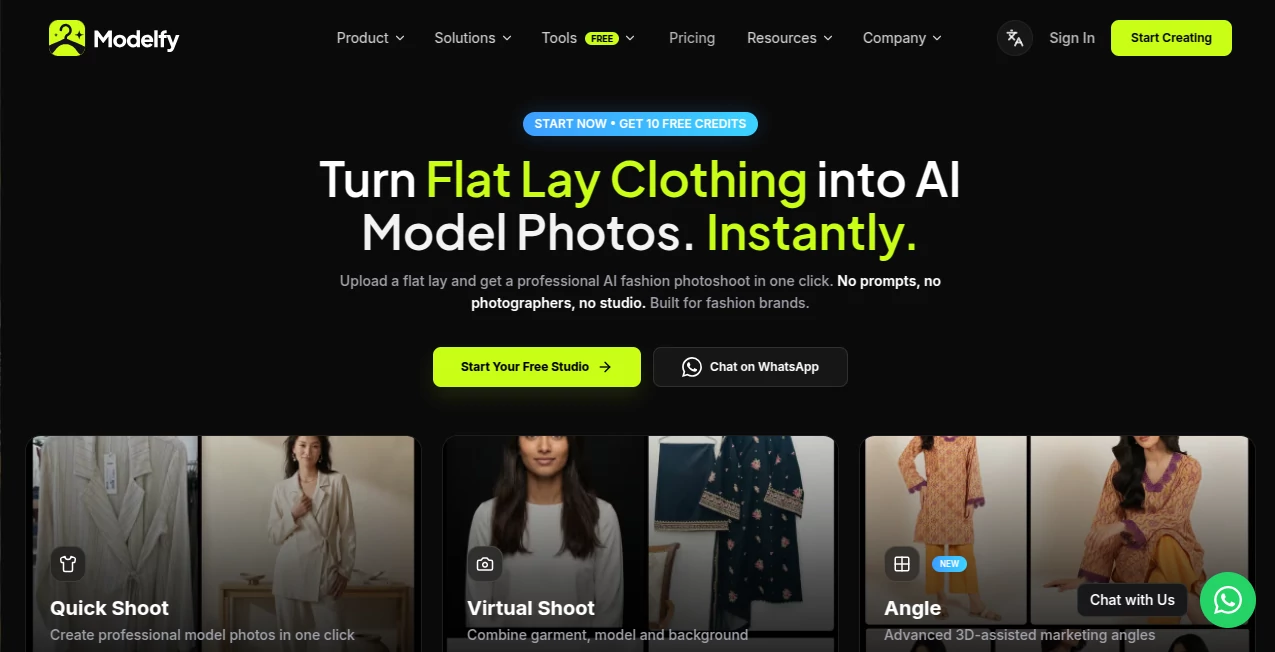
Running a fashion brand means photos are everything, but traditional photoshoots are expensive, slow, and stressful. You wait for models, book studios, deal with lighting issues, and still end up with only a handful of shots. This tool changes the game completely. You upload a simple flat lay or hanger photo of your garment, pick a model and scene, and get studio-quality images of real-looking models wearing your clothes—in seconds. No prompts to write, no expensive production days, no reshoots. Just your garment looking its best on a variety of models and backgrounds. Many founders say it feels like having an entire fashion photography team on demand.
Introduction
Modelfy was built specifically for clothing brands, boutiques, and independent designers who need beautiful on-model photos without the usual headaches. Instead of generic AI image tools that require complex prompting and still produce weird results, this one understands fashion—fabric drape, fit, stitching details, and brand aesthetic. You don’t fight with the tool. You upload your flat lay, choose your preferred model and setting, and get campaign-ready shots that actually look professional. It’s become a favorite for small brands scaling their catalogs and larger ones cutting photography costs dramatically while maintaining quality.
Key Features
User Interface
The experience is refreshingly simple. Big upload area for your garment photo, clean model selector with diverse body types and ethnicities, and scene/background options. Everything is visual—no long forms or confusing settings. You see previews quickly so you can adjust and regenerate without frustration. The whole flow feels designed by people who actually work in fashion rather than general AI engineers.
Accuracy & Performance
The AI pays close attention to how clothes actually sit on a body—realistic folds, natural drape, accurate fit across different sizes. It preserves your garment’s details, colors, and branding without distorting them. Generation is fast, usually under 30 seconds per image, and outputs are high-resolution and consistent. Brands report that the photos look so good they often replace or supplement their traditional shoots.
Capabilities
Transform flat lays or hanger shots into on-model photos, virtual try-on across multiple models and sizes, different backgrounds and scenes (studio, lifestyle, urban, beach, etc.), multiple angles, and even macro detail shots for fabric texture. You can generate entire lookbooks from a single garment upload. The results are ready for your online store, social media, ads, or lookbooks with minimal or no editing needed.
Security & Privacy
Your designs stay yours. Uploaded garments are processed securely and not used to train public models. You control what gets generated and shared. For emerging and established brands alike, knowing your latest collection stays protected until you’re ready to launch brings real peace of mind.
Use Cases
A small clothing brand uploads new arrivals as flat lays in the morning and has dozens of on-model lifestyle shots ready for their Shopify store by lunch. An independent designer tests how different models and settings make a piece look before deciding on final samples. A boutique owner creates seasonal campaigns without booking expensive photoshoots, saving thousands while keeping a fresh feed. The common benefit is speed, consistency, and dramatically lower costs while still looking premium.
Pros and Cons
Pros:
- Extremely fast turnaround from flat lay to professional on-model photos.
- Strong understanding of fashion-specific details like fabric behavior and fit.
- Diverse, realistic AI models across body types and ethnicities.
- No prompt engineering required—just upload and choose.
- Significant cost and time savings compared to traditional photoshoots.
Cons:
- Best results come from clean, well-lit flat lays or hanger shots.
- Highly complex or avant-garde designs may need more iterations.
- Free tier has limited credits; heavier use requires a paid plan.
Pricing Plans
It starts with a generous free tier so you can test the quality on your own products. Paid plans offer more monthly credits, higher resolution, priority generation, and commercial licensing. Pricing is straightforward and scales with your needs—many brands find it pays for itself after replacing just one traditional photoshoot.
How to Use Modelfy
Upload a clear flat lay or hanger photo of your garment. Browse the model library and pick the ones that match your brand aesthetic. Choose a background or scene style. Click generate and review the results. Download the ones you love in high resolution. For multiple garments or variations, use batch mode on paid plans. The entire process is quick enough that you can refresh your entire catalog in a single session if needed.
Comparison with Similar Tools
General AI image tools require heavy prompting and still struggle with realistic clothing drape and fit. This one was purpose-built for fashion, so it consistently delivers better garment accuracy and natural-looking results without the usual prompt battles. It sits in a sweet spot—more specialized and reliable than broad tools, more accessible and affordable than booking real photoshoots.
Conclusion
Great fashion photos shouldn’t be reserved for brands with big budgets and long production timelines. This tool makes professional-looking imagery fast, affordable, and repeatable, letting smaller brands compete visually with bigger players. When your products look as good as you know they are, customers notice—and sales follow. For anyone building a clothing brand today, it’s one of the smartest tools available to scale visually without breaking the bank.
Frequently Asked Questions (FAQ)
How good do my flat lay photos need to be?
Clean, well-lit photos work best, but even decent phone shots often produce strong results.
Can I use the images commercially?
Yes—paid plans include full commercial usage rights for your brand.
How realistic are the AI models?
Very. They’re designed to look like real people with natural skin, proportions, and poses.
Is there a limit on free generations?
Yes, the free tier gives you a good number of credits to test with your own products.
Can I generate photos in different environments?
Absolutely—studio, lifestyle, urban, beach, and more scenes are available.