
















What is moleculardocking.online?
Molecular docking is an important step in computational drug discovery, but setting up a reliable workflow can take more time than expected. Preparing protein structures, converting ligand formats, configuring software dependencies, and organizing results often require a fair amount of technical work before the actual research begins.
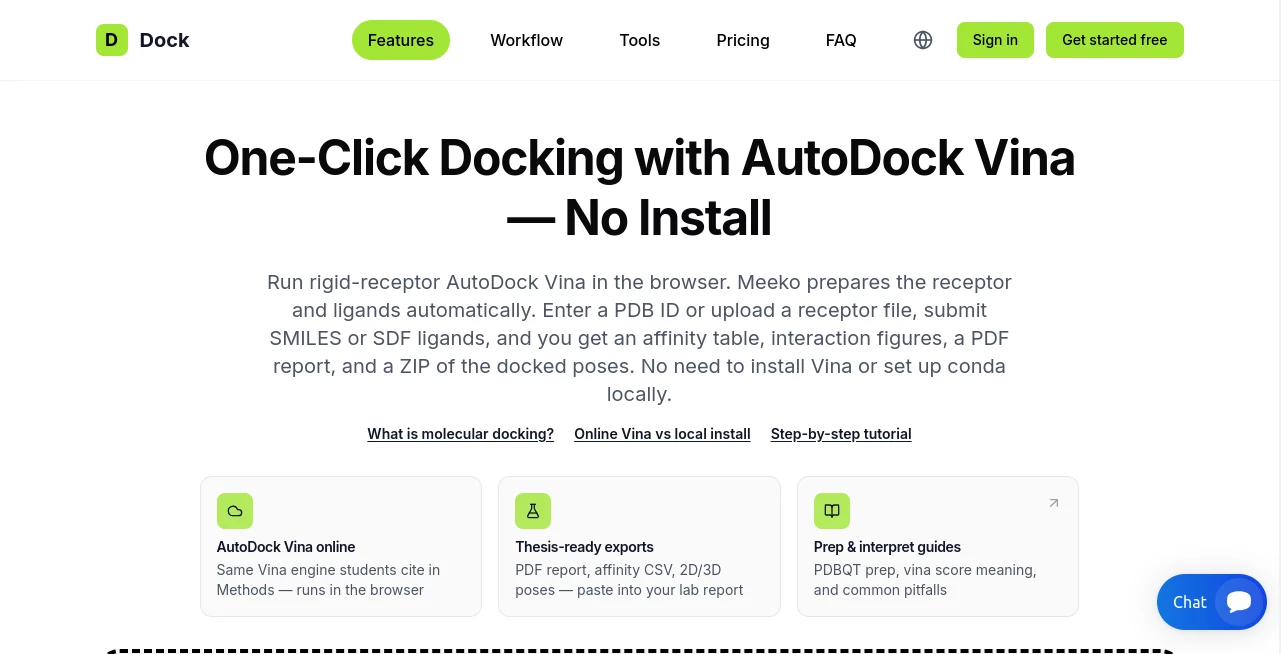
This online molecular docking platform makes that process considerably more accessible. Built around AutoDock Vina, it provides a browser-based workflow for predicting how small molecules may bind to protein targets. Researchers can enter a PDB identifier or upload a receptor structure, supply compounds as SMILES strings or SDF files, and run docking calculations without installing a local software environment.
What makes the platform particularly useful is its focus on the complete research workflow rather than docking scores alone. It combines structure preparation, binding affinity estimates, interaction diagrams, pose quality checks, and downloadable reports. For students working on a thesis or researchers screening a collection of compounds, having these outputs organized in one place can save considerable preparation time.
Key Features
User Interface
The browser-based interface follows a practical sequence: enter the protein, add the ligands, review the setup, and launch the calculation. Users can retrieve a receptor structure using its four-character PDB identifier or upload a prepared PDB file. Ligands can be entered individually or supplied in batches using SMILES notation or an SDF file.
Before credits are spent, the setup review helps identify potential problems with the receptor, ligand structures, and binding-site definition. A three-dimensional preview displays the receptor and docking box, making it easier to inspect whether the selected region is appropriate for the intended experiment.
Several advanced options are available without requiring users to assemble a command-line pipeline. These include protonation pH settings, selected metal or cofactor preservation, custom docking boxes, binding-site residue anchors, and co-crystal redocking checks. The result is a workflow that feels approachable for newcomers while retaining options that experienced researchers may appreciate.
Accuracy & Performance
The platform uses AutoDock Vina 1.2.7 with a documented set of docking parameters, including an exhaustiveness setting of 8 and nine output modes. Meeko handles receptor and ligand preparation, while RDKit supports three-dimensional ligand generation and geometry optimization. These established scientific tools provide a recognizable foundation for computational screening.
Results include predicted binding affinities, alternative ligand poses, interaction analysis, and automated pose quality checks. Where available, PoseBusters evaluates structural plausibility, while PLIP identifies protein–ligand interactions. A co-crystal redocking check can also compare a predicted pose with a known crystallographic pose.
The website reports more than 12,450 completed docking runs, a 99.9% Vina job success rate, and an average processing time of 42 seconds in its displayed production metrics. These are platform-reported figures rather than independently verified benchmarks, and actual processing time will depend on the job and server workload.
It is important to distinguish computational performance from scientific accuracy. A favorable docking score does not establish that a compound binds experimentally, and predicted poses can be affected by protein preparation, protonation states, binding-site selection, and the limitations of a rigid-receptor model. Experimental validation and comparison with published evidence remain essential.
Capabilities
The platform covers several stages of a typical structure-based screening workflow:
- Automated preparation of receptor and ligand structures for docking.
- Single-compound docking and batch screening of multiple ligands.
- Support for PDB receptor files, PDB identifiers, SMILES strings, and SDF ligand collections.
- Binding-site selection using a co-crystal ligand, predicted pockets, residue anchors, or custom coordinates.
- Export of the top three docking poses for each successfully docked ligand.
- Protein–ligand interaction diagrams and binding-site overview images.
- Pose quality checks and confidence indicators.
- Computational ADMET summaries, including Lipinski, Veber, and QED-related information.
- Sortable batch results with affinity scores, quality checks, and selected molecular properties.
- PDF reports, affinity tables, CSV exports, and ZIP archives containing structures and supporting files.
- Optional PyMOL-generated binding-site figures for publication-oriented illustrations.
- Reproducibility information covering software versions, docking settings, binding-box coordinates, and protonation conditions.
Batch jobs can accommodate up to 300 ligands, subject to the applicable plan and credit balance. Jobs containing multiple ligands can use parallel processing, helping researchers compare candidate compounds more efficiently. A single unsuccessful ligand does not necessarily prevent the remaining compounds in a batch from being processed.
The downloadable ZIP archive is especially valuable for researchers who want to continue working in external tools such as PyMOL or Chimera. Rather than receiving only a score table, users can retain the docked structures, prepared receptor, interaction data, and run metadata for further examination.
Security & Privacy
The service describes its workflow as secure and privacy-focused, stating that submitted research data is processed securely and cleared immediately after job completion. However, its result-retention policy also specifies that completed reports and files remain available for a limited period depending on the selected plan.
Users should therefore review the current privacy policy and retention terms before uploading unpublished research, proprietary molecular structures, or other confidential material. Downloading the results archive promptly is a sensible precaution, particularly when working on projects with limited storage windows. Researchers handling sensitive data should also confirm whether the service's processing arrangements meet their institution's requirements.
Use Cases
Drug discovery and lead identification: Researchers can compare candidate compounds against a selected protein target and prioritize molecules for additional investigation. Predicted affinities and interaction patterns can help organize an initial shortlist, although they should not be treated as proof of biological activity.
Virtual screening: A collection of SMILES strings or an SDF file can be screened against the same receptor. The resulting sortable table helps identify compounds worth examining more closely, especially when combined with molecular properties and pose quality indicators.
Academic projects and thesis research: Students can produce docking figures, affinity tables, structure files, and report-ready Methods information without spending hours configuring a local software environment. The included documentation can also help explain the assumptions behind the calculations.
Medicinal chemistry and SAR analysis: Researchers comparing related compounds can examine how changes in molecular structure correspond to differences in predicted poses, scores, and protein contacts. This can support structure–activity relationship discussions and help generate hypotheses for subsequent experiments.
Structural biology and target assessment: The platform can support exploratory studies involving known protein structures, predicted binding pockets, and selected receptor residues. Co-crystal redocking checks offer an additional way to investigate whether the chosen setup can reproduce a known ligand pose.
Computational toxicology: Users can examine potential interactions with selected off-target proteins and review basic computational drug-likeness indicators. Such analyses can inform early research questions but cannot replace experimental toxicology or formal safety assessment.
Pros and Cons
Pros
- No local installation of AutoDock Vina, Meeko, or a conda environment is required.
- Automated receptor and ligand preparation reduces repetitive technical work.
- Single-ligand and batch workflows support different research needs.
- Interaction diagrams, quality checks, and basic ADMET summaries provide more context than an affinity score alone.
- PDF and ZIP exports make it easier to preserve results and continue analysis offline.
- Documented software versions and run settings support reproducibility.
- A free starting credit allows users to test a small docking job before purchasing a plan.
Cons
- The docking workflow uses a rigid receptor, so protein side-chain flexibility and induced-fit docking are not supported.
- Computational predictions require careful interpretation and independent scientific validation.
- Credits limit the number of ligands that can be processed, particularly for larger screening projects.
- Result files are retained for a limited period, depending on the subscription.
- Advanced interpretation still requires familiarity with protein structures, binding sites, molecular interactions, and docking limitations.
- Optional publication figures and AI-generated manuscript assistance consume additional credits.
Pricing Plans
The service uses a credit-based model, with a free entry option, monthly subscriptions, and one-time credit packs. The following prices reflect the plans displayed on the official website and may change over time.
- Free Plan — $0: One credit at signup, no credit card required, and seven-day result storage. The credit is a one-time allocation rather than a recurring monthly allowance.
- Student Plan — $9.99 per month: Five credits per month and 14-day result storage, designed for coursework and smaller academic projects.
- Research Plan — $24.99 per month: Sixteen credits per month, two concurrent jobs, priority queue access, and 30-day result storage. This plan suits researchers running regular small-scale studies.
- Lab Plan — $49.99 per month: Thirty-five credits per month, five concurrent jobs, priority queue access, and 90-day result storage for research groups with more frequent workloads.
- Single Run Pass — $7.99 one time: Three credits for occasional docking work without a recurring subscription.
- Screening Pack — $19.99 one time: Ten credits for larger screening tasks or several project reports, without a recurring subscription.
All plans use the same core docking pipeline and provide the main result deliverables. Credits are deducted when a docking job is submitted. A job with one to three ligands costs one credit; larger jobs generally cost one credit per five ligands, rounded up. Optional PyMOL publication figures cost an additional 0.5 credit per job.
Subscription credits reset at the start of each billing period, whereas credits purchased through one-time packs remain available until used. Results are stored for seven, 14, 30, or 90 days on the Free, Student, Research, and Lab plans, respectively. Users should save their reports and ZIP archives before the retention period ends.
How to Use the Platform
- Choose a protein receptor. Enter a four-character PDB identifier to retrieve a structure from the RCSB Protein Data Bank, or upload your own cleaned PDB file.
- Add the ligand structures. Enter a SMILES string for a single compound, provide multiple SMILES entries for batch screening, or upload an SDF file containing several molecules.
- Review ligand and receptor preparation. Check the molecular information, warnings, selected protein chain, protonation settings, and any relevant cofactors or metals.
- Define the binding site. Use a co-crystal ligand, a predicted pocket, residue anchors, or custom coordinates. Inspect the three-dimensional docking-box preview before proceeding.
- Validate the setup. Run the free setup review to identify possible structural or configuration issues before spending credits.
- Launch docking. Confirm the number of ligands and available credits, then submit the job. Enable optional redocking checks or PyMOL figures when appropriate for the research question.
- Examine the results. Compare affinity estimates, predicted poses, interaction diagrams, pose quality indicators, and computational ADMET summaries. Investigate warnings instead of relying solely on the highest-ranked score.
- Export and preserve the results. Download the PDF report and results ZIP, including the structural files and run metadata, for further analysis and research documentation.
For the most reliable interpretation, start with a well-characterized protein structure and a defensible binding-site definition. If a co-crystal ligand is available, a redocking check can provide useful context for evaluating the setup. Record the chosen parameters and compare computational findings with published research or experimental evidence.
Comparison with Similar Tools
Several established tools can perform molecular docking, but they differ in accessibility, flexibility, and the amount of preparation required.
Local AutoDock Vina: Running Vina locally offers direct control over files, parameters, scripting, and integration with custom pipelines. The browser-based alternative simplifies installation and combines preparation, docking, and reporting in a single workflow. Researchers who need extensive customization or flexible-receptor calculations may still prefer a local environment.
GNINA: GNINA adds machine-learning-based scoring and related capabilities to structure-based docking workflows. It may be attractive when researchers want to investigate alternative scoring approaches, although setup and computational requirements can be more involved. Its results should be interpreted according to its own methodology rather than compared with Vina scores as if they were identical measurements.
DiffDock: DiffDock uses a diffusion-based approach to predict protein–ligand binding poses. It offers a different computational methodology from conventional Vina docking, making it useful for researchers exploring machine-learning approaches. Pose-generation methods and scoring systems differ, so results require method-specific evaluation.
Other molecular docking servers: Browser-based research services can offer varying combinations of receptor preparation, docking engines, interaction analysis, and report exports. The practical difference here is the integrated workflow around AutoDock Vina, batch screening, pose quality checks, ADMET summaries, and downloadable research files.
For students and researchers who want a recognizable docking engine without managing a local installation, this platform offers a convenient starting point. Users who require flexible receptor side chains, induced-fit methods, covalent docking, or highly customized computational pipelines should evaluate whether a more specialized tool is necessary.
Conclusion
This browser-based molecular docking service brings several useful research steps together: receptor and ligand preparation, AutoDock Vina calculations, interaction analysis, pose quality checks, basic ADMET summaries, and structured exports. Its combination of a guided setup review and downloadable scientific files makes it particularly practical for students, academic researchers, and small teams conducting preliminary virtual screening.
The credit-based pricing also provides a straightforward way to begin with a small experiment and move to larger workloads when needed. Researchers can test the setup before committing credits, compare multiple compounds, and retain the files required for subsequent analysis.
Its main limitation is also an important scientific consideration: the workflow uses rigid-receptor docking, and its predictions do not replace experimental evidence. Within that scope, it offers an accessible and well-documented route from molecular structures to testable binding hypotheses, helping researchers spend less time on software setup and more time examining the scientific questions behind their results.
Frequently Asked Questions (FAQ)
1. What does the platform do?
It performs online molecular docking with AutoDock Vina to predict possible binding poses and affinity scores for small molecules interacting with a selected protein target. It also provides interaction analysis, quality checks, basic ADMET summaries, and downloadable reports.
2. Do I need to install any software?
No local installation is required for the standard browser workflow. The service handles receptor and ligand preparation and runs the docking calculations on its servers.
3. Which input formats are supported?
Users can provide a receptor through a PDB identifier or an uploaded PDB file. Ligands can be submitted as SMILES strings or an SDF file containing multiple compounds.
4. Can I screen multiple compounds in one job?
Yes. Batch screening supports multiple ligands, with a platform maximum of 300 ligands per job. The number you can process depends on the available credits and applicable plan limits.
5. Are the predicted binding affinities experimentally confirmed?
No. Docking affinities and poses are computational predictions. They can help prioritize compounds and develop hypotheses, but experimental binding assays and other appropriate validation methods are needed to establish actual biological activity.
6. Does the platform support flexible-receptor docking?
No. Its standard workflow uses a rigid receptor with flexible ligand torsions. Induced-fit docking and flexible protein side-chain calculations are not supported by this pipeline.
7. What files can I download?
Completed jobs provide an on-page report, a PDF report, and a ZIP archive containing docking poses, protein–ligand complexes, structural data, interaction information, quality-control results, and run metadata. CSV exports and figures are also available where applicable.
8. Is there a free plan?
Yes. The Free plan costs nothing and provides one credit at signup without requiring a credit card. The credit is granted once and does not refresh monthly.
9. How are docking credits calculated?
One to three ligands cost one credit per job. Larger batches generally cost one credit per five ligands, rounded up. Optional PyMOL publication figures add 0.5 credit per job, and optional AI paper-draft generation costs an additional credit.
10. How long are completed results stored?
Retention depends on the plan: seven days for Free, 14 days for Student, 30 days for Research, and 90 days for Lab. Download important files before they expire.
11. Can the results be used in a thesis or research paper?
The exported figures, affinity tables, Methods text, and run metadata can support research documentation. Researchers should independently verify the findings, cite the underlying scientific software and relevant literature, and follow their institution's rules for reporting computational methods and AI-assisted writing.
12. Is the platform suitable for beginners?
It can be a useful starting point because the browser workflow, setup validation, and documentation reduce the amount of software configuration required. Beginners should still learn the basics of protein structures, ligand preparation, binding-site selection, docking scores, and the limitations of computational predictions.