MorphLogo
What is MorphLogo?
MorphLogo is an AI-powered brand animation studio designed for turning a finished logo into polished motion without rebuilding the artwork from scratch. Instead of asking an image generator to reinterpret a brand mark, the platform works from the uploaded logo itself and creates animated sequences around it.
This makes it particularly useful for businesses, creators, marketers, agencies, and designers who already have a logo but want to give it more presence in videos, social media content, advertisements, websites, and product launches. The process is refreshingly straightforward: upload a logo, select a motion style or describe the animation you want, adjust the video settings, and generate the result.
There is also a practical advantage for people who do not want to spend hours inside professional motion-design software. There is no traditional timeline or keyframing workflow involved. For a small startup preparing a launch video, for example, creating a short animated logo can be handled in minutes rather than becoming a separate design project.
Key Features
- AI-powered logo animation from an existing logo file
- Support for PNG, JPG, JPEG, and WebP uploads up to 24MB
- Curated animation styles including liquid morph, cinematic reveal, neon pulse, hologram, 3D orbit, glitch burst, particle assembly, and more
- Prompt-based control over motion, lighting, and camera movement
- Animated outputs in MP4, WebM, GIF, and WebP formats
- 16:9, 1:1, and 9:16 aspect ratios for different publishing channels
- HD, 1080p, and up to 4K rendering depending on the selected model
- Generated sound effects that can match the selected animation
- Animations designed to preserve the uploaded logo rather than redraw it
- Watermark-free downloads on paid plans
- Commercial usage rights included with paid options
User Interface
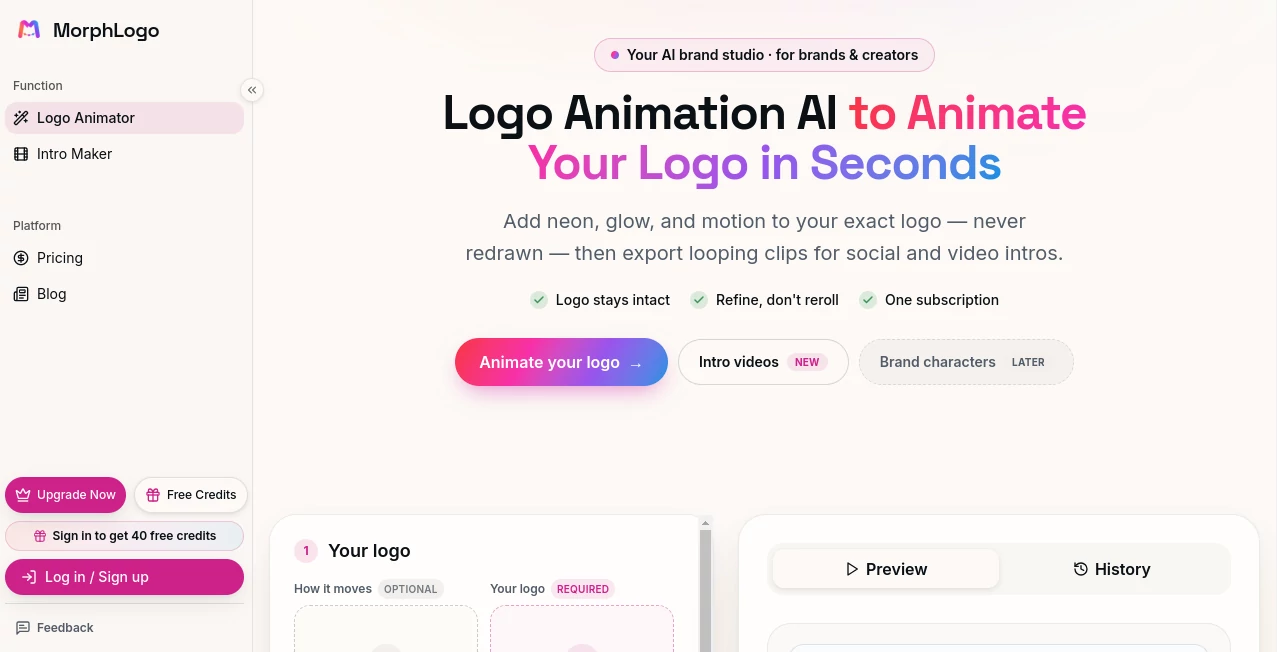
The interface keeps the workflow focused on the few decisions that actually matter. Users begin by uploading their logo and can optionally provide a brand name. They can then choose from predefined motion styles or write a custom description of how they want the logo to move.
Video controls cover important production choices such as aspect ratio, duration, quality, model, and sound. This is a useful setup for creators who want a quick result without navigating a complicated collection of animation panels.
The preview and history sections also make the workflow easier to manage when experimenting with different visual directions. A designer can try a cinematic reveal, compare it with a particle effect, and decide which version fits the brand better.
Accuracy & Performance
One of the strongest aspects of the platform is its approach to logo preservation. The uploaded logo is used as the actual starting point of the animation, helping maintain its original shape, colors, and proportions rather than generating a replacement interpretation.
Typical renders are designed to be available in roughly a minute, although higher resolutions and longer animations can require additional processing time. This makes the service especially attractive when several branding variations need to be tested during a campaign.
The available output quality also gives users room to create lightweight social clips as well as sharper animations intended for larger screens and high-resolution presentations.
Capabilities
The animation library covers a broad range of visual directions. Users can create subtle movements such as soft floating effects, or choose more dramatic treatments including energy shockwaves, liquid transformations, particle assemblies, holographic effects, chrome finishes, and glitch-style reveals.
Custom prompts add another layer of control. Instead of relying exclusively on a preset, users can describe the movement, lighting, reveal, or camera behavior they have in mind. This is helpful when a brand has a particular visual identity that does not fit neatly into a predefined animation style.
The platform can also create 3D-style presentations without requiring traditional 3D modeling. Effects such as orbiting and dimensional finishes can give a flat logo more depth while keeping the original brand mark recognizable.
Security & Privacy
When working with brand assets, privacy and ownership are important considerations. Users should review the platform's current Privacy Policy and Terms of Service before uploading sensitive or confidential materials. The service also provides commercial usage rights with its paid options, while its terms recommend reviewing AI-generated results and conducting appropriate rights checks before using an output as an official trademark or brand asset.
For ordinary marketing workflows, it is still good practice to upload only assets that you are authorized to use and to avoid submitting confidential material unless the applicable policies and terms meet your requirements.
Use Cases
- Social Media Intros: Create short animated brand marks for Instagram Reels, TikTok, YouTube Shorts, and other vertical content.
- Video Introductions: Add a polished logo reveal to the beginning or end of promotional and corporate videos.
- Product Launches: Give launch videos and announcements a recognizable branded opening.
- Website Headers: Use subtle motion to make a brand presentation more engaging on landing pages and hero sections.
- Advertising: Produce animated brand elements for digital advertisements and campaign videos.
- App and Product Branding: Create animated marks for splash screens, product demonstrations, and launch presentations.
- Creative Agencies: Produce multiple animation concepts for clients without building every variation manually.
- Startups: Add professional-looking motion branding to pitch videos, social content, and product announcements.
- Content Creators: Turn a static personal or channel logo into a reusable visual element for video content.
Pros and Cons
Pros
- Simple workflow that does not require traditional animation software
- Works directly from an existing logo
- Large selection of motion styles
- Custom prompts provide additional creative control
- Supports common video and animation formats
- Multiple aspect ratios for social and video platforms
- Rendering can be completed relatively quickly
- Up to 4K output is available depending on the model
- No watermark on paid-plan downloads
- Commercial use is included with paid options
Cons
- Advanced animation control is more limited than working directly in professional motion-design software
- Higher-quality and heavier rendering can consume more credits
- Users who need highly precise frame-by-frame animation may still prefer traditional editing tools
- Commercial downloads require a paid option after the free generation
Pricing Plans
The service currently offers a free generation for users who want to test the experience without providing a credit card. Downloading generated results requires a paid plan.
- Lite: $24.17 per month with 1,000 credits, approximately 8 HD clips per month, Studio engine and 4K support, all listed export formats, unlimited downloads, no watermark, commercial use, and early access to new features.
- Pro: $32.50 per month with 2,400 credits, approximately 19 HD clips or 2 4K clips per month, plus the features included in Lite.
- Max: $49.17 per month with 5,000 credits, approximately 39 HD clips or 4 4K clips per month, plus the same core feature set.
Annual billing is also available with a displayed 20% discount. Users can cancel, upgrade, or downgrade through their account settings. One-time credit packs are available for users who need additional generation capacity without waiting for the next billing cycle.
How to Use the Tool
- Upload a logo in PNG, JPG, JPEG, or WebP format. Transparent PNG files are recommended when a clean background-free animation is desired.
- Choose an animation style such as cinematic reveal, liquid morph, neon pulse, 3D orbit, particle assembly, or another available effect.
- Use the custom prompt option if you want to describe specific movement, lighting, or camera behavior.
- Select the desired aspect ratio, duration, quality, and model.
- Optionally add a generated sound effect that complements the animation.
- Generate the animation and review the preview.
- Download the finished animation in a supported format when your plan allows downloads.
Comparison with Similar Tools
Traditional logo animation usually involves a timeline-based application, keyframes, masks, effects, and a fair amount of manual adjustment. That approach offers excellent control, but it can be excessive for someone who simply needs a short branded intro.
Generic AI image and video generators take a different route. They can produce impressive visual concepts, but regenerating a recognizable logo through a prompt may introduce unwanted changes to lettering, proportions, colors, or other brand details.
This platform occupies a useful middle ground. It is designed specifically around an existing logo and focuses the AI generation process on movement, lighting, effects, and presentation. For quick marketing animations, social intros, and branded video elements, that narrower focus can make the workflow considerably more convenient.
Conclusion
Creating an animated logo used to mean either hiring a motion designer or learning a fairly involved animation workflow. This platform offers a much faster alternative for teams and individuals who already have a finished brand mark and simply want to bring it to life.
The combination of preset visual styles, custom prompts, multiple aspect ratios, common export formats, and high-resolution rendering gives users enough flexibility for everything from a simple social-media intro to a more polished campaign asset. The biggest advantage is that the process starts with the actual logo rather than asking AI to invent it again.
For startups, creators, marketers, agencies, and small businesses looking for professional-looking logo motion without a traditional animation timeline, it is a practical tool worth trying. The free generation also provides an easy way to judge the results before committing to a paid plan.
Frequently Asked Questions (FAQ)
Is there a free version?
Yes. New users can try one free generation without a credit card. A paid plan is required to download the generated result.
What logo formats are supported?
Supported upload formats include PNG, JPG, JPEG, and WebP, with a maximum file size of 24MB. Transparent PNG files are recommended for clean results.
Can I control how the logo moves?
Yes. You can choose a predefined animation style or describe the desired motion, lighting, and camera behavior using a custom prompt.
Can I export the animation in different formats?
Yes. Paid plans support formats including MP4, WebM, GIF, and WebP, with 16:9, 1:1, and 9:16 aspect ratios available.
Can I create a 3D-style logo animation?
Yes. Several visual styles can give a logo dimensional movement, including orbit, glass, and chrome-inspired effects, without requiring traditional 3D modeling.
Does the AI redraw my logo?
The platform is designed to animate the uploaded logo rather than replace it with a newly generated interpretation. Its workflow keeps the original logo as the starting point and aims to preserve its shape, colors, and proportions.
Can animated logos be used commercially?
Commercial use is included with paid subscription plans and one-time credit packs. Users should still review the generated result and make appropriate rights checks before using it as an official trademark or permanent brand asset.
How long does an animation take to render?
Typical animations are designed to render in around one minute. Higher resolutions and longer durations may take additional time.
AI Animated Video , AI Logo Generator , AI Video Generator , AI Graphic Design .
These classifications represent its core capabilities and areas of application. For related tools, explore the linked categories above.

MorphLogo Alternatives Product

vei4 ai
Seedance 3.0
Motion Contr…
LipPulse
Happy Horse …
LTX 2.3

Nano Banana …
soro2
Meigen AI