Muse Video
What is Muse Video?
Turning an idea into a polished video usually takes more than a good concept. You need visuals, motion, sound, editing, and often several rounds of refinement. Muse Video brings many of those steps into one creative workspace, allowing users to generate cinematic video from a text prompt or a single image while adding native audio to the result.
The platform is particularly appealing to creators, marketers, product teams, filmmakers, and small businesses that need professional-looking footage without organizing a full production. Instead of starting with a camera or a complicated editing timeline, you can begin with a simple description such as a cinematic product shot, a dramatic landscape, or a character walking through a city at night.
What makes the workflow especially interesting is the combination of generation and direction. After creating a clip, users can work with camera movement, visual styles, extensions, lip syncing, and multi-shot sequences from the same workspace. That makes it useful not only for experimenting with AI video, but also for developing actual creative projects.
Key Features
- Text-to-video generation from natural-language prompts
- Image-to-video animation for bringing still images to life
- Native synchronized audio generation
- AI lip syncing and voice generation
- Multi-shot canvas for building connected sequences
- Camera control and motion direction
- Style transfer and visual restyling
- Consistent characters and products across scenes
- 4K video upscaling and high-resolution export
- Frame interpolation for smoother motion
- Video-to-video capabilities
- Commercial usage rights for generated clips
User Interface
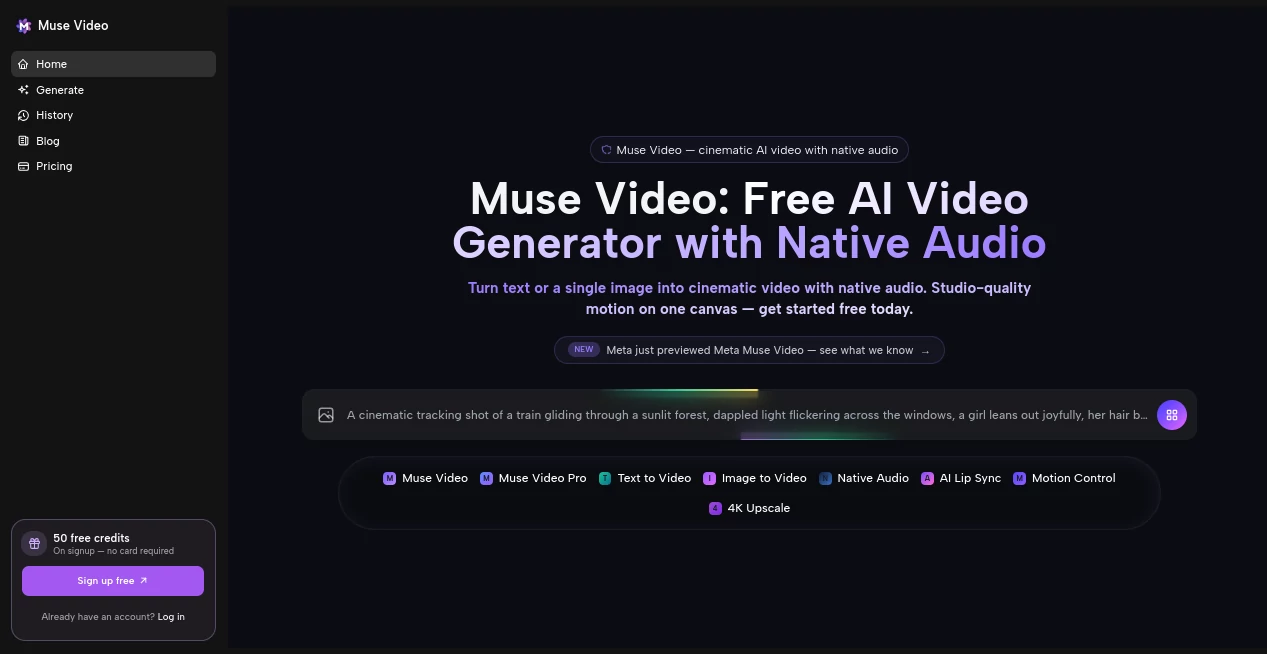
The interface is designed around a canvas-based workflow rather than forcing every project into a conventional editing timeline. Users can start with a prompt or upload an image, generate a clip, and then continue refining the result. The multi-shot canvas is particularly useful when a project needs several related scenes because different shots and variations can be arranged in the same workspace.
Templates and an inspiration gallery also make the initial learning curve easier. Someone creating their first AI video can start with examples such as product showcases, cinematic trailers, talking avatars, nature footage, or food close-ups rather than figuring out every prompt from scratch.
Accuracy & Performance
Video generation quality depends heavily on the prompt, source image, motion complexity, and selected output settings. For controlled movements, product scenes, atmospheric shots, and cinematic compositions, the platform is built to maintain temporal consistency and keep important subjects recognizable between frames.
There are still practical limitations. Very fast or complicated movements can introduce visual distortions, while small text, logos, signs, and other precise typography may not remain perfectly accurate. For professional advertising, it is sensible to add exact brand elements and legal copy during the final editing stage.
Capabilities
The platform covers several stages of AI video production. Text-to-video is useful when starting entirely from an idea, while image-to-video is better suited to situations where the visual identity of a product, character, or scene has already been established.
Native audio is another notable capability. Instead of generating silent footage and handling sound separately, the system can create synchronized ambient audio, effects, and voice elements alongside the video. Lip syncing can also be used for talking characters and avatar-style content.
For larger creative concepts, the canvas workflow allows multiple shots and alternatives to be developed together. Users can also choose between different model options, including standard, Pro, and Turbo variants, depending on the desired balance between speed and visual quality.
Security & Privacy
Users should review the platform's current privacy policy and terms before uploading confidential business material, unreleased products, client assets, or other sensitive files. As with any cloud-based generative media service, organizations handling private or commercially sensitive content should understand how uploaded inputs and generated outputs are processed and stored.
For commercial projects, the platform states that generated clips include commercial-use rights, allowing them to be used in advertising, products, films, and social media without additional attribution requirements.
Use Cases
Marketing and advertising: Marketers can quickly produce product teasers, campaign concepts, advertising variations, and visual hooks without arranging a traditional shoot. Generating several creative directions can also make A/B testing easier.
Social media: Short-form creators can turn ideas into vertical or square clips for platforms such as TikTok, Instagram Reels, and YouTube Shorts. The ability to create multiple variations is useful when a publishing schedule requires fresh content regularly.
E-commerce: A single product photograph can be transformed into a moving product presentation, lifestyle scene, rotating product shot, or promotional loop. This can be particularly useful for brands with large product catalogs.
Film and pre-production: Filmmakers can use generated sequences for mood reels, concept development, shot visualization, and previsualization before investing in a physical production.
Education: Educators and course creators can produce animated visual explanations, demonstrations, and supporting footage for lessons without having to shoot every scene manually.
Small businesses: A founder with a limited production budget can create promotional videos, explainers, launch material, and social content without hiring a complete production team.
Pros and Cons
- Pros: Text-to-video and image-to-video generation in one platform
- Pros: Native synchronized audio reduces the need for separate sound production
- Pros: Multi-shot canvas is useful for developing larger creative sequences
- Pros: Supports high-resolution output up to 4K
- Pros: Commercial-use rights are included for generated clips
- Pros: Character and product consistency can help maintain visual continuity
- Cons: Complex and extremely fast motion can still produce artifacts
- Cons: AI-generated text and fine logos may require manual correction
- Cons: Short, prompt-driven generation is not a replacement for a full professional video editor
Pricing Plans
The platform follows a credit-based model that allows users to begin experimenting without paying upfront. Free credits can be used to test generations and determine whether the workflow suits a particular project.
Paid access is aimed at users who need more generation volume and production-oriented features. Depending on the plan and generation settings, paid options provide access to higher-resolution output, additional credits, faster generation, longer clips, and watermark-free downloads.
Because generation costs can vary according to factors such as clip length and resolution, users working on a larger project should check the current pricing and credit requirements before committing to a production workflow.
How to Use Muse Video
- Start by describing the scene you want to create in a clear text prompt, or upload a single image as the visual starting point.
- Describe important details such as camera movement, subject behavior, lighting, atmosphere, style, and composition.
- Generate the first video and review the movement, subject consistency, composition, and audio.
- Use the available controls to adjust the camera, visual style, motion, voice, or lip synchronization.
- For projects requiring several scenes, organize variations and connected shots on the canvas.
- Choose the appropriate output resolution and aspect ratio for your intended platform.
- Export the finished clip and complete any final branding, typography, captions, or precise edits in a conventional video editor when necessary.
Comparison with Similar Tools
AI video generators often overlap in their core promise, but their workflows can feel very different. Some focus mainly on text-to-video generation, while others concentrate on editing existing footage, avatar creation, or cinematic experimentation.
This platform stands out by bringing text-to-video, image-to-video, native audio, lip syncing, camera direction, and a multi-shot canvas into the same workflow. That combination makes it especially interesting for users who want to move from a rough idea to several connected creative assets without constantly switching between different services.
It is not necessarily the best choice for every project. Someone looking for frame-perfect editing of existing footage, long-form film production, or highly precise on-screen typography will still benefit from pairing generative video with a dedicated professional editor.
Conclusion
For creators who want to turn ideas into polished moving images quickly, this is a compelling addition to the growing AI video landscape. The combination of text-to-video, image animation, native audio, controllable motion, and a multi-shot canvas gives the creative process considerably more flexibility than a basic prompt-and-download generator.
Its strongest use cases are short-form content, advertising concepts, product videos, social media campaigns, previsualization, and other projects where speed and visual experimentation matter. The ability to start with free credits also makes it relatively easy to test the quality with a real project before deciding whether a paid plan makes sense.
Like other generative video systems, it works best when users understand its boundaries. Keep prompts focused, use purposeful motion, and handle exact branding or typography during final editing. Used that way, it can become a practical part of a modern video-production workflow rather than simply another tool for making visual experiments.
Frequently Asked Questions (FAQ)
Can I generate a video from text?
Yes. You can describe a scene using a text prompt and generate a cinematic video based on the requested subject, movement, lighting, mood, and camera direction.
Can I animate an existing image?
Yes. Image-to-video generation lets you upload a single still image and add controlled movement, camera effects, parallax, and ambient animation while attempting to preserve the main subject.
Does it generate audio?
Yes. Native audio generation can produce synchronized sound elements such as ambience, effects, and voice alongside the generated video.
Can I use generated videos commercially?
The platform states that generated clips include full commercial-use rights, allowing users to use their creations for advertising, products, films, and social media without additional attribution.
Does it support 4K video?
Yes. High-resolution output up to 4K is supported, although rendering time and credit consumption can vary depending on the selected resolution and clip length.
Is it suitable for professional video production?
It can be useful for advertising, product content, social media, previsualization, and other professional workflows. However, projects requiring frame-perfect editing, exact typography, long-form production, or verified technical information should still include conventional editing and human review.
AI Image to Video , AI Video Generator , AI Video Editor , AI Text to Video .
These classifications represent its core capabilities and areas of application. For related tools, explore the linked categories above.

Muse Video Alternatives Product

LTX 2.3

Seedream 4.0…

Seedance 4.0

Veo4

HappyHorse

Seedance 2.0

Sora-2.co
videodance

Kling O1