
Music Prompt Studio
What is Music Prompt Studio?
Music Prompt Studio is a practical workspace for people who want more control over AI-generated music without having to figure out the perfect wording from scratch. Instead of staring at a blank prompt box, users can choose genres, moods, instruments, vocals, tempo, key, song structure, and production details through guided controls.
The result is a structured music prompt that can be copied into a text-to-music model or used directly to generate a song inside the studio. It is particularly useful for creators who have a musical idea in mind but do not always know how to describe that idea in the language AI music generators understand.
What makes the experience appealing is the balance between guidance and control. Beginners can use presets and visual explanations, while more experienced users can switch to manual editing and fine-tune the generated description.
Key Features
- Structured prompts covering genre, mood, energy, instruments, vocals, tempo, key, and production style.
- Support for prompts that can be used with popular text-to-music models such as Suno, Udio, MusicGen, Riffusion, and other compatible systems.
- Built-in song generation using the ElevenLabs Music model for signed-in users.
- Guided song structure controls for arranging sections such as verses, choruses, and bridges.
- Style guides covering genres including lo-fi, hip-hop, rock, pop, R&B, country, phonk, cinematic, EDM, jazz, ambient, and synthwave.
- Audio previews for genres, moods, instruments, and production characteristics.
- Presets that provide a useful starting point instead of requiring users to build every prompt from zero.
- Copy and share options for quickly moving prompts between projects or sending a configuration to another person.
- Music reference material covering theory, notation, tempo, dynamics, articulation, instruments, voices, genres, and song structure.
User Interface
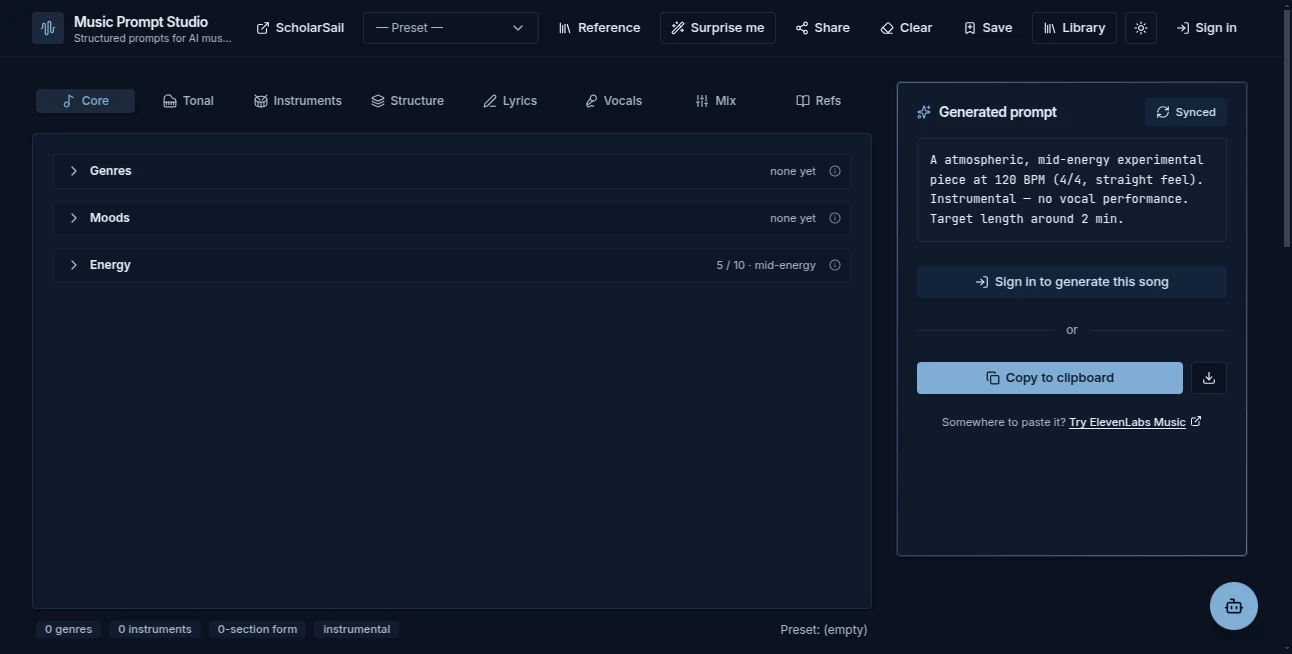
The interface is built around selection rather than complicated technical settings. Users can gradually construct a track by choosing musical characteristics and watching the prompt update as they work.
Small visual aids make the process easier to understand. The interface includes an energy meter, tempo pulse, time-signature pattern, and a keyboard scale view, which can be especially helpful for people who understand music by listening rather than by memorizing terminology.
There is also a manual editing option for users who want to take the generated prompt and change the wording themselves. That combination makes the interface feel useful for both experimentation and more deliberate production work.
Accuracy & Performance
The strength of the platform is not simply producing a longer prompt. Its controls encourage users to describe a musical idea through several connected dimensions, including style, instrumentation, tempo, mood, structure, and production character.
This can make prompts more consistent than a short instruction such as “make an upbeat electronic song.” For example, a creator can specify a particular tempo, bass character, drum approach, vocal style, and arrangement before sending the resulting description to a music model.
There are still limitations because the final audio depends on the underlying AI model. Musical prompts should be treated as instructions rather than guarantees, and the site's own reference material appropriately describes its previews as illustrative approximations.
Capabilities
The platform goes beyond a simple prompt generator. Users can create prompts for different musical styles, experiment with song structures, work with lyrics, explore music terminology, and generate audio directly after signing in.
One particularly useful feature is its compatibility with multiple AI music workflows. A prompt does not have to remain inside the studio. Because the output is written in natural language, it can be copied and adapted for other text-to-music services.
The style guides are another strong point. Someone interested in phonk, for example, can learn why cowbell patterns, distorted 808s, chopped textures, and other genre-specific characteristics matter instead of simply adding the word “phonk” to a generic prompt.
Security & Privacy
The prompt builder itself can operate directly in the browser, and basic prompt construction does not require an account. The service states that prompts are not stored on its servers unless the user chooses a feature that requires server-side processing, such as generating audio, using AI writing features, or saving content.
When users create an account, generated songs and saved prompts are associated with their account library. The service also states that personal information is not sold or used to build advertising profiles.
For audio generation, relevant prompts, structures, and lyrics are sent to the third-party AI provider responsible for producing the requested result. Users should therefore review the privacy and usage terms before submitting sensitive or confidential material.
Use Cases
There are several situations where this type of workspace can save considerable time.
- Songwriters: Turn a rough musical idea into a detailed prompt before experimenting with AI-generated arrangements.
- Independent producers: Quickly test different combinations of tempo, instrumentation, mood, and production characteristics.
- Content creators: Develop background music concepts for videos, podcasts, social media, and other projects.
- Beginners: Explore music creation without needing extensive knowledge of music theory or production terminology.
- Prompt experimenters: Compare different descriptions and discover which musical details have the greatest effect on generated results.
- Educators and students: Use the music reference and style guides to connect musical concepts with practical AI generation.
A simple example would be a creator who wants a relaxed study track. Rather than writing a vague request for “calm music,” they can combine an ambient or lo-fi direction with a slower tempo, warm keys, restrained percussion, soft textures, and a specific production character. That gives the music model considerably more information to work with.
Pros and Cons
- Pros: Guided prompt creation, broad musical controls, useful style guides, multiple AI music workflows, built-in references, audio previews, shareable configurations, and a free prompt-building experience.
- Pros: The interface is approachable even if the user does not have a strong background in music theory.
- Pros: Prompts can be copied and used with different text-to-music models rather than being locked into a single workflow.
- Cons: The quality of the final song still depends heavily on the external or integrated music-generation model.
- Cons: Audio generation consumes credits, so frequent generation can become a paid activity.
- Cons: AI-generated music can still produce unexpected arrangements, artifacts, or interpretations of detailed instructions.
Pricing Plans
The prompt builder, style guides, music reference, presets, audio previews, and sharing features are available without requiring payment. Users who want to generate actual songs can use a free account with a monthly credit allowance.
- Free Account: $0 with 30 credits per month, equivalent to roughly 1.5 minutes of generated music, along with access to the prompt tools, library, AI lyrics, and builder assistant.
- Intro Pack: $1 for 50 credits, providing approximately 2.5 minutes of music. This is a one-time offer available once per account.
- Credit Pack: $5 for 150 credits, equivalent to approximately 7.5 minutes of music. Purchased credits remain valid for 12 months.
- Premium: $20 per month for 1,000 credits, equivalent to around 50 minutes of generated music, with the broader Premium benefits available through the associated account.
Audio generation costs 10 credits for each started 30 seconds. The exact credit cost is displayed before generation, and failed generations have their credits returned automatically.
How to Use the Tool
- Open the music prompt workspace and start with a preset or a blank configuration.
- Select the genre and mood that best describe the track you want to create.
- Adjust the energy level, tempo, key, time signature, and other musical characteristics.
- Choose instruments, vocal characteristics, production details, and song sections where appropriate.
- Review the generated prompt and switch to manual editing if you want to change its wording.
- Copy the finished prompt into your preferred AI music generator, or sign in and generate a song directly in the studio.
- Save useful configurations and generated tracks to your library for later experimentation.
For a first attempt, it is usually better to make a few meaningful choices rather than filling every available field. Once the result is close to the desired sound, additional details can be added to refine the next generation.
Comparison with Similar Tools
Many AI music tools focus primarily on generating the final audio. This platform takes a slightly different approach by putting the prompt-building process at the center of the experience.
That distinction matters for users who want to understand why a generated track sounds the way it does. Instead of relying entirely on a single text box, they can experiment with individual musical components and see how those choices shape the final description.
It is also more flexible than a generator designed around one specific model. Its natural-language prompts can be copied into several AI music systems, while dedicated guides help users adapt their prompting style to different generators.
For someone who already knows exactly what to type, a conventional text box may be faster. For someone who wants to explore musical ideas, learn prompting techniques, or build more deliberate descriptions, the guided workflow is considerably more useful.
Conclusion
Music Prompt Studio is a well-designed option for creators who want more structure when working with AI-generated music. Its biggest advantage is the way it turns abstract musical ideas into practical prompt components without making the process feel like a technical exercise.
The combination of guided controls, style references, previews, song structure options, and compatibility with multiple AI music models gives users plenty of room to experiment. The free prompt-building tools also make it easy to explore the workflow before spending credits on audio generation.
It will not remove the unpredictability that comes with generative music, but it can make the creative process more intentional. For anyone who regularly writes prompts for AI music and wants better control over genre, instrumentation, arrangement, and production direction, it is a useful addition to the creative toolkit.
Frequently Asked Questions (FAQ)
Can I use the prompts with different AI music generators?
Yes. The prompts are written in natural language and can be copied into compatible text-to-music models. The platform specifically supports workflows involving services such as Suno, Udio, MusicGen, Riffusion, Stable Audio, and other AI music systems.
Do I need music theory knowledge?
No. Tooltips and visual aids explain many of the musical settings, allowing users to make choices through practical controls rather than requiring advanced knowledge of notation or theory.
Can I generate a complete song?
Yes. Signed-in users can generate audio directly in the studio using the integrated music-generation system. Generated tracks are also saved to the user's library.
Is the prompt builder free?
Yes. Prompt creation, presets, style guides, music references, audio previews, and sharing can be used without paying. Audio generation uses credits.
How much does AI music generation cost?
Generation uses 10 credits for every started 30 seconds of music. A free account receives 30 credits per month, while paid options include one-time credit packs and a Premium plan with 1,000 monthly credits.
Can I edit the generated prompt?
Yes. The generated description can be switched to manual editing, giving users direct control over the wording before copying or generating the track.
Can I save my songs?
Yes. Generated songs and saved prompt configurations can be stored in the account library, where they can be played again or loaded back into the workspace.
Can I share a prompt with another person?
Yes. The sharing feature encodes the current selections into a link, allowing another person to open the same prompt configuration in their browser.
Does the service generate its own audio previews?
Yes. Short previews for musical styles, instruments, moods, and production characteristics are generated with AI and are intended as illustrative references rather than authoritative recordings.
Is the generated music guaranteed to be unique?
No. AI-generated output may be similar to results produced for other users, and the service does not promise exclusivity. Users should review the applicable terms and rights requirements before using generated material commercially.
Can beginners use it?
Absolutely. The guided controls, presets, visual aids, and reference material make it suitable for users who are experimenting with AI music for the first time.
AI Text to Music , AI Music Generator , Prompt .
These classifications represent its core capabilities and areas of application. For related tools, explore the linked categories above.
Music Prompt Studio details
Website unavailable — View Alternatives
Pricing
- Freemium
Apps
- Web App
Categories

Music Prompt Studio Alternatives Product

Lyria.run

Seedance Pro…

ModelsLab

Omnesuite AL…

Ghibli Image…

Melodank

Flow Song
Noir Prompt
Lyria 3 AI M…