
Myra
What is Myra?
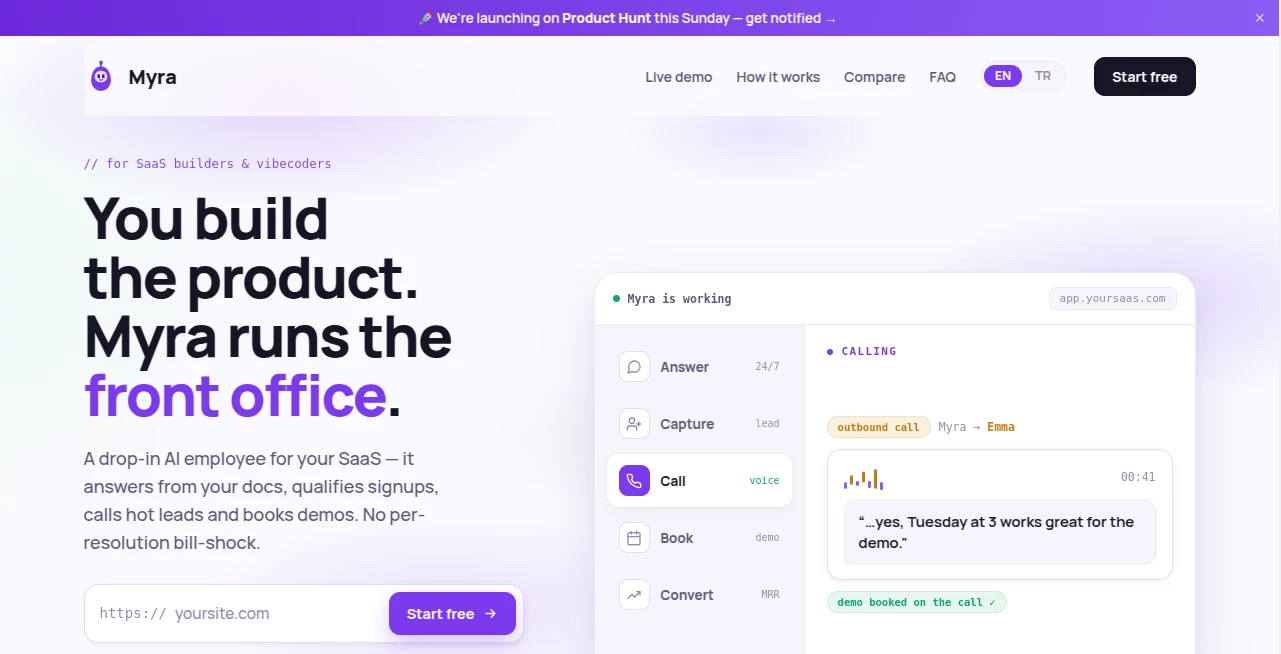
Every business wants to respond instantly when a potential customer lands on its website, but maintaining around-the-clock support is difficult and expensive. This AI-powered assistant fills that gap by providing fast, intelligent conversations that help businesses engage visitors, answer common questions, and convert interest into qualified leads.
Designed for startups, SaaS companies, online businesses, agencies, and service providers, the platform combines conversational AI with practical business automation. Instead of simply answering questions, it identifies buying intent, captures valuable contact information, schedules appointments, and keeps every interaction organized inside a unified dashboard.
One of its strongest advantages is how quickly it can be deployed. Businesses simply connect their website, provide company information, customize the assistant, and embed a lightweight widget. Within minutes, visitors receive accurate responses based on business-specific knowledge instead of generic AI-generated answers.
The platform also reduces repetitive customer support tasks while ensuring every visitor receives attention—even outside business hours. This creates a smoother customer experience and helps businesses avoid losing potential opportunities because nobody was available to reply.
Key Features
User Interface
The dashboard is clean and intuitive, allowing teams to monitor conversations, review captured leads, customize the chat widget, and manage customer interactions without navigating complicated menus. Conversations, lead details, notifications, and activity are displayed in one centralized workspace that is easy to understand even for first-time users.
Accuracy & Performance
Responses are generated using information gathered from the connected website and business instructions, allowing the assistant to provide relevant answers instead of relying on generic knowledge. Fast response times help maintain natural conversations while reducing visitor wait times. When information is missing, unanswered questions become opportunities to improve the knowledge base for future conversations.
Capabilities
The assistant offers much more than live chat. It automatically captures names, email addresses, and phone numbers from interested visitors, qualifies leads, supports appointment booking through calendar integration, delivers multilingual conversations, sends Telegram notifications, and allows staff members to manually take over any conversation whenever needed. Integrations with automation platforms and CRM systems further streamline lead management.
Security & Privacy
Business owners remain in full control of customer conversations and collected data. Chat histories stay accessible for review, while administrators can modify business instructions, monitor activity, and decide when human intervention is appropriate. This balance between automation and oversight helps maintain consistent customer communication.
Use Cases
Companies can use the assistant to answer frequently asked questions, qualify sales prospects, collect contact information, schedule product demonstrations, support SaaS onboarding, assist e-commerce shoppers, handle appointment requests for local businesses, reduce repetitive support inquiries, and improve customer engagement during evenings, weekends, and holidays.
Marketing agencies can deploy it for multiple clients, startups can capture demo requests automatically, online stores can answer product questions before checkout, and service businesses can reduce missed opportunities by remaining available around the clock.
Pros and Cons
Pros
- Very quick setup without requiring technical expertise.
- Captures qualified leads automatically.
- Supports multilingual conversations.
- Integrates with calendars and automation workflows.
- Provides human takeover whenever necessary.
- Organized dashboard with complete conversation history.
- Helpful notifications through Telegram.
Cons
- Advanced customization may require additional business configuration.
- Response quality depends on the completeness of business information provided.
- Some enterprise organizations may require deeper custom integrations.
Pricing Plans
A free trial is available without requiring a credit card, allowing businesses to evaluate the platform before subscribing. Paid plans offer additional capabilities for companies that need continuous customer engagement, lead management, and business automation. Pricing may vary depending on the selected plan and business requirements.
How to Use Myra
Create an account and connect your website.
Add business information, services, frequently asked questions, and custom instructions so the assistant understands your organization.
Customize the appearance and greeting of the chat widget.
Embed the provided script on your website or use the hosted chat link.
Monitor conversations, review qualified leads, improve the knowledge base over time, and manually join conversations whenever necessary.
Comparison with Similar Tools
Compared with many traditional live chat solutions, this platform focuses on combining customer support, lead generation, appointment booking, multilingual communication, and business automation inside one product. Instead of requiring separate tools for chat, scheduling, notifications, and lead capture, it provides a unified workflow that helps businesses simplify customer communication while reducing operational complexity.
Its emphasis on practical deployment, fast setup, CRM connectivity, and continuous learning also makes it attractive for growing businesses that need measurable results without investing heavily in enterprise software.
Conclusion
Businesses increasingly compete on response speed and customer experience. An intelligent website assistant that remains available every hour of the day can dramatically improve visitor engagement while reducing manual workload.
With automated conversations, lead qualification, appointment scheduling, multilingual support, centralized management, and seamless human takeover, this solution provides an efficient way for organizations to transform website traffic into meaningful business opportunities. It is especially valuable for startups, SaaS companies, agencies, online stores, and service providers looking to improve conversions while delivering faster customer support.
Frequently Asked Questions (FAQ)
Can it answer questions 24/7?
Yes. Visitors receive automatic responses at any time, including outside normal business hours.
Can businesses take over conversations manually?
Yes. Human agents can join any conversation whenever personal assistance is needed.
Does it support multiple languages?
Yes. The assistant can communicate with visitors in many different languages, making it suitable for international audiences.
Can it capture customer information?
Yes. Contact details such as names, email addresses, and phone numbers can be collected automatically during conversations.
Is coding knowledge required?
No. Setup is designed to be straightforward, and most businesses can launch the assistant within a few minutes.
AI Lead Generation , AI Chatbot , AI Customer Service Assistant , AI Scheduling .
These classifications represent its core capabilities and areas of application. For related tools, explore the linked categories above.

Myra Alternatives Product

StarBattle O…
AiZolo

Medialyst
AILeadz.io
Marketbetter…

Distro

Vibebot.gg

AthenaChat

Klyra AI