Mythos
What is Mythos?
Reading a good book often means stopping every few pages to look something up. A difficult paragraph needs explaining, an unfamiliar name needs context, or a foreign sentence needs translating. Switching to another app for each small question can quickly break the rhythm of reading.
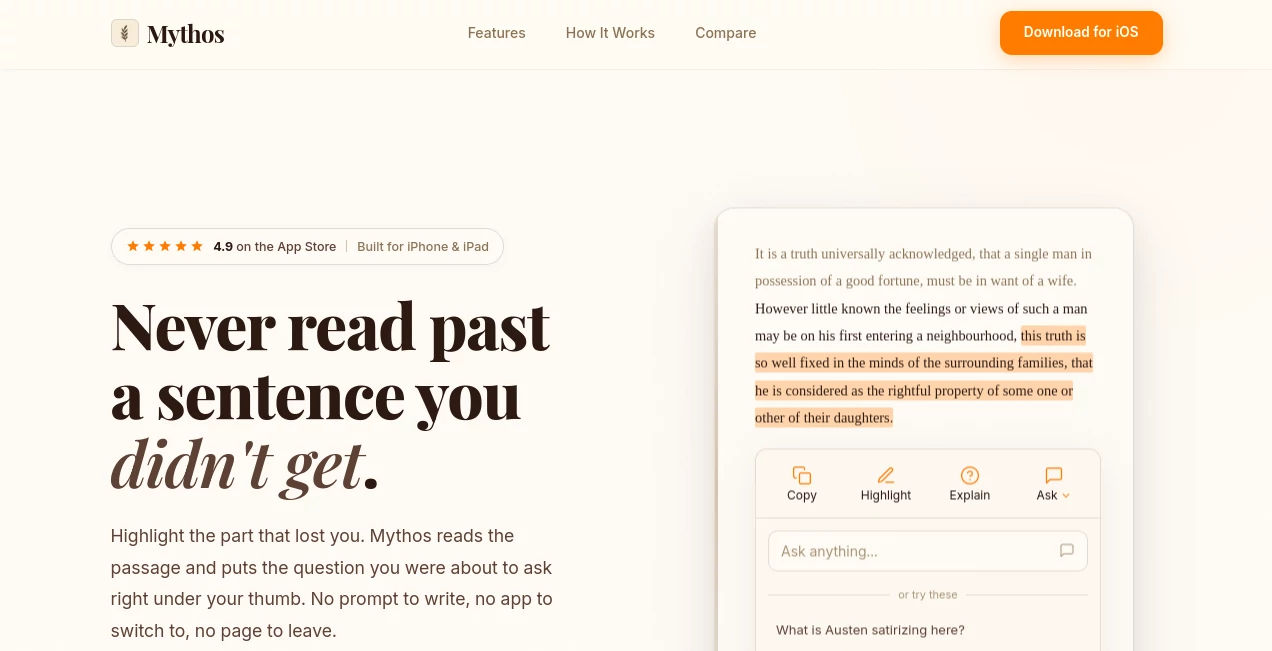
Mythos is an AI-powered book reader designed for iPhone and iPad that puts intelligent assistance directly inside the reading experience. It works with EPUB and PDF files, allowing readers to highlight a word, sentence, paragraph, or larger passage and receive contextual help without leaving the page.
Instead of forcing readers to write a detailed prompt every time they need assistance, the app analyzes the selected text and suggests useful actions based on what is being read. A character name can lead to a character explanation, while a complicated argument may trigger an option to simplify or summarize it.
This approach makes the tool particularly interesting for students, professionals, researchers, language learners, and anyone who regularly reads books or long-form documents.
Key Features
- AI-powered text selection for EPUB and PDF reading
- Contextual explanations for difficult passages
- Instant summaries of selected content
- Inline translation across dozens of languages
- Intent-aware AI suggestions based on highlighted text
- Ability to ask custom questions about a passage
- Support for EPUB and PDF files
- Offline reading for imported books
- AI assistance that remains inside the reading experience
- Reader-focused interface designed for distraction-free reading
- Support for textbooks, research papers, reports, novels, and other long-form content
User Interface
The interface takes a deliberately quiet approach. Rather than surrounding the reader with AI controls, the application keeps the reading surface at the center and brings assistance forward only when it is needed.
The basic workflow is straightforward: import an EPUB or PDF, read normally, and highlight something when you need help. The contextual action panel then provides relevant options. This makes the experience feel closer to highlighting a passage in a physical book than opening a separate chatbot.
For people who prefer uninterrupted reading sessions, this design choice can make a noticeable difference. There is less copying, pasting, switching between applications, and reconstructing context for an AI assistant.
Accuracy & Performance
The major strength of the AI experience is its contextual approach. Responses are generated around the selected passage rather than treating every question as an isolated request. This is especially useful when a sentence depends on terminology, characters, arguments, or historical context introduced elsewhere in the reading.
For example, selecting an unfamiliar term can result in a definition suited to the surrounding text, while highlighting a dense explanation can lead to a simpler interpretation. Readers can also type their own follow-up questions when the suggested actions are not quite what they need.
AI-powered explanations, summaries, translations, and questions require an internet connection. The books themselves can still be read offline, so connectivity does not prevent normal reading.
Capabilities
The application covers several common situations that interrupt serious reading. Readers can summarize a chapter or passage, ask for an explanation in simpler language, translate text, explore unfamiliar references, and ask follow-up questions about highlighted material.
It supports EPUB and PDF documents, making it useful beyond conventional ebooks. A student can import a textbook or research paper, a professional can work through an industry report, and a general reader can use the same workflow with a novel.
Another thoughtful feature is intent detection. The AI does not simply offer the same generic actions for every selection. A character name, technical term, foreign phrase, and complex paragraph can lead to different suggested actions.
Security & Privacy
The service states that user data is stored safely and that the product is built around readers rather than advertising. Reading activity is presented as belonging to the user rather than being used as an advertising product.
As with any cloud-powered AI feature, users should still consider the nature of documents they import, particularly when working with sensitive professional or confidential material.
Use Cases
Students: Dense textbooks can become much easier to work through when a difficult paragraph can be explained immediately. Students can also summarize sections before lectures, clarify terminology, and translate assigned reading without leaving the book.
Researchers and academic readers: Research papers often contain specialized terminology and compressed explanations. Highlighting a difficult section and requesting clarification can make the first pass through a paper considerably more approachable.
Professionals: Industry reports, business documents, technical material, and nonfiction books can contain unfamiliar concepts or jargon. Contextual explanations can help readers understand those passages while keeping the original document open.
Language learners: Reading material in another language becomes less intimidating when unfamiliar passages can be translated directly where they appear. Readers can also ask for an explanation after translating something that remains difficult.
Curious readers: Historical references, unfamiliar people, literary terms, and cultural references can all become opportunities to learn more without opening a browser and losing the thread of the story.
Pros and Cons
- Pros: AI assistance is built directly into the reading workflow.
- Pros: Supports both EPUB and PDF files.
- Pros: Suggestions adapt to the selected content.
- Pros: Summaries, explanations, translations, and questions are available from highlighted text.
- Pros: Reading itself can be done offline.
- Pros: A free tier includes daily AI actions.
- Cons: Currently focused on iPhone and iPad.
- Cons: AI-powered features require an internet connection.
- Cons: Audiobooks are not currently supported.
- Cons: DRM-protected ebooks from major stores cannot be imported.
Pricing Plans
The application is free to download and includes daily AI actions for features such as summarization, explanations, translation, and asking questions. The free tier does not use a trial countdown and does not require a credit card or educational email address.
Users can import EPUB and PDF files from their own library without a stated limit on the number of imported books. Optional paid upgrades are available for heavier users who need more AI usage.
How to Use Mythos
Getting started takes only a few steps.
- Import an EPUB or PDF from your device or a supported cloud storage provider.
- Open the book and read normally.
- Highlight a word, phrase, sentence, or passage that you want to understand.
- Review the AI actions suggested for the selected content.
- Choose an explanation, summary, translation, or another suggested action.
- Ask a custom follow-up question if you need more detail.
- Close the AI response and continue reading from the same place.
The simplicity is one of the most appealing parts of the workflow. You do not need to prepare a prompt before every interaction. The highlighted text provides the starting context.
Comparison with Similar Tools
Traditional ebook readers such as Kindle and Apple Books are excellent for accessing and reading books, but their primary purpose is displaying the content. This tool takes a different approach by adding contextual AI assistance directly to text selection.
It also differs from using a general-purpose chatbot with a PDF. With a chatbot, readers typically need to switch applications, provide the relevant passage, write a prompt, and then return to the document. Here, those steps are condensed into the reading interface itself.
Readwise Reader is another relevant comparison, particularly for people who combine books and documents with articles, newsletters, and RSS feeds. Its broader read-it-later ecosystem can be attractive for web-focused readers, while this product is more narrowly centered on understanding EPUB and PDF content through contextual AI.
That distinction matters. Someone looking for an all-purpose content inbox may prefer a broader reading platform, while someone primarily interested in intelligent assistance inside books may find the focused approach more appealing.
Conclusion
For readers who frequently pause because a sentence is unclear, a concept is unfamiliar, or a passage needs translation, an AI-powered reading environment can remove a surprising amount of friction.
The strongest aspect of this product is not simply that it adds AI to ebooks. It is the way the AI is integrated into the act of reading. Highlighting becomes the starting point, contextual suggestions reduce the need for prompt writing, and answers appear without forcing the reader into another application.
Students, professionals, language learners, researchers, and serious book lovers can all find practical value here. The focus on EPUB and PDF files also keeps the experience centered on content users already own rather than requiring them to move their reading habits into a new ecosystem.
For anyone who wants to understand difficult passages without constantly breaking their concentration, this is a particularly compelling approach to AI-assisted reading.
Frequently Asked Questions (FAQ)
What is this AI reading tool?
It is an AI-powered book reader for iPhone and iPad that lets users highlight text in EPUB or PDF files and receive contextual explanations, summaries, translations, and answers.
What file formats are supported?
The application supports EPUB and PDF files. Users can import books and documents from their device and compatible cloud storage providers.
Is it free to use?
Yes. The application is free to download and includes daily AI actions. Optional paid upgrades are available for users who need heavier AI usage.
Can it translate books?
Yes. Users can highlight passages and request inline translations across dozens of languages without leaving the reading experience.
Can books be read offline?
Yes. Imported books can be read offline. However, AI features such as explanations, summaries, translations, and AI answers require an internet connection.
Does it support audiobooks?
Not currently. The product is focused on text-based reading through EPUB and PDF files.
Can DRM-protected ebooks be imported?
No. DRM-protected books purchased through platforms such as Apple Books, Kindle, and Kobo generally cannot be opened by third-party readers. DRM-free EPUB files can be imported.
Who can benefit most from this tool?
It is particularly useful for students, professional learners, researchers, nonfiction readers, language learners, and anyone who regularly works with books or long-form PDF documents.
Does it require users to write prompts?
No. After highlighting text, the AI can suggest relevant actions based on the selected content. Users can still type their own questions whenever they want more specific information.
AI PDF , AI Knowledge Management , AI Documents Assistant , AI Education Assistant .
These classifications represent its core capabilities and areas of application. For related tools, explore the linked categories above.

Mythos Alternatives Product

Lynote

YouMind

ChatGPT

ukamiru

TopPDF

Gizmo
AI OCR

TranscribeYT

Collate