NeuroSet
What is NeuroSet?
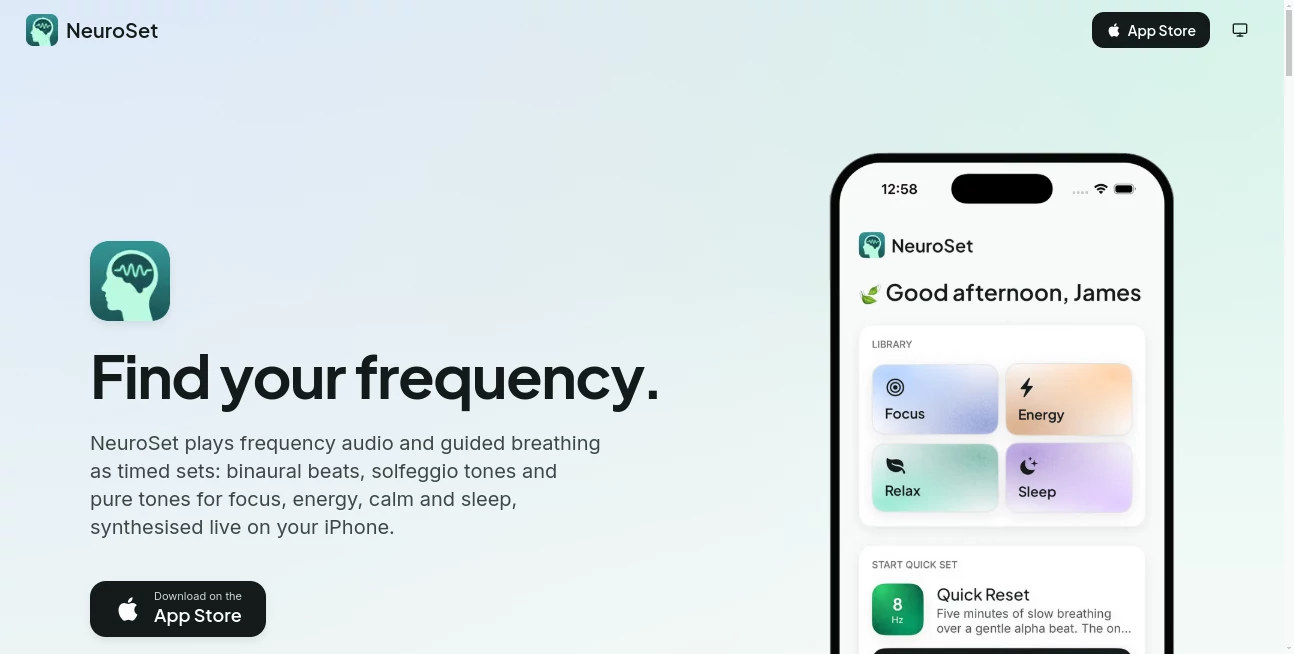
NeuroSet is a wellness-focused audio app designed to make focused listening and guided breathing easier to fit into everyday routines. Instead of asking users to search through long playlists or complicated meditation libraries, it brings frequencies, tones, breathing patterns, and timed sessions into one simple experience.
The idea is refreshingly straightforward: choose a goal such as Focus, Energy, Calm, Sleep, or Restore, press play, and let the session run. Audio is synthesised directly on the iPhone, so users can work with different frequencies and durations without relying on a collection of downloaded audio files.
For someone who wants a short session before work, a calmer transition after a busy day, or a longer audio session before sleep, the approach feels practical rather than overwhelming. It is also worth noting that the app describes itself as a wellness companion rather than a medical device or treatment.
Key Features
- Timed audio sessions combining frequencies, tones, and guided breathing.
- Eight brainwave frequencies ranging from 0.10 Hz epsilon to 40 Hz gamma.
- A library of traditional tones including 174 Hz, 285 Hz, 396 Hz, 417 Hz, 432 Hz, 528 Hz, 639 Hz, 741 Hz, 852 Hz, and 963 Hz.
- Ten guided breathing patterns with different pacing styles.
- Curated sessions covering Focus, Energy, Calm, and Sleep.
- A custom set builder for choosing a frequency, tone, breathing pattern, and duration.
- Background playback with the iPhone screen locked.
- Daily goals, streaks, reminders, and practice history.
- A home-screen widget for quickly starting a session.
- Local-first storage with optional iCloud synchronization and no advertising or tracking.
User Interface
The interface is built around the idea of getting into a session quickly. Rather than presenting users with a complicated dashboard, the experience revolves around selecting a set and starting playback. Guided breathing sessions use an on-screen circle to provide a visual rhythm, which can make the pacing easier to follow without constantly checking instructions.
The locked-screen playback is another thoughtful touch. Once a session has started, users can put the phone away and continue listening with lock-screen controls. A widget also reduces the number of taps needed to begin a routine, which is particularly useful for people who want to turn short sessions into a daily habit.
Accuracy & Performance
The audio is synthesised live on the iPhone rather than simply being streamed from a fixed recording. This allows sessions to be generated with different frequencies and durations while keeping the experience flexible. Binaural beats use slightly different tones in each ear to create the perceived beat, so headphones are recommended when using this particular format.
The app also takes a relatively measured approach to its claims. Its website references research around binaural beats and breathing practices, while clearly separating those findings from medical claims. That distinction is useful for users who want to explore sound-based wellness without being promised unrealistic results.
Capabilities
The strongest part of the experience is its flexibility. Users can start with one of the curated sets or create their own combination. A custom session can include a frequency, traditional tone, breathing pattern, and chosen duration. Pro users can also combine a traditional tone with a brainwave beat, such as using a 528 Hz carrier beneath a 10 Hz alpha beat.
The library covers several different listening styles. Binaural beats are designed around brainwave frequencies, while pure tones provide a steady audible pitch. Breathing patterns add another layer, ranging from structured box breathing to longer-exhale techniques and other paced exercises.
Security & Privacy
Privacy is one of the more clearly defined parts of the product. The service states that it does not use advertising or tracking and that sets, history, and settings are stored locally on the iPhone, with optional iCloud synchronization under the user's control.
An account is not required for normal use. When an account is used for subscription access across devices, the service states that the information stored on its servers is limited to an email address and subscription entitlement. This local-first approach is appealing for people who prefer wellness apps that do not depend heavily on collecting behavioral data.
Use Cases
- Focused work: Use faster or higher-frequency sessions as an audio backdrop while studying, writing, reading, or working at a desk.
- Morning routines: Energy-oriented tones and brisk breathing patterns can provide a structured audio session before starting the day.
- Evening wind-down: Slower sessions and guided breathing can help create a clear transition between a busy day and a quieter evening.
- Sleep routines: Sleep-focused sets can continue playing while the screen is locked, with Pro supporting sessions lasting up to 12 hours.
- Breathing practice: Users can run guided breathing on its own or combine it with audio frequencies.
- Personal routines: People who prefer experimentation can build custom sessions instead of relying only on predefined sets.
Pros and Cons
Pros
- Simple concept that is easy to understand.
- Live audio synthesis provides considerable flexibility.
- Multiple frequencies, traditional tones, and breathing patterns are available.
- Useful background playback and lock-screen controls.
- Custom session builder gives users more control.
- No advertising or tracking according to the official privacy information.
- The free tier has no daily usage cap.
Cons
- The experience is currently centered on iPhone and the Apple ecosystem.
- Binaural beat sessions are better suited to headphone use.
- Some of the more advanced combinations and longer sessions require Pro.
- Users looking for conventional music, meditation courses, or extensive spoken guidance may find the frequency-based approach relatively specialised.
Pricing Plans
The free version is more generous than a typical trial. It does not impose a daily session limit and includes four curated sets covering Focus, Energy, Calm, and Sleep. Users also get selected frequencies and tones, four breathing patterns, sessions of up to 60 minutes, one custom set, and seven days of history.
The Pro plan starts with a 7-day free trial and expands the library to eight frequencies, ten tones, ten breathing patterns, and nine curated sets. It also unlocks the complete solfeggio range, sessions of up to 12 hours, unlimited custom sets, tone-as-carrier combinations, and full practice history. The official site lists the subscription at $6.99 per month or $59.99 per year.
How to Use It
- Open the app on an iPhone.
- Choose a goal such as Focus, Energy, Calm, Sleep, or Restore.
- Select one of the available curated sessions or open the builder to create a custom set.
- Choose a frequency, tone, breathing pattern, and duration when building a personal session.
- Follow the on-screen breathing guide when the selected session includes guided breathing.
- Use headphones when listening to binaural beats for the intended left-right audio presentation.
- Lock the phone if you want the session to continue in the background.
- Use reminders, daily goals, and streaks if you want to turn occasional sessions into a consistent routine.
Comparison with Similar Tools
Many wellness and meditation apps focus heavily on spoken meditation, ambient music, sleep stories, or large libraries of recorded content. This product takes a narrower route. Its central idea is the combination of synthesised frequencies, traditional tones, and guided breathing in timed sets.
That difference matters when choosing an app. Someone who wants a large catalogue of guided mindfulness courses may prefer a traditional meditation platform. On the other hand, users who enjoy experimenting with frequencies and building precise audio sessions may appreciate the additional control available here.
The custom builder is particularly useful in this comparison because it changes the experience from simply choosing a recording to configuring a session. The result is closer to a personal audio routine that can be adjusted according to duration, tone, frequency, and breathing style.
Conclusion
NeuroSet takes a focused approach to digital wellness by bringing frequency-based audio and guided breathing into a clean, configurable session format. Its biggest strength is not the sheer number of features, but how those features work together: pick a mood, choose a set, breathe along when prompted, and let the audio continue in the background.
The generous free tier also makes it easy to explore the concept without immediately committing to a subscription. More advanced users can move to Pro for longer sessions, the complete audio library, and unlimited custom combinations.
It should be viewed as a wellness and relaxation tool rather than a medical solution. For people interested in sound-based routines, breathing exercises, focused listening, or building a more structured wind-down habit, it offers an interesting and unusually configurable approach.
Frequently Asked Questions (FAQ)
What are the main types of sessions available?
The experience is organised around Focus, Energy, Calm, Sleep, and Restore. Curated sets are primarily designed around the first four moods, while Restore provides a collection of traditional tones to explore.
Does it use binaural beats?
Yes. Binaural beats are created by presenting slightly different tones to each ear. Headphones are recommended because the effect relies on the separate audio signals reaching each ear.
Can I create my own sessions?
Yes. The builder lets users select a frequency or tone, breathing pattern, and duration. The free version includes one custom set, while Pro allows unlimited custom sets and additional tone-and-beat combinations.
Can it be used for sleep?
Yes. Sleep-oriented sessions can continue with the screen locked. The free version supports sessions up to 60 minutes, while Pro supports sessions lasting up to 12 hours, including overnight sessions.
Does it require an account?
No account is required for normal use. The service states that an account is optional and is mainly used to associate a subscription across devices.
Does it track users?
The official website states that the app has no advertising or tracking and follows a local-first approach. Optional iCloud synchronization can be controlled by the user.
Is it a medical treatment?
No. The product explicitly describes itself as a wellness app rather than a medical device or treatment. Users should not treat its audio sessions as a replacement for professional medical advice.
Is the free version useful?
Yes. The free tier provides unlimited daily sessions, selected frequencies and tones, four breathing patterns, four curated sets, sessions up to 60 minutes, one custom set, and seven days of history. This makes it possible to evaluate the core experience before considering Pro.
These classifications represent its core capabilities and areas of application. For related tools, explore the linked categories above.

NeuroSet Alternatives Product

Meet in the …

Greetings Is…

FortuneTelle…

Suno list

TwitterXVideo
Peanut AI
AI Meal Plan…
MyJournalPal

Bulletin