NotFair
What is NotFair?
Managing advertising campaigns often means jumping between dashboards, reports, spreadsheets, and analytics platforms just to answer a simple question: what is going wrong, and what should be fixed first? NotFair takes a different approach by bringing live advertising, analytics, search, and CRM data into AI-powered conversations through the Model Context Protocol (MCP).
The platform connects AI clients such as Claude, Codex, Cursor, OpenClaw, and Hermes with services including Google Ads, Meta Ads, X Ads, LinkedIn Ads, Google Search Console, Google Analytics, and GoHighLevel. Instead of working from exported reports or yesterday's numbers, users can ask questions about their accounts and receive answers based on current data.
What makes the approach particularly interesting is the separation between reading and changing data. The system can investigate campaigns and identify problems freely, while actual account changes are presented for review before they are applied. For marketers who want more automation without giving an AI unrestricted control of their advertising accounts, that distinction is valuable.
Key Features
- Live access to advertising and analytics data through hosted MCP servers.
- Support for Google Ads, Meta Ads, X Ads, LinkedIn Ads, Google Search Console, Google Analytics, and GoHighLevel.
- Natural-language campaign diagnosis through compatible AI clients.
- Prioritized recommendations based on issues such as wasted spend, keyword quality, search terms, conversions, and campaign structure.
- Approval-gated campaign changes with a visible difference before execution.
- Change history and one-call undo functionality for supported workflows.
- Support for multiple AI clients, including Claude, Codex, Cursor, OpenClaw, and Hermes.
- Bulk workflows for keywords, ads, budgets, and scripts on the Growth plan.
User Interface
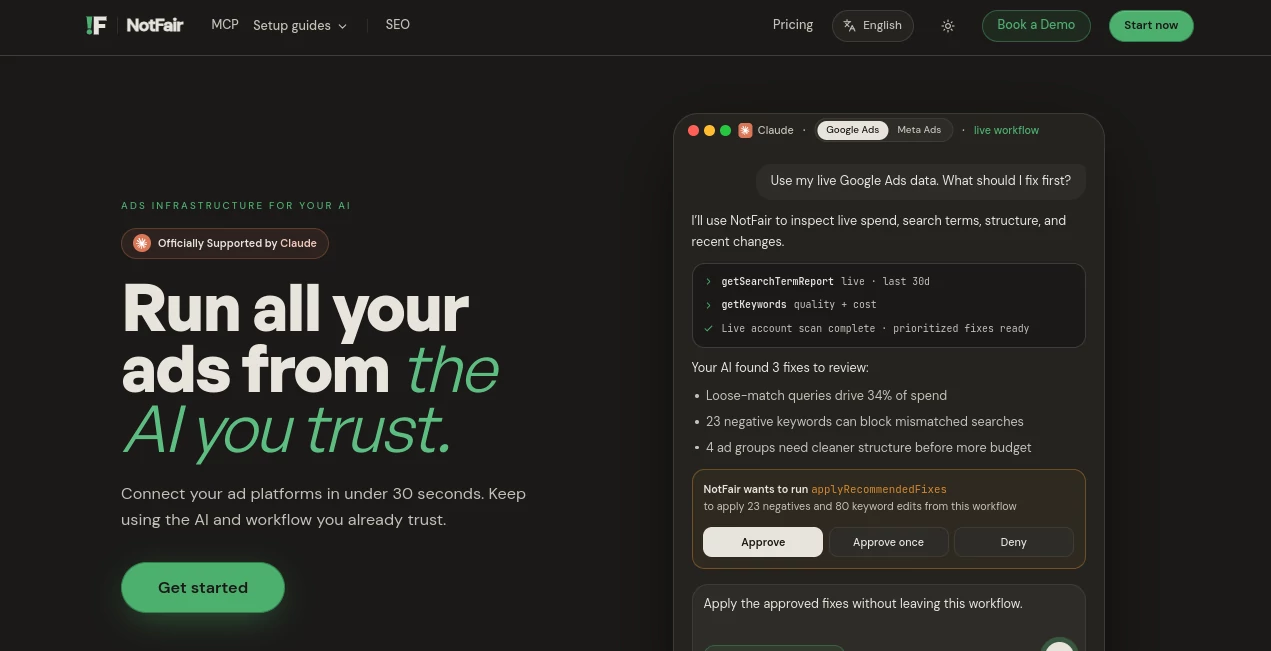
The experience is centered around conversation rather than another complicated marketing dashboard. Users can connect an account and ask questions in natural language, such as why cost per lead increased or which campaigns deserve attention.
The conversational workflow makes the interface feel closer to working with an experienced marketing operator than reading a collection of static reports. Findings can be turned into proposed actions, while the user remains involved before changes are made.
Accuracy & Performance
One of the strongest aspects of the platform is its use of live account context. Instead of asking users to upload CSV files or manually copy campaign data into an AI assistant, the connected agent can inspect current metrics and account information.
For example, campaign diagnosis can consider spending, conversions, search terms, impression share, quality signals, recent changes, and other available account data. This makes the resulting analysis more practical for ongoing campaign management, where yesterday's report may already be outdated.
Capabilities
The system goes beyond simple reporting. An AI client can investigate advertising performance, identify potentially wasted spend, rank issues by impact, draft changes, and present those changes for approval.
Depending on the connected service, workflows can include keyword and search-term analysis, budget and campaign adjustments, ad changes, audience-related operations, analytics reporting, organic search analysis, and CRM-related workflows. The MCP architecture also makes it possible to use the same general workflow across different compatible AI clients.
Security & Privacy
Control over account changes is one of the more notable parts of the platform. Read operations can be used to inspect account information, while write operations are gated behind explicit approval. Before an action is applied, the proposed change can be reviewed rather than silently executed in the background.
Changes are also recorded in the platform's history, and supported actions can be reversed through an undo workflow. This approval-first model is especially useful for businesses that want AI assistance while still keeping a human responsible for consequential advertising decisions.
Use Cases
- Paid advertising audits: Quickly investigate campaign performance, spending, keywords, search terms, and other account signals.
- Wasted-spend detection: Find campaigns, keywords, or search behavior that may be consuming budget without producing suitable results.
- Campaign optimization: Ask an AI agent to identify potential improvements and prepare changes for review.
- Google Ads management: Work with campaign data, keywords, ads, budgets, recommendations, and change history through conversation.
- Meta advertising: Review insights, ad sets, audiences, creatives, and campaign performance while keeping changes approval-gated.
- SEO and organic search analysis: Use Search Console data to investigate queries, rankings, CTR, index coverage, and related search performance.
- Analytics investigation: Ask questions about GA4 traffic, conversions, revenue, and recent activity without manually assembling reports.
- Marketing operations: Connect advertising, organic search, analytics, and CRM information so an AI agent can analyze multiple parts of a marketing workflow.
Pros and Cons
Pros
- Works with several popular AI clients rather than locking users into a single assistant.
- Uses live account information instead of relying on manually exported reports.
- Supports both diagnosis and action-oriented workflows.
- Human approval is required before supported write operations are applied.
- Change history and undo capabilities add an additional layer of control.
- Offers a free starting tier without requiring a credit card.
- Useful for marketers managing multiple advertising and analytics platforms.
Cons
- The setup is more technical than using a traditional advertising dashboard because it involves an MCP-compatible AI client.
- The value of the system depends partly on the quality of the connected account data and the AI client's interpretation.
- Advanced usage and higher operation limits require a paid plan.
- Users who only need basic campaign reporting may find a full MCP workflow more than they need.
Pricing Plans
The service currently offers a free plan designed for users who want to try the workflow before committing to a subscription. The Free plan provides seven days of unlimited access, followed by 300 MCP operations per month at no cost. It does not require a credit card and includes account diagnosis, draft campaign changes, and previews of supported edits.
The Growth plan is aimed at users running advertising workflows regularly. It is listed at $79 per month or $950 per year and includes unlimited Google and Meta Ads operations, five shared ad-account spots, bulk workflows, full change history, one-call undo, priority email support, and access through supported AI clients including Claude, Codex, Hermes, OpenClaw, and Cursor.
For teams managing substantial advertising budgets, the service also provides a contact option for larger accounts. Pricing and available features can change, so users should verify the current plan details before subscribing.
How to Use It
Getting started is relatively straightforward if you already use an MCP-compatible AI client. First, choose the advertising, analytics, search, or CRM service you want to connect. Then add the appropriate hosted MCP connection to your AI client and complete the authentication process.
Once the account is connected, you can ask questions in ordinary language. For example, a marketer could ask why cost per lead increased during the last week, which campaigns are wasting the most money, or which issues should be addressed first.
The AI agent can inspect the available live data and return findings. When an actionable change is appropriate, the proposed operation is shown for review. You can then approve, reject, or adjust the action instead of allowing an automated system to make an unreviewed change.
Comparison with Similar Tools
Traditional advertising platforms are excellent for managing campaigns directly, but they usually require users to navigate through multiple reports, filters, menus, and settings. Conventional analytics tools are similarly powerful but often leave the interpretation of the data to the marketer.
This solution focuses on a different layer: connecting those systems to AI agents through MCP. The main advantage is the ability to ask a question in natural language and let the connected agent investigate multiple data points before presenting a conclusion or proposed action.
Compared with a simple AI marketing assistant that works from manually provided information, the live-data approach can be considerably more useful for operational work. Compared with fully automated campaign management, the approval mechanism offers a more cautious alternative because important writes remain subject to human review.
Conclusion
For marketers who are tired of moving between advertising dashboards and manually preparing reports for AI analysis, this MCP-based approach offers a practical alternative. It turns compatible AI clients into a working interface for campaign diagnosis, marketing analytics, and approved account operations.
The strongest selling point is not simply automation. It is the combination of live data, conversational analysis, actionable recommendations, and human-controlled execution. A marketer can ask what happened, investigate why it happened, see what should change, and decide whether that change should actually go live.
That balance makes the platform particularly interesting for agencies, growth teams, performance marketers, and businesses that want to introduce AI into daily marketing operations without handing over complete control of their advertising accounts.
Frequently Asked Questions (FAQ)
What is this platform used for?
It connects compatible AI clients to advertising, analytics, organic search, and CRM platforms so users can investigate live data, identify problems, prepare recommendations, and approve supported changes.
Which AI clients are supported?
Supported clients include Claude, Codex, Cursor, OpenClaw, and Hermes, provided they support the relevant MCP workflow.
Which marketing platforms can be connected?
The available hosted MCP servers include Google Ads, Meta Ads, X Ads, LinkedIn Ads, Google Search Console, Google Analytics, and GoHighLevel.
Can the AI change my advertising campaigns automatically?
Write operations are approval-gated. Proposed changes are presented for review before they are applied to supported advertising platforms.
Does it require coding knowledge?
Basic use does not require programming expertise. The initial MCP connection may involve copying a configuration command or completing an authentication flow, depending on the AI client being used.
Is there a free plan?
Yes. The free tier currently includes seven days of unlimited access followed by 300 MCP operations per month, with no credit card required.
Can previous changes be reversed?
Supported changes are recorded in change history, and the platform provides a one-call undo workflow for eligible operations.
Is it suitable for agencies?
It can be useful for agencies and marketing teams managing multiple accounts because the conversational workflow can reduce repetitive analysis and help prioritize campaign issues before changes are made.
AI SEO Assistant , AI Analytics Assistant , AI CRM Assistant , AI Advertising Assistant .
These classifications represent its core capabilities and areas of application. For related tools, explore the linked categories above.

NotFair Alternatives Product

Prelight

Sales Prospe…

IntoTheBlock

OGimage

Cataseo AI

Crawlly AI

AllInOneTools

Sorank

AILeadz.io