
Ofox AI
What is Ofox AI?
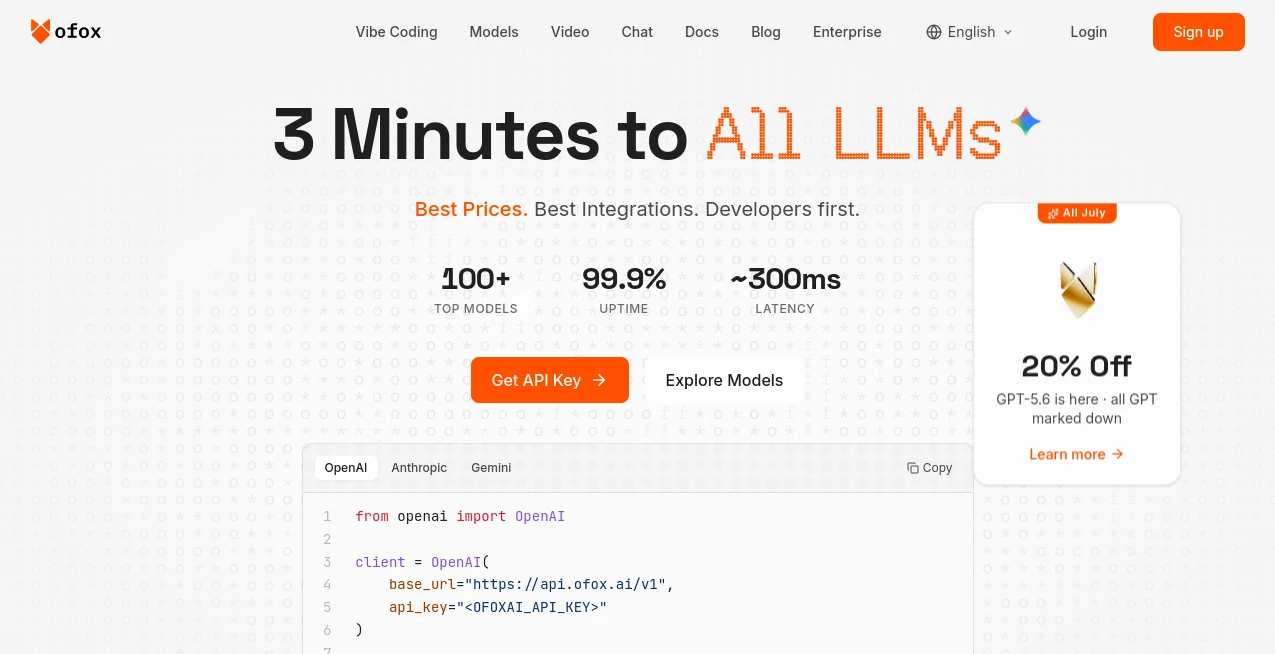
Modern AI development often requires working with multiple models, different providers, and complicated integrations. OfoxAI simplifies this process by providing a unified gateway that allows developers and businesses to access a wide range of large language models through a single API connection.
Designed for teams that want flexibility without managing multiple accounts, keys, and billing systems, this platform creates a smoother way to experiment, build, and scale AI-powered applications. Whether you are developing an AI assistant, automation workflow, research tool, or software product, it helps reduce technical friction and keeps your AI infrastructure organized.
With support for popular language models and developer-friendly compatibility, it offers a practical solution for anyone who wants reliable access to advanced AI capabilities from one central place.
Key Features
User Interface
The dashboard is designed with simplicity in mind. Users can manage API access, monitor usage, review spending, and control their AI resources from a single workspace. The clean interface makes it easier for developers and teams to understand their AI consumption without navigating between different platforms.
For users who work with several AI services, having one organized control panel can save significant time. Instead of maintaining separate configurations, everything can be managed from one convenient location.
Accuracy & Performance
Performance is an important factor when building AI applications, and this platform focuses on providing stable connections to advanced language models. Developers can select suitable models depending on their requirements, balancing speed, quality, and cost.
The unified API approach helps applications communicate consistently with different AI providers, making testing and model comparison much easier. This is especially useful for teams that want to evaluate multiple models before choosing the best option for a specific project.
Capabilities
The platform provides access to a broad collection of AI models through a single integration point. Developers can use different models for tasks such as content generation, coding assistance, data analysis, automation, research, and conversational applications.
- Access multiple large language models through one API connection
- Compatible API structure for easier migration from existing AI integrations
- Support for popular AI development workflows
- Centralized usage tracking and management
- Flexible model selection based on project requirements
- Suitable for individual developers and larger teams
Security & Privacy
Security and responsible data handling are essential when working with AI services. The platform provides account management features and usage controls designed to help users manage their AI access safely.
Businesses can benefit from having a centralized environment where API usage and resources are easier to monitor compared with managing multiple independent AI subscriptions.
Use Cases
This solution can support a wide range of AI projects across different industries. Developers building software products can integrate advanced language models without creating separate connections for every provider.
- AI Application Development: Build chatbots, assistants, and intelligent software solutions faster.
- Content Creation: Generate articles, marketing materials, summaries, and creative content.
- Programming: Add AI coding assistance and automation features into developer tools.
- Business Automation: Create workflows that use AI for customer support, research, and productivity.
- Testing & Research: Compare different models and evaluate performance for specific tasks.
Pros and Cons
Pros
- Single API access to multiple AI models
- Reduces complexity of managing different AI providers
- Useful for developers building AI-powered products
- Flexible model selection options
- Centralized billing and usage tracking
- Supports modern AI development workflows
Cons
- Best suited for users who need API-based AI access
- Beginners without development experience may need additional guidance
- Model availability and pricing can vary depending on providers
Pricing Plans
The platform follows a usage-based pricing approach, allowing users to pay according to their AI consumption instead of committing to unnecessary fixed plans. A free option is available for users who want to explore the service before increasing their usage.
Pricing may vary depending on the selected models, usage volume, and additional services. This flexible structure makes it suitable for both experimentation and production-level applications.
How to Use OfoxAI
Getting started is straightforward. Users can create an account, generate API credentials, select available AI models, and connect the service with their applications.
- Create an account and access the developer dashboard
- Generate an API key for authentication
- Select the preferred AI model for your project
- Connect the API with your application or workflow
- Monitor usage and optimize model selection over time
Comparison with Similar Tools
Traditional AI integrations often require developers to create separate accounts, manage multiple API keys, and maintain different billing systems. A unified AI gateway provides a more convenient alternative by bringing several models together under one system.
Compared with using only one AI provider, this approach gives teams more freedom to experiment with different models and choose the most suitable option for each task. It is particularly valuable for developers who want flexibility and control while building AI-powered applications.
Conclusion
For developers, startups, and businesses looking to simplify AI integration, this platform offers a practical way to access powerful language models without unnecessary complexity. Its unified approach helps teams save time, manage resources more efficiently, and explore different AI capabilities from one place.
By combining flexibility, centralized management, and access to modern AI technologies, it provides a valuable foundation for creating the next generation of intelligent applications.
Frequently Asked Questions (FAQ)
What is this platform used for?
It is used to connect applications with multiple AI language models through a unified API system, making AI integration easier for developers and businesses.
Who can benefit from using it?
Developers, startups, software companies, researchers, and teams building AI-powered products can benefit from its centralized AI access and management features.
Can I use different AI models in one project?
Yes. The platform allows users to work with different models and choose the most suitable option depending on performance, cost, and project requirements.
Does it support developers?
Yes. It is designed with API-based development in mind and helps developers integrate AI capabilities into their own applications.
Is there a free option available?
Yes. Users can explore the service with available free usage options before scaling their AI projects.
AI Chatbot , AI API Design , Large Language Models (LLMs) , AI Developer Tools .
These classifications represent its core capabilities and areas of application. For related tools, explore the linked categories above.

Ofox AI Alternatives Product

FurWall
AiZolo

TruthSpine

SoulChat

WhatsMyName …

git-lrc

PatentFig AI

freellm

Ptero