


















Pensieve
What is Pensieve?
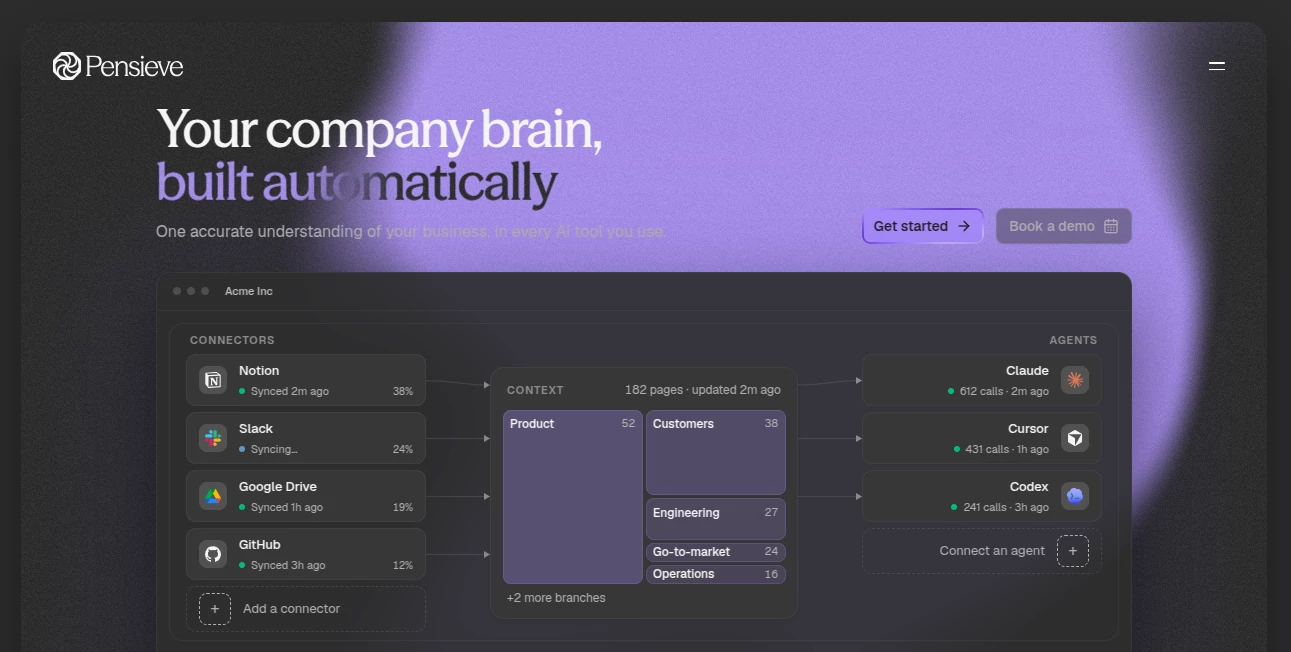
Pensieve is a company context layer designed to give the AI tools your team already uses a reliable understanding of the business. Instead of making Claude, Cursor, ChatGPT, or another agent repeatedly search through scattered documents, conversations, repositories, and business systems, it builds a living map of the company that those AI systems can consult.
The idea is particularly useful for teams where important knowledge is spread across Slack, Notion, Google Drive, GitHub, HubSpot, and other connected sources. The platform brings that information together into a navigable structure covering people, projects, customers, decisions, products, and other relationships, while keeping the underlying sources as the systems of record.
One of the more convincing aspects is that the context does not simply sit still. As new information appears or existing information changes, the map can be refreshed so AI agents are working with a more current picture of the business. The company reports 28% fewer tokens per session, 46% fewer searches, and 32% fewer tool calls in its public benchmark comparison, with answer quality held level.
Key Features
- Living company context layer built from connected business data
- Integrations with tools such as Slack, Notion, Google Drive, GitHub, and HubSpot
- MCP connectivity for Claude, Cursor, ChatGPT, and custom agents
- Source citations and provenance for information stored in the context layer
- Background maintenance that keeps company knowledge current
- Scoped access to selected pages, folders, channels, repositories, and data types
- Decision memory that helps teams avoid repeatedly revisiting old discussions
- Dedicated database isolation for each context
- Read-only synchronization with connected source systems by default
- Support for bringing your own OpenRouter key or using managed inference
User Interface
The interface is built around a visual map of the organization rather than another traditional chatbot window. A context can contain branches such as Product, Customers, Engineering, Go-to-market, and Operations, with individual pages representing the information underneath them.
This structure makes the product easier to understand because users can see how information is organized instead of receiving an unexplained answer from an AI model. Changes can also be followed over time, including newly created pages, merged duplicate pages, and updates to the grounding of information.
Accuracy & Performance
Accuracy is one of the strongest reasons to use a context layer in the first place. Every claim added to the map can retain a connection to its original source, allowing users and connected agents to check where an answer came from rather than simply trusting a generated response.
The published benchmark is also worth noting. On a public benchmark containing 4,161 files, the company reports 28% fewer tokens per session, 46% fewer searches, and 32% fewer tool calls while maintaining answer quality. These figures are useful indicators rather than a guarantee for every company's workload, since real results depend on the size, structure, and quality of the connected data.
Capabilities
The platform can ingest information from different types of sources and turn it into a connected map. Notion pages and databases, Google Drive files and folders, GitHub repositories, Slack conversations, CRM information, and other supported sources can contribute to the same company context.
The MCP server is particularly important. Rather than asking users to abandon their preferred AI application, it lets existing agents access the company context during their normal workflow. A coding agent can understand decisions behind a repository, while an operations agent can use company knowledge when preparing a weekly summary.
The system also distinguishes between different ways of reading information. Structured sources can be represented as individual records, conversations can be distilled into durable facts, and repositories can be researched as a larger tree. This approach helps preserve useful context without simply dumping every piece of source material into an AI prompt.
Security & Privacy
Data handling is clearly emphasized. Each context receives its own dedicated graph database, while other stored information is isolated at the database level. Connected sources are read-only by default, meaning the service does not normally modify the original systems.
Users can control the scope of what is shared, such as individual Notion pages, Google Drive folders, Slack channels, repositories, or selected CRM data types. The company also states that customer content is not used to train AI models and that users can disconnect sources or delete a context.
The service uses infrastructure and AI providers including Supabase, Google Cloud Platform, Railway, Nango, Anthropic, OpenAI, LangSmith, PostHog, and Resend. Some processing takes place in the United States, while primary data stores are hosted in the UK and EU, with stated contractual safeguards for international transfers.
Use Cases
For engineering teams, the context layer can give coding agents more than access to source code. An agent can also understand previous technical decisions, project history, owners, and surrounding business context.
For customer success teams, information from conversations, notes, and CRM systems can be brought into a shared picture. This makes it easier to identify recurring customer concerns without manually collecting information from several applications.
Founders and operations teams can use the system for recurring business summaries. An AI agent can read the maintained company context and prepare a weekly brief covering important customer conversations, product changes, decisions, and operational developments.
Product teams can also use it for competitive research. An agent can work from an established understanding of the company's products and roadmap instead of beginning each research task with a blank context.
Pros and Cons
- Pros: Creates a persistent understanding of company information rather than starting every AI session from scratch.
- Pros: Works alongside existing AI products through MCP instead of forcing teams into another isolated chatbot.
- Pros: Source citations make it easier to verify important information.
- Pros: Supports granular data scoping and read-only synchronization.
- Pros: The reported benchmark results suggest meaningful reductions in searches, tool calls, and token usage.
- Cons: The biggest benefits are likely to appear in teams with multiple information sources and regular AI usage.
- Cons: Managed AI inference uses a credit system, so organizations need to pay attention to consumption.
- Cons: Some teams may prefer a simpler standalone AI assistant rather than adding a context layer to their existing stack.
Pricing Plans
The pricing structure currently has two main approaches. The Self-serve option is free with no platform fee and allows users to bring their own OpenRouter API key. In this setup, the customer's own inference account handles the model costs.
The Enterprise option provides managed inference, assisted setup, white-glove onboarding, a dedicated channel and named contact, early access to selected connectors and features, and greater influence over the product roadmap. Pricing for the managed enterprise approach is handled through a demo rather than a standard public monthly price.
For managed inference, AI work is measured through credits. Different activities consume different amounts; for example, a document ingestion is roughly 400 credits, a connected website page is roughly 400 credits, a day of Slack history is roughly 20 credits, and a megabyte of repository code is roughly 135 credits. These figures are indicative rather than fixed quotes.
How to Use Pensieve
Getting started begins with creating a context that represents the area of information you want to maintain. The available context types include Organisation, Project, Personal, and General.
Next, connect the sources that contain useful company knowledge. Notion and Google Drive are particularly straightforward starting points, while Slack, GitHub, HubSpot, and other connectors can expand the context as needed. You can choose what data is actually shared rather than automatically exposing an entire account.
Once the initial information has been processed, the platform organizes it into a connected map. Finally, connect the AI applications your team already uses through MCP. Claude, Cursor, ChatGPT, and custom agents can then consult the company context during their normal conversations and tasks.
Comparison with Similar Tools
Traditional AI assistants are generally optimized to answer questions within an individual conversation, while enterprise search tools focus on finding documents or information across connected systems. This approach sits somewhere different: its primary job is to maintain an understandable context layer that another AI can use.
That distinction matters for teams using several AI agents. Instead of separately teaching each agent about the organization, a shared context layer can provide the same underlying understanding to different applications. A developer can use it through a coding assistant, while an operations lead can access the same company knowledge through another AI workflow.
The result is less about replacing existing AI products and more about giving them a durable source of organizational understanding. For businesses already experimenting with AI agents, that makes the concept particularly interesting.
Conclusion
Pensieve addresses a practical problem that becomes increasingly noticeable as companies adopt more AI: access to information is not the same thing as understanding it. Giving an agent permission to search Slack, Drive, GitHub, or a CRM does not automatically tell it how the pieces fit together.
By continuously turning connected business information into a structured, cited company map, the platform gives existing AI tools a much stronger starting point. Its MCP approach is another major advantage because teams can keep using the AI products they already know.
For organizations with scattered knowledge, multiple AI agents, and a growing need for consistent business context, this is a compelling approach. The combination of persistent context, source traceability, controlled data access, and integrations makes it a particularly relevant option for teams building AI-assisted workflows around real company data.
Frequently Asked Questions (FAQ)
What is Pensieve used for?
It builds a continuously maintained context layer containing information about a company's people, projects, customers, decisions, products, and other relationships, allowing AI agents to work with a stronger understanding of the business.
Does it replace ChatGPT or Claude?
No. It is designed to work alongside existing AI applications. Through MCP, supported AI tools can read the company's context and use it when answering questions or performing tasks.
Which tools can be connected?
Supported sources include Slack, Notion, Google Drive, GitHub, HubSpot, and other connectors. The available connector set is designed to cover the systems where teams already keep operational knowledge.
Is company data used to train AI models?
The company states that customer data is not used to train AI models. Connected information is used to build and maintain the organization's context layer and provide the service.
Can users control what data is shared?
Yes. Access can be scoped to specific pages, folders, channels, repositories, CRM object types, and other supported data boundaries. Information outside the selected scope remains inaccessible.
Is there a free option?
Yes. The Self-serve option has no platform fee and allows customers to bring their own OpenRouter API key. The Enterprise approach adds managed inference and assisted onboarding.
How does the MCP integration help?
MCP allows compatible AI applications to access the maintained company context during a conversation or task. This means an agent can first understand the relevant company background before carrying out its work.
Can data be deleted?
Yes. Sources can be disconnected, and an entire context can be deleted. The security documentation states that deleting a context removes its context layer, stored documents and files, and associated graph database.
AI Knowledge Management , AI Productivity Tools , AI Knowledge Base , AI Developer Tools .
These classifications represent its core capabilities and areas of application. For related tools, explore the linked categories above.

Pensieve Alternatives Product

gpt-plus.ai

JSON to TOON…

fasturl

Linkflare

freellm

Resyfy AI

Scillus

Mage Flow AI…

Mythx AI
