
Photo2Ads
What is Photo2Ads?
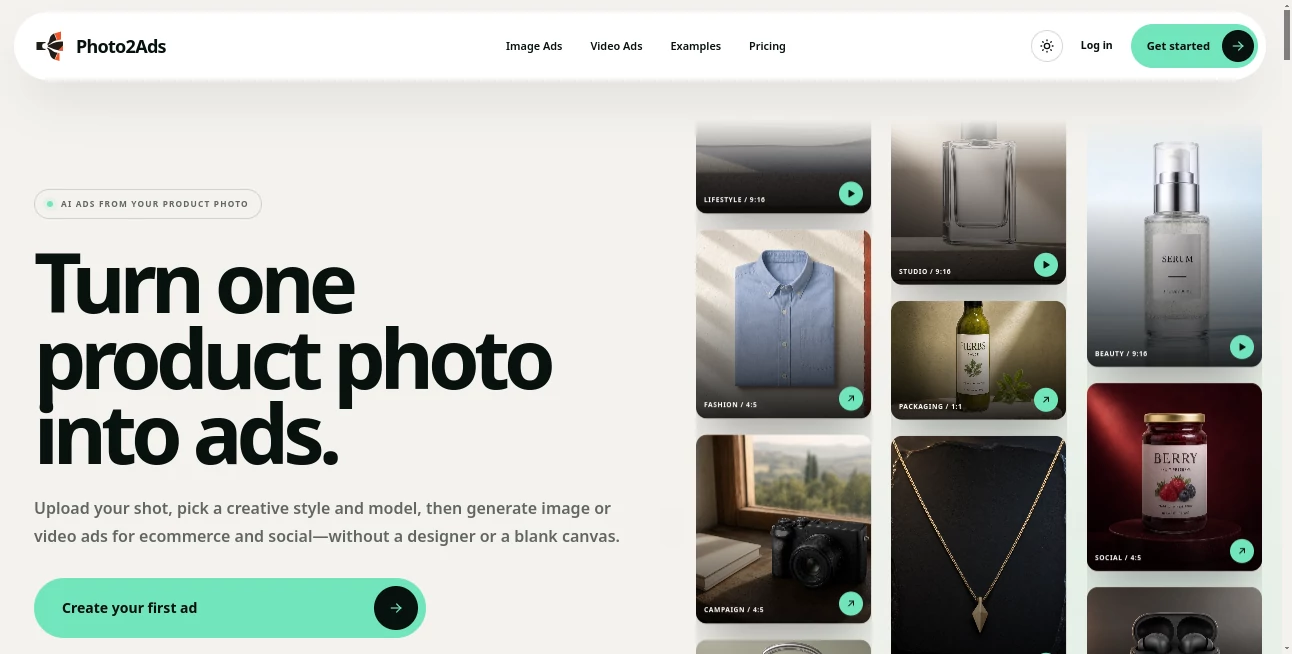
Photo2Ads is built around a simple idea: start with a product photo and turn it into polished advertising creative without starting from a blank design canvas. The platform lets ecommerce brands, marketers, and creators generate both image and video ads for social media, product pages, and paid campaigns.
The workflow is refreshingly straightforward. Upload a clear product image, choose the creative direction, select a model, format, and other settings, then generate the ad. Instead of spending hours arranging backgrounds, lighting, scenes, and compositions manually, users can explore different advertising concepts from the same source product.
It is particularly useful for smaller ecommerce teams that need a steady flow of visual content but do not always have a designer or production team available. A single product photograph can become a studio image, lifestyle scene, UGC-style creative, commercial concept, or short-form video.
Key Features
- Generate AI image ads from product photos.
- Create AI video advertisements for ecommerce and social campaigns.
- Support for UGC-style product content, including reviews, testimonials, and unboxing concepts.
- Multiple creative directions such as Studio, Lifestyle, TikTok, UGC, and Commercial.
- Support for common advertising aspect ratios including 1:1, 4:5, and 9:16.
- Upload up to five product views in image mode when additional product detail is important.
- Optional person references for creator-style campaigns.
- Multiple image and video generation models available through the studio.
- Ability to select the visual style, opening, scene, format, and generation settings.
- Generation of multiple image options in a single run.
User Interface
The interface is centered around the product rather than a complicated collection of design tools. The basic workflow follows three steps: upload the product, choose a style, and create the advertisement.
This approach makes sense for marketers who know what they want to promote but do not necessarily want to learn traditional image-editing software. The style previews are also helpful because users can see the intended creative direction before applying it to their own product.
For example, a skincare brand can start with a straightforward bottle photograph and explore a clean studio presentation, a lifestyle environment, or a social-media-oriented creative without rebuilding each concept manually.
Accuracy & Performance
Product consistency is one of the most important considerations when generating advertising imagery. The platform uses uploaded product views as visual references and is designed to preserve recognizable details such as colors, packaging, labels, logos, materials, and proportions.
Providing additional product views can be useful when a product has details that are difficult to understand from a single angle. The platform also allows users to compare source product photos with generated results through reviewed examples on the website.
As with other generative image and video systems, the output should still receive a human review before publication. Small details such as text, logos, hands, materials, or product-to-person contact can sometimes require checking.
Capabilities
The platform covers considerably more than simple background replacement. Its image workflows can produce studio product photography, lifestyle scenes, packaging presentations, fashion concepts, beauty campaigns, and social creatives.
Video generation extends the workflow into product demonstrations, UGC-style clips, commercial spots, creator-led videos, and other short-form advertising concepts. Users can also work with different durations, formats, quality settings, and model-specific options depending on the selected video workflow.
One of the strongest aspects is the connection between static and motion content. A brand can begin with the same product reference and develop both still advertisements and video concepts instead of treating those as completely separate production tasks.
Security & Privacy
When working with commercial product photography, users should consider the permissions and ownership of every uploaded asset. Product images should belong to the user or be properly licensed, and person references should only be used when the necessary permission has been obtained.
Generated UGC-style content also needs responsible disclosure. AI-generated creator imagery should not be presented as an authentic customer review, verified buyer experience, or naturally submitted user content. A final human review is important before using generated material in a public advertising campaign.
Use Cases
Ecommerce product pages: Turn basic product photographs into cleaner lifestyle or studio-style visuals that can complement an online store.
Social media advertising: Create vertical and portrait-oriented concepts for feeds, stories, and short-form social campaigns.
UGC campaigns: Generate creator-style reviews, testimonials, selfies, tutorials, and unboxing concepts using an optional person reference.
Product launches: Quickly explore several visual directions before committing to a full photography or video production.
Paid advertising tests: Produce multiple creative concepts and compare different visual approaches instead of relying on a single advertisement.
Small ecommerce teams: Useful for businesses that need fresh advertising material but do not have an in-house designer or dedicated production team.
Creative experimentation: Test studio, lifestyle, commercial, TikTok, and UGC concepts from the same underlying product photograph.
Pros and Cons
Pros
- Simple product-photo-to-ad workflow.
- Supports both image and video advertising.
- Useful creative directions for ecommerce and social media.
- Can work from a single product photo.
- Additional product references can improve visual context.
- UGC-style workflows add another useful advertising format.
- Multiple aspect ratios make the output easier to adapt to different placements.
Cons
- Generated results still need human quality control before publication.
- Small product details, text, logos, and hands may occasionally require inspection.
- Some advanced generation options depend on the selected model and plan.
- AI-generated UGC should be disclosed appropriately rather than presented as genuine customer content.
Pricing Plans
The platform uses a credit-based generation system rather than treating every generation as having the same fixed cost. Image generation starts at 4 credits, while the final credit requirement can vary according to the selected model, resolution, and plan access.
Because image and video models have different generation requirements, the amount consumed can change depending on the workflow and settings selected. Users should therefore check the current pricing and generation cost shown in the platform before starting a larger campaign.
How to Use Photo2Ads
- Upload a clear photograph of the product you want to advertise.
- Add additional product views when more visual detail is needed.
- Add a person reference if the chosen creative requires a specific presenter or creator.
- Choose a creative direction such as Studio, Lifestyle, TikTok, UGC, or Commercial.
- Select the desired image or video workflow and available generation model.
- Choose the appropriate aspect ratio and other available settings.
- Generate the advertisement.
- Review the product appearance, branding, text, hands, identity, and overall composition.
- Download the approved creative and prepare it for the intended ecommerce or advertising channel.
Comparison with Similar Tools
Many AI creative platforms focus primarily on generating images from text prompts, while this workflow is more product-centered. The starting point is an actual product photograph, and the generation process is built around turning that reference into advertising material.
This makes the platform especially relevant for ecommerce businesses that already have basic product photography but need more creative variations. Instead of asking a designer to create every new concept from scratch, marketers can explore different scenes and campaign directions from the same source material.
Another distinction is the combination of static and video advertising workflows. A business can experiment with product photography, lifestyle imagery, UGC-style content, and product videos within a related workflow, making it easier to build a broader creative library around one product.
Conclusion
For ecommerce brands, creating enough advertising content can become surprisingly time-consuming. Product photography, lifestyle scenes, social creatives, and video campaigns all require different production approaches. This platform brings many of those jobs into a single product-focused workflow.
The biggest advantage is its starting point: one product photograph can become the foundation for multiple advertising concepts. Whether the goal is a clean ecommerce image, a lifestyle campaign, a creator-style testimonial, or a short product video, the workflow provides a practical way to explore those directions quickly.
It is not a replacement for human creative judgment, particularly when product accuracy and advertising claims matter. But for marketers who need more variations from the product assets they already have, it offers a convenient and capable approach to AI-assisted advertising production.
Frequently Asked Questions (FAQ)
What does the platform do?
It turns product photographs into AI-generated advertising creatives for ecommerce and social campaigns, including both images and videos.
Can I start with only one product photo?
Yes. A single clear product photo is enough to begin. Additional product views can be added when more visual context is useful.
Can I create video ads?
Yes. The platform supports video advertising workflows alongside static image generation, with options that vary according to the selected video model.
Can I create UGC-style advertisements?
Yes. UGC workflows can create review, testimonial, selfie, tutorial, and unboxing-style product content. A person reference is optional when identity continuity is important.
What aspect ratios are supported?
The studio supports common advertising formats such as square, portrait, vertical, landscape, and wide display ratios. The main advertised formats include 1:1, 4:5, and 9:16.
How many product images can I provide?
Image workflows can use up to five product views, which can help when the product contains important details that cannot be represented clearly from one angle.
Are AI-generated UGC images real customer testimonials?
No. They are synthetic marketing assets designed to resemble familiar creator-style formats. They should not be presented as genuine customer experiences or verified testimonials.
How much does an image generation cost?
Image generation starts at 4 credits. The exact credit usage can vary depending on the selected model, resolution, and plan access.
Should generated advertisements be reviewed before publishing?
Yes. A final human review is recommended to check product details, branding, text, anatomy, contact points, and any advertising claims before the creative is published.
AI Ad Creative Assistant , AI Ad Generator , AI Video Generator , AI Advertising Assistant .
These classifications represent its core capabilities and areas of application. For related tools, explore the linked categories above.

Photo2Ads Alternatives Product

Seedance 2.0

PDF to Video

Kling 3 AI

Seedance 2.0

ImgVid

Aura AI

Sora 2

VO4 AI

brainrotkit