
PhotoEditorAI
What is PhotoEditorAI?
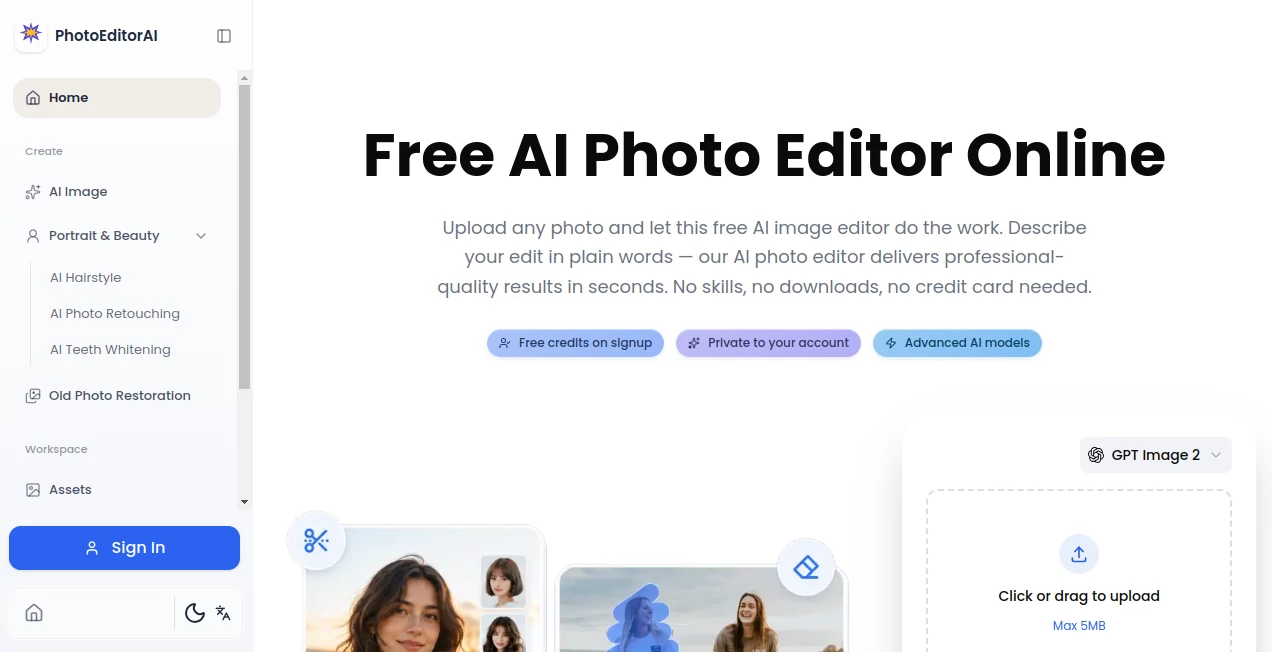
Creating professional-quality visuals no longer requires advanced design skills or expensive software. This platform brings together image editing, enhancement, generation, and creative transformation into a single browser-based workspace. Whether you are managing product photography, building marketing assets, creating social media content, or restoring personal photos, the experience is designed to be fast, intuitive, and accessible.
What makes this solution particularly appealing is its ability to handle a wide variety of visual tasks from one interface. Users can remove backgrounds, upscale low-resolution images, generate new visuals from text prompts, apply artistic styles, retouch portraits, and create commercial-ready graphics within seconds. The workflow feels natural, making it suitable for beginners while still offering enough flexibility for experienced creators.
For businesses, freelancers, marketers, and content creators, it serves as a practical way to reduce production time while maintaining high-quality visual output.
Key Features
User Interface
The interface is designed around simplicity. Users can upload an image, describe the desired changes in plain language, and receive edited results without navigating complicated menus. The clean workspace minimizes distractions and allows both first-time users and professionals to focus on creativity rather than technical settings.
The browser-based design also means projects can be accessed from desktops, laptops, and mobile devices without requiring software installation.
Accuracy & Performance
Image processing is remarkably fast, with many edits completed in just a few seconds. The platform uses multiple advanced AI models optimized for specific tasks, helping preserve important image details while applying changes accurately.
Portrait enhancements maintain natural facial features, product photos retain realistic textures, and background edits blend seamlessly into the final image. This attention to detail helps produce polished results suitable for professional use.
Capabilities
- AI-powered image editing through text instructions
- Background removal and replacement
- Object removal and cleanup
- Photo enhancement and sharpening
- Image upscaling for higher resolution output
- Text-to-image generation
- Portrait retouching and restoration
- Style transfer and artistic effects
- Commercial-ready product image creation
- Batch image generation and editing workflows
- Thumbnail and social media graphic creation
- Support for multiple AI image models
Security & Privacy
The platform emphasizes secure cloud-based processing and provides a professional environment for handling visual content. Permanent storage options, account management features, and commercial licensing support make it suitable for business users who require reliable access to their creative assets.
For organizations managing marketing campaigns or e-commerce catalogs, maintaining image consistency and project organization becomes significantly easier through centralized workflows.
Use Cases
- E-commerce businesses creating product listings and promotional visuals
- Marketing teams producing advertising creatives and campaign assets
- Content creators generating social media graphics and thumbnails
- Freelancers building client concepts and design mockups
- Educators creating presentations and learning materials
- Bloggers designing featured images and article illustrations
- Startups developing pitch deck visuals and branding assets
- Photographers restoring and enhancing old photographs
- Influencers producing engaging visual content at scale
- Agencies managing large volumes of creative projects efficiently
Pros and Cons
Pros
- Easy-to-use interface with minimal learning curve
- Multiple AI editing and generation tools in one platform
- Fast image processing speeds
- Suitable for commercial projects
- Works directly in a web browser
- Supports image enhancement, generation, and retouching workflows
- Offers a variety of creative styles and editing options
Cons
- Advanced workflows may require premium plans
- Complex creative edits can occasionally require multiple iterations
- Credit-based systems may not suit every usage pattern
- Some premium AI models are restricted to higher-tier subscriptions
Pricing Plans
The platform offers multiple pricing tiers designed for different user needs.
- Basic Plan: Suitable for casual users and beginners creating occasional visuals.
- Premium Plan: Designed for content creators requiring higher output volume and additional features.
- Pro Plan: Ideal for professionals managing frequent image production and editing tasks.
- Max Plan: Built for agencies, studios, and teams with large-scale creative requirements.
Commercial usage rights, advanced AI models, higher generation limits, and priority processing become available as users move to higher subscription levels.
How to Use PhotoEditorAI
Getting started is straightforward and requires only a few simple steps.
- Upload an image or begin with a text description.
- Select the desired editing or generation task.
- Describe the changes you want in natural language.
- Allow the AI system to generate or modify the image.
- Review the results and refine them if needed.
- Export the finished visual for personal or commercial use.
This streamlined workflow helps reduce the time traditionally required for image production and editing.
Comparison with Similar Tools
Many image editing solutions focus on only one area, such as background removal, image enhancement, or text-to-image generation. This platform stands out by combining all these capabilities into a unified environment.
Compared with traditional design software, the learning curve is dramatically lower. Users can achieve professional-looking results through simple prompts instead of spending hours mastering complex editing tools. For marketers, online sellers, and creators who value speed, this integrated approach offers a practical advantage.
Another notable difference is the availability of multiple AI models optimized for different tasks, allowing users to choose the most suitable technology for specific projects.
Conclusion
This platform successfully bridges the gap between professional image editing and everyday usability. By combining AI-powered generation, enhancement, restoration, and editing tools within a single browser-based environment, it enables users to create impressive visuals with minimal effort.
Whether the goal is improving product photography, generating marketing assets, enhancing portraits, or creating entirely new visual concepts, the platform provides a flexible and efficient workflow. Its balance of speed, accessibility, and creative power makes it a valuable solution for businesses, creators, and professionals looking to streamline visual production.
Frequently Asked Questions (FAQ)
What types of images can be edited?
Users can edit portraits, product photos, marketing graphics, social media visuals, illustrations, and many other image formats.
Can beginners use the platform effectively?
Yes. The interface is designed to work with simple text instructions, making it accessible even for users with no design experience.
Is it suitable for commercial projects?
Yes. Commercial usage options are available, making it appropriate for businesses, agencies, and professional creators.
Does it support image enhancement and restoration?
Yes. Features such as photo enhancement, sharpening, restoration, and upscaling help improve image quality significantly.
Can users generate images from text prompts?
Absolutely. Text-to-image generation is one of the core capabilities, allowing users to create original visuals from written descriptions.
AI Photo & Image Generator , Photo & Image Editor , AI Background Remover , AI Image to Image .
These classifications represent its core capabilities and areas of application. For related tools, explore the linked categories above.
PhotoEditorAI details
Pricing
- Free
Apps
- Web App
Categories

PhotoEditorAI Alternatives Product

AI Picture G…

AI Ease AI P…

Img Extender

KOOX AI

Remove text …

Image2GPT
Pixfy AI

Mage
chibi art