
Pioneer
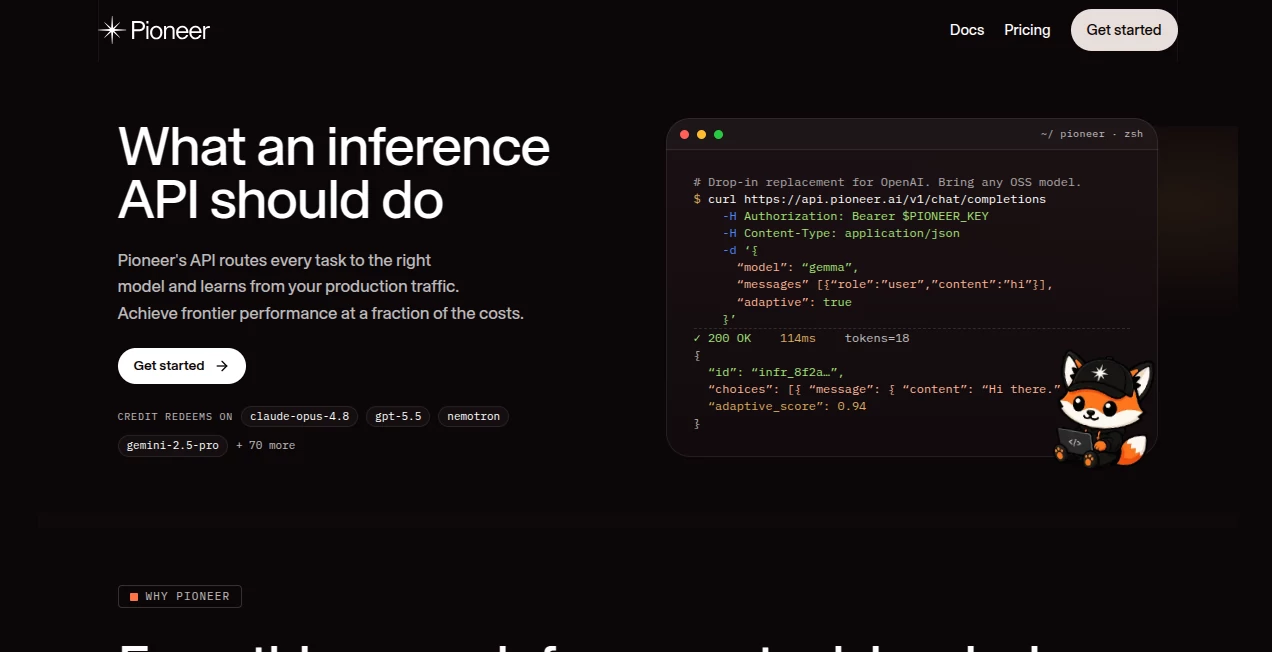
What is Pioneer?
Pioneer is an inference API built for developers who want to use different AI models without spending their time managing GPU infrastructure, model deployments, and constant performance tuning. It provides a compatible interface for working with modern language models while adding model routing, monitoring, fine-tuning, evaluation, and continuous improvement features.
The main idea is refreshingly practical: instead of forcing a development team to pick one model and live with its limitations, the platform can route different tasks to appropriate models and learn from production traffic. Developers can connect existing OpenAI or Anthropic-compatible applications with minimal changes, making it particularly interesting for teams already working with modern AI APIs.
It supports both proprietary and open-source models, including models from providers such as OpenAI, Anthropic, Google, Alibaba, NVIDIA, and other model developers. This gives teams considerably more flexibility when balancing quality, speed, and inference costs.
Key Features
- OpenAI- and Anthropic-compatible inference endpoints
- Access to a broad selection of frontier and open-source models
- Automatic model routing based on task requirements
- Production traffic and failure-mode analysis
- Adaptive inference and continuous model improvement
- LoRA-based fine-tuning workflows
- Built-in model evaluation
- Downloadable model weights and training datasets
- Streaming, tool calls, and structured outputs
- Support for coding-agent integrations
User Interface
The interface is designed around developers rather than casual AI users. The dashboard focuses on practical information such as model performance, task clusters, failure patterns, training runs, evaluations, and deployment activity.
That approach makes sense for its target audience. A developer evaluating several models does not necessarily need a flashy interface; they need to understand which model is working, where it is failing, and whether a change actually improves production results.
The documentation also provides a straightforward workflow for creating an API key, selecting models, running inference, creating training jobs, and evaluating results. This keeps the learning curve relatively manageable for developers who are already familiar with API-based AI services.
Accuracy & Performance
Performance is one of the more interesting aspects of the platform because it is not limited to simply serving model responses. Production requests can be analyzed to identify recurring failure modes, allowing teams to see where their existing model is struggling.
The platform reports sub-200ms p50 latency and a 99.99% uptime SLA on its current website. It also states that Adaptive Inference can improve classification and extraction performance compared with a base model, although actual results will naturally depend on the application, dataset, model, and traffic patterns.
This distinction matters. Rather than treating benchmark scores as the only measure of quality, the platform focuses on how a model behaves with real production workloads. For businesses with highly specific AI tasks, that can be considerably more useful than choosing a model based only on a public leaderboard.
Capabilities
The platform covers several parts of the modern AI development lifecycle. Developers can send inference requests to base models, use fine-tuned models, create training jobs, evaluate model performance, and deploy trained models without building the entire infrastructure themselves.
Its model routing capabilities are particularly useful when different tasks have different requirements. A lightweight open model may be enough for a simple classification request, while a more capable model could be preferable for complex reasoning. Using the same API layer for these scenarios can make an application easier to maintain.
Another notable capability is Adaptive Inference. The system can analyze failures from live traffic, identify useful training examples, retrain specialist models, and make improved checkpoints available behind the same endpoint. The platform also allows users to download their weights and training datasets, which provides additional flexibility for teams that want control over their trained assets.
For developers working with coding agents, the service can also provide access to multiple models through a common inference endpoint. This makes it easier to experiment with different models without rebuilding the surrounding application.
Security & Privacy
Security requirements vary significantly between individual developers and larger organizations, and the available plans reflect that difference. Enterprise customers can use features such as private VPC or bring-your-own-cloud deployments, SAML and SSO, additional team controls, and dedicated support.
The Enterprise offering also advertises options designed for organizations with stricter infrastructure and compliance requirements, including private networking and on-premises deployment capabilities.
As with any API that processes production data, teams should review the current privacy policy, terms, retention practices, and deployment options before sending sensitive information. The exact configuration should be selected according to the application's security and compliance requirements.
Use Cases
AI applications: Teams building AI-powered products can use a single API layer to access multiple models instead of integrating each provider independently.
Model routing: Applications that handle several types of requests can route simpler tasks to smaller models while reserving more capable models for demanding workloads.
Fine-tuning: Businesses with proprietary datasets can create specialized models and evaluate their performance before using them in production.
Classification and extraction: The platform is particularly relevant to structured AI workloads where accuracy, latency, and predictable outputs matter. Entity recognition and structured data extraction are examples of tasks where smaller specialized models can be useful.
Coding agents: Developers can connect supported coding agents to different AI models and experiment with model selection without changing the entire development workflow.
Production AI monitoring: Teams can inspect recurring failure patterns instead of relying solely on occasional manual testing. This can make it easier to discover problems that only become visible after an application starts receiving real-world traffic.
Pros and Cons
- Pros: OpenAI and Anthropic compatibility, broad model selection, automatic routing, fine-tuning support, evaluation tools, adaptive inference, production monitoring, and access to downloadable model assets.
- Pros: Developers can experiment with different models without maintaining separate infrastructure for every provider.
- Pros: The focus on production traffic makes the service useful beyond simple model experimentation.
- Cons: The platform is primarily aimed at developers and technical teams rather than everyday consumers.
- Cons: Understanding model routing, inference costs, fine-tuning, and evaluation still requires some technical knowledge.
- Cons: The benefits of adaptive improvement become more meaningful when an application has enough real production traffic and useful failure data.
Pricing Plans
The current pricing structure is designed to accommodate both experimentation and production use. A Free option is available for getting started without a credit card, while the Pro plan is listed at $20 per seat per month with platform credits included. The Enterprise plan is listed at $50 per seat per month and adds features aimed at larger teams and organizations with more demanding security and collaboration requirements.
The Pro offering includes downloadable model weights, team invitations, and additional platform credits. Enterprise adds capabilities such as SAML, SSO, two-factor authentication, team roles, inference-tracking opt-out, and dedicated support.
Inference itself is also priced according to the selected model and token usage. Because the available models have different capabilities and token prices, the actual cost of running an application will depend heavily on the model and workload selected.
How to Use the Platform
Getting started is straightforward for developers familiar with API-based AI services.
- Create an account and generate an API key from the account settings.
- Choose a model from the available catalog based on the application's requirements.
- Connect the application using the native API or an OpenAI- or Anthropic-compatible endpoint.
- Send inference requests and monitor the resulting performance.
- Use evaluation tools to compare model behavior against the application's requirements.
- Create a fine-tuning job when a specialized model is needed.
- Deploy the trained model and route production traffic to it.
For an existing application using the OpenAI SDK, the integration can be especially quick because the endpoint can be changed without rewriting the surrounding application logic. This makes experimentation considerably less disruptive.
Comparison with Similar Tools
The platform occupies an interesting position between a conventional model API provider and a full machine-learning infrastructure platform. Traditional AI APIs can be very convenient when a team wants to call one provider's models, but they may require additional engineering when an application needs multiple providers, custom models, or automated performance improvement.
On the other hand, building an internal model-routing and fine-tuning system gives teams maximum control but can require significant engineering effort. GPU provisioning, deployment, evaluation pipelines, monitoring, retraining, and model versioning all become the team's responsibility.
The main advantage here is the attempt to bring those pieces together behind a developer-friendly API. For teams that value flexibility but do not want to build an entire inference stack from scratch, that can be a compelling middle ground.
Conclusion
For developers building serious AI applications, choosing a model is only the beginning. The harder challenge often appears later: controlling inference costs, identifying failures, evaluating alternatives, fine-tuning models, and keeping production systems reliable as workloads change.
This platform approaches that problem by combining inference, model routing, monitoring, fine-tuning, evaluation, and adaptive improvement in one environment. Its OpenAI- and Anthropic-compatible interfaces also make experimentation less painful for existing applications.
It is not designed to be a casual chatbot or a simple AI writing application. Its value becomes clearer when viewed as infrastructure for teams that are shipping AI-powered software and want more control over how models perform in the real world.
Frequently Asked Questions (FAQ)
What is this platform used for?
It provides AI inference infrastructure, model routing, fine-tuning, evaluation, and production optimization for developers building AI applications.
Can developers use different AI models through one API?
Yes. The service provides access to a range of proprietary and open-source models through a common inference layer, allowing developers to switch between supported models without rebuilding the entire integration.
Does it support OpenAI-compatible requests?
Yes. Existing applications using compatible OpenAI-style requests can connect through the provided endpoint, which can significantly simplify integration.
Can I fine-tune a model?
Yes. Developers can create training jobs using their own data and evaluate the resulting model before deploying it for inference.
Does it provide model evaluation?
Yes. The platform includes evaluation capabilities and allows developers to bring their own evaluations when they need application-specific benchmarks.
Is there a free plan?
Yes. A free option is available for getting started, and the service states that no credit card is required to begin.
Who is this service best suited for?
It is best suited to developers, startups, AI engineering teams, and organizations building production applications that need access to multiple models, specialized fine-tuning, or more control over inference performance and cost.
Can trained model assets be downloaded?
Yes. The platform states that users can download their model weights and training datasets, giving teams the option to use those assets outside the platform or continue fine-tuning them on their own infrastructure.
Large Language Models (LLMs) , AI Developer Tools .
These classifications represent its core capabilities and areas of application. For related tools, explore the linked categories above.

Pioneer Alternatives Product

Mage Flow AI…

Workik

Kimi K2.5

Grok

GPTLocalhost

Nestify

MacroMicro

Screenshot t…

Standard Com…