Piooy
What is Piooy?
I’ve tried quite a few AI image tools over the past year, but Piooy stands out because it actually feels fun to use. You type an idea, maybe add a reference photo, and a few seconds later you’re looking at something that feels polished and full of personality. It’s not just generating random pictures — it understands lighting, composition, and style in a way that makes the results feel crafted rather than churned out. Whether I’m making social media content, product mockups, or just exploring wild concepts at night, it consistently delivers visuals I’m happy to share.
Introduction
Creating strong visuals used to require expensive software, years of practice, or hiring someone. Piooy changes that reality. It’s a fast, intuitive platform that turns your words (and optional reference images) into high-quality images and short videos. What I like most is how it balances creative freedom with practical results. You don’t need perfect prompts to get good output, and the extra tools like background removal, upscaling, and photo restoration make it a complete creative workspace rather than just another generator. For marketers, creators, small business owners, and hobbyists, it removes the usual barriers and makes visual creation feel accessible and enjoyable.
Key Features
User Interface
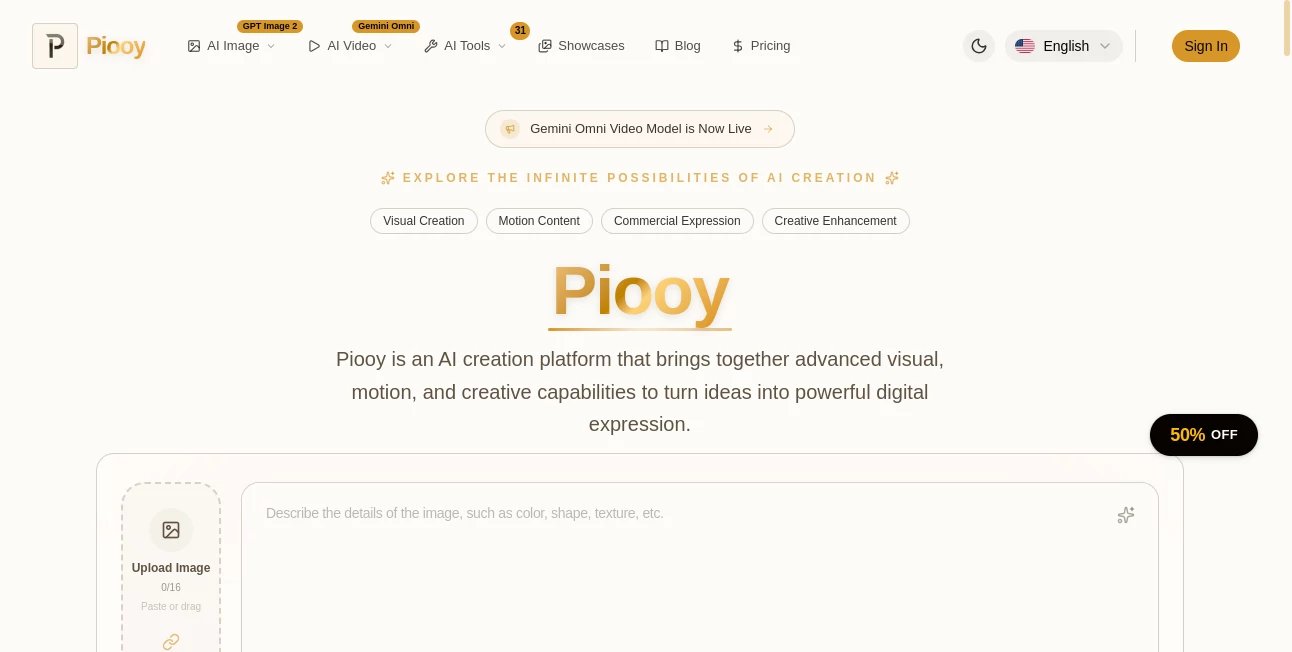
The design is clean and welcoming. A big prompt box invites you to describe what you want, with helpful style suggestions and easy options for aspect ratio and quality. Uploading reference images is drag-and-drop simple. Results appear quickly, and you can generate multiple variations side by side to compare. It never feels cluttered or intimidating — even when I’m tired, I can jump in and create something decent in minutes.
Accuracy & Performance
The output quality is consistently strong. Details like hands, faces, and text come out cleaner than many tools I’ve used. It handles complex scenes well and maintains style consistency when you give it references. Generation speed is excellent, which keeps the creative flow going instead of breaking it with long waits. In real use, I often get usable results on the first or second try, which saves a lot of time and frustration.
Capabilities
Beyond strong text-to-image and image-to-video generation, you get practical tools that make it a daily companion: smart upscaling, background removal, photo restoration, object removal, and more. The video feature adds motion that feels natural rather than chaotic. You can create everything from hyper-realistic product shots to artistic illustrations and short promotional clips. The combination of creative power and utility tools makes it versatile for both fun experiments and serious work.
Security & Privacy
Your creations and uploaded images are handled securely. The platform focuses on delivering great results while respecting user privacy, which is important when working with client projects or personal photos. You can create without worry, knowing your work stays yours.
Use Cases
A small business owner generates consistent product photos and social media graphics without hiring a photographer every time. A content creator builds entire visual campaigns from one idea in a single afternoon. A real estate agent quickly creates attractive property renders. Someone restoring old family photos brings them back to life with the restoration tools. The platform adapts naturally whether you need one hero image or a full batch of marketing assets.
Pros and Cons
Pros:
- High success rate — you get good results quickly without fighting the prompt.
- Useful everyday tools (upscaling, restoration, background removal) make it more than just a generator.
- Fast enough to keep creative momentum alive.
- Beautiful, versatile styles that work for both realistic and artistic needs.
- Generous free access lets you test the quality properly.
Cons:
- Very specific or highly complex artistic visions may still need prompt refinement.
- Higher volume and advanced video features require paid plans.
Pricing Plans
It starts with a meaningful free tier so you can explore and create without pressure. Paid plans unlock faster generation, higher limits, priority access, and advanced features. The pricing feels reasonable for the quality and time it saves — many users say it quickly becomes one of their most-used creative tools.
How to Use Piooy
Start by typing a clear description of what you want to create. Add a reference image if you want to guide style or composition. Choose your aspect ratio and quality level, then hit generate. Review the variations, pick your favorite or refine the prompt for another round. For practical tasks like cleaning up a photo or removing a background, upload the image and select the right tool. Download and use the assets right away. The whole process stays fast and satisfying, whether you’re making one image or building a series.
Comparison with Similar Tools
Some AI generators are fast but produce inconsistent or low-quality results. Others are high-quality but slow and complicated. Piooy finds a sweet spot: strong, reliable output with a clean interface and useful extra tools. It feels more complete and production-ready than many alternatives while still being approachable for casual users.
Conclusion
Visual creation should spark joy, not frustration. Piooy makes that possible by combining beautiful results with practical tools and a smooth experience. Whether you’re building a brand, creating content, or just having fun with ideas, it gives you the power to bring visions to life quickly and confidently. Once you see what you can create in minutes, it’s hard to imagine going back to slower methods.
Frequently Asked Questions (FAQ)
How fast can I generate images?
Most images appear in just a few seconds, keeping your creative flow uninterrupted.
Do I need perfect prompts?
No — natural language works very well, though more detail gives even better control.
Can I use it for commercial work?
Yes — paid plans support commercial use with appropriate licensing.
Are my uploads private?
Yes — images are processed securely and not used for training without permission.
What extra tools are included?
Photo restoration, upscaling, background removal, object removal, and more.
AI Photo & Image Generator , AI Image to Video , AI Art Generator , AI Design Generator .
These classifications represent its core capabilities and areas of application. For related tools, explore the linked categories above.

Piooy Alternatives Product

UNi-1 AI

Banana AI
Niji V7
chibi art
Nano Banana …

AI Image Edi…

Generador De…
Sora 2 Video
MuseCraft.AI