
Pixo Video
What is Pixo Video?
Pixo is an AI-powered video creation platform built for creators who want to move from an initial idea to a finished video without juggling several disconnected tools. Instead of treating video generation as a single prompt-and-download task, it brings scripting, storyboarding, visual generation, voice, sound effects, editing, and final assembly into one workflow.
The experience starts with a conversation. You can describe what you want to make, explain the audience and style, or provide an existing script. The AI Director then helps turn that idea into a structured production plan. For creators working on YouTube videos, advertisements, product showcases, educational content, music videos, or podcast visuals, this approach can make the creative process much easier to manage.
Key Features
One of the strongest aspects of the platform is its scene-based approach to AI video production. Instead of generating an entire project blindly, creators can work through individual shots and decide how each part should look, sound, and move.
- AI Director that helps turn ideas or scripts into structured video projects.
- AI-assisted storyboards with individual scenes, references, dialogue, camera movement, and timing.
- Access to multiple AI generation models within the same project.
- Generation of images, video clips, voiceovers, and sound effects.
- Reference assets for maintaining characters, locations, products, and visual styles.
- Timeline-based editing for assembling generated media into a finished video.
- Real-time collaboration for teams working on the same project.
- MP4 export for completed projects.
User Interface
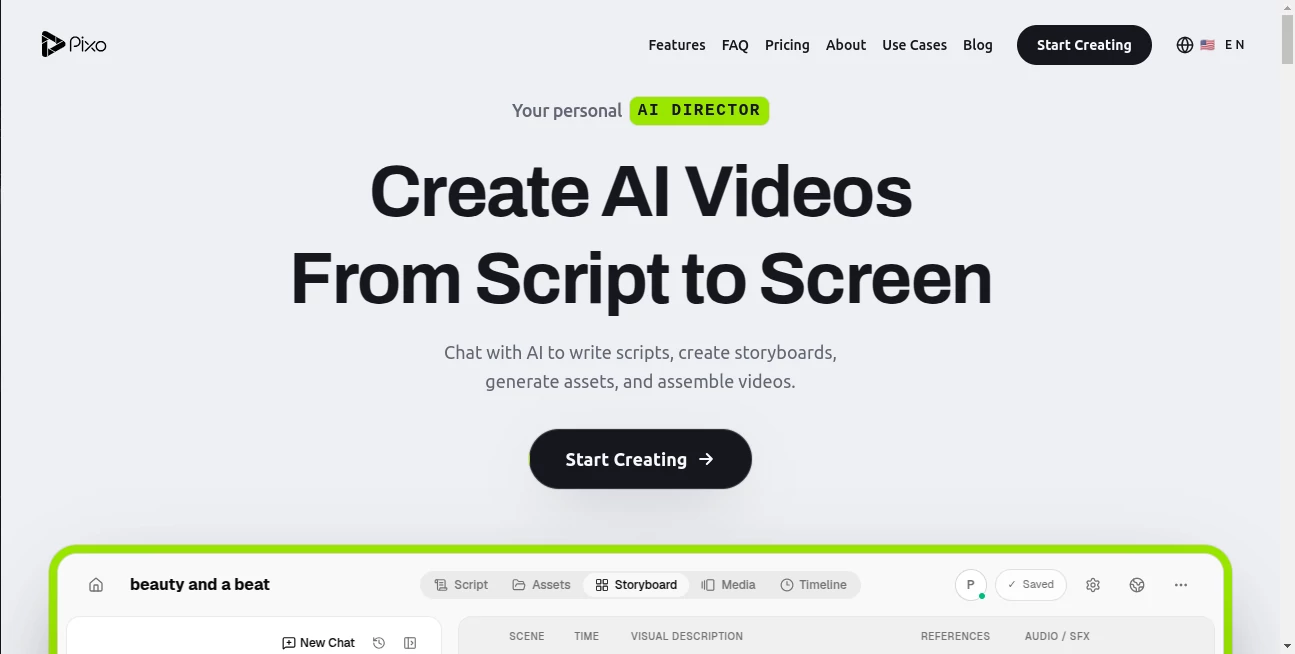
The interface is organized around a practical production workflow rather than a collection of isolated AI generators. A creator can begin with a conversation, move into a storyboard, review individual shots, and then work with the generated material on a timeline.
This is particularly useful when a project becomes more complicated than a short social clip. Being able to see scenes, references, audio, timing, and previews together gives the creator a clearer picture of how the final piece is developing.
Accuracy & Performance
Video generation quality can vary depending on the selected model, prompt, reference material, and type of scene. The platform addresses this by allowing different AI models to be used for different shots rather than forcing an entire project through one generation engine.
This multi-model workflow is a practical advantage. A cinematic scene may benefit from one model while a character-focused or action-heavy shot may work better with another. Creators can review individual results and regenerate what needs improvement without throwing away the parts that already work.
Capabilities
The platform goes beyond basic text-to-video generation. Its AI Director can help structure scripts into scenes, while the storyboard provides a production-level view of the project. Each shot can include visual descriptions, references, dialogue, camera instructions, duration, and audio or sound-effect cues.
Another useful capability is asset consistency. Reference images can be used for characters and scenes so that important visual elements can be reused across multiple shots. This is valuable for storytelling, product demonstrations, branded videos, and other projects where visual continuity matters.
The workflow can also bring generated video, images, voiceovers, music, and sound effects together on a timeline, making the platform useful for creators who want to handle much of the production process in one place.
Security & Privacy
When working with AI-generated video, creators may upload scripts, reference images, product assets, and other project materials. As with any online creative platform, users should review the current privacy policy and terms before uploading confidential or commercially sensitive material.
For professional teams, it is also worth considering how project access and collaboration permissions fit into the organization's internal workflow. The platform supports collaborative projects, allowing multiple team members to work within a shared workspace.
Use Cases
This platform can fit a wide range of creative workflows. YouTube creators can use it to develop complete videos from scripts, while marketing teams can create advertising concepts and alternative creative versions without relying entirely on traditional production processes.
It is also well suited to product showcases, where consistent product visuals and controlled scenes are important. Educators can use generated visuals to make explanations more engaging, while podcasters can transform audio content into video-oriented material.
Music creators have another interesting use case. By combining generated visuals, characters, environments, and audio elements, they can develop music videos with a more structured visual narrative instead of producing disconnected clips.
For example, a creator could start with a two-minute story, let the AI organize it into individual scenes, add reference images for the main character and location, generate different shots using suitable models, and then assemble the selected clips with voice and sound on the timeline. That feels much closer to a lightweight production studio than a traditional one-click AI generator.
Pros and Cons
- Pros: Combines scripting, storyboarding, generation, editing, audio, and asset management in one workflow.
- Pros: Supports multiple AI models within the same project.
- Pros: Scene-by-scene control makes it easier to refine individual shots.
- Pros: Reference assets help improve consistency across scenes.
- Pros: Collaboration features are useful for creative teams.
- Cons: Credit-based generation means larger projects can consume credits quickly.
- Cons: Final output quality can still vary depending on the selected generation model and prompt.
- Cons: Users who only need simple short clips may find the broader production workflow more than they need.
Pricing Plans
A free plan is available with 200 credits and access to all AI models. It supports up to three projects and one team member, making it a useful way to explore the workflow before paying.
The Basic plan provides 1,000 credits, supports up to 10 projects, offers up to 1080p generation, and allows two concurrent generations. The listed monthly price is $19.90, with a lower effective price of $9.90 per month when billed annually.
The Pro plan includes 4,200 credits, unlimited projects, five team members, up to 4K resolution, and five concurrent generations. Its listed monthly price is $84.90, while annual billing is presented at an effective $39.90 per month.
The Max plan is designed for heavier production workloads, offering 22,000 credits, unlimited projects, unlimited team members, up to 4K resolution, and 10 concurrent generations. Its listed monthly price is $439.90, with annual billing presented at an effective $199.90 per month.
Because generation is credit-based, the most suitable plan depends heavily on how frequently you create videos and how much high-resolution generation your projects require.
How to Use Pixo
Start by creating a project and describing the video you want to produce. You can provide an idea, audience, style, duration, or an existing script. The AI Director can then help structure the concept into a storyboard.
Review the proposed scenes before generating the final assets. Each scene can contain visual instructions, references, dialogue, camera movement, timing, and audio cues. This gives you an opportunity to correct the direction before spending credits on generation.
Next, generate the required images, video clips, voiceovers, music, and sound effects. Different AI models can be selected for different shots, which gives you more flexibility when a particular scene needs a different visual treatment.
Finally, review the project on the timeline, adjust timing and transitions, regenerate individual scenes where necessary, and export the finished video as an MP4 file.
Comparison with Similar Tools
Many AI video platforms focus primarily on generating a clip from a text prompt or transforming an image into a short video. That approach can be excellent for quick experiments, but it becomes less convenient when a project requires multiple scenes, recurring characters, dialogue, sound design, and a coherent timeline.
The main difference here is the production workflow. Rather than focusing exclusively on generation, the platform combines an AI planning layer with storyboarding, multi-model generation, asset consistency, collaboration, and timeline editing.
For someone who only needs a few seconds of generated footage, a simpler generator may be faster. For creators developing structured videos with several scenes, the broader workflow can be considerably more useful.
Conclusion
Creating an AI video becomes much more interesting when the process is treated as actual production rather than simply generating isolated clips. The combination of an AI Director, scene-based storyboarding, multiple generation models, reusable assets, audio tools, and timeline editing gives creators considerably more control over the finished result.
The platform is especially appealing for people producing YouTube content, advertisements, product presentations, educational videos, music videos, and other projects where consistency matters. The free plan also makes it possible to explore the workflow before committing to a paid subscription.
For creators looking for a more organized way to move from an idea or script to a complete AI-assisted video, this is a strong option worth exploring.
Frequently Asked Questions (FAQ)
What is Pixo?
It is an AI-powered video creation platform that combines script development, storyboarding, AI asset generation, audio creation, editing, and video assembly in one workflow.
Can I use multiple AI models in one project?
Yes. The platform supports multiple AI generation models within the same project, allowing creators to choose a suitable model for individual shots.
Can I create a storyboard from a script?
Yes. The AI Director can turn a script into a structured storyboard containing individual scenes, visual descriptions, references, timing, and audio instructions.
Does it support character consistency?
Yes. Reference assets can be used to help maintain consistent characters, locations, products, and visual styles across multiple scenes.
Can teams collaborate on projects?
Yes. Real-time collaboration is supported, allowing multiple team members to work on shared projects.
Can I export finished videos?
Yes. Completed projects can be reviewed on the timeline and exported as MP4 videos.
Is there a free plan?
Yes. The free plan includes 200 credits and access to all AI models, with limits on projects, team members, and concurrent generations.
Which type of creator would benefit most from it?
It is particularly suitable for content creators, marketers, creative teams, educators, musicians, and businesses that need multi-scene AI videos rather than occasional short generated clips.
AI Animated Video , AI Video Generator , AI Music Video Generator , AI Video Editor .
These classifications represent its core capabilities and areas of application. For related tools, explore the linked categories above.

Pixo Video Alternatives Product

LTX-3 AI

Seedream 4.0…

Seedance 2.0…

Visfeng AI F…

Seedance 2.5

VO4 AI

AI Motion Co…

Brainrotshor…

Wan 2.7 AI