


















Press Prep
What is Press Prep?
Media interviews can change quickly. A friendly conversation can turn into a difficult line of questioning within seconds, and even experienced spokespeople can struggle when they are caught off guard. Press Prep is designed to make that preparation more structured, giving communications professionals a practical way to research the reporter, understand the current news cycle, anticipate difficult questions, shape key messages, and rehearse before going on the record.
Rather than treating interview preparation as a last-minute collection of notes, the platform brings the important pieces together in one workflow. You can provide the reporter, outlet, topic, strategic goal, and supporting documents, then work through research, questions, talking points, practice, and a post-interview review.
That approach is particularly useful when the stakes are high. An executive preparing for an earnings interview, a PR team handling a product announcement, or a spokesperson facing a crisis can all benefit from having the difficult questions considered before the actual conversation begins.
Key Features
- Reporter Intelligence: Researches the reporter's beat, recent stories, known angles, and social presence to give the spokesperson more context before the interview.
- Real-Time News Scan: Surfaces current headlines connected to the interview topic and turns them into a useful day-of news frame.
- AI-Generated Questions: Creates likely and harder questions based on the reporter profile, topic, and interview context.
- Tailored Talking Points: Helps organize core messages, supporting points, approved language, red lines, and a closing quote around the desired communication goal.
- Live Mock Practice: Allows users to rehearse interviews through text, voice, or video-based practice depending on the plan.
- Interview Debrief: Users can provide a published story or broadcast transcript and receive feedback covering message alignment, clarity, discipline, quotability, and potential risks.
- Reusable Spokesperson Profiles: Profiles can include biographies, expertise, evergreen talking points, and red lines for repeated interview preparation.
- Interview Context Library: Q&A documents, press releases, fact sheets, and background notes can be attached to provide richer context.
- Email-to-Brief: A reporter's interview request can be forwarded by email so the system can extract relevant details and prepare the briefing workflow without requiring a login for that step.
User Interface
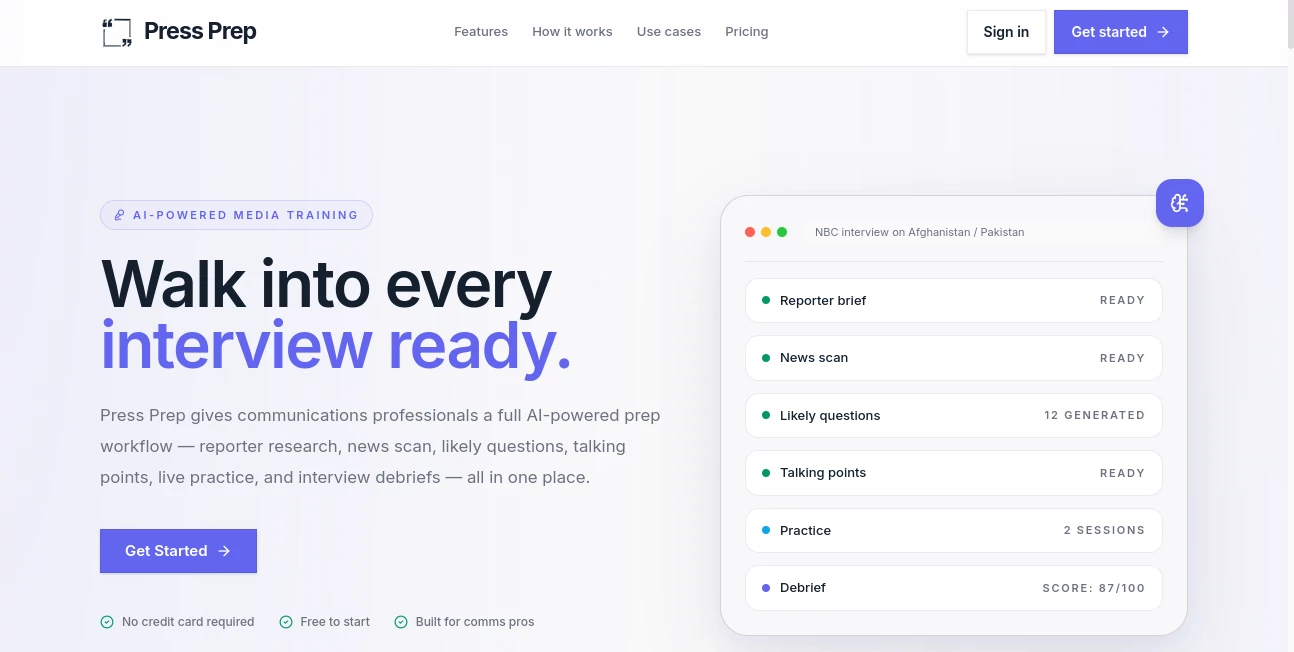
The interface follows a straightforward workflow rather than presenting users with a generic chatbot. The process begins with the interview details and moves through reporter research, news scanning, question generation, talking points, practice, and debriefing.
This structure makes sense for busy communications teams. Instead of jumping between a search engine, notes document, video-call software, and separate AI assistant, the preparation process stays organized around the interview itself. The email-to-brief feature is another practical touch, especially for someone receiving an interview request while traveling or moving between meetings.
Accuracy & Performance
The quality of interview preparation depends heavily on context, and that is where the platform takes a useful approach. Its practice interviewer is built from the reporter research, interview topic, talking points, and supplied background material rather than relying entirely on generic questions.
The real-time news scan also adds an important layer. A spokesperson may prepare perfectly for yesterday's story and still be surprised by a headline published an hour before the interview. Bringing current news into the preparation process helps make the rehearsal more relevant to the actual media environment.
Users should still review generated information and talking points before relying on them publicly. AI can support preparation, but final messaging, facts, legal language, and approved corporate positions should remain under human control.
Capabilities
The platform covers the complete interview lifecycle. Before an interview, it can research the reporter, analyze the current news environment, generate likely questions, and organize talking points. During preparation, users can run mock interviews and choose between aggressive, neutral, or friendly questioning styles.
After the interview, the workflow does not simply end. A transcript or published story can be used for a scored debrief, helping teams examine whether the spokesperson stayed aligned with the intended message, communicated clearly, avoided unnecessary risks, and produced quotable answers.
This makes the product more than a question generator. Its strongest value is the combination of preparation, rehearsal, and review in one process.
Security & Privacy
Interview preparation can involve sensitive corporate information, internal talking points, press releases, background documents, and crisis-response material. For that reason, organizations should review the provider's current privacy policy and terms before uploading confidential or restricted documents.
The platform provides a dedicated privacy and legal contact route, while its workflow allows teams to add documents and interview context for more tailored preparation. As with any AI service handling business information, organizations should establish their own rules for what material can be shared with an external platform.
Use Cases
Corporate Communications: Executives can rehearse interviews related to earnings, product launches, company announcements, or difficult corporate situations while keeping important messages in focus.
PR Agencies: Agencies can create structured preparation for multiple clients without rebuilding the entire process from scratch for every interview. Reporter research, anticipated questions, talking points, and practice can all be organized around the specific assignment.
Government and Public Affairs: Policy interviews often require precise wording. The ability to work with approved language, red lines, and specific background material can help spokespersons prepare for sensitive questions.
Investor Relations: Financial interviews can involve difficult questions about earnings, guidance, performance, or analyst concerns. Rehearsing those questions before the interview can make the conversation considerably less intimidating.
Broadcast Interviews: Television interviews leave little room for long explanations. Aggressive practice sessions can help spokespeople become more comfortable with interruptions, challenging questions, and the pressure of answering concisely.
Crisis Communications: When a story is developing quickly, teams may not have hours to prepare. A workflow that combines current news, reporter context, questions, talking points, and practice can help create a more disciplined response under time pressure.
Pros and Cons
- Pros: Covers the full interview preparation process instead of focusing on a single AI feature.
- Pros: Reporter research makes preparation more specific to the person conducting the interview.
- Pros: Real-time news scanning adds current context before an interview.
- Pros: Practice modes can simulate friendly, neutral, or aggressive questioning.
- Pros: Voice and video practice provide a more realistic rehearsal experience on eligible plans.
- Pros: Post-interview scoring gives teams a way to learn from completed interviews.
- Pros: Email-to-brief can save time when an interview request arrives unexpectedly.
- Cons: The platform is specialized for media interview preparation rather than general-purpose AI work.
- Cons: Generated research, questions, and talking points should still be reviewed by a communications professional.
- Cons: Credit-based usage means frequent AI activity can require additional credits beyond the monthly allowance.
Pricing Plans
The service offers a 14-day free trial with 250 credits and does not require a credit card to start. This gives teams an opportunity to test the preparation workflow before committing to a paid subscription.
The Starter plan costs $20 per month, or $16 per month when billed annually. It includes 1,000 credits per month, one seat, voice practice, and credit rollover up to twice the monthly allowance.
The Pro plan costs $49 per month, or $39 per month when billed annually. It provides 3,000 credits per month, one seat, and both voice and video practice, with the same rollover approach.
Additional credit packages are available as one-time purchases. The listed options include 800 credits for $10, 2,200 credits for $25, 4,700 credits for $50, and 9,500 credits for $100. The credits purchased through these top-ups do not expire.
Teams and organizations looking for custom arrangements can contact the provider for team pricing.
How to Use the Tool
- Provide the interview details, including the reporter, publication, story angle, and strategic goal.
- Upload relevant background material such as Q&A documents, press releases, fact sheets, or notes when appropriate.
- Review the reporter research and current news context generated for the interview.
- Go through the likely and difficult questions and refine the talking points to match approved messaging.
- Run a mock interview using the preferred pressure level and practice answering questions without losing the main message.
- Use voice or video practice when you want a more realistic rehearsal experience.
- After the real interview, provide the transcript or published coverage for a post-interview debrief.
- Use the feedback to identify answers that worked well and areas that should be improved before the next interview.
There is also a faster option for people who receive interview requests by email. Forwarding the request allows the system to extract details such as the reporter, outlet, topic, format, and schedule and begin preparing the brief.
Comparison with Similar Tools
General-purpose AI assistants can certainly help brainstorm interview questions, summarize documents, or draft talking points. The difference here is specialization. The workflow is built specifically around media interviews, with reporter intelligence, news scanning, message discipline, practice sessions, and post-interview analysis connected together.
Traditional media training can provide valuable human coaching and nuanced feedback, especially for executives preparing for exceptionally important appearances. However, it can be expensive and difficult to repeat every time a new interview arrives. This platform offers a more repeatable software-based option that can be used whenever preparation is needed.
For communications teams that conduct interviews regularly, the combination of reusable profiles, saved context, practice sessions, and debriefs makes the platform particularly interesting. It is less about replacing experienced communications professionals and more about giving them a structured preparation layer they can use repeatedly.
Conclusion
Good media preparation is rarely about memorizing perfect answers. It is about understanding who is asking the questions, knowing what is happening around the story, deciding what must be communicated, and practicing how to handle pressure when the conversation moves somewhere unexpected.
Press Prep brings those steps together in a focused workflow that feels especially relevant for PR teams, corporate communications departments, public affairs professionals, investor relations teams, and executives who regularly speak with the media.
The standout feature is the complete preparation loop. Research comes before questions, questions lead into talking points, talking points become practice, and the real interview can later become a debrief. For professionals who would rather walk into an interview prepared than improvise when the camera turns on, that structure can be genuinely valuable.
Frequently Asked Questions (FAQ)
Who is this tool designed for?
It is designed primarily for communications professionals, PR agencies, corporate communications teams, public affairs teams, investor relations professionals, crisis communications specialists, and executives who participate in media interviews.
Can I practice a difficult interview?
Yes. Practice sessions can be run in aggressive, neutral, or friendly modes, allowing users to rehearse different levels of questioning before the real interview.
Does it support voice practice?
Yes. Voice practice allows users to answer questions aloud and receive feedback on their responses. Voice practice is included with the Starter plan.
Is video interview practice available?
Yes. Video avatar practice is available on the Pro plan, providing a more realistic on-camera rehearsal experience.
Can it research a reporter?
Yes. The platform researches the reporter's beat, recent stories, known angles, and social presence to create a more relevant interview brief.
Can I use my own documents?
Yes. Users can attach materials such as Q&A documents, press releases, fact sheets, and background notes so the generated preparation can take the supplied context into account.
Can I prepare from a reporter's email?
Yes. A reporter's interview request can be forwarded by email, allowing the system to extract relevant details and generate a preparation brief without requiring a login for that process.
Is there a free trial?
Yes. A 14-day free trial includes 250 credits and does not require a credit card to begin.
What happens after an interview?
You can provide the published article or broadcast transcript and receive a scored debrief covering areas such as message alignment, clarity, discipline, quotability, and risk.
Are there additional credit options?
Yes. One-time credit top-ups are available in several sizes, and purchased top-up credits do not expire.
AI Research Tool , AI General Writing , AI Response Generator .
These classifications represent its core capabilities and areas of application. For related tools, explore the linked categories above.

Press Prep Alternatives Product

SciSpace

AISEOMate

PurityRadar

Markdown to …

Grok

TutuoAI

Toonifyit

ModelsLab

MacroMicro
