


















Promptly Ai
What is Promptly Ai?
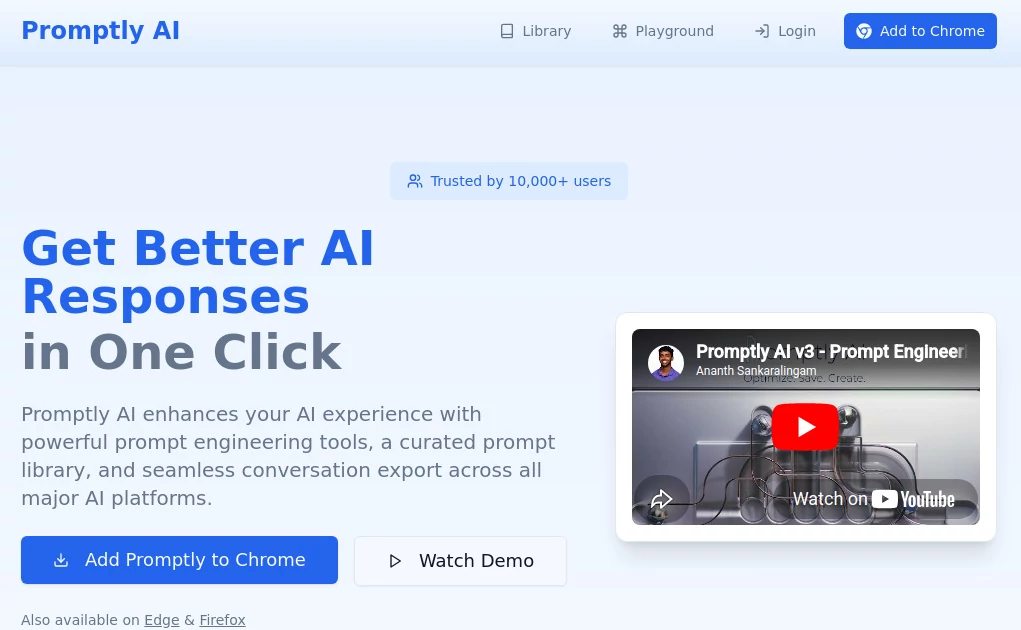
Writing a great prompt is often the difference between an average AI response and an outstanding one. This platform was built to bridge that gap by helping users create better prompts, organize their favorite templates, and move conversations between leading AI assistants without losing valuable context. Whether you're drafting marketing copy, researching complex topics, writing code, or brainstorming creative ideas, it simplifies the entire prompting process.
Instead of relying on trial and error, users can instantly refine their instructions with advanced prompt engineering techniques. The platform also provides a growing collection of professionally designed prompt templates that save time while improving consistency. For professionals who regularly switch between different AI models, conversation export and organization features make daily workflows significantly smoother.
With browser extension support, cross-platform compatibility, and a clean interface, it fits naturally into existing AI workflows without adding unnecessary complexity. The result is a faster, more productive experience that helps users unlock the full potential of today's most popular AI assistants.
Key Features
User Interface
The interface focuses on speed and simplicity. A lightweight browser extension places prompt optimization only one click away while keeping saved prompts, templates, and exported conversations easily accessible. Navigation feels intuitive, making it suitable for both beginners and experienced AI users.
Accuracy & Performance
Instead of generating completely new ideas from scratch, the system enhances existing prompts by adding clarity, context, and structure. This approach often produces more relevant and consistent AI responses across multiple large language models while reducing repetitive editing.
Capabilities
- One-click prompt enhancement.
- Personal prompt library with folders.
- Daily updated prompt templates.
- Conversation export across multiple AI platforms.
- Support for ChatGPT, Claude, Gemini, Perplexity, DeepSeek, and more.
- Keyboard shortcuts for faster workflows.
- Prompt organization and quick reuse.
- Community prompt collection.
- Intelligent conversation summaries.
- Cross-platform productivity improvements.
Security & Privacy
Privacy is treated as an important part of the experience. The service emphasizes responsible handling of user prompts while allowing individuals to manage their own prompt collections. Since it works primarily as a productivity extension, users can continue working within their preferred AI services without changing their existing workflow.
Use Cases
- Creating higher-quality prompts for AI chatbots.
- Building reusable prompt libraries for teams.
- Generating marketing content more efficiently.
- Improving coding and software development prompts.
- Academic research and structured questioning.
- Exporting conversations for documentation.
- Managing prompt templates across multiple AI platforms.
- Improving writing, brainstorming, and creative projects.
Pros and Cons
Pros
- Free to start with no complicated setup.
- Excellent prompt enhancement capabilities.
- Works with several leading AI assistants.
- Well-organized prompt management system.
- Useful conversation export functionality.
- Lightweight browser extension.
- Easy enough for beginners while offering productivity benefits for advanced users.
Cons
- Most features are designed around browser usage.
- Requires external AI services to generate final responses.
- Some advanced workflows depend on supported AI platforms.
Pricing Plans
The platform offers a generous free experience that includes prompt enhancement, prompt management, and conversation export features. Users can install the browser extension without providing payment information, making it an attractive option for individuals who want to improve AI productivity with minimal barriers.
How to Use Promptly AI
Install the browser extension and open your preferred AI chatbot. Enter your initial prompt, then use the enhancement feature to automatically improve its structure and clarity. Save effective prompts into organized folders for future projects, browse community templates when you need inspiration, and export important conversations whenever you want to continue work across different AI platforms.
Comparison with Similar Tools
Unlike traditional prompt libraries that simply store templates, this solution combines prompt optimization, organization, and conversation portability in one place. Many competing products specialize in only one of these functions, whereas this platform focuses on creating a complete workflow for people who regularly use multiple AI assistants. The combination of one-click optimization, reusable prompt management, and cross-platform chat export makes it especially valuable for professionals who depend on AI every day.
Conclusion
For anyone looking to improve the quality of AI responses without spending hours learning prompt engineering, this platform offers an impressive balance of simplicity and practical functionality. Its prompt enhancement tools, organized template library, and seamless conversation export features create a workflow that feels efficient from the very first use. Whether you're a writer, marketer, developer, researcher, or student, it provides a reliable way to produce clearer prompts and achieve consistently better AI results.
Frequently Asked Questions (FAQ)
Is the platform suitable for beginners?
Yes. The interface is simple enough for first-time AI users while still providing advanced capabilities for experienced professionals.
Which AI assistants are supported?
It works with several popular AI platforms, including ChatGPT, Claude, Gemini, Perplexity, and DeepSeek.
Can prompts be saved for future use?
Yes. Users can organize prompts into folders, create personal collections, and quickly reuse successful templates.
Does it support exporting AI conversations?
Yes. Conversations can be exported and summarized, making it easier to continue work across different AI platforms.
Is there a free version?
Yes. Core features are available without payment, allowing users to start improving their AI workflow immediately.
AI Productivity Tools , Prompt , AI Developer Tools , AI Writing Assistants .
These classifications represent its core capabilities and areas of application. For related tools, explore the linked categories above.

Promptly Ai Alternatives Product
KoloQR

GameClick.io

Nifty
Zamicus
Dolphinscribe

Standard Com…

Lexikon AI

Simplified

TruthSpine
