


















Qria
What is Qria?
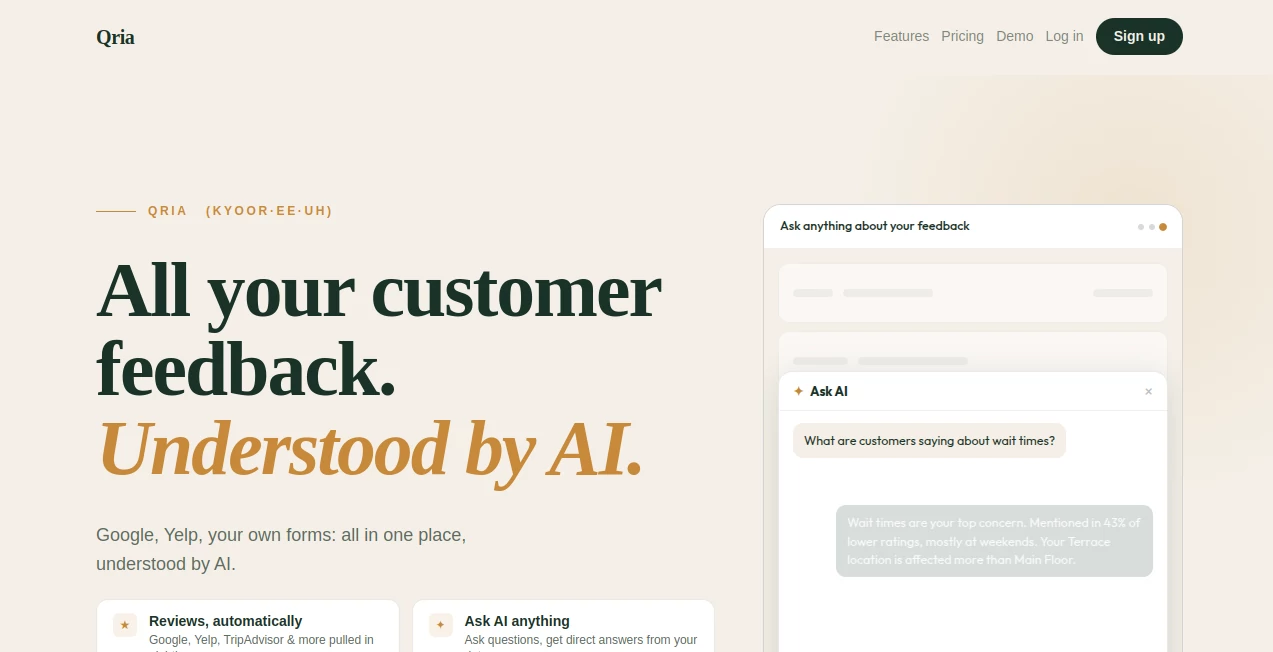
Running a business means constantly guessing what your customers really think—until you have a tool that listens carefully and explains everything back to you in plain English. This platform does exactly that. It gathers feedback from your own forms and online reviews, then lets you chat with the data like you would with a smart colleague. No more digging through spreadsheets or guessing trends. You ask questions like “What do people say about parking?” and get honest, specific answers with context. I’ve seen restaurant owners discover patterns they never noticed, and service businesses fix small issues before they turned into bad reviews. It feels less like software and more like having an extra team member who actually reads every comment.
Introduction
Most businesses collect feedback but struggle to make sense of it. Forms fill up, Google reviews pile on, yet the real insights stay buried. Qria changes that by bringing everything into one place and adding thoughtful AI that speaks your language. You build simple forms or print QR codes for direct input, connect your existing review sites, and suddenly the AI can summarize trends, spot emerging problems, and answer follow-up questions. It’s especially valuable for local businesses, hospitality, retail, and anyone who serves people directly. The difference between “we got some complaints” and “parking issues are up 8% this month because of roadwork” is night and day—and that clarity helps you act faster and smarter.
Key Features
User Interface
The dashboard feels calm and purposeful. You can build a feedback form in minutes with star ratings, multiple choice, and open text. Share a nice branded link or a clean QR code that customers can scan on the spot. Once data starts coming in, the chat interface lets you talk naturally with your feedback—“How’s the new menu landing?” or “What are people saying about weekend service?” Everything is presented clearly, without overwhelming charts or jargon.
Accuracy & Performance
The AI reads both your direct feedback and pulled-in public reviews to give balanced, contextual answers. It tracks sentiment over time, spots patterns by location or period, and rarely hallucinates. When you ask follow-ups, it remembers the conversation and stays consistent. For busy owners, this reliability means you can trust the insights instead of double-checking everything manually.
Capabilities
Build custom feedback forms, generate QR codes for in-person collection, automatically pull reviews from Google, Yelp and similar sites, chat with your combined data in plain language, track sentiment trends, get summaries by time period or location, and export insights when needed. It works beautifully for multi-location businesses because you can ask questions like “How does the downtown spot compare to the mall one?” and get meaningful answers.
Security & Privacy
Your data stays protected and only used for your own insights. Review pulling respects public data rules, and direct feedback is handled securely. It’s built with care for businesses that value customer trust—nothing feels sneaky or overly invasive.
Use Cases
A café owner prints QR codes on receipts and discovers that weekend service speed is the top complaint—then fixes staffing and watches ratings improve. A tour company asks about recent changes and learns guests love the new route but want better lunch options. A retail chain compares locations and realizes one store’s checkout process frustrates people more than others. Even nonprofits use it after events to understand what donors actually felt. It turns scattered voices into clear direction.
Pros and Cons
Pros:
- Combines direct feedback and public reviews in one smart place.
- Chat interface feels natural—like asking a thoughtful team member.
- QR codes and quick forms make collecting feedback effortless.
- Insights are specific and actionable, not vague summaries.
- Helps small and local businesses compete smarter.
Cons:
- Best value comes after you have some data collected.
- Advanced analytics and higher volume live in paid plans.
Pricing Plans
It starts with a solid free tier so you can try collecting feedback and asking the AI questions without risk. Paid plans unlock more responses, additional review sources, advanced filtering, and priority support. The pricing is reasonable for the time and clarity it saves—many users say it pays for itself after catching and fixing just one recurring issue.
How to Use Qria
Sign up and build your first feedback form in a few minutes. Add your logo, choose questions, then generate a shareable link or QR code. Connect Google or Yelp if you want existing reviews included. Start collecting responses, then open the chat and ask anything—“What’s our biggest strength this month?” or “Are customers happy with the new hours?” Read the answers, follow up for more detail, and act on what you learn. It becomes part of your routine surprisingly quickly.
Comparison with Similar Tools
Many feedback tools just collect data and show basic charts. Others focus only on reviews without letting you ask natural questions. This one brings everything together and adds a conversational layer that makes insights feel accessible instead of buried in dashboards. It’s especially strong for real-world, local, and service-based businesses where quick, human-readable answers matter more than fancy graphs.
Conclusion
Good feedback should help you improve, not add another thing to check. This platform makes listening to customers feel natural and productive again. It turns scattered opinions into clear stories you can actually use. For anyone who serves people and wants to get better at it, having this kind of insight available at your fingertips is genuinely valuable. Sometimes the best tools aren’t the flashiest—they’re the ones that quietly help you do your job better.
Frequently Asked Questions (FAQ)
How quickly can I start collecting feedback?
You can have a working form and QR code ready in under five minutes.
Does it pull all my Google reviews automatically?
Yes, once connected it keeps them up to date alongside your direct feedback.
Can I ask about specific time periods or locations?
Absolutely—the AI understands context like dates, locations, and specific topics.
Is there a free way to try it?
Yes, the free plan lets you test forms, collect responses, and chat with your data.
Who is this best for?
Restaurants, cafes, retail stores, tour operators, service businesses, nonprofits—anyone who interacts directly with customers.
AI Research Tool , AI Analytics Assistant , AI Customer Service Assistant .
These classifications represent its core capabilities and areas of application. For related tools, explore the linked categories above.

Qria Alternatives Product

mainaro

MidJourney

Diploria AI

igrecent

ModelsLab

Toonifyit

TutuoAI

UseWok

Docubix
